Quantcast Using An Unlocked iPhone in Canada: What Features Work? | iPhone in Canada Blog - Tips, Tricks, News, and Tutorials for Canadian iPhone Users

Using An Unlocked iPhone in Canada: What Features Work?

by Gary on December 7th, 2007

I received an email earlier from a reader that posed an interesting question: What works on an unlocked iPhone in Canada? Are there iPhone features that are missing? Are there any hidden costs or charges that could accrue by using an unlocked iPhone in Canada with Rogers or Fido? Well, I am going to relay what I responded to that reader in this post.

An unlocked iPhone in Canada will work EXACTLY the way it does in the United States. However, there are two features I can think of that will cause some problems for iPhone Canada users:

1) Lack of “Visual Voicemail”–this feature is exclusive to AT&T iPhone users in the USA

2) Lack of voicemail notification for Rogers and Fido users in Canada–this problem varies according to what firmware version your iPhone is. But if you read in my previous post about fixing SMS texts to receive voicemail notification with Fido and Rogers, then this should not be a problem at all.

Aside from these two, everything else works on my iPhone. YouTube works flawless, the Mail program is synced up to my Gmail account via IMAP (one of the best features on my iPhone), Safari browser works like a charm, the iPod works perfectly (along with videos and Coverflow), oh and one last thing–the PHONE part works too! :)

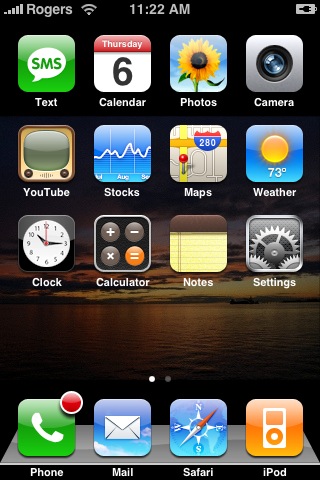
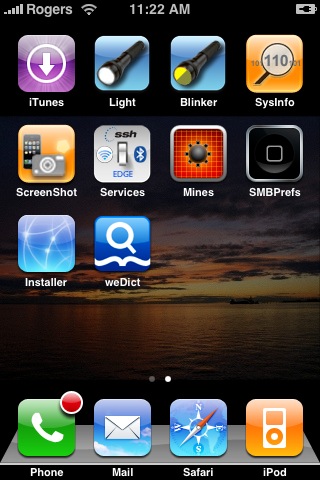
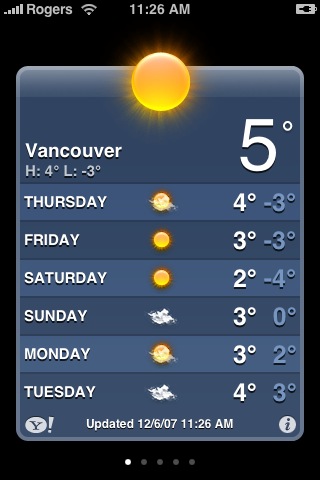
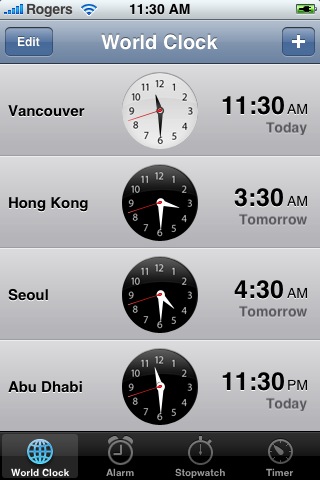
Here are a few pictures to illustrate…screenshots of my iPhone for your viewing pleasure (if you have any doubt–erase it! The iPhone is for you as along the firmware is not 1.1.2 as the phone part has not been figured out yet). Here we have two shots of my springboard, the weather app, stocks, world clock, and one of my most used features, Google Maps. With Google Maps, you can preload directions to a destination and it will download to the phone. So it works great when you need directions somewhere as the applications gives you step by step instructions, even with a map.

My iPhone “Springboard”; The picture on the right shows up after I “sweep” to the left with my finger to reveal more icons:

springboard1.jpg springboard2.jpg

Weather & World Clock:

weather.jpgiphone_world-clock.jpg

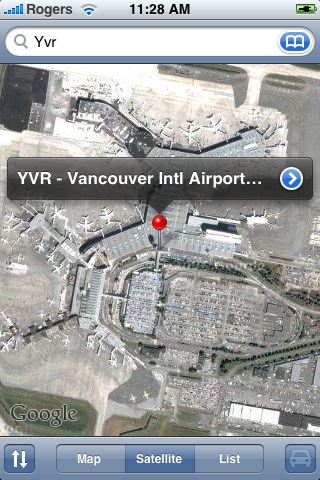
Stocks and Google Maps (notice how entering YVR will automatically bring up the Vancouver International Airport):

iphone_stocks.jpggooglemaps_iphone.jpg

If you enjoyed this post, please subscribe to my Full Feed RSS, so you won’t miss any updates!

**Looking for an iPhone 3G/3GS case? Get the invisibleSHIELD by ZAGG, the strongest protection for your iPhone backed by a 30 day moneyback guarantee, lifetime replacement warranty, and FREE shipping! Use coupon code 'iphoneinca' for 20% off your purchase! Order today!**

Don't forget to follow iPhone Fan on twitter!

Posted under: How To..., New iPhones, iPhone Fido, iPhone Rogers

No related posts
Sign up for my iPhone in Canada newsletter and get access to the latest tips, tricks, and news that others won't!
  • Pamela
    I have a unlocked I-phone from USA which I use in Canada but unfortunately I dropped it and now the 2nd and 3rd row on the screen are completely unusable, how can I fix this and who do I take it to Rogers or call Mac?
  • I would take it to an Apple store to see what they can do for you.
  • Harmony
    Oh, you would take it to the Apple store. So...let me understand this...you have an iphone...which you bought NOT from Apple...which is unlocked (further taking revenue away from Apple) and which you dropped...and you think it's reasonable to ask Apple to fix it for you? What exactly are you smoking and where can I get some?
  • Rafael
    I just purchased an unlocked iphone (i live in Canada) and for the first time i connected it to my computer & itunes. I started transferring my music with no problems. But once i changed my phones name from "owners phone" to an original name it erased all my music files from my phone?? itunes still accepts my iphone and shows everything..but now when i go to put music on it won't allow me to..no warnings come up...but it seems like its blocked it from transferring my music files. The phone works great still. I'm afraid by changing my phones name it registered it somehow?? Can anyone PLEASE help me?? I really want to be able to listen to my tunes on it!!
    THANKS!!!!!!
  • Gary
    Try diwnloading an american version of iTunes. The ipod feature should work.
  • anya
    How do you get the phone to pik up at&t signal with rogers in the states. It works for other phones on rogers why not iphone?
  • Mary-Ellen
    Just a quick question...you mentioned two pages of springboard items, I only have one... I am missing all the second page or the screen on the right why is that? I am running 1.1.3, hmmmmm am I not fully unlocked?
    thanks
  • cody
    hey there, so i have an old old AT and T sim card, with a north american plan, which i need for travell, and doesn't include interne.t on the current plan, so if i put my sim card in a unlocked iphone and travell usa to canada, and the other way around using the internet and other features will my bill be the same or will i be charged extra for the travell and internet use in both countries. i travel between denver and toronto and was wondering if the unlocked iphone would work with my current plan,

    any help is useful, thanks
  • Kevin
    Hi there - American reader here. I traveled to BC last summer several times with my iPhone and I had a Fido card that I would sometimes pop into my iPhone. Regarding visual voicemail, in the states you can pop a SIM that is say, in a BlackJack or Blackberry and pop it into the iPhone and everything works (as you mentioned) except visual voicemail. The workaround for me was to add the voicemail number that my provider dials to my contacts so i could speed dial the number and check to see if i have any messages after a missed phone call. A bit of the pain, but believe you me my canadian friends, worth every cent.

    Hope to see some of you at Whistler or on Seymour this summer.

    Cheers,
    Kevin
  • Mira
    hi I was just wondering how you changed your weather thing on your iPhone. Mine says new york.
  • AC
    Mira,

    If you look at the bottom right corner of the weather screen you'll see the letter "i" within a circle. If you touch "click" on that you'll "turn over" the weather screen info and you can customize your location, you can even add multiple locations.
  • Tak
    Have you tried sending photos via e-mail to Flickr or other e-mail enabled photo site? I've tried this with Rogers and my Motorola v3i, and, instead of the photo showing up on the other end, they get a link to a Rogers site where the photo has been saved!

    Now, I don't have a data plan, so maybe that's all it is?
  • Eddie
    Hello all, I've been looking and waiting to see what new iPhone will be on the shelves - I have a BB Pearl. Now i notice with the new updated iPod Touch you can open mail attachments such as Word, Excel, PDF, etc. Can the iPhone (any version) do the same?

    Thanks 4 your response in advance.
  • E
    Eddie, did you manage to get an answer on your question "can the iphone open word, excel, pdf files from email"? This is truly one of the things I am really missing as I carry alot of excel and word files around as reference.
  • E
    Love the iphone In Canada Blog. Just purchased my iphone in the USA, Buffalo, NY at the Galleria Walden Mall. Have order the StealthSim unlock card and cannot wait to receive it. I have looked at the video instructions and hope is it not going to be too difficult to unlock for a reasonably non techy like myself. Your blog if a fountain of knowledge. Cannot wait to join the ranks of the many other Canadian iphone users.
  • Eco mike
    Hi, wondering if you could help. I'm thinking about purchasing an iphone for
    $200.00 in Canada through Rogers on a 3 yr contract. The only foreseeable problem I can think of would be if I break the phone, leaving me to have to pay over $600.00 for a replacement through Rogers. Or, I could buy one in the States and pay $200.00. The question now is how do I get a sim card that works in Canada? Also, does the phone come with a sim card pre-installed?
blog comments powered by Disqus
Sign up for my iPhone in Canada newsletter and get access to the latest tips, tricks, and news that others won't!
  • Get the best iPhone cases at OtterBox.com!
Blogroll

BackBeat Media