
You Can Now Jailbreak iOS 16.4.1 with Palera1n 2.0.0 Beta 6
Codenamed Bakepale, the latest v2.0.0 beta 6 update to jailbreak tool Palera1n has just been released, which fully supports iOS 16.4 - iOS 16.4.1 jailbreak.
Some App Store developers have been having difficulty getting their Apps approved by Apple. It seems like Steve Jobs and his crew are pretty adamant on their requirements of what developers can and cannot do (remember how NetShare was pulled?). Think of it as “quality control” by Apple–yet their suffocating requirements are leaving some people frustrated.
Well, one way for some other developers to bypass the App Store is to release their applications through Cydia and Installer. This is why jailbreaking can be a potential benefit as you’ll get access to more customizations and apps. Today we’re going to take a look at Stack, which is very similar to Stacks on OS X Leopard. Here is the stacks feature on your Mac…

…and here is Stack on your iPhone 3G:
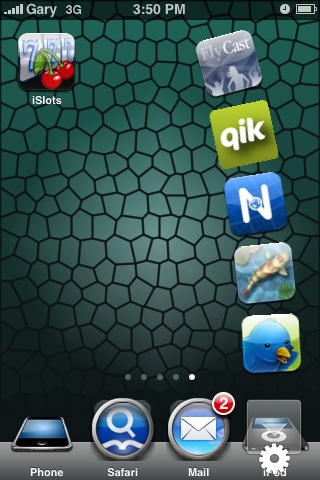
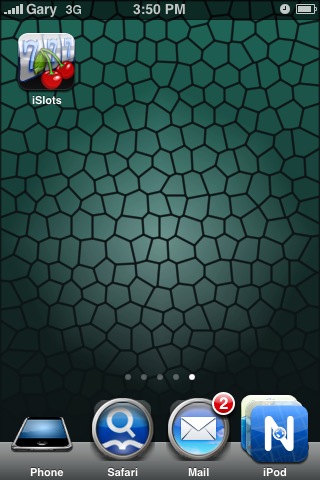
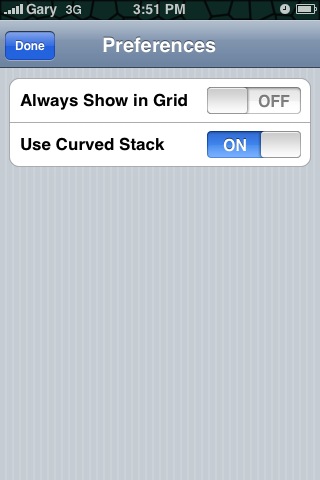

Stacks “hovers” over the iPod icon and when you press the area, it will launch. You can choose to have a curved stack or a grid style as shown above (grid style will take over when you have more than 5 icons). Just drag icons into the corner to add them. To remove icons, just drag them away during the “stack” and they’ll disappear. With more and more apps appearing in the App Store, Cydia, and Installer, it can get overwhelming at times.
With Stacks, you can now quickly access those applications you frequent immediately and quickly! Stacks is now available in Cydia, check it out and let me know what you think of it!
**Looking for an iPhone 3G case? Go get an invisibleSHIELD, the strongest protection for your iPhone backed by a 30 day moneyback guarantee, lifetime replacement warranty, and FREE shipping! Use coupon code iphoneinca for 20% off your purchase! Order today!**
If you enjoyed this post, please subscribe to my RSS feed, so you won’t miss any updates! You can also subscribe via email and have daily updates sent to your Inbox! Want more? Find out what I’m doing right now! Follow me on Twitter!
Want to see more of our stories on Google?

P.S. Want to keep this site truly independent? Support us by buying us a beer, treating us to a coffee, or shopping through Amazon here. Links in this post are affiliate links, so we earn a tiny commission at no charge to you. Thanks for supporting independent Canadian media!


I <3 this app, I use it for items that I frequent the most and Instead of having all of those icons on the first page of my iphone I can have them in the stack.
Yup, it definitely makes it super easy. I love it!
For those of you with Jailbroken 3G phones (on 2.1), how is the speed/responsiveness of the phone? Is it better than the 2.0.2 was?? Thanks 🙂
Hmm…well right now I’ve been having some major slowdowns. I don’t know if it’s due to the fact I have so many App Store apps plus JB’d apps too. But, to see a customized interface is worth it whenever I see “stock” iPhones… 🙂
Let’s hope 2.2 will be even faster!
Great review. I use to use this app back when it came out on FW 1.1.2 lol
Cheers iPhone Fan!
I bit the bullet… JB’d my 3G!!! I’m gonna go get this app today! It looks way too cool not to!! 😀
Jailbreaking is pretty awesome @Tim! “Un-Unlockable” is pretty fun from Cydia. It make the lock screen completely transparent. My friends have no clue how to unlock my phone and plus, you can see your entire wallpaper without having an arrow block anything. My only recommendation is NOT to download NES. I find it slows down the iPhone significantly even after I uninstall the SSH. It does run a lot better than 2.02 in my opinion. The Settings app takes forever to load! But I heard that’s the same even if you don’t jailbreak. Hope it helps!
Congrats on JB ur iPhone!
@Peacock Thanks for the vote of confidence and for the app tip! Weird though… I installed Un-Unlockable and it doesn’t seem to be working 🙁 I’m probably doing something wrong and I’m not a quitter! 🙂 Thanks again Peacock!
@Tim:Hmm I wonder what you’re doing wrong. I’m sure you have Winterboard installed. I wonder what it could be.
@Everyone: Stacks is pretty cool! They recommend only having two are three icons in the dock as well so that stacks does not overlap you iPod icon (or any other icon you have in the far right position). Making the stack curve kind of pixelates the icons, but it still looks very cool much like the Mac OS.
@iPhone Fan: That’s a really cool theme. What is it? I’m currently using the iFrozen one, it’s pretty cool because it “freezes” all of your applications by giving it a cool, blue skin for each one.
It’s called “Honeycomb”…go get it! 🙂
hey guys, I downloaded the app and I just wanna share my experience with it.
I removed all icons on the dock and put them all in the ‘Stack’. Whenever I receive a call i slide the slider to answer, but the screen freezes at that point.
This app 100% of the time would freeze my phone at the Call screen with “slide to answer” at the bottom. I can’t hang up and the home button doesn’t respond.
This happens all the time even if I have no themes running. I already removed/re-installed. Is anyone else having the same prob? i hope it’s just a random case coz this app is really neat…if i can get it to work.
Did you find any solutions? I’m getting the same behaviour as you described.
Hate untested stuff…
@default… I agree! There are some bugs. I installed this app and tried it… wasn’t too excited about it, so I immediately uninstalled it 🙂
@iPhone Fan… yes… what is that theme you are using… me likes it! 😀
Nice work on the JB! The theme is called “Honeycomb”… 😉
I <3 this app, I use it for items that I frequent the most and Instead of having all of those icons on the first page of my iphone I can have them in the stack.
I <3 this app, I use it for items that I frequent the most and Instead of having all of those icons on the first page of my iphone I can have them in the stack.
For those of you with Jailbroken 3G phones (on 2.1), how is the speed/responsiveness of the phone? Is it better than the 2.0.2 was?? Thanks 🙂
For those of you with Jailbroken 3G phones (on 2.1), how is the speed/responsiveness of the phone? Is it better than the 2.0.2 was?? Thanks 🙂
Great review. I use to use this app back when it came out on FW 1.1.2 lol
Cheers iPhone Fan!
Great review. I use to use this app back when it came out on FW 1.1.2 lol
Cheers iPhone Fan!
Yup, it definitely makes it super easy. I love it!
Yup, it definitely makes it super easy. I love it!
Hmm…well right now I’ve been having some major slowdowns. I don’t know if it’s due to the fact I have so many App Store apps plus JB’d apps too. But, to see a customized interface is worth it whenever I see “stock” iPhones… 🙂
Let’s hope 2.2 will be even faster!
Hmm…well right now I’ve been having some major slowdowns. I don’t know if it’s due to the fact I have so many App Store apps plus JB’d apps too. But, to see a customized interface is worth it whenever I see “stock” iPhones… 🙂
Let’s hope 2.2 will be even faster!
I bit the bullet… JB’d my 3G!!! I’m gonna go get this app today! It looks way too cool not to!! 😀
I bit the bullet… JB’d my 3G!!! I’m gonna go get this app today! It looks way too cool not to!! 😀
Jailbreaking is pretty awesome @Tim! “Un-Unlockable” is pretty fun from Cydia. It make the lock screen completely transparent. My friends have no clue how to unlock my phone and plus, you can see your entire wallpaper without having an arrow block anything. My only recommendation is NOT to download NES. I find it slows down the iPhone significantly even after I uninstall the SSH. It does run a lot better than 2.02 in my opinion. The Settings app takes forever to load! But I heard that’s the same even if you don’t jailbreak. Hope it helps!
Jailbreaking is pretty awesome @Tim! “Un-Unlockable” is pretty fun from Cydia. It make the lock screen completely transparent. My friends have no clue how to unlock my phone and plus, you can see your entire wallpaper without having an arrow block anything. My only recommendation is NOT to download NES. I find it slows down the iPhone significantly even after I uninstall the SSH. It does run a lot better than 2.02 in my opinion. The Settings app takes forever to load! But I heard that’s the same even if you don’t jailbreak. Hope it helps!
@Peacock Thanks for the vote of confidence and for the app tip! Weird though… I installed Un-Unlockable and it doesn’t seem to be working 🙁 I’m probably doing something wrong and I’m not a quitter! 🙂 Thanks again Peacock!
@Peacock Thanks for the vote of confidence and for the app tip! Weird though… I installed Un-Unlockable and it doesn’t seem to be working 🙁 I’m probably doing something wrong and I’m not a quitter! 🙂 Thanks again Peacock!
Congrats on JB ur iPhone!
Congrats on JB ur iPhone!
@Tim:Hmm I wonder what you’re doing wrong. I’m sure you have Winterboard installed. I wonder what it could be.
@Everyone: Stacks is pretty cool! They recommend only having two are three icons in the dock as well so that stacks does not overlap you iPod icon (or any other icon you have in the far right position). Making the stack curve kind of pixelates the icons, but it still looks very cool much like the Mac OS.
@iPhone Fan: That’s a really cool theme. What is it? I’m currently using the iFrozen one, it’s pretty cool because it “freezes” all of your applications by giving it a cool, blue skin for each one.
@Tim:Hmm I wonder what you’re doing wrong. I’m sure you have Winterboard installed. I wonder what it could be.
@Everyone: Stacks is pretty cool! They recommend only having two are three icons in the dock as well so that stacks does not overlap you iPod icon (or any other icon you have in the far right position). Making the stack curve kind of pixelates the icons, but it still looks very cool much like the Mac OS.
@iPhone Fan: That’s a really cool theme. What is it? I’m currently using the iFrozen one, it’s pretty cool because it “freezes” all of your applications by giving it a cool, blue skin for each one.
hey guys, I downloaded the app and I just wanna share my experience with it.
I removed all icons on the dock and put them all in the ‘Stack’. Whenever I receive a call i slide the slider to answer, but the screen freezes at that point.
This app 100% of the time would freeze my phone at the Call screen with “slide to answer” at the bottom. I can’t hang up and the home button doesn’t respond.
This happens all the time even if I have no themes running. I already removed/re-installed. Is anyone else having the same prob? i hope it’s just a random case coz this app is really neat…if i can get it to work.
hey guys, I downloaded the app and I just wanna share my experience with it.
I removed all icons on the dock and put them all in the ‘Stack’. Whenever I receive a call i slide the slider to answer, but the screen freezes at that point.
This app 100% of the time would freeze my phone at the Call screen with “slide to answer” at the bottom. I can’t hang up and the home button doesn’t respond.
This happens all the time even if I have no themes running. I already removed/re-installed. Is anyone else having the same prob? i hope it’s just a random case coz this app is really neat…if i can get it to work.
@default… I agree! There are some bugs. I installed this app and tried it… wasn’t too excited about it, so I immediately uninstalled it 🙂
@iPhone Fan… yes… what is that theme you are using… me likes it! 😀
@default… I agree! There are some bugs. I installed this app and tried it… wasn’t too excited about it, so I immediately uninstalled it 🙂
@iPhone Fan… yes… what is that theme you are using… me likes it! 😀
It’s called “Honeycomb”…go get it! 🙂
It’s called “Honeycomb”…go get it! 🙂
Nice work on the JB! The theme is called “Honeycomb”… 😉
Nice work on the JB! The theme is called “Honeycomb”… 😉
Did you find any solutions? I’m getting the same behaviour as you described.
Hate untested stuff…
Did you find any solutions? I’m getting the same behaviour as you described.
Hate untested stuff…