xGPS: Turn-by-Turn GPS for the iPhone and iPod Touch!

Is your iPhone jailbroken yet? If it’s not, then after checking out the review of this upcoming 3rd party app, you’re going to want to. The program is called xGPS by Xwaves, and it’s a turn-by-turn GPS for the iPhone. This app will now give us real time voice GPS navigation!

Right now, 1.1 is available which does not have the voice feature yet. However, once the 1.2 beta version is finalized and scheduled for released on February 20th, get ready for some fun. Words cannot do justice to this app, just watch the videos to see what I mean.

Video 1:

Video 2:

xGPS will work for the iPhone, iPhone 3G, and iPod Touch. You will also be able to play your iPod at the same time as you saw in the videos above. 1.2 beta will also feature English voice instructions, alerting you on when and where to turn on your journey–way cool!

I tried this app out this afternoon and early on I must say this app is definitely impressive. There is also an option for KM/H, which will make Canadians and the rest of the world rejoice. What I do love about xGPS is how the maps auto-rotate as you’re driving–awesomeness.

The speedometer is pretty much a ballpark figure, but given the fact that I only used it for a short period in a crowded environment, that didn’t help. You will also be able to download maps for offline use as well. Check out the screenshots below:
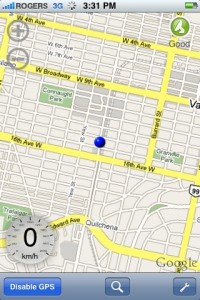
xgps_iphonexgps_iphone2

You can download xGPS via Cydia. If you can’t find it, you will need to add the following Source: http://cydia.xwaves.net

Are you getting the “size mismatch” error? You need to delete the Xwaves repo, and download xGPS from the MMI (modmyiphone) repo instead. :)

Let me know how you like this app so far. Could we soon see GPS apps in the App Store?

Founder and Editor-in-Chief of iPhoneinCanada.ca. Follow @iPhoneinCanada and on Google+. Click here to save 20% OFF at ZAGG.com with coupon 'iphoneinca'!

Did you like the post?

  • adam

    This is an amazing app…especially since i don’t have a data plan. Does anyone know how to upload google maps onto the iphone from my computer, its way too slow to do it from my iphone. Thanks

  • adam

    This is an amazing app…especially since i don’t have a data plan. Does anyone know how to upload google maps onto the iphone from my computer, its way too slow to do it from my iphone. Thanks

  • Duc

    People with the message saying size mismatch, just update your Cydia Community Sources to version 0-8 and re-install version 1.1 of xGps again and it should work…that’s what I did to mine and I have it installed with no problems.

  • Duc

    People with the message saying size mismatch, just update your Cydia Community Sources to version 0-8 and re-install version 1.1 of xGps again and it should work…that’s what I did to mine and I have it installed with no problems.

  • SKY

    I test this nice software, which still have some problems.
    1. If I want to start navigation, I have to on a road before I start to plan the route with my current GPS location.
    2. If I was not on any road (which means I am off road, or in parking lot, or on the driveway outside my house, or etc)and I plan the route with 2 fixed address, after I turn on the GPS, the route will be wipped out, because it cannot compute the route when I was offroad.
    3. searching for fix address or place always need city name after it.

    Anyway, It is a important step in realtime offline navigation on iPhone, nice job, cheers.

  • SKY

    I test this nice software, which still have some problems.
    1. If I want to start navigation, I have to on a road before I start to plan the route with my current GPS location.
    2. If I was not on any road (which means I am off road, or in parking lot, or on the driveway outside my house, or etc)and I plan the route with 2 fixed address, after I turn on the GPS, the route will be wipped out, because it cannot compute the route when I was offroad.
    3. searching for fix address or place always need city name after it.

    Anyway, It is a important step in realtime offline navigation on iPhone, nice job, cheers.

  • adam

    If any of you were wondering how to download maps to your iphone so you can use it while being offline here the video explaining how to do so

    http://video.google.it/videoplay?docid= … 9617&hl=it

  • adam

    If any of you were wondering how to download maps to your iphone so you can use it while being offline here the video explaining how to do so

    http://video.google.it/videoplay?docid= … 9617&hl=it

  • adam

    If anyone you guys were wondering like I was how to transfer offline maps to you iphone here’s a video explaining

    ——-video.google.it/videoplay?docid= … 9617&hl=it

  • adam

    If anyone you guys were wondering like I was how to transfer offline maps to you iphone here’s a video explaining

    ——-video.google.it/videoplay?docid= … 9617&hl=it

  • SKY

    I get another problem using iPhone 3G internal GPS.
    1. The position is not very precise on the map (I am on a road, but my position is on the sidewalk of the road, sometimes even further. the position in on the road next to the I am on).
    2. The position is not fresh quick enough, so the movement on the mave is not smooth.

  • SKY

    I get another problem using iPhone 3G internal GPS.
    1. The position is not very precise on the map (I am on a road, but my position is on the sidewalk of the road, sometimes even further. the position in on the road next to the I am on).
    2. The position is not fresh quick enough, so the movement on the mave is not smooth.

  • Michael

    Whats the data usage like on 3G?

  • Michael

    Whats the data usage like on 3G?

  • Jay

    The URL for downloading maps is broken.
    Could you please post the correct one
    Thanks

  • Jay

    The URL for downloading maps is broken.
    Could you please post the correct one
    Thanks

  • http://shaunbinghamisnaked.com/ shaun Bingham

    then what good is the gps

  • http://shaunbinghamisnaked.com shaun Bingham

    then what good is the gps

  • Forrest

    I’ve downloaded XGPS 1.1 today and every time i try using driving directions, i get an error message saying “No driving direction can be computed using your query” my friend’s does the same thing, please help.

  • Forrest

    I’ve downloaded XGPS 1.1 today and every time i try using driving directions, i get an error message saying “No driving direction can be computed using your query” my friend’s does the same thing, please help.

  • Anonymous

    This apparently is a known flaw that is supposed to be fixed in version 1.2 (or so I’ve read)

  • Joost

    This apparently is a known flaw that is supposed to be fixed in version 1.2 (or so I’ve read)

  • http://www.cellphonebestbuy.com/ Anna

    this is a must have app!

  • http://www.cellphonebestbuy.com Anna

    this is a must have app!

  • Michael

    Needs a ‘celebrity voices’ option
    I’m thinking Arnold, Shatner, Batman, or Gilbert Godfried.

  • Michael

    Needs a ‘celebrity voices’ option
    I’m thinking Arnold, Shatner, Batman, or Gilbert Godfried.

  • rvs007

    xGPS v1.2 is being released today (March 2), according to their website!

  • rvs007

    xGPS v1.2 is being released today (March 2), according to their website!

  • Guest

    It sure is!

  • Dusty

    It sure is!

  • Guest

    Ya man! Keep checking out the forums for some updates. ;)
    http://www.iphoneincanada.ca/forums/

  • Dusty

    Ya man! Keep checking out the forums for some updates. ;)
    http://www.iphoneincanada.ca/forums/

  • Guest

    Word on the street…

    Quote:
    Just got the word from the xgps Mod Thomas… It should up on the ModMyI cydia repo sometime between 2-4 EST..

  • Dusty

    Word on the street…

    Quote:
    Just got the word from the xgps Mod Thomas… It should up on the ModMyI cydia repo sometime between 2-4 EST..

  • Guest

    NEW UPDATE xGPS v1.2 released, read about it in the forums… http://www.iphoneincanada.ca/forums/showthread.php?t=4787

  • Dusty

    NEW UPDATE xGPS v1.2 released, read about it in the forums… http://www.iphoneincanada.ca/forums/showthread.php?t=4787

  • DaSandman

    Its out! Looking good :D

  • DaSandman

    Its out! Looking good :D

  • Anonymous

    Just updated my copy to the new version… works pretty well so far. The voice for the driving directions is really low, but I’m not sure if that is me or the program.

  • Joost

    Just updated my copy to the new version… works pretty well so far. The voice for the driving directions is really low, but I’m not sure if that is me or the program.

  • rvs007

    Ya, I tested out 1.2 on my way home tonight and I also found the volume extremely low for the voice prompts, even though I had the iPhone volume cranked up to the max. I hope they fix that.

  • rvs007

    Ya, I tested out 1.2 on my way home tonight and I also found the volume extremely low for the voice prompts, even though I had the iPhone volume cranked up to the max. I hope they fix that.

  • Guest
  • Dusty
  • imclumzy

    Overall this is a great app and should have been included in with the iPhone 3G from the beginning. Great job Xwaves!

    Feedback:
    1. When deviating from the route a box flashes and says “WRONGNWAY”
    2. By default the GPS to use was set to “xGPS module”. “iPhone 3G GPS’ should be default.
    3. Selecting a new destination, going to the Address Book and selecting the contact’s address. Expected behavior would be once selected it should go back to the map screen. However, I hear the instructions but must back out of the menus manually. If I select the address again, xGPS crashes.

  • imclumzy

    Overall this is a great app and should have been included in with the iPhone 3G from the beginning. Great job Xwaves!

    Feedback:
    1. When deviating from the route a box flashes and says “WRONGNWAY”
    2. By default the GPS to use was set to “xGPS module”. “iPhone 3G GPS’ should be default.
    3. Selecting a new destination, going to the Address Book and selecting the contact’s address. Expected behavior would be once selected it should go back to the map screen. However, I hear the instructions but must back out of the menus manually. If I select the address again, xGPS crashes.

  • offroader

    Can someone please post the lastest source link for Cydia I can’t seem to get the lateast XGPS 1.2 to load.

  • offroader

    Can someone please post the lastest source link for Cydia I can’t seem to get the lateast XGPS 1.2 to load.