
Spotify Confirms its Disco Ball App Icon Will be Retired This Week
The standard Spotify app logo replaced by the disco ball refresh. Many of whom didn't take a strong liking to it.
Flickr has announced its iPhone app has been updated with numerous improvements such as faster photo uploads, the ability to save images to your camera roll and the ability to tag your friends in comments.
What’s New in Version 2.10.803
– Faster uploading
– Easily save photos from your Photostream to your camera roll
– Automatically saves your original, pre-filter photos to your camera roll
– Quickly tag your contacts in photo comments and description by simply typing @screename
– Get notified when your contacts mention you
– Higher resolution photo display in lightbox view so your photos look even more stunning
– Take photos in a snap using your iPhone’s volume up button
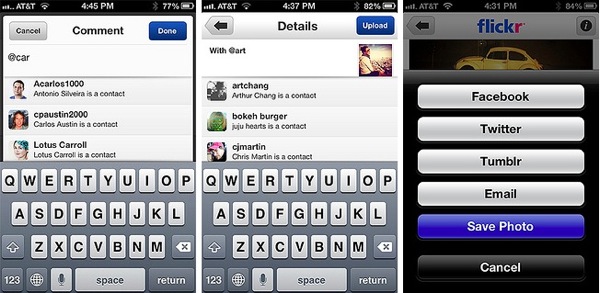
Other changes include the automatic saving of images to your camera roll when taken with the app and the inclusion of the system wide option to take pictures using the volume up button, plus lightbox view now has higher resolution images.
The Flickr iOS app was released back in December and the changes come as CEO Marissa Mayer (a former Google executive) continues her mandate to turn the company around after it had remained stagnant for years. Last September she offered all employees free smartphones, with the iPhone 5 being one of the available choices. Yesterday the Yahoo.com portal was redesigned for the first time in years to be more intuitive and easier to navigate.
Click here to download Flickr for iOS–it’s free.
Want to see more of our stories on Google?

P.S. Want to keep this site truly independent? Support us by buying us a beer, treating us to a coffee, or shopping through Amazon here. Links in this post are affiliate links, so we earn a tiny commission at no charge to you. Thanks for supporting independent Canadian media!

