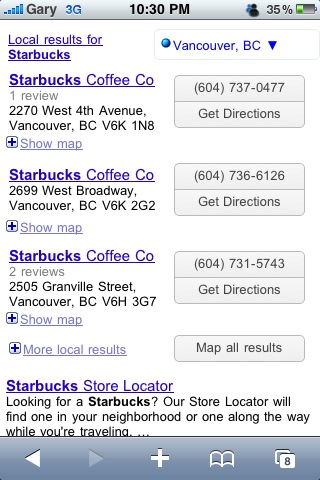
The Google Mobile team has a new feature available for iPhone users. It’s their new “Near Me Now” feature built right into Google.com. It takes advantage of Location Services to locate restaurants, coffee shops, etc near you!
This new feature is great because now when you search for places, it’ll take advantage of your location and show relevant results near you first. There’s also an “Explore Right Here” option to show you what is around you (similar to the app My Nearest).
“Near me now” is currently available in the US for iPhone (OS 3.x) or Android-powered devices with version 2.0.1 or later. You must first enable location in order for “Near me now” to appear, and “Explore right here” works only if the phone provides location accuracy within approximately a city block.
Give this a test and let us know how well it works for you. Just launch Safari on your iPhone, and then go to Google.com. Props to the Google Mobile team for constantly updating Google features on the iPhone (Google Reader’s interface was slightly updated too a while ago). I didn’t get a chance to try this outdoors, where I would’ve gotten a more accurate GPS signal to test out the “Explore Right Here” feature.


[Google Mobile Blog]



I think ill give this a try and let ya know how it goes…
So……do you have to remove your google app then re-install it from the US iTunes store?
So do you have to install this app from US iTunes?
Reread the post above. No.
Sorry Gary
Works Great for me!
@1HIs_Nibs1
don't worry 🙂
It's all good! 😉
Perfect! Thanks for letting us know!
Yup. Working here in Victoria.
Totally awesome. This will really help when I 'm out of town..
Okay, I see the left hand page that Gary posted above in his review, of course with my city name instead and with the word update beside it. However, I don't see any link to “near me now”, even though I am signed in. Where should the link be and any ideas on how I can find it? Thoughts are much appreciated!
Okay, I see the left hand page that Gary posted above in his review, of course with my city name instead and with the word update beside it. However, I don't see any link to “near me now”, even though I am signed in. Where should the link be and any ideas on how I can find it? Thoughts are much appreciated!