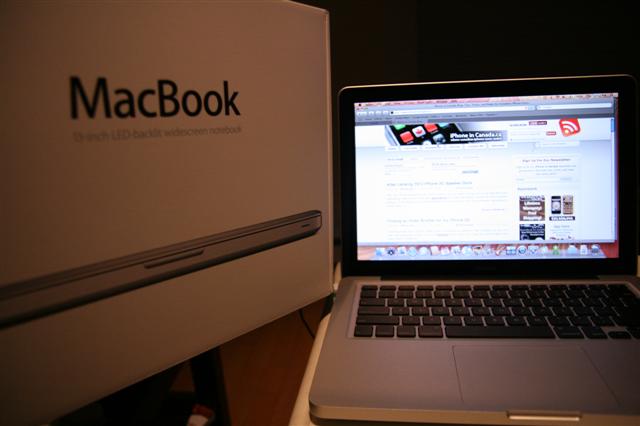
MacBook Review: My iPhone 3G’s Older Brother

On Tuesday Apple released an update to their MacBook line up. The new updated MacBook caught my eye as as I explained in my previous post. After getting my first real taste of OS X through the iPhone, I started to seriously consider switching over to a Mac! You hear people talk about how Apple is a gateway drug to more Apple products. When I heard this, I thought to myself “that’s crazy”…now I am having second thoughts, LOL!

Yesterday the Pacific Centre Apple Store did not have the new MacBooks in stock during the day. However, later in the evening they received a shipment of these new MacBooks (X1Zero was camping out waiting for one)! So today prior to visiting the store I called to inquire if there were any MacBooks in stock and on display. The answer I got was YES they are in stock, but not on display for you to dirty up with your greasy fingers.

After hearing the positive news I went down to the Apple Store and purchased my first Mac, a new aluminum MacBook (I cancelled my online order just in time on the phone after arriving at the store). I went with the base configuration (2.0GHz/160GB/2GB) and had an education discount to bring the price to $1349. Why didn’t I go for the higher end model for $300 more? Well, the illuminated keyboard would be nice but honestly how often do you surf the web in dimly lit areas? Also, since these new MacBooks allow for easy access to the hard drive I can always upgrade that myself in the future.

My Initial Thoughts on Using OS X Leopard

I think using the iPhone has prepared me for what OS X has to offer. I immediately noticed the similarities in icons, settings, and the intuitive features that are a signature of Apple products. At first though, I felt a bit lost since I was so accustomed to Windows XP all this time. Where’s the right click (figured that out later on)? How do I maximize windows? No Start button?!

Of course, after spending my evening on this beautiful notebook and getting ideas on what programs to download via Twitter, I am starting to feel a lot more comfortable using OS X. I must admit the system feels very rock solid, as opposed to Windows XP. I always had a feeling that Windows XP would crash on me whenever I was doing something important and get that dreaded BSOD (blue screen of death). Leopard feels very good and everything has been relatively smooth and lightning fast. Granted, my MacBook is pretty barebones right now so I’ll see how this unit fares when I have a bunch of software and other files are on the machine.

The Design of the MacBook Itself: It’s Pretty Darn Nice

The aluminum unibody structure is very strong. Holding the laptop with one hand does not result in any squeaking noises or bending–this MacBook is extremely well built. The glossy screen makes images pop out and I did not find any issues with glare (my Dell 700M had a glossy screen so maybe I’m used to it by now). The keyboard is nice and easy to type on. The keys are spaced out fairly well and soft with a slightly firm feel.
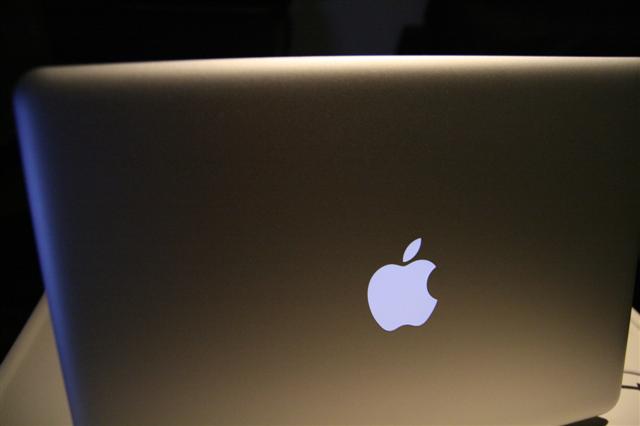
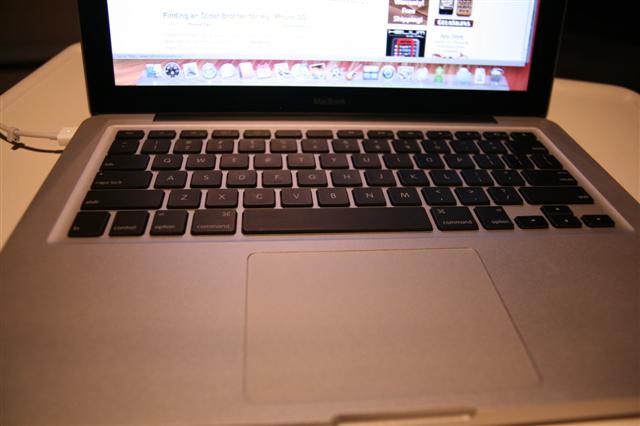
The new glass trackpad does not feel like glass (where is it?!). Since there are no more buttons, you have a lot of retail space to move your mouse around with. The trackpad button covers about two-thirds of the area and sometimes I made the mistake of trying to push near the top to no avail. After having the unit on for more than five hours, no heat has been emitting from the keyboard area, the LED LCD, or the palm rests itself. The aluminum is going to keep this puppy super cool or pass on the heat. So far so good!

Founder and Editor-in-Chief of iPhoneinCanada.ca. Follow @iPhoneinCanada and on Google+. Click here to save 20% OFF at ZAGG.com with coupon 'iphoneinca'!

Did you like the post?

  • http://www.futurelooks.com/ Stephen

    The light up keyboard is definitely a mistake on a glossy screened laptop. Think about it. The keys will light up and show up on the screen in dimly lit conditions. Distracting. I am a bit worried about that screen. The MBP and the MB screens are clearly different. The MB’s screen takes on characteristics of a TN panel (based on the Engadget shoot out), which means that it is quite possible that the display does not show the full gamut of colors and not as true black levels. This is quite worrying to the graphics peeps out there and could cause problems for calibration and print output. Probably won’t be a huge problem for the rest of us and we can always color correct on an external monitor.

    I’ll probably end up with the MB base as well and then chuck in that 256GB SSD that I’ve been wanting to play with along with that 4GB DDR3 SODIMM upgrade kit. With that Langara Faculty discount of $600 on top of the Educational Discount, it should be a no brainer. I love that my GF is a prof =)

  • http://www.futurelooks.com Stephen

    The light up keyboard is definitely a mistake on a glossy screened laptop. Think about it. The keys will light up and show up on the screen in dimly lit conditions. Distracting. I am a bit worried about that screen. The MBP and the MB screens are clearly different. The MB’s screen takes on characteristics of a TN panel (based on the Engadget shoot out), which means that it is quite possible that the display does not show the full gamut of colors and not as true black levels. This is quite worrying to the graphics peeps out there and could cause problems for calibration and print output. Probably won’t be a huge problem for the rest of us and we can always color correct on an external monitor.

    I’ll probably end up with the MB base as well and then chuck in that 256GB SSD that I’ve been wanting to play with along with that 4GB DDR3 SODIMM upgrade kit. With that Langara Faculty discount of $600 on top of the Educational Discount, it should be a no brainer. I love that my GF is a prof =)

  • http://www.iphoneincanada.ca Gary

    Damn you Stephen and your “deals” all the time! Maybe your GF should’ve bought mine for me. ;)

    But like you said, in all honesty I am very happy with this machine. It looks amazing and the glare is not that bad. It feels great to be able to learn a new OS and discover all these cool apps out there. Let the fun begin!

  • http://www.iphoneincanada.ca iPhone Fan

    Damn you Stephen and your “deals” all the time! Maybe your GF should’ve bought mine for me. ;)

    But like you said, in all honesty I am very happy with this machine. It looks amazing and the glare is not that bad. It feels great to be able to learn a new OS and discover all these cool apps out there. Let the fun begin!

  • Sunny

    I think I’m going to be getting the white MacBook instead of the new one. Since I don’t need the better graphics and I save some money off it. (I don’t play games.)

  • Sunny

    I think I’m going to be getting the white MacBook instead of the new one. Since I don’t need the better graphics and I save some money off it. (I don’t play games.)

  • Harry

    Dude you are sooo lucky. I’m waiting to get mine new macbook. I’ll be switching over and using my old HDD as its 320GB. Here are some apps I use:
    1) Handbreak-Good at Coping ur dvds and making them into Iphone playable.
    2)Mac the Ripper- Rips DVDs
    3) Candybar-Customize ur new Mac
    4)AppDelete-Gets rid of all the files associated with a program (a must have)
    5) Flip4Mac-Plays WMP files nicely.
    6)Toast 8-Burning DVDs etc.

  • Harry

    Dude you are sooo lucky. I’m waiting to get mine new macbook. I’ll be switching over and using my old HDD as its 320GB. Here are some apps I use:
    1) Handbreak-Good at Coping ur dvds and making them into Iphone playable.
    2)Mac the Ripper- Rips DVDs
    3) Candybar-Customize ur new Mac
    4)AppDelete-Gets rid of all the files associated with a program (a must have)
    5) Flip4Mac-Plays WMP files nicely.
    6)Toast 8-Burning DVDs etc.

  • http://www.futurelooks.com/ Stephen

    If you really want to save money, you can hit up stores that are clearing out their 2.4 GHz white or black Macbooks. I saw the White 2.4GHz at London Drugs for $1299, but I’m sure you can haggle more off.

  • http://www.futurelooks.com Stephen

    If you really want to save money, you can hit up stores that are clearing out their 2.4 GHz white or black Macbooks. I saw the White 2.4GHz at London Drugs for $1299, but I’m sure you can haggle more off.

  • http://www.futurelooks.com/ Stephen

    Glossy and me don’t get along. I’m going to need to get the Anti-Glare skin for it. I could probably just get one for a 13 inch notebook and carefully apply it to the right area as a quick fix.

  • http://www.futurelooks.com Stephen

    Glossy and me don’t get along. I’m going to need to get the Anti-Glare skin for it. I could probably just get one for a 13 inch notebook and carefully apply it to the right area as a quick fix.

  • Mike

    The best app to quickly adjust a photo is Preview. It replaces Adobe for PDF’s and is a media viewer for pretty much any format of still image. You can easily crop, resize, rotate, and save in various formats. Doesn’t do any complex editing, but for on the fly adjustments, its great.

    Best part is, if you load a picture onto your computer, double clicking it automatically opens preview by default.

    If you are bringing it in from iPhoto with your camera, just drag and drop the pics to the desktop, double click on the file, and voila. Preview. Now you can save and edit as you please and not harm your photo library.

  • Mike

    The best app to quickly adjust a photo is Preview. It replaces Adobe for PDF’s and is a media viewer for pretty much any format of still image. You can easily crop, resize, rotate, and save in various formats. Doesn’t do any complex editing, but for on the fly adjustments, its great.

    Best part is, if you load a picture onto your computer, double clicking it automatically opens preview by default.

    If you are bringing it in from iPhoto with your camera, just drag and drop the pics to the desktop, double click on the file, and voila. Preview. Now you can save and edit as you please and not harm your photo library.

  • http://www.robdale.ca/ Rob

    Congrats on the Mac purchase! I’m currently using an iMac and an older MacBook. I’ve ordered the new Pro and it’s supposed to arrive on Monday.

    As for APPS … well, the most used utility I have is called VisualHub. It is the professional version of iSquint (free). Both allow for easy conversion of video. I use the program to convert any video I might create on my MacBook (usiing iMovie) to native Flash format (.flv) Unfortunately, they just discontinued the product, but I’m sure you can find the version I’m using for download if you search for it.

    Harry’s suggestions are excellent. I use Handbrake & Mac the Ripper all the time. Toast is a must have, and Flip4Mac is useful. I use AppZapper instead of AppDelete, and haven’t looked at Candybar yet (I will).

    Also, I use Transmit as my FTP client and Transmission as my Bittorrent client. Both are excellent and easy to use.

    If you want to find a bunch of free apps, check out this site: http://www.opensourcemac.org/

    Hope that helps, and welcome to the Mac community!

  • http://www.robdale.ca Rob

    Congrats on the Mac purchase! I’m currently using an iMac and an older MacBook. I’ve ordered the new Pro and it’s supposed to arrive on Monday.

    As for APPS … well, the most used utility I have is called VisualHub. It is the professional version of iSquint (free). Both allow for easy conversion of video. I use the program to convert any video I might create on my MacBook (usiing iMovie) to native Flash format (.flv) Unfortunately, they just discontinued the product, but I’m sure you can find the version I’m using for download if you search for it.

    Harry’s suggestions are excellent. I use Handbrake & Mac the Ripper all the time. Toast is a must have, and Flip4Mac is useful. I use AppZapper instead of AppDelete, and haven’t looked at Candybar yet (I will).

    Also, I use Transmit as my FTP client and Transmission as my Bittorrent client. Both are excellent and easy to use.

    If you want to find a bunch of free apps, check out this site: http://www.opensourcemac.org/

    Hope that helps, and welcome to the Mac community!

  • http://www.chrisburke.ca/ Chris Burke

    Skitch is a great photo resizer… and it also allows you to host the pics right on their site and gives you html for posting.. its great i use it EVERYDAY

  • http://www.chrisburke.ca Chris Burke

    Skitch is a great photo resizer… and it also allows you to host the pics right on their site and gives you html for posting.. its great i use it EVERYDAY

  • Tim Aucoin

    Congrats iPhone fan, and welcome to the world of Mac!
    One bit of advice I can offer is that I have used both Parallels and VMware Fusion. Which do i like best? Well, Parallels is no longer installed! I find VMware Fusion to be much more solid a platform. No crashes to date, no lagging and no problems! I used Boot Camp to partition the drive portion for windows and used the Boot Camp partition to install Fusion. Very smooth installation and operation. I use it daily for my business accounting and would highly recommend it!
    All of the other software I use is pretty high end… Adobe CS4, ColorBurst RIP, PrintSmith, etc… likely stuff you won’t get into any time soon! For font management, I recommend Linotype FontExplorer X. This is FREE from http://www.linotype.com.

    Have a fantastic Friday and enjoy your new treasure!

  • Tim Aucoin

    Congrats iPhone fan, and welcome to the world of Mac!
    One bit of advice I can offer is that I have used both Parallels and VMware Fusion. Which do i like best? Well, Parallels is no longer installed! I find VMware Fusion to be much more solid a platform. No crashes to date, no lagging and no problems! I used Boot Camp to partition the drive portion for windows and used the Boot Camp partition to install Fusion. Very smooth installation and operation. I use it daily for my business accounting and would highly recommend it!
    All of the other software I use is pretty high end… Adobe CS4, ColorBurst RIP, PrintSmith, etc… likely stuff you won’t get into any time soon! For font management, I recommend Linotype FontExplorer X. This is FREE from http://www.linotype.com.

    Have a fantastic Friday and enjoy your new treasure!

  • Tim Aucoin

    Test?

  • Tim Aucoin

    Test?

  • http://www.tyleringram.com Tyler Ingram

    Cool you made the switch lol!

    Wish i could drop that sort of money on a macbook though, its that or a 70-200mm f2.4 L IS lens hehe

  • http://www.tyleringram.com/ Tyler Ingram

    Cool you made the switch lol!

    Wish i could drop that sort of money on a macbook though, its that or a 70-200mm f2.4 L IS lens hehe

  • Tim Aucoin

    Congratulations iPhone Fan… welcome to the “family”!
    One thing I will suggest is to go with VMware Fusion over Parallels. I have used both and I find Fusion to be much more stable and user friendly. I use it daily here at my business to run my accounting software and have had no problems to date (4 months now)! Parallels gave me headaches.
    Microsoft Office for Mac is very good software if you have a need for it.
    For managing fonts… Linotype FontExplorerX and it’s FREE from http://www.linotype.com. Does a great job.
    For http://FTP... go with Fetch from fetchworks.com.
    Other than that, I use pretty much high end software (Adobe CS4, ColorBurst RIP, PrintSmith).
    Good luck and again, welcome to the family! :-D

  • Tim Aucoin

    Congratulations iPhone Fan… welcome to the “family”!
    One thing I will suggest is to go with VMware Fusion over Parallels. I have used both and I find Fusion to be much more stable and user friendly. I use it daily here at my business to run my accounting software and have had no problems to date (4 months now)! Parallels gave me headaches.
    Microsoft Office for Mac is very good software if you have a need for it.
    For managing fonts… Linotype FontExplorerX and it’s FREE from http://www.linotype.com. Does a great job.
    For http://FTP... go with Fetch from fetchworks.com.
    Other than that, I use pretty much high end software (Adobe CS4, ColorBurst RIP, PrintSmith).
    Good luck and again, welcome to the family! :-D

  • Tim Aucoin

    @Tyler… Just curious, do you shoot Nikon or Canon?

  • Tim Aucoin

    @Tyler… Just curious, do you shoot Nikon or Canon?

  • Mike

    Nobody ever regrets buying a Mac. One word of caution though….you will find yourself becoming quite frustrated with Windozzze.

  • Mike

    Nobody ever regrets buying a Mac. One word of caution though….you will find yourself becoming quite frustrated with Windozzze.

  • Tyler Conium

    i dont think you know just how jealous i am of that macbook right now. i have an old iBook g4 and a 20″ iMac Intel, but i want that macbook baaad. for basic free apps Harry posted some great ones. However, dont forget large, expensive programs. Downloading torrents is a great way to get free programs. Currently i have the entire Creative Suite 4 (photoshop etc.) as well as the Macromedia suite (dreamweaver, flash) and lets not forget the new microsoft office. I’m sure your familiar with torrents, but if you need any help let me know.. and trust me, youll never use a windows based machine again

  • Tyler Conium

    i dont think you know just how jealous i am of that macbook right now. i have an old iBook g4 and a 20″ iMac Intel, but i want that macbook baaad. for basic free apps Harry posted some great ones. However, dont forget large, expensive programs. Downloading torrents is a great way to get free programs. Currently i have the entire Creative Suite 4 (photoshop etc.) as well as the Macromedia suite (dreamweaver, flash) and lets not forget the new microsoft office. I’m sure your familiar with torrents, but if you need any help let me know.. and trust me, youll never use a windows based machine again

  • Tim Aucoin

    I just remembered another excellent program that you may want to check out…
    It’s called Pixelmator. It’s a very, very good photo editing program designed for Mac. For the $59 price tag, it has some very powerful editing features. You can also download a demo. I tried this software out about a year ago and found it to be very good. I haven’t used it much since, as I use Photoshop and Lightroom for the most part. I think it’s worth a look :-)

  • Tim Aucoin

    Sorry… it’s at http://www.pixelmator.com

  • Tim Aucoin

    I just remembered another excellent program that you may want to check out…
    It’s called Pixelmator. It’s a very, very good photo editing program designed for Mac. For the $59 price tag, it has some very powerful editing features. You can also download a demo. I tried this software out about a year ago and found it to be very good. I haven’t used it much since, as I use Photoshop and Lightroom for the most part. I think it’s worth a look :-)

  • Tim Aucoin

    Sorry… it’s at http://www.pixelmator.com

  • Ali

    just go to http://www.screencastsonline.com

    it got all mac tutorials you need plus there is a special guide for switchers like yourself at there.

  • Ali

    just go to http://www.screencastsonline.com

    it got all mac tutorials you need plus there is a special guide for switchers like yourself at there.

  • bc

    simplest picture resizer, included in OS X:
    open the JPG in Preview, then go to Tools -> Adjust Size…

  • bc

    simplest picture resizer, included in OS X:
    open the JPG in Preview, then go to Tools -> Adjust Size…

  • bc

    p.s. with Preview you can also Crop and do some other things. poke around in the menus. and BTW you can also use Preview to do some basic markup and editing of PDF files…

  • bc

    p.s. with Preview you can also Crop and do some other things. poke around in the menus. and BTW you can also use Preview to do some basic markup and editing of PDF files…

  • M

    Cyberduck & transmission

  • M

    Cyberduck & transmission

  • Bernardb2

    Congratulations on your new MacBook. My one word of advice is: read up! The online tutorials on OS X are a good primer and they are in the support section of Apple.com. There are help files installed on your MacBook too which offer good guidance on OS X and all the bundled applications. There is a FEAST of 1st class software to relish on your MacBook right out of the box – quite the opposite of starved-for-software Windows machines that come with a bare-bones OS and get stuffed with annoying crapware. Just remember: OS X is deep and knowledge is power. Enjoy!

  • Bernardb2

    Congratulations on your new MacBook. My one word of advice is: read up! The online tutorials on OS X are a good primer and they are in the support section of Apple.com. There are help files installed on your MacBook too which offer good guidance on OS X and all the bundled applications. There is a FEAST of 1st class software to relish on your MacBook right out of the box – quite the opposite of starved-for-software Windows machines that come with a bare-bones OS and get stuffed with annoying crapware. Just remember: OS X is deep and knowledge is power. Enjoy!

  • M

    http://networklocationapp.com

    Cyberduck / Easy FTP

    Transmission / Torrent download

  • M

    http://networklocationapp.com

    Cyberduck / Easy FTP

    Transmission / Torrent download

  • Peacock

    Hey Guys,
    @Harry and @Rob: Thanks for the advice on AppDelete and AppZapper, I had no idea you needed to properly delete apps. Come to think of it, I don’t think I’ve ever deleted an app, and I’ve own this Macbook for 10 months now! HAHA

    Besides from all the apps that have previously been mentioned, the only one that people haven’t mentioned yet is called iAlertU. I like to think of it as a secret app, but I’ll let my fellow iPhone readers in on the big secret. The less people that know about it, the better! Basically, you download the app and set it all up. When an intruder comes to steal your computer or go on it, a really loud alarm will go off (it also takes a picture of the intruder!). I can see it useful if you go to school and leave your computer to go to the washroom. However, I still wouldn’t risk it just because if someone were to steal your computer and the alarm went off, they might be freaked out and drop the laptop on the ground. HAHA. It’s also a great prank to play on friends and family. Try it out. See if you like it. Write your comments here! Have a great Friday everyone!

  • Peacock

    Hey Guys,
    @Harry and @Rob: Thanks for the advice on AppDelete and AppZapper, I had no idea you needed to properly delete apps. Come to think of it, I don’t think I’ve ever deleted an app, and I’ve own this Macbook for 10 months now! HAHA

    Besides from all the apps that have previously been mentioned, the only one that people haven’t mentioned yet is called iAlertU. I like to think of it as a secret app, but I’ll let my fellow iPhone readers in on the big secret. The less people that know about it, the better! Basically, you download the app and set it all up. When an intruder comes to steal your computer or go on it, a really loud alarm will go off (it also takes a picture of the intruder!). I can see it useful if you go to school and leave your computer to go to the washroom. However, I still wouldn’t risk it just because if someone were to steal your computer and the alarm went off, they might be freaked out and drop the laptop on the ground. HAHA. It’s also a great prank to play on friends and family. Try it out. See if you like it. Write your comments here! Have a great Friday everyone!