
Four New Owned Games Available to Stream Via Xbox Cloud Gaming
Microsoft has added four new titles to Xbox's ever-expanding "Stream your own games library" for Xbox Cloud Gaming including Bloodstained: Ritual of the Night.
Hey everyone, here we go with another quality post on how to tweak your iPhone for all you Canadians out there. Now, my GSM provider is Fido (which is owned by Rogers) in Canada. The problem for iPhone users out there is that those on firmware version 1.0.2 or 1.1.1 lack the SMS voicemail notification whenever you get voicemail. Instead of the regular SMS message received to your inbox, nothing is sent.
Apple solved this problem with the latest 1.1.2 firmware update. However, there are many people out there who don’t want to bother with the hassle of updating to the latest firmware, I am going to show you today how to fix the iPhone SMS voicemail notification for Rogers and Fido (some Rogers users have voicemail notification on 1.1.1)! This process is really simple…here we go!
How to Fix the iPhone SMS Voicemail Notification Problem (Rogers & Fido users are probably smiling right now)
Disclaimer: USE THIS FOR FIRMWARE VERSION 1.1.1 ONLY!
Step 1: Make sure you have AppTapp Installer installed. Open Installer (I was using Installer Version 3)
Step 2: Go to “Sources” and click “Edit”. Click “Add” and enter another source, “http://i.unlock.no” if you don’t have it installed already. Click “OK”.
Step 3: Go to “Install” and then go to “Unlocking Tools”, then go to “SMS Fix” and install it. Reboot your iPhone.
That’s it! Now, call yourself and leave yourself a voice message. You should now receive the SMS voicemail alert that everyone receives! Sweet!
Notes:
-I’m on Fido Pay As You Go, and the “red dot” still appears over the Voicemail button. Not sure if this is the same with Rogers users–let me know in the comments!
-Some people have said that voicemail works in 1.1.1 if you’re on Rogers (it depends on what SIM card you have–old or new).
-This SMS fix is apparently taken from the 1.1.2 firmware–which saves you the time to update!
-If you’re on Rogers, you may need a new SIM card for this to work. You can just call customer service and ask for a new 4000 series SIM card. They will replace your old SIM for free.
The screenshot to show that it really works:
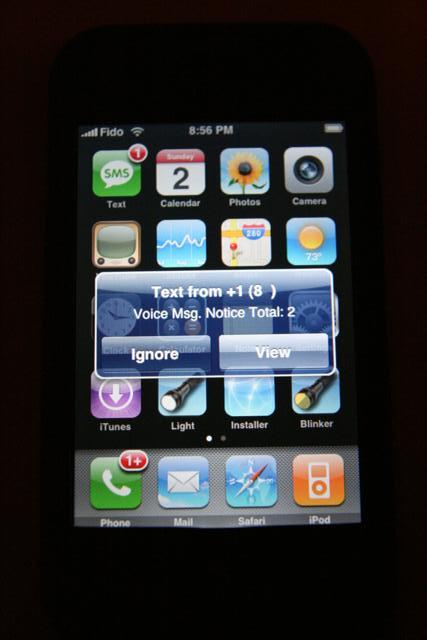
Credit goes to the Unlock.no team! Thanks!
If you enjoyed this post, please subscribe to my RSS feed, so you won’t miss any updates!
Want to see more of our stories on Google?

P.S. Want to keep this site truly independent? Support us by buying us a beer, treating us to a coffee, or shopping through Amazon here. Links in this post are affiliate links, so we earn a tiny commission at no charge to you. Thanks for supporting independent Canadian media!


Awesome, I got voicemail notification, but is there a fix to show the notification above the voicmail icon.
Ash: The only solution for that voicemail notification is to update to firmware 1.1.2 at the moment. I am not going to do that until a relatively painfree method has been released, tested, and verified! Thanks for visiting!
great tool! using it on FW1.1.1 upgraded from 1.02 on fido monthly package. works great. thanks
Hi..hopefully you can help me.I put my Rogers Sim card in my iPhone V 1.1.1…all worked.My voice mail was set up so if i push VM it went straight to my messages with out having to manually input my password.That has blown up… how do I reprogram it to go strait to password.I called Rogers..as usual they were useless but said I should in put 416-358 1549, password while in VM settings cant find it…Any ideas.Thanks a very frustrated Rogers user..Ron
I followed your instructions above, but couldn’t find the Unlocking Tools section nor the SMS Fix file. I am running 1.1.1 on Rogers. Ideas? If I can’t get the red dot notification of VM, I’d like to get the SMS notification working at least.
Duh. I didn’t add the website to my sources. Me = dumbass
Ron: Give me a couple days and I’ll get back to you on that. There are certain codes you can enter that will change your voicemail number.
Hades: You’re welcome! THanks for visiting!
Bryan: hehe, glad it worked out for ya! 🙂
I’m having an error message pop up when trying to text with the iphone on Fido.
It almost finishes sending and then says there is an error….
any suggestions or similar experiences?
iPhone Fan,
As far as I know, if your phone was unlocked by a different carriers card the notification stays even if you dont have a voice message. A friend of mine unlocked his phone with a Rogers sim and gets the notification because he is on rogers. This what I was told at least.
Actually, it depends on what version SIM card you have. If you have a 4000 series from Rogers, that allow you to receive the SMS voicemail alerts. 🙂
Thanks again for the SMS fix…..it was working great for a bit, but now all it does to show me i have a vm is show a little balloon in the top right corner next to the battery.
Tn for the SMS Fix works great with my monthly fido plan. Any way to make the visual voice mail work?
“Visual Voicemail” is only exclusive to AT&T users in the USA. Thanks for visiting!
Thanks for the tip. My voice mail notification works well now
Thanks for the tip! I will try it as soon as I can get my 1.1.2 iPhone unlock 🙂
Cheers!
i am using a 1.1.2 out of the box with rogers. I dont have any notifications at all when i get a voicemail. can someone help me fix this. I would apreciate it
thanks
hi everyone one quick question I was wondering if u guys can help me I have a rogers account and iam currently on FW 1.1.2 and everything works but for some reason I don’t get any SMS VOICEMAIL NOTTIFICATION and I have read that apple fixed this problem but it just won’t work for me 🙁 when I had 1.02 it worked perfectly and I just don’t know how to fix it by the way I have sim 4000 so I know its not my sim PLEASE PLEASE HELP ME THANKS A MIILION 🙂
I have FW 1.1.2 and voicemail nottification doesn’t work on my iPhone when I had 1.02 it worked perfectly but now it doesn’t iam with rogers and I have sim 4000 and I know its not my sim please help me fix this problem thanks 🙂
This just fixed my issue with the missing notifications on vmail! Thanks.
Jason, how did you get your 1.1.2 out of the box unlocked to rogers?
well i bought a bran new ihpone 1.1.2 jailbreaked it and used the stealth sim so i can use it as a phone
Thanks for the post for VM notification(1.1.1). Followed your instructions and got it to work. Few days ago the fix is back to normal with no notification, why would this happen?….is there anyway to get it back?.. I tried uninstaling and reinstalling SMSfix with no luck.. HELP!…thanks
i believe u have gone an gotten the new jailbreak for 1.1.2 or 1.1.3.
try uninstalling and reinstalling. should work
Thanks that did the trick
I have a 1.1.2 and all my fido notifications work perfectly without any modification
I have had 2 rogers 4000 sims and neither of them work in my iphone. Has anyone had this problem? I’m using a stealth sim and I just get a sim error message and then where is usually says rogers it says invalid sim. Ive used other people sims and they seem to work fine, but i think they have older sims. Anyone seen this?
I just recently purchased an unlocked iPhone, it works great except for the text messeging and voicemail notification. It is version 1.1.3 and I am with Rogers Wireless. Could you please help.
Thank you so much
Alex
Hey Alex,
I’m having the same issue! I have tried different things such as reset voicemail with Rogers and resetting my network settings. I still have had no luck. Have you found anything since you last posted?
Thanks!
Has anyone had a problem that when the iphone is in sleep mode it does not receive incoming calls?…..I am, and I’ve looked everywhere for help…..can someone help me here..PLEASE!!!
I’ve been having the same problems….its not constant just the occasional phone call will not go through. Will just get a voicemail notification…..Pretty annoying
I am running firmware 1.1.2 on Roger’s and am getting the SMS notification but do not know how to pickup my voicemail. Obviously a number needs to be programmed, but I don’t know what it is or how to do it. I checked Roger’s website, which of course, was useless. Any ideas?
Hi
I just bought an unlocked 16 Gb iphone with software version 1.1.3 installed. I am using Fido. Do I still need to install SMS Fix? Also I notice that the red dot (voicemail indicator) stays on even after I have listened to and deleted all my voicemail messages. Is there a fix to this? Any help would be greatly appreciated.
did you find a fix for the red dot problem yet
i just upgraded to 1.1.3 and the voicemail icon notification seems to be working fine 😀 i’m on Rogers
Hi guys, how do I set up my VM feature so that it dials directly to my VM. I have the phone number but don’t know where to input it.
d
I have the 16gb iphone with 1.1.4 firmware and I am on Fido.I seem to be having the same issue with the red dot always on the phone icon and it is always on the voicemail icon.When i miss a call i get the number of calls in the red dot on the phone icon but i never get a number on the voice mail red dot to indicate how many messages i have. I do receive a text from fido telling me i have a voice mail and who called but i don’t get the number in the voice mail red dot. Any idea on how to get this feature to work properly or do we just have to put up with it?
by the sound of it Fido is a lot more reliable than Rogers, the only reason i might go Rogers instead of Fido is because of the $6/125 text message deal.
Peace
Did anyone find a fix for 1.1.4 firmware voicemail notification problem with Rogers yet? I can’t figure it out and no one who has this problem seems to have a solution yet. If you had this problem and you found a solution, be a pioneer and give us all this useful information!
i have firmware version 1.14 with rogers, although i bought my phone in the states. Everything worked fine for the past year until I changed the firmware to 2.1 then back to 1.14. Now i do not get any voicemail notification through text, but i do get regular sms texts. Settings are where they need to be. I have a 4000 series sim card. I dont even get the little red dot over the voicemail icon anymore. Now i must call my voice mail to see if there is anything there. Someone please help!
This is NOT a fix but it will remove red dot. I have 16GB 1.1.4 firmware with the same voicemail notification problem when ever I put in the Rogers sim card or activate/deactivate edge. To remove the red dot, simply send yourself a voicemail and retrieve the voicemail. After you retrieved your voicemail, the red dot will disappear.
Harry is right after you retrived your voicemail, the red dot will disappear. Untill yo recive a new voicemail of reboot your phone. Red dot has something to do with not being on At&t network. It will be come on everytime you reboot your phone. once you leave and retrive your mess. it will stay of till you reboot again. Hope this help.
Hi,
I have a new Iphone running version 1.13, will this voicemail work on mine, without messing it up. Thanks for your help…..
And what if i dont want to receive those notifications ?
is there a way not to ? i have an 1.1.4 8g baby unlocked for Greece .
Keep up your great job here ! Thanks
Does anyone on fido get the red dot properly when they get a voicemail and have it go away when the message is deleted?
I am having difficulties setting up the visual voicemail for my iphone (version 1.1.4). Similar to Jordan’s comment, I was wondering what I might be able to do in order to set up the voicemail feature on my phone.
Thanks!
Visual Voicemail is not available in Canada, only with AT&T in the USA. 🙂
Hi Guys,
I want to set up the Edge network so I can surf the internet. I spoke to the people at Rogers and they say it is very expensive, does anyone know of a cheaper way to do it….Thanks for your help…..
The comment made by iPhone Fan, “Visual Voicemail is not available in Canada, only with AT&T in the USA. :)”
This is not true now, I am in Quebec and Visual Voicemail is working fine.
ian: do you mean regular voicemail is working fine? Visual voicemail is not supported by Rogers. If you got it working, I’d love to see some screenshots! 😉
Whether you bricked your iPhone trying to unlock it we’re afraid this has come too late for you. The “Universal SIM Unlock Card” claims to open up the iPhone without any modification.It works thanks to a dollop of electronics just 0.1mm thick. Inside there’s a special microcontroller, which conveniently sits between your sim card and the sim’s connectors, fooling the iPhone into thinking it’s a legitimate SIM.
i-smartphone is the new mobile phone unlocking revolution.Its support actually ALL the mobile phone on the market right now and UP coming models!You can use now any LOCKED phone your sim will be accepted !It will not interupt any services,you will FULLY enjoy all the features your phone may Absolutely all functions your provider sim will support with an unlocked phone will support with i-smartphone and a locked phone.
our web:www.i-smartphone.com or MSN:th*********@*****il.com
also if you have any query pls feel free to let me know .
How do you get rid of the text notification of voice mail? I don't want to be notified via SMS.
How do you get rid of the text notification of voice mail? I don't want to be notified via SMS.
Awesome, I got voicemail notification, but is there a fix to show the notification above the voicmail icon.
Awesome, I got voicemail notification, but is there a fix to show the notification above the voicmail icon.
Awesome, I got voicemail notification, but is there a fix to show the notification above the voicmail icon.
Awesome, I got voicemail notification, but is there a fix to show the notification above the voicmail icon.
Awesome, I got voicemail notification, but is there a fix to show the notification above the voicmail icon.
Awesome, I got voicemail notification, but is there a fix to show the notification above the voicmail icon.
Awesome, I got voicemail notification, but is there a fix to show the notification above the voicmail icon.