Good morning everyone! Great news today for all you iPhone 3G owners out there who have been contemplating a jailbreak. Yours truly went ahead with it on the weekend and after my first attempt I was successful! I know I had talked about not jailbreaking my 3G in the past, but after some nagging from my friend Greg and his “themed out” 3G, I just had to do it!
Also part of my reluctance was the fact that jailbreaking is not necessary to use the iPhone 3G in Canada. When I first got my original iPhone, activating/jailbreaking/unlocking was the norm to get a phone working in Canada. Moreover, jailbreaking meant familiarizing myself with the guides out there and WinPwn. I soon realized that using WinPwn was easy as pie (as long as you know how to read and follow instructions, LOL) after updating my first gen from 1.1.4 to 2.0.1! You can say it gave me some confidence in the program!
How to Jailbreak your iPhone 3G with WinPwn 2.0.0.4 (Windows Users Only)
This process is very straightforward. If you’re going to do this and you’re a complete newbie, don’t worry. It’s not hard, you just need to read up and familiarize yourself. Before starting SYNC your iPhone 3G to backup your settings, emails, contacts, etc. Here are the essential steps…(I am not responsible if for some reason your iPhone 3G is damaged during this process–use at your own risk obviously!)
1. Create a folder called winpwn on your desktop.
2. Download WinPwn 2.0.0.4, save it into this folder.
3. Download the latest iPhone 3G 2.0.1 firmware and put it in there too.
4. Make sure you have iTunes 7.7 installed.
5. Launch WinPwn. Click “Browse IPSW” and select the 2.0.1 firmware. WinPwn will load.
6. Click “Build IPSW”…a new window will pop up. Select the Applications tab, tick off Cydia and Installer (DO NOT tick off YouTube fix).
7. Go to the Advanced tab. Make sure nothing is ticked.
8. Go to the Partition Resizer tab. Make sure you select a size 512mb or greater.
9. Click the “build ipsw” button, and choose your save location as your desktop winpwn folder.
10. WinPwn will build the custom software. Will take about 5-10 minutes.
11. After it completes, click on iPwner to “pwn” iTunes. iTunes will close. Launch it again.
12. Now this is where you SHIFT+CLICK restore your iPhone after putting it into DFU mode. Choose the custom firmware that was created in your winpwn folder. iTunes will restore your iPhone with the custom firmware.
13. Everything should finish, iPhone 3G jailbroken! Now, restore your iPhone from your previous sync to regain contacts, emails, bookmarks, etc!
14. If you’ve made it this far, CONGRATS!!
Ready for the full video tutorial? Watch it in all its glory…enjoy:
So Was Jailbreaking Worth it?
My answer is YES. After using a jailbroken iPhone again, I really do realize how great it is to be able to tweak and customize the iPhone! Since everybody and their grandma is snatching up the iPhone, being able to select different themes will make your phone stand out and feel “new” again. Cydia and Installer are the two main sources for 3rd party apps. Summerboard has been replaced by Winterboard. The possibilities are going to be endless as many companies are releasing their apps through Cydia/Installer and bypassing the App Store.
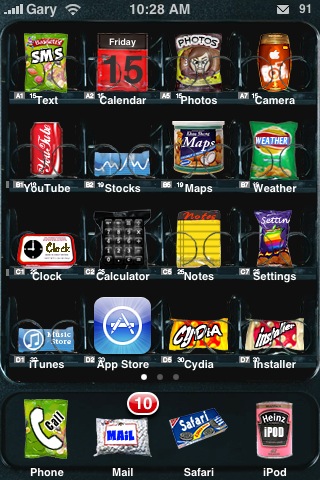
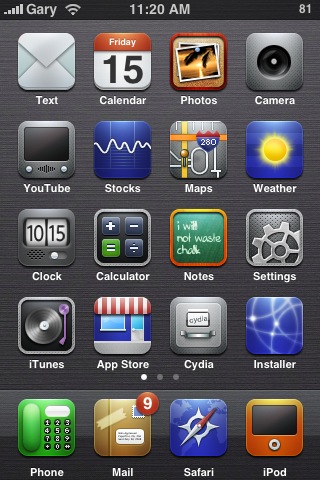
Here are a few themes that I’ve been testing out:
As you can see there are some pretty amazing themes out there! Changing themes is super easy with Winterboard (pictured). I even get to have my old favourite, Neurox Leopard! Yahoo!
Anyways, if you’re thinking about jailbreaking your iPhone 3G, the decision lies within YOU. I was hesitant but after going through the update of my first gen, it wasn’t all that hard.
When the next iPhone firmware update is released by Apple, obviously I can one-click update via iTunes to the new firmware, but my phone will no longer be jailbroken. I’d have to wait for an update to WinPwn and start it all over again. I guess that’s the downside of jailbreaking, but hey, it’s pretty fun tinkering around with the iPhone though. You learn so much about how to use your phone, which is another bonus.
I hope this information will help those sitting on the fence go through with their decisions. Let me know how the tutorial video works for you! Good luck! Big thanks to iClarified and the WinPwn team!
**Looking for an iPhone 3G case? Go get an invisibleSHIELD, the strongest protection for your iPhone backed by a 30 day moneyback guarantee, lifetime replacement warranty, and FREE shipping! Use coupon code iphoneinca for 15% off your purchase! Order today!**
P.S. Want to keep this site truly independent? Support us by buying us a beer, treating us to a coffee, or shopping through Amazon here. Links in this post are affiliate links, so we earn a tiny commission at no charge to you. Thanks for supporting independent Canadian media!
Subscribe
262 Comments
Oldest
NewestMost Voted
Danny
17 years ago
Just wondering if it is easy to upgrade an iPhone with 2.0 pwnage.
Can I keep all my stuff or will it erase it all.
I know there’s like a “have you pwned your iphone before” or whatever.
What happens?
eric: nope. you’re good to go, did you watch the video?
trancen
17 years ago
I so want to do it, BUT I will wait for the next update 2.1 before I do it.
Moe
17 years ago
Once you jailbreak your iphone 3g, does your data with rogers/fido still work the same as if it was factory fresh?
I want to jailbreak because there are so many other apps i have noticed online but I don’t want to lose my wonderful data privilages that i pay for.
Kai
17 years ago
I’m really tempted to jailbreak my 3G, but what about my warranty. iPhone Fan, do you think you can give us a list of all the apps that are possible with a jailbroken like Qik. I’m particularly interested in file storage, document viewing/editing. Also, how would you update it after it’s jailbroken?
eva
17 years ago
so even after jailbreaking, you can use itunes to upgrade whenever the new iphone firmwares get released? upgrading won’t accidently lock or brick the iphone?
Justin
17 years ago
I’m at the last step but can’t find where the custom restore file is in the hard drive. Where is it puttted?
Justin
17 years ago
found it thanks.
Justin
17 years ago
For anyone who is going through the final step of “Preparing iPhone software for restore…” in iTunes after Shift + restore, it has taken the iTunes around 7 to 10 mins to do its thing. It was scary and nervous for me of the long wait, but hang in there. It’s part of the last step…
This is live editing while my iPhone is being jailbroken, going through the restoring process but it should be all good at this point.
Good luck everybody.
MMM
17 years ago
is there any news on the “big announcement” coming from rogers this week?
Will
17 years ago
I just followed the video and its was easy to jailbreak.
The difficult part was to get the iPhone in “DFU” mode, otherwise, you will get a “error 6” message.
Under the correct DFU mode, your screen WILL BE BLACK when the phone connects to iTunes. If you see the USB picture, then you are not in DFU mode.
Good luck
Ron
17 years ago
Does this work with Fido Service Provider, I just bought a new iPhone.. just need to confirm
David
17 years ago
Hey Iphone Fan, great tutorial. Can you go into a little bit more detail about how you were able to actually theme your phone with Winterboard? Like, how do you import themes into the application so they can be applied? Also, I’ve been experimenting with “Customize”, available via Cydia, but it doesn’t really appear to be working… only a few things seem to be customizable, while everything else remains stock (a quick Google search seems to show that most people experience this problem with Customize) – do you know why this is? What’s the difference between Winterboard and Customize? They seem to accomplish the same things, no?
teenwolf
17 years ago
is there a website for downloading new themes or is it part of the jailbreak? And are you sure I can do the one click update when the new firmware is released?
Justin
17 years ago
i’m a Fido customer, it works for me. However, here is an odd thing: after the restore from my backup , I played with the new jailbroken iPhone and re-connect back to iTunes but it still thinks I need to restore. So I’m going through a second time now. Hope it will not need to due it again after or it’ll be sucks to set up as a new iPhone and I lose all my stuff. 🙁
Justin
17 years ago
still after a second restore from the backup, iTunes still lands on the Set Up Your iPhone screen. Please help. What to do.
@trancen Good idea…I couldn’t wait so I jumped right into…haven’t looked back…
@Moe Data works the same as before with Rogers…and it should for Fido too. No changes.
@Kai Qik is awesome, BossPrefs gives you so much control over the phone. I will write another post. But you should be able to one-click update because the custom firmware acts like any other firmware. It would be different if you were using the 3G with a non-Rogers provider and updating would re-lock the iPhone. However this isn’t the case for us. 🙂
@eva updating won’t lock or brick your phone. However, of course I can’t guarantee that…the iPhone is pretty hard to brick unless you’re changing code or something…
@Ron Yes this will work with Fido/Rogers, it should work with any provider…
@David Customize is more changing up little things, Winterboard is more for themes…
@teenwolf you can preview themes in Cydia before you install them. About the one-click update, if you do it you will lose the Jailbreak but your phone should still work. Don’t quote me 100% but it should work since the custom firmware acts like any other firmware. 😉
@Justin Is there any way to click cancel for the restore?
@Justin: try clicking setup a new iPhone and at the next screen, you can just tick off the items you want to sync again and everything should be there…
Justin
17 years ago
did the set up a new iPhone and it’s all good then. Thank.s
i always get error 1602 everytime i try it. i have iphone 3G, using winpwn 2.0.0.4 on windows vista ultimate and itunes 7.7. tried reinstalling itunes and apple mobile device as well as quicktime. still i get the same result.
@Kitosch: Did you click winpwn? did you select the custom made firmware during SHIFT+CLICK? Are you in the correct DFU mode? The screen should be black during DFU…watch the video again.
vince
17 years ago
hey iPhone Fan, (or anyone), do you know if you jailbreak your phone, will you be able to debug your iPhone app rewritten in Xcode (iphone SDK)?
I currently registered in the iphone developer porgrammer and worries I can’t run/debug my app after I jailbreak my phone. Thanks.
@vince To be honest I’m not sure as I’m not familiar with the developer side of the phone. Maybe try Googl’ing some apple iphone developer forums and see what the other guys are doing?
Justin
17 years ago
so like there is nothing in the installer. Need sources…
Cydia is awesome (like the old installer). Now we need to know what are the top ten applications wihtin Cydia, etc…. 🙂
james
17 years ago
Sitting on, “preparing iphone for restore” for almost 10 minutes now!
First time it appears it wasn’t in DFU mode properly, and second time, it’s just sitting saying perparing. How long does this last!?
james
17 years ago
It appears all I had to do, was type that message.. now it says, “restoring iphone software”
Phew! Heart rate went up 400%
iFone
17 years ago
Use Quickpwn (check iphone dev team blog), it’s way easier and faster.
james
17 years ago
It worked!
Great write-up.. the comments regarding “error 6” were a huge help too! Cheers
@iFone: QuickPwn is at the developer release stage and is not for everyday users…have you tried it?
Momin
17 years ago
2.0.2 update is out. Get it now through iTunes
Corey
17 years ago
Does this work for iPhones updated to version 2.0.2 or should I wait for a new version of WinPWN to come out?
Momin
17 years ago
@Corey
Wait for the next version of WinPWN
Corey
17 years ago
Okay, that’s what I thought. THese things usually come out quickly though, right? I’ve been waiting for this for a while, but I remember hwen I had my old iPhone before I got the 3G one, that once the jailbreak came out, the newer versions came out quickly. I hope it does the same with this one.
Also, did anyone notice if this update did anything to interrupt the jailbreak for 2.0.1?
Anthony
17 years ago
i hate the process of jailbreaking from the dev team…i know i’m going to mess something up i’m just going to wait for ziphone to come out with theyre unlocking and jailbreaking its easy and you dont need to go throught 10 000 steps and restore your iphone… i suggest you guys wait for that one to
Anthony
17 years ago
i hate the process of jailbreaking with the dev team… i know i’m going to mess somehthing up so i’m just oging to wait for ziphone to come out with their unlocking and jailbreaking… its 100 times easier and you dont need to go through 10 000 steps and restoring your iphone all you do is download the program and it detects your itouch or iphone and it jailbreaks without saving programs or going into itunes… its safe and the fastest and best way so i suggest you just wait it shouldnt take to long for it to come out
iFone
17 years ago
I’ve not tried quickpwn as I just updated to 2.0.2. I’ve heard a good amount of success stories with it though.
Momin
17 years ago
@ Corey
It will not interrupt the jailbreak process of 2.0.1
Robert J Perry the 1st
17 years ago
@ iphone fan
i think your gonna need 2 iphones, one jailbroken, and one not
i’m torn now, i usually follow your every move, but i’m also curious about the new update……?but i’m probley going to jailbrake by the end of the night…..
@Robert J
haha…yeah maybe I should get another iPhone 3G to do this testing. But realistically, the new firmware update seems like a minor one that fixes “bugs”. You can be sure the WinPwn/Pwnage teams will be on this already. I probably won’t update to 2.0.2 since it’s not a significant update. However if I did want to one-click update that should work for me too.
MMM: The “big announcement” from Rogers is probably the release of the Blackberry Bold.
Dereck
17 years ago
Does the following method work with version 2.0.1 16gb 3g? I just want to make sure i don’t mess my phone up. Where do you get the games or software to actually enjoy the full programs, and obviously not screw up my phone.
Question: I heard a few reports where after people have jailbroken their phone, they lose signal quality and the like. Is this true? Or does that only happen if you’re a retard and you messed up the jailbreaking? Please make me feel better, thanks. I really want to jailbreak my 3g.. and I’ve read article after article after article.
iPhone Fan
17 years ago
Dereck: Yes this will work for 3G iPhones on 2.0.1 as stated in the post, for Windows.
Ted: LOL…so far I’ve ran into no major issues, a few freezes here and there but 2.0.1 was like that to begin with. Follow the video and you should be fine!! 🙂
Andrew
17 years ago
what is DFU mode and how do i get my iphone into it. every guide i look at never says anything about it or how to get into it:S
Ok, I will wait for the new quickpwn or whatever and do it. Hopefully it will be a long while before they update the phone again. I’m looking forward to playing NES, Quake, and to getting some cool apps goin.
I really appreciate all the work you guys have done for this program, and in this forum in answering peoples’ questions. It makes me feel all warm and fuzzy inside just before I jailbreak.
Getting in on a big IPO at the offering price used to be something only big banks and big time investors could do. Toronto-based Wealthsimple wants to flip that, and it just opened the door for everyday Canadians to grab a piece of what could be the largest IPO ever. Last month, Wealthsimple rolled out...
The Formula 1 2026 Canadian Grand Prix is finally here. As the racing world descends on the legendary Circuit Gilles-Villeneuve in Montréal, the anticipation is building for one of the most exciting weekends on the calendar. Whether you are following the championship leaders or cheering on local favourite Lance Stroll, here is the best way...
The 2026 Stanley Cup Playoffs are now in full swing, having officially started on Saturday, April 18. While fans enjoyed games on CBC Gem during the regular season, the streaming landscape has tightened for the post-season. If you want to stream the games on your phone, tablet, or smart TV, Rogers Sportsnet+ is now the...






Just wondering if it is easy to upgrade an iPhone with 2.0 pwnage.
Can I keep all my stuff or will it erase it all.
I know there’s like a “have you pwned your iphone before” or whatever.
What happens?
Danny: just sync your iPhone 3G before you do anything. That will backup everything.
As for using Pwnage, I can’t answer that because I use Windoze…
The themes do look good but I don’t think I’m ready to jailbreak just yet
ruffdeezy: using Qik.com is pretty cool…it’s just one of a few apps only available via jailbreak. You’ll come to the dark side soon enough! 🙂
so after it’s jailbroken there is no need for activation, right?
eric: nope. you’re good to go, did you watch the video?
I so want to do it, BUT I will wait for the next update 2.1 before I do it.
Once you jailbreak your iphone 3g, does your data with rogers/fido still work the same as if it was factory fresh?
I want to jailbreak because there are so many other apps i have noticed online but I don’t want to lose my wonderful data privilages that i pay for.
I’m really tempted to jailbreak my 3G, but what about my warranty. iPhone Fan, do you think you can give us a list of all the apps that are possible with a jailbroken like Qik. I’m particularly interested in file storage, document viewing/editing. Also, how would you update it after it’s jailbroken?
so even after jailbreaking, you can use itunes to upgrade whenever the new iphone firmwares get released? upgrading won’t accidently lock or brick the iphone?
I’m at the last step but can’t find where the custom restore file is in the hard drive. Where is it puttted?
found it thanks.
For anyone who is going through the final step of “Preparing iPhone software for restore…” in iTunes after Shift + restore, it has taken the iTunes around 7 to 10 mins to do its thing. It was scary and nervous for me of the long wait, but hang in there. It’s part of the last step…
This is live editing while my iPhone is being jailbroken, going through the restoring process but it should be all good at this point.
Good luck everybody.
is there any news on the “big announcement” coming from rogers this week?
I just followed the video and its was easy to jailbreak.
The difficult part was to get the iPhone in “DFU” mode, otherwise, you will get a “error 6” message.
Under the correct DFU mode, your screen WILL BE BLACK when the phone connects to iTunes. If you see the USB picture, then you are not in DFU mode.
Good luck
Does this work with Fido Service Provider, I just bought a new iPhone.. just need to confirm
Hey Iphone Fan, great tutorial. Can you go into a little bit more detail about how you were able to actually theme your phone with Winterboard? Like, how do you import themes into the application so they can be applied? Also, I’ve been experimenting with “Customize”, available via Cydia, but it doesn’t really appear to be working… only a few things seem to be customizable, while everything else remains stock (a quick Google search seems to show that most people experience this problem with Customize) – do you know why this is? What’s the difference between Winterboard and Customize? They seem to accomplish the same things, no?
is there a website for downloading new themes or is it part of the jailbreak? And are you sure I can do the one click update when the new firmware is released?
i’m a Fido customer, it works for me. However, here is an odd thing: after the restore from my backup , I played with the new jailbroken iPhone and re-connect back to iTunes but it still thinks I need to restore. So I’m going through a second time now. Hope it will not need to due it again after or it’ll be sucks to set up as a new iPhone and I lose all my stuff. 🙁
still after a second restore from the backup, iTunes still lands on the Set Up Your iPhone screen. Please help. What to do.
@trancen Good idea…I couldn’t wait so I jumped right into…haven’t looked back…
@Moe Data works the same as before with Rogers…and it should for Fido too. No changes.
@Kai Qik is awesome, BossPrefs gives you so much control over the phone. I will write another post. But you should be able to one-click update because the custom firmware acts like any other firmware. It would be different if you were using the 3G with a non-Rogers provider and updating would re-lock the iPhone. However this isn’t the case for us. 🙂
@eva updating won’t lock or brick your phone. However, of course I can’t guarantee that…the iPhone is pretty hard to brick unless you’re changing code or something…
@Ron Yes this will work with Fido/Rogers, it should work with any provider…
@David Customize is more changing up little things, Winterboard is more for themes…
@teenwolf you can preview themes in Cydia before you install them. About the one-click update, if you do it you will lose the Jailbreak but your phone should still work. Don’t quote me 100% but it should work since the custom firmware acts like any other firmware. 😉
@Justin Is there any way to click cancel for the restore?
@Justin: try clicking setup a new iPhone and at the next screen, you can just tick off the items you want to sync again and everything should be there…
did the set up a new iPhone and it’s all good then. Thank.s
i always get error 1602 everytime i try it. i have iphone 3G, using winpwn 2.0.0.4 on windows vista ultimate and itunes 7.7. tried reinstalling itunes and apple mobile device as well as quicktime. still i get the same result.
Same thing happens to mine…its so annoying, have you been able to jailbreak it yet?
@Justin Nice…well done. 😉
@Kitosch: Did you click winpwn? did you select the custom made firmware during SHIFT+CLICK? Are you in the correct DFU mode? The screen should be black during DFU…watch the video again.
hey iPhone Fan, (or anyone), do you know if you jailbreak your phone, will you be able to debug your iPhone app rewritten in Xcode (iphone SDK)?
I currently registered in the iphone developer porgrammer and worries I can’t run/debug my app after I jailbreak my phone. Thanks.
@vince To be honest I’m not sure as I’m not familiar with the developer side of the phone. Maybe try Googl’ing some apple iphone developer forums and see what the other guys are doing?
so like there is nothing in the installer. Need sources…
Cydia is awesome (like the old installer). Now we need to know what are the top ten applications wihtin Cydia, etc…. 🙂
Sitting on, “preparing iphone for restore” for almost 10 minutes now!
First time it appears it wasn’t in DFU mode properly, and second time, it’s just sitting saying perparing. How long does this last!?
It appears all I had to do, was type that message.. now it says, “restoring iphone software”
Phew! Heart rate went up 400%
Use Quickpwn (check iphone dev team blog), it’s way easier and faster.
It worked!
Great write-up.. the comments regarding “error 6” were a huge help too! Cheers
@iFone: QuickPwn is at the developer release stage and is not for everyday users…have you tried it?
2.0.2 update is out. Get it now through iTunes
Does this work for iPhones updated to version 2.0.2 or should I wait for a new version of WinPWN to come out?
@Corey
Wait for the next version of WinPWN
Okay, that’s what I thought. THese things usually come out quickly though, right? I’ve been waiting for this for a while, but I remember hwen I had my old iPhone before I got the 3G one, that once the jailbreak came out, the newer versions came out quickly. I hope it does the same with this one.
Also, did anyone notice if this update did anything to interrupt the jailbreak for 2.0.1?
i hate the process of jailbreaking from the dev team…i know i’m going to mess something up i’m just going to wait for ziphone to come out with theyre unlocking and jailbreaking its easy and you dont need to go throught 10 000 steps and restore your iphone… i suggest you guys wait for that one to
i hate the process of jailbreaking with the dev team… i know i’m going to mess somehthing up so i’m just oging to wait for ziphone to come out with their unlocking and jailbreaking… its 100 times easier and you dont need to go through 10 000 steps and restoring your iphone all you do is download the program and it detects your itouch or iphone and it jailbreaks without saving programs or going into itunes… its safe and the fastest and best way so i suggest you just wait it shouldnt take to long for it to come out
I’ve not tried quickpwn as I just updated to 2.0.2. I’ve heard a good amount of success stories with it though.
@ Corey
It will not interrupt the jailbreak process of 2.0.1
@ iphone fan
i think your gonna need 2 iphones, one jailbroken, and one not
i’m torn now, i usually follow your every move, but i’m also curious about the new update……?but i’m probley going to jailbrake by the end of the night…..
@Robert J
haha…yeah maybe I should get another iPhone 3G to do this testing. But realistically, the new firmware update seems like a minor one that fixes “bugs”. You can be sure the WinPwn/Pwnage teams will be on this already. I probably won’t update to 2.0.2 since it’s not a significant update. However if I did want to one-click update that should work for me too.
MMM: The “big announcement” from Rogers is probably the release of the Blackberry Bold.
Does the following method work with version 2.0.1 16gb 3g? I just want to make sure i don’t mess my phone up. Where do you get the games or software to actually enjoy the full programs, and obviously not screw up my phone.
does this work with Windows?>
Question: I heard a few reports where after people have jailbroken their phone, they lose signal quality and the like. Is this true? Or does that only happen if you’re a retard and you messed up the jailbreaking? Please make me feel better, thanks. I really want to jailbreak my 3g.. and I’ve read article after article after article.
Dereck: Yes this will work for 3G iPhones on 2.0.1 as stated in the post, for Windows.
Ted: LOL…so far I’ve ran into no major issues, a few freezes here and there but 2.0.1 was like that to begin with. Follow the video and you should be fine!! 🙂
what is DFU mode and how do i get my iphone into it. every guide i look at never says anything about it or how to get into it:S
Ok, I will wait for the new quickpwn or whatever and do it. Hopefully it will be a long while before they update the phone again. I’m looking forward to playing NES, Quake, and to getting some cool apps goin.
I really appreciate all the work you guys have done for this program, and in this forum in answering peoples’ questions. It makes me feel all warm and fuzzy inside just before I jailbreak.