**Register with the iPhone in Canada Forums to be able to enter contest giveaways and chat with the ONLY dedicated Canadian iPhone community! Click here to register!**
One of the useful native apps on the iPhone is the Notes program. Here you can add simple notes and have them saved for later. However, if you want to import a huge note, that can be time consuming when you’re entering it on your iPhone. So what’s the solution? You can use the 3rd party app called RemoteNote!
RemoteNote lets you create/edit/delete notes on your iPhone via the web! It’s very simple to use and is pretty neat. Let’s find out how we can install this program on our iPhone!
How to Install RemoteNote on your iPhone to Edit/Create/Delete Notes Online
Step 1: Launch Installer. Go to Install. Go to the Development category. Install Jiggy Runtime.
Step 1b: Add the following source to download Jiggy Runtime: http://jiggyapp.com/i (thanks zorg!)
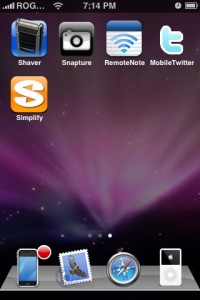
Step 2: Go to the Productivity category. Install RemoteNote. Press the Home button.
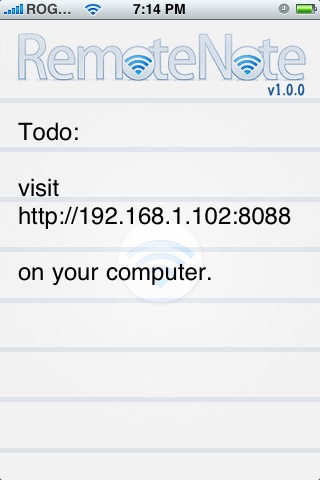
Step 3: Launch RemoteNote. Visit http://192.168.1.102:8088 on your computer (your URL might be different)

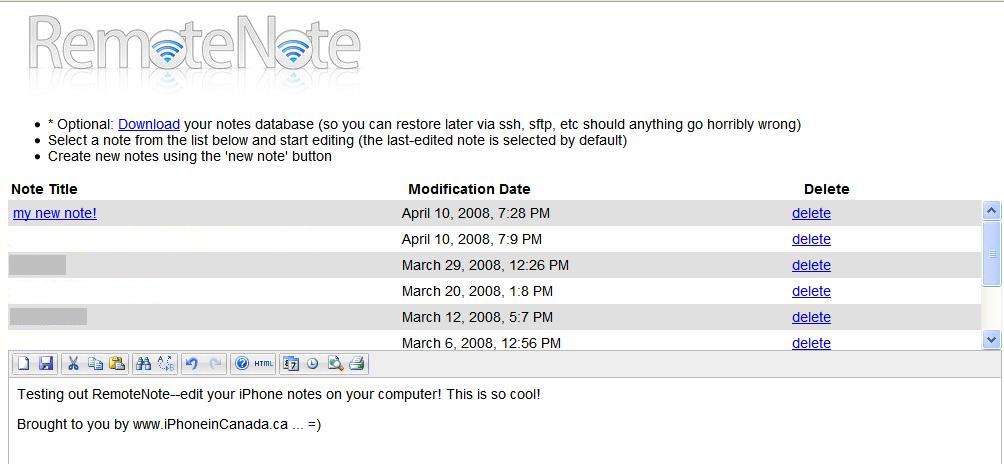
Step 4: Now, through your browser you can create/edit/delete notes on your iPhone! Your current notes should be visible and you can edit them with the WYSIWYG editor. Click “save” and it will save to your iPhone. That’s it!

This is a great app that will come in handy if you need to copy and paste a lot of text into your iPhone. Another solution I’ve used before is sending myself an email of the info I need, then downloading it to the Mail application on the iPhone. Thanks to John Robinson for creating this awesome app!
If you enjoyed this post, please subscribe to my RSS feed, so you won’t miss any updates! You can also subscribe via email and have daily updates sent to your Inbox!




I installed Jiggy Runtime without any errors but I don’t have the RemoteNote program under my productivity tabs. Which repository do you need to install to get it?
Thanks!
Thanks iPhone Fan for the tip.
and I don’t have Jiggy Runtime under Development!!
Help
Ok — google helped me answer my own questions
Jiggy Runtime
Add the Jiggy repository to Installer. Launch Installer, click on the “Sources” button, click on “Edit” at the top right and then “Add”. Enter the following URL
http://jiggyapp.com/i
(from http://www.jiggyapp.com/get_jiggy)
RemoteNote
RemoteNote is freely available via Installer, thanks to BigBoss. (from John Robinson’s site! http://jrobinsonmedia.wordpress.com/remotenote/)
Launch Installer, click on Sources, then under Community Sources you’ll see BigBoss’s Apps and Things!!
That worked for me.
what source is it under?
it’s not under productivity. bigboss says you don’t have to add an additional source. just go into all packages and scroll to find it. sucks, but for now, that’s how you find it.
browsed through it, it’s actually under Utilities. you need to install the Jiggy Runtime thing under Development first for it to work.
doesn’t work for me.
it connects, and then i tried to delete a note and it wouldn’t respond.
i’m on 1.1.3.
I installed Jiggy Runtime without any errors but I don’t have the RemoteNote program under my productivity tabs. Which repository do you need to install to get it?
Thanks!
I installed Jiggy Runtime without any errors but I don’t have the RemoteNote program under my productivity tabs. Which repository do you need to install to get it?
Thanks!
I installed Jiggy Runtime without any errors but I don’t have the RemoteNote program under my productivity tabs. Which repository do you need to install to get it?
Thanks!
Thanks iPhone Fan for the tip.
Thanks iPhone Fan for the tip.
Thanks iPhone Fan for the tip.
and I don’t have Jiggy Runtime under Development!!
Help
and I don’t have Jiggy Runtime under Development!!
Help
and I don’t have Jiggy Runtime under Development!!
Help
what source is it under?
what source is it under?
what source is it under?
it’s not under productivity. bigboss says you don’t have to add an additional source. just go into all packages and scroll to find it. sucks, but for now, that’s how you find it.
it’s not under productivity. bigboss says you don’t have to add an additional source. just go into all packages and scroll to find it. sucks, but for now, that’s how you find it.
it’s not under productivity. bigboss says you don’t have to add an additional source. just go into all packages and scroll to find it. sucks, but for now, that’s how you find it.
browsed through it, it’s actually under Utilities. you need to install the Jiggy Runtime thing under Development first for it to work.
browsed through it, it’s actually under Utilities. you need to install the Jiggy Runtime thing under Development first for it to work.
browsed through it, it’s actually under Utilities. you need to install the Jiggy Runtime thing under Development first for it to work.
doesn’t work for me.
it connects, and then i tried to delete a note and it wouldn’t respond.
i’m on 1.1.3.
doesn’t work for me.
it connects, and then i tried to delete a note and it wouldn’t respond.
i’m on 1.1.3.
doesn’t work for me.
it connects, and then i tried to delete a note and it wouldn’t respond.
i’m on 1.1.3.