Rogers has released a new carrier update for iPhone users, version 13.1 (which replaces 13.0). Users can get the update by navigating to:
Settings >; General >; About
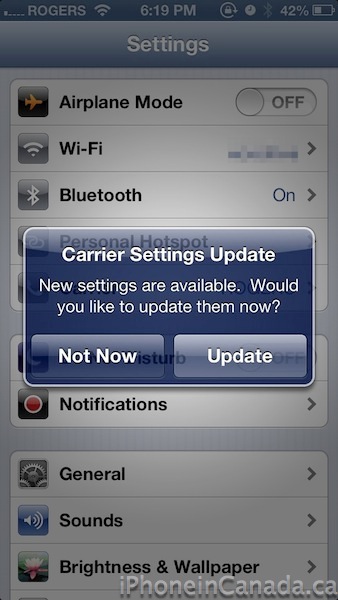
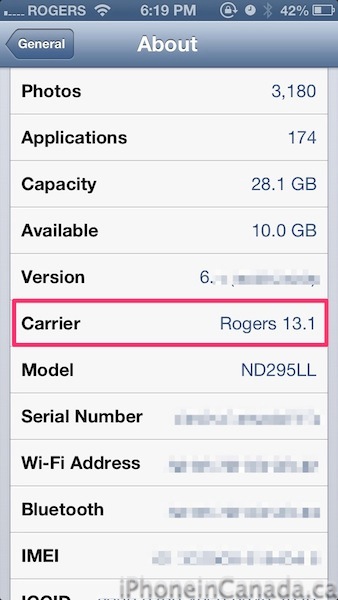
Once you wait a few seconds, a prompt will pop up on your screen informing you of a new carrier settings update available and ask you to update. Once you update, you should see version 13.1 under ‘About’:

Numerous users have experienced an iOS 6 bug where data gets used over Wi-Fi, which Rogers and Fido have claimed has nothing to do with their end. This carrier settings update could address that issue, just like how Verizon released a 13.1 update to address the same bug back in late September. Fido users probably should see this update as well.
Let us know if this carrier update fixes your data over Wi-Fi usage bug, or changes anything else on your iPhone.
Update: Some users note you need to reboot after the install for the update to come into effect.
Update 2: Fido users are seeing the update as well, but it appears as 13.2. (thanks @habsfan324)
Update 3: Rogers emailed us to explain what this update addresses:
Our carrier bundle update is wholly unrelated to other carrier updates that address issues with wireless data being used when connected to WiFi. Our update improves how our customers connect to the wireless LTE network by ensuring more radio channels are available to take advantage of Canada’s first LTE network
Thanks @robbahd!



I just got 13.2 on my Fido using iPhone 5
iPhone 5 on 6.0 I did get it but , Iphone 4 on 5.1.1 I can’t get it. Maybe if I trick it thru ifile making it thing that is on iOS 6 it will do it. I’ll post later if it works
Yep. Got 13.2 on my iPhone 4S (Fido)
Didn’t work on 5.1.1 . I’ll stay with my untether jailbreak
I just got 13.2
iPhone 5 – iOS 6.0.1 – Fido
updated to 13.2 for Fido just now. Wish they tell us what’s been changed
I hope this fixes the data problem. I’ve burned through 3gb in a week since I got the iPhone 5
That sounds like a rogue app issue more than a phone issue.
carrier updates normally contain new APN, settings and tower roaming information to ensure you connect to the right towers if you have a cellular device… it is generally a good idea to install these… Unless you are on one of the US carriers that decided not to support tethering.
you should think of moving to TELUS for more than one bar reception Gary 🙂
Lol I’m on it soon 🙂
Wow. Just checked, and I’m still on 12.0. lol
By the way, I’m on my 4S with 5.1.1 JB. I get no prompt asking me to update to 13.1.
Just installed 13.1, did a speed test, my upload speed constantly now half as compared to my wife’s iphone 5 ( shes hasn’t applied the new carrier settings). I get @9Mbps and she is getting @20Mbps. Anybody else notice this?
I can confirm, same thing iPhone 5 6.01 and carrier 13.2 now getting half the download speed on LTE as before, upload is still the same. I get 9-10Mbps compared to 20+ before
Installed 13.1, I am getting 35mb/down and 25mb/up… Performed three tests, and each is give or take 2mb. My speeds have not changed before/after the update, still get the same speeds on average.
Same with me. I used to get 30-50MB down and 20-30MB up. That has stayed the same with the update. No concerns here.
I have a 4S and my speed is ridiculously slow after the update. I can’t even connect to 3G and sometimes it even goes to Edge or no service/bars at all. I’m very upset by this.
I strongly recommend against this carrier update if you currently have good LTE reception.
I would consistently get 41Mbit/s with occasional bouts of 50Mbit/s or so. Now I’m getting 23Mbit’s with occasional bouts of about 15Mbit/s or 30Mbit/s. Upload is bad too. Used to get 20+ now: 2-6Mbit/s.
I’m on fido, so it’s carrier version fido 13.2
How can this be reverted to 13.1 from 13.2?!
Hi folks, this is @Rogers_Chris from the Rogers social media team. Our carrier
bundle update is wholly unrelated to other carrier updates that address issues
with wireless data being used when connected to WiFi. Our update improves
how our customers connect to the wireless LTE network by ensuring more radio
channels are available to take advantage of Canada’s first LTE network.
Sure? Then why it is applied on non LTE devices?
Because they’re not splitting the update among different devices. Why would this guy come on here and post bullshit?
Its the internet, if I wanted to I can claim im from Fido.
Anyways they’re distributing the carrier update to those that can update to “iOS 6” which has that dreaded Wi Fi bug with it.
when will that update be comming then?
Just wondering why this wasn’t applied to the IPad LTE as well? got the update on my iPhone but not iPad
Hi @twitter-190654530:disqus ,
Is it true that Rogers automatically and deceivingly enters/entered people into 3 year contracts if they called in to upgrade a feature such as say.. voice mail ?? Without them knowing? Because that would be unethical and the wrong thing to do.. Especially since the customer who finds out about this would find it highly offensive and probably want to switch carriers.
Also, Is it true that Rogers along with the other two big telecommunications carriers Bell and Telus have the highest profit margins in the world on their income statements every year??? It seems that some how this might be considered gauging the Canada consumer but that’s just me…
Also, is it true that Rogers does not truly have LTE coverage in all areas that they advertised on their website that they do? It seems that this might be considered false advertising if true.. since LTE coverage is spotty at best.. and other countries are way ahead of Canada in implementing cutting edge LTE.
Thanks for your time Chirs
I was able to have my over data usage credited
I talked with retentions first and he wouldnt do anything for me, he was arrogant too, so I asked to speak with the manager, and when i got transfered, i explained to the manager that I couldnt explain the usage since ios6 and it was known that it has a problem, thats why rogers 13.1 was out to correct some issues and i explained i’ve called many times to fix rogers app on the iphone (which is true), and she credited my 10,92$.
Total time ‘wasted’: 1hour
10.92$ is nothing and customer care should have been able to credit you right away as they have up to 50$ they can give to anyone.. I’ve also been transferred to a manager after calling 3 times and I only got 50$ (the maximum they can credit you) but my data usage was more than 100$. I’m still unsatisfied especially with the resolution from the manager.. my next step is to write to the office of the president (step 3 when making a complaint). I hope many customers will do the same!
I was fine with that
Since ios6, it was over of 10$ only
I’m guessing you won’t see the update if your phone is not on iOS 6…
4.3.3 & Fido 10 LOL
What about Bell? still on 13.0
I work on the 32nd floor of an office building. I was only able to get a weak Edge connection prior to the update. I now get LTE speeds in the office. Great update!
I updated 2 days ago with Rogers and ever since I did, I’ve been losing my signal, getting no bars, and no service in my house, whether it be on a wireless or in 3G.
after update to 13.2 personal hotspot on my iphone5 is worked
I went from 3 bars to two, with the Rogers 13.1 Carrier Settings update on 3G and LTE. WTF
I’m in downtown London on Rogers. Just updated to the 13.1 and my LTE bars went from 2 to 4. Speed has increased marginally. I’m on the outskirts of downtown but if I walked 2 blocks towards the core, my bars went to 5 instantly. At home I can get LTE on the second floor of my house but not on the main floor. Wondering if this makes a difference there.
any update on the LTE speed after applying the Carrier update? is there any decrease from other’s who have done it?
Does anyone know that if I applied this update will it affect my unlock status of the my iPhone 5 as my iPhone is unlocked?
iPhone 5 Rogers 13.1
Can’t connect to LTE or use iMessage.
Data effing slow.
Any new updates regarding effects on LTE? I still haven’t updated due to worries it may affect my LTE speeds…