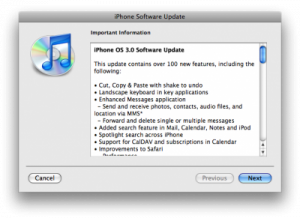
Around 10:15am PST, Apple FINALLY released the much anticipated firmware 3.0 update via iTunes! Many people stayed up last night to midnight thinking it would be released then, but were disappointed! Seems like Apple will release their updates when they want to!
Anyways, my iPhone 3G is now being updated to firmware 3.0. I ran into the following error upon my first attempt at the update:
The iPhone “Gary’s iPhone 3G” cannot be updated at this time because the iPhone activation server is temporarily unavailable.
After asking the twitter community, it seems this error will go away if you just keep trying the update after it’s been downloaded. Just to make sure, I rebooted my iPhone and restarted iTunes to see if that would work. Then, voila! My iPhone 3G is now being updated to firmware 3.0 (previously was on 2.2.1)!
Version: 3.0 (7A341)
Carrier: Rogers 4.1
Jailbreaking iPhone OS 3.0…Expect iPhone Dev Team Updates Soon
The iPhone Dev Team should be releasing their updated jailbreaking tools, ala QuickPwn and PwnageTool. Expect these to come shortly. In the meantime, I’m going to enjoy exploring all the new features of firmware 3.0.
Have you updated to 3.0 yet? How do you like it so far? Any problems?




yes my MMS is NOT WORKING! it doesnt even show the option in the settings menu =(
I’m a developer, and have used the 3.0 for a while now. I had a few issues, just like you are. If you have already rebooted the phone, then try and go into the settings menu and perform the settings reset (make sure you don’t reset the whole phone, just the settings). This caused my tethering option to appear, it resolved the missing picture icon for messaging, and a few other weird inconsistencies.
it is found in SETTINGS–>GENERAL–>RESET
I did the “Reset Network Settings” and that worked for me. But you can always do the “Reset All Settings” just to be sure.
MAKE SURE YOU DO A BACKUP FIRST. (just in case)
Cheers!
Also, if you are on a 1st gen iPhone, MMS will not work.
Finally installed mine after an hour of trying!!!
Works like a charm.
Awesome! It’s like getting a new iPhone all over again! I’ll wait for the next hardware release in 2010 before I upgrad.! 3.0 will tide me over until then!
I was able to update it right away without any problems. Although I knew it wasn’t coming, I was hoping for video and touch focus in this update. I know they wanted to keep it for 3GS but it would of been nice to have on my 3G. I haven’t tried Jailbreaking yet, but I have a feeling it would probably be a good choice to do so soon.
Yeah, I had the same problem where it didn’t want to upgrade because of activation server, but I took out my SIM card after being denied 3 times and it worked on the 4th! I finally upgrade from 2.1, LOL, I was too lazy to rejailbreak and download and customize. Told myself “ahh.. I’ll just wait until 3.0 comes out in the summer…”
Anybody having wifi issues with the new update. I’m finding my reception blows now compared to before.
worse or better
MMS isn’t working had a bunch of friends send me pics. haven’t recieved a singel one. i’ve called and asked Internet tethering isn’t going to work until the 19th. Besides that. its working fine.
HEy the tethering actually works. I called rogers told them to enable it then just for fun i tried it out to see if it works and it does, without any problems.
Awesome! 🙂
Discuss over at forums and download links… https://www.iphoneincanada.ca/forums/showthread.php?t=5551
Everything except MMS is working for me?
Maybe its a ROGERS/FIDO thing?
Did anyone download the Carrier settings?
And what’s up with the tethering?
Can’t wait to Jailbreak it though.
Going to wait till the jailbroken version comes out before doing anything. 🙂
Mine works beautifully!! Except I hate that it cost 5$ more a month for this upgrade. Typical Rogers B.$.!
what?
Yeah…what is he talking about?
I think he means that to get MMS on your plan you have to get the $20 iPhone Value Pack.
ding! You got it Ian. I have the 15$ value pack and now I need the 20$ one now?? Like I said … Typical Roger$ bull$shit! Always after your wallet! Anyone else pissed about this? 60$ a year ….
Yeah it’s pretty lame, I have a 6GB data plan and at most I’ve used 1GB, 2500 SMS which I use maybe 700, and now they wan’t $5 more to send MMS. I wish they would make it 2500 SMS OR MMS with the $15 plan, I don’t need unlimited.
OMG!!! Ian, you took the words right outta my mouth. I have the exact same usage pattern as you. About 1 GB and 700 texts so what the F do I need unlimited for? The Rogers reps are such idiots too … it’s like they don’t know the company they work for is gouging people?? Aaaaah … I feel so much better knowing at least 1 person in Canada is on the same page as I am. Cheers Ian.
As in the additional 5.00$ you need to add to your value pack …. duh … Unless you have the 60$ value pack which would be about 0.03% of you guys.
I have a smart playlist that went totally bonkers. I had to delete it, sync, recreate it and sync again before it made any sense. It was supposed to be choosing the 40 most recent unplayed podcasts. It was picking 40 but they ones that showed up on the phone were up to 2 years old and bore not relations to what iTunes was showing.
Well i updated mine from 2.2.1 jailbreak to 3.0 at first after the update itunes wouldnt let me see the info of my phone. like music and space and etc. After a while it worked and everything i got everything back on but i dont know if because it doesnt work with non-jailbreak phone but when i try to transfer my ringtones to my iphone it doesnt let me do it???
MMS is not working. I can see the camera icon. I also have MMS included in my smartphone plan. Cant seem to send or receive pics via MMS. Suggestions?
does 3.0 gives you guys a big boost in speed on the iPhone? I will wait till its jailbroken and unlock (otherwise I can’t use my phone)
After the update your carrier will update your account capabilities to allow mms. You really don’t want to use mms on an account that doesn’t have it.
The really dissapointing thing about 3.0 is that they never fixed the calendar to allow a useful event notification. Still just the dieing cricket sound.
Same with no ability to set SMS sound for contacts.
THIS IS A GREAT POINT….. the lack of custom/personalized sounds is a HUUUUUUUUGE drawback to the iphone that seems like it would be incredibly easy to add…..i just dont get apple sometimes….
I do not see the Push notifications menu under settings. Is this because Roges isn’t supporting / enabling it yet? I would like to try it, but it doesn’t show up on my iPhone…
You need an app capable of push first before it gets enabled.
I am on 3.0 and I honestly got mms working and I was tethering for an hour over Bluetooth on my MacBook. But it stopped working shortly after
Just jizzed in my pants! Vibration is intense when in your pocket!
Lol
Took forever to connect to the Apple activation server, prob just because it’s busy as heck! MMS works if you download the carrier update… May have to phone to add the $20 plan in place of the $15 plan so they won’t charge extra. Took a long time to back-up and sync after update, was starting to worry, but it seems to have worked.
MMS is working for me. When I updated to 3.0, immediately afterward iTunes asked me to update my “carrier settings.” I did. Did you guys get this notification? Perhaps this is why MMS is not working for all?
i did update my carrier settings as well… no luck re: MMS
Check for the little icon in the bottom left corner of the SMS app.
MMS has been working since 3.0 GM became available (Not officially) and i got an update yesterday apparently a carrier update which enabled tethering.
I updated the phone to 3.0 and applied the carrier update. Checked tethering and MMS right away – both work without me having to call Fido. I wonder if I will still have tethering blocked after December?
So 3.0 allows for MMS messages right?
Do the Fido/Roger value packs with texting allow for MMS messages too? Or do we get charged per send?
I’m on some $11 value pack for voicemail/call display/125 texts. I wonder if I can send MMS with those 125.
You can’t. It’s fifty cents an MMS. Unless you upgrade you value pack which is 5.00$ more a month.
Tethering on Rogers works very well! Via USB cable at least. In about 30 seconds it was working without a hitch. Connection is pretty fast too. The rogers rep I spoke with said it was included on my plan until dec 09 but after that they’d be “re-evaluating” the plan. I’m on the 6gb plan
AD2P is working like a Charm
I also have a cheap value pack plan on my phone (just added the 6GB plan last July) and I don’t think it allows MMS without extra charge per message. Just gonna email I like my cheap plan MMS shouldn’t cost more money in my opinion and I believe that the cheap value pack now has 250 texts not 125 like it used to !
got an iPhone carrier settings updates in iTunes – guess rogers updated some stuff. anyone know the details?
If you have an updated IPCC file, your carrier will say ROGERS 5.0 and it will have tethering enabled.
I got 4.1 and my mms works has i received one from my wife’s cellphone so what do i need to update the ipcc file cause i didnt get no option to do so when i updated?
Updated, all functions work as noted. Why the hell does a MMS cost more, should it not be part of the data plan?? More Rogers gouging?
Updated and MMS worked right away but now NONE of my apps work. They all crash after splash screen. Tried hard reset but no joy.
At least internet works. :-/
Called Rogers and got my MMS activated. I was told MMS is only free to send within Canada. I had no idea that was the case.
Same with text messaging. The plans only cover within Canada unless you pay for a U.S. or International plan.
Hey guys Tethering worked, and thanks to IphoneinCanada.ca for all the help with setting it up. It actually worked. Im on a 500 MB data plan, and tethering works via Bluetooth and USB. Thanks for your help!!!!
Cheers and you’re welcome! Glad you got it working. 😀
@X1Zero. My carrier says Rogers 4.1 and my tethering works. Should it say 5.0? And if so, any reason it doesn’t? I did the carrier update after the 3.0 update.
Yeah mine is 4.1 also and my tethering and MMS currently work fine
mine says Rogers 4.0 and tethering/MMS work fine…
I have the same problem with my iPhone. None of my apps are working. I tried restarting the phone but it didn’t work. Everything else works great, it’s just all my downloaded apps that don’t work. Any suggestions? Please help!
You need to delete one app, any app will do. Re-download it.
This will reset your DRM (digital rights management {or something like that})
And all will work again
Good luck
@Monty – That is intereting because I’ve sent a bunch of text messages to a friend in Scotland and I’ve never been charged extra.
I get charged $.25 per text sent to U.S. numbers. From their site:
International and United States Text Messaging Plans
Stay in touch with friends and family around the world by sending text messages from Canada for as little as 4¢** by subscribing to a Text Messaging Plan below. Send a text message anywhere in the world from Canada without a plan and pay only 25¢ per message sent.
If you’re in the U.S. and send text it’s worse:
The rate for sending a text message while traveling outside of Canada will increase to $0.75 per text message plus applicable taxes, effective July 7, 2009. All other aspects of your service remain the same.
Had no problems with the update.
MMS working.
Skype says unsupported OS but works fine.
My phone is not jailbroken yet (waiting for Quickpawn 3)
Notes wasn’t syncing then just started doing it 🙂
Tethering asks me to call Roger but wait times are 30minutes (another time then)
guys i need your help!
Does MMS requires a data plan ?
Because I’m unable to send picture messages and the Rogers rep is telling me that it requires Data plan activated or whatever and I just feel like he’s bullshiting me!
MMS is not a data plan its part of a bundle they have for smartphone. visual voicemail caller id txt message and mms for $20 now
That is exactly what I thought! & I do have the 20$ for mms but each time I try to send a mms it doesn’t work and from what the Rogers app representant told me, its because of the Data blocked on my account. Does it make any sense?
Well i got the 6 gb data and the $20 plan i was able to receive but not to send i would wait till friday until the 3gs is actually released. most of the rep dont know what they are talking about
Everything is working fine for me except for the app store updates. I have two iTunes accounts – one Canadian and one US. I tried toggling between them and now I am unable to download updates to any of my apps. Anyone been able to access a US iTunes account since the update?
No luck… tried the resynch but no difference. Tried going into the new Store setting, logging out and logging back in with my US account. But when I try to access the App Store it prompts me for the password for my Canadian account. An sometimes it keeps popping up the new user agreement over and over again. I’ll give it a day or two and then contact support.
I have this same problem. I think the Apple servers are just being bombarded right now, try again in a day or two.
Everything is working a-ok now. Patience was rewarded.
Apps start working again after a full re-sync
for an unlocked iphone 3g…do I just plug into itunes and run the update…or is there a step to “un-unlock” the phone before I can update. Thanks!
you need to restore to the 3.0 so when u click update just dl the file and then once finish shift + restore select the file its located in C:\Documents and Settings\xxxxxxxx\Application Data\Apple Computer\iTunes\iPhone Software Updates
make sure u back up first
What should popup on screen when iPhone has tethering enabled? Is there any network setting to be setup on my pc? My phone says tethering enabled?
Holy Crap this is fun, my freakin head is spinning..who needs the new phone when 3.0 has all this new stuff to play with…. Just the maps alone will keep me busy…Can’t wait to take my laptop to the roof of my condo tonight, have a beer and try my tethering….. 🙂
I feel lucky, my download was a breeze and everything is working fine….
WHoever said there was a new user agreement yes there is one just accept and when u plug ur iphone for tethering and u plug it to the pc there should be a lan that get activated in your network settings
Updated to 3.0 but my 2G iphone will not recognized my SIM card. The rogers logo is there but it wont go pass the emergency 911 screen. Anyone else have that same problem?
Your iPhone is still unlocked, but not activated anymore. You’ll have to re-jailbreak with the new tools, when there are released. Should be soon.
push needs to be enabled to use find my iphone!!!!! should i get a juice pack or cancel mobile me???hmmmmm, so far….not happy with this update, i don’t see what the big fuss is about
Worked for me at 1:15 this afternoon. No issues and everything works great.
Is 3.0 any slower?
3.0 actually has an increase of overall speed…I was impressed immediately.
Come Dec 31st, will Rogers/Fido have a new “iPhone Carrier Configuration†file? If you don’t install will tethering still work?
I’m not sure, but the Fido person told me you will still have tethering for no extra charge if you activate the tethering before December!