Earlier today, Apple finally launched iTunes Match in the US, along with iTunes 10.5.1 to the rest of the world. For our American friends, iTunes Match allows your music library to be matched to the cloud for $24.99 annually.
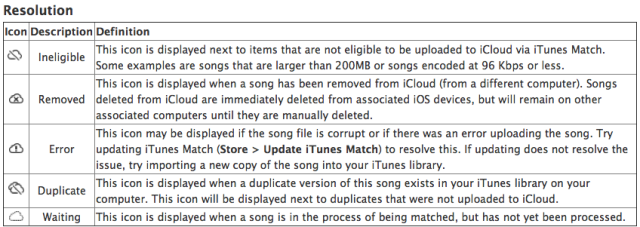
With the new version of iTunes, those in the US using iTunes Match will see new icons beside their songs, to inform you of the status of your songs being uploaded to iCloud. Think of this as a preview of what’s to come for Canada and the rest of the world, as this support document reveals (via The Loop):
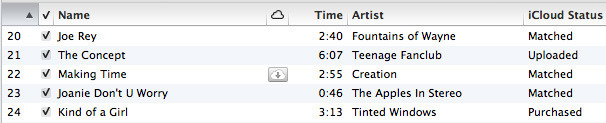
A closer detailed look at iTunes Match is detailed by Macworld’s Jason Snell. He goes over how iTunes Match looks like as your library is being uploaded to iCloud:

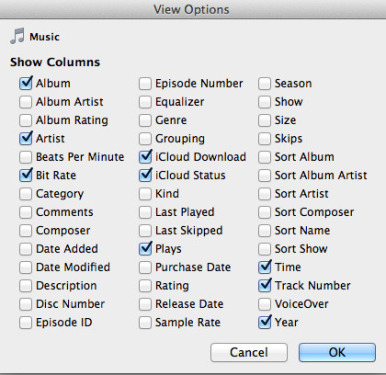
By going to View Options, you can adjust what is displayed:

As Canada and the world patiently awaits the launch of iCloud soon, as announced by Apple’s Eddy Cue, all we can do in the meantime is observe our US neighbours enjoy the new service. Or, if you have a US iTunes account you can already get the service a try, but it can get messy with multiple accounts on various devices.



I read an article just now that stated that the local music on your iPhone is wiped off when you turn on the Match service.
Is that accurate?
I can’t imagine that this is going to be a popular side effect since the Match library will only be there if you have a service/data connection.
I believe that only applied to developers that were testing iTunes Match beta.
Craig is right, if you turn on iCloud it will wipe all music off of your IOS Devices. Also if your Music and Music Videos is over 200mb and bit rate is 96 and below those file will not upload to iCloud.(found information on internet) I know because I am in the process of uploading to iCloud.
Craig can’t be right. I turned it on and nothing was deleted from my iOS devices, only added… I’m in Canada with both US and Canadian accounts.