The iPhone hacker community is at it again! This time, it’s Zibri who just developed a program that will jailbreak, activate, and unlock brand new 4.6 bootloader iPhones (plus install Installer.app), with the click of a button! No more need to downgrade to 1.1.1! Before we start with instructions and resources on how to use ZiPhone, let’s review:
iPhones with 3.9 version bootloaders (firmware version 1.1.1 and below) will be able to:
- Jailbreak your phone (-j)
- Activate your phone (-a)
iPhones with 4.6 version bootloaders (firmware 1.1.2 or 1.1.3 OTB) will be able to do everything mentioned above AND:
- Unlock your phone at baseband 4.02
- Fix your IMEI issues
What the Heck Does this Mean for Me? Can You Clarify?!
For example, if you updated your 1.1.1 unlocked iPhone (upgraded from 1.0.2; bootloader 3.9) to 1.1.3 firmware with the latest iTunes (7.6), you will be able to use ZiPhone to activate and jailbreak, then use AnySIM 1.3 to unlock your phone. Users online from HowardForums have reported doing this successfully many times already.
For those with 1.1.2 and 1.1.3 OTB iPhones, brand new and untouched, running ZiPhone will activate, jailbreak, and unlock your iPhone–very simple!
This ZiPhone activate/jailbreak has definitely blessed the current and new generation of iPhone users. Although there are still bugs reported by many, this is a fantastic step towards the easiest way to jailbreak and activate your iPhone! Watch for iPhone prices to plummet on Craigslist soon! 😉
How to Activate, Jailbreak, and Unlock Your 1.1.2, 1.1.3 OTB iPhone with ZiPhone
First of all, big kudos to GeeZuZz at Unlock.no as he has released a modified GUI version of ZiPhone to make it even easier for everyone (less than 3 minutes)! Note: .NET framework 2.0 required (most of you should have that installed)
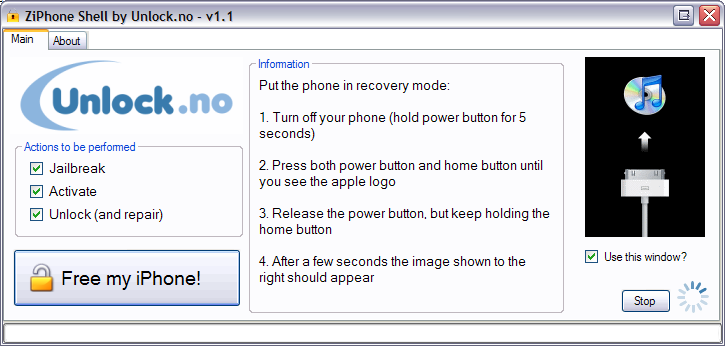
Step One: Download ZiPhone
Step Two: Put the iPhone into “Recovery Mode”
- Turn off your iPhone (hold power button for 5 seconds)
- Press both power button and home button until you see the Apple logo
- Release the power button, but keep holding the “home” button
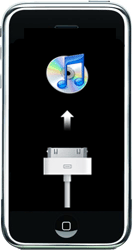
- After a few seconds the following image below will appear:

From here…follow the GUI interface and free your iPhone! You can follow the thread on this unlock here…refer to it before you attempt anything! Remember, you run the risk of getting stuck (or worst possible scenario damaging) your iPhone by running these new OTB 1.1.2, 1.1.3 jailbreak/activate/unlock methods!
If you enjoyed this post, please subscribe to my RSS feed, so you won’t miss any updates!



wow this is great for the iPhone community as this seems like a much easier way to get both a 3.9 and 4.6 bootloader iPhone jailbroken and unlocked. everyone who wants an iPhone should go and get one now, there is no excuse saying that there is no unlock or that its hard to do. with this, anyone should be able to have an unlocked iphone.
thanks again to iphone fan for the latest news and updates
I have already jailbreak my iphone 1.1.2. Can i update my iphone to 1.1.3 and can i only unlock it then with Ziphone( i haven’t unlocked it yet)?
This is a great program to use! These guys are an amazing help to the iPhone community 🙂
Nice post, thanks 😉
coolbeans
Excellent news!
One question… I’m a newbie! How exactly do I find out which bootloader version I have?
Does anyone know how this unlocks the 4.6 bootloader? Last i heard the only way to unlock it was to put a new firmware on the baseband, but there was no way to go back to a original one after.
anyone know if the google maps functions will all work with this update to 1.1.3 with this method? (triangulation, hybrid etc)
yes it works great
I have a 1.0.2 and upgraded to 1.1.1 unlocked, does that mean all I have to do is upgrade to 1.1.3 and let the Ziphone do the rest? Thanks.
Hi Herb,
I would check out the thread here if I were you:
http://www.hackint0sh.org/forum/showthread.php?t=29554
I believe that this program is only working on 4.6 bootloaders. If you have 1.0.2 OTB, then it will have the 3.9 bootloader as far as I understand.
Hi
I am using Ziphone to unlock 1.1.2 phones, everything works well but only can not find Tweaks 1.1.2 to install iWorld.
Please help.
Regards
Ismail
is****@*****co.org
Try checking your Sources in Installer?
Add http://hackthatphone.com/1.xml as a source and iWorld should show up now (it is in the folder named ‘hack that phone tools’)
Anyone know if this works on the new 16GB iPhone?
This should work, as stated in the post.
I have a stealth sim unlocked iphone with 1.0.2……Does anybody know where i can go and get step by step instructions in order to get me to 1.1.3 software unlock, so i don’t have to use the stealth sim anymore…….
I have a new 16GB activated and working with ATT service.
I am new to the Iphone and lovin it. Is it possible for me to just jailbreak using this method? Any help would be greatly appreciated.
I used ZiPhone to jailbreak, activate and unlock my iphone (1.1.2) but unfortunately when I insert new sim card I can not call out nor receive incoming call and it show the error message (the letter E at the upper left near network signal). How to fix this problem?? please email me sa******@***oo.com
Thanks.
i love you guys but i have a little problem with anysim 1.3 i press the red button unlock phone then it just stays there nothing comes out please help me out
I think I’ll stick with my “soft” upgraded 1.1.3 for now, everything works like a charm and with all the bugs/fixes there seem to be with the ZiPhone I am going to stay away from it!
the letter e stand for edge network not error
anyone use this method to just unlock their iphone to get rid of turbosim/stealth sim?
Well, I finally took the plunge. My StealthSim was continually failing, and I had to pop it out, realign and fiddle with it on a weekly or twice weekly basis. After it failed today, I figured I would give this software unlock a try.
I first restored my 1.1.2 phone to 1.1.2 to get rid of the old jailbreak. I used the ziphonegui.exe, and it worked flawlessly! I then upgraded to 1.1.3 through iTunes and used the ziphone unlock again and I am now working on Rogers with 1.1.3 and the software unlock!
Thanks Zibri, GeZuzz and iPhoneFan!
I just used this method and it works perfectly. I first restored the phone to 1.1.3 in itunes. Then I ran ziphone version 2.4. It is awesome. Everything works perfectly. Even the google maps locate feature works without having to install locateme or navizon. The phone works fine. Youtube works fine. Feels like I have a new phone. Finally took that turbosim out. Came from 1.1.2 otb.
I recommend doing this. Too easy.
I did this method and it worked but the locate me doesn’t. Any ideas?
I assume you mean the locate feature inside of the Google map? It doesn’t work where I live, (outskirts of Toronto), but it does work downtown. So I think it just depends how many cell towers are around. When I use Navizon, it gives me a location where I live, but it is not very accurate.
Right. I live downtown Ottawa, and when I click “locate me” it just spins forever. If I use Navizon it works but its a few blocks away.
@Tyler
Cool, Cool. I’m still using the StealthSIM and it seems to be doing the job but since after reading ur post, I might just try the new ZipPhone v2.4 Hmmmmm lol I will let ya know if I do…
Thanks for ur comments guys! 🙂
I have a 16GB otb iPhone and ran ziphone 2.4. Getting “different SIM” errors demanding that I connect to iTunes. Total noob to this and have some questions:
Which SIM, if any, should I have inserted when running ZiPhone? (original AT&T SIM or my Tmobile SIM?)
How do I avoid the “Different SIM detected” errors?
Why does iTunes say my phone “may be damaged” if I connect with my Tmobile SIM inserted?
I dont think the sim matters. I had my fido sim in it when I did it. I would restore in itunes and try again.
I just did this method and it works PERFECTLY – my phone was an 1.1.2 OTB with 4.6 bootloader.
Updated the iPhone software:
I opened the package, put the phone into “restore mode”, plugged it into my computer with iTunes 7.6 and clicked RESTORE. This updated the phone to 1.1.3.
Unlocked the phone:
Then I just followed the instructions above with the ZiPhone. After unlocking, I swapped the SIM cards and the phone works great! Everything appears to be functional. This is a great tool.
How to check your firmware version:
http://wiki.howardforums.com/index.php/IPhone_Firmware_Guide
How to put iPhone into “restore mode” and update the software:
http://iphone.unlock.no/#recovery-restore-mode
What tmobile plan do you have?
I’m on ROGERS.
I had my iPhone previously unlocked with a StealthSIM but keep getting the No SIM message so I did this ziPhone unlock and it worked flawlessly. The unlock itself only took 4 mins.
Anyway need a StealthSIM? 🙂
THANKS !!! WORKS !!!
THANKS THANKS THANKS !!!
HAPPY TO UNLOCK IT !!!
Glad it worked! 🙂
Here’s a success story!! I bought a new 16GB 1.1.3 iPhone on Friday (in Buffalo – yea!). I unlocked it using ZiPhone (for Mac)…and in 2.5 minutes it was all mine. A quick trip to a cell outlet later, I’m on Rogers, old cell number in tow. Perfect perfect perfect.
I took a voice plan – no data, since I’m in an urban centre where I can almost always find a free open Wifi network – and I’m about to save tons compared to the old Bell plan with data and a Treo. The iPhone will pay for itself in no time!
Enjoy all – and THANK YOU FOR THIS WEBSITE…wow!!!
Can’t find free Wifi anywhere on iPhone in city, all networks seem to be locked out and says cannot join network,does anybody now how to find free Wifi. Even coffee shops in city like Starbucks that i thought had free Wifi you have to pay. Seems like Wifi is pretty useless if you can’t ever connect to network, you pretty much need data plan if you want to surf the internet.
Are 1.1.4 phones being sold in stores? I’m working in the US and was planning on going to get a phone tonight. I’ll hold off if 1.1.4 is being sold in the stores.
Are 1.1.4 phones being sold in stores or is it only available through iTunes?
I won’t bother waiting, since when new firmware is release – it takes the hacker community some time to be able to unlock it properly. Don’t wait to buy the iPhone, just do it!!!
You can always upgrade your firmware/unlock.
so with this if i pick up and iphone all i would need to do is ise ZiPhone, then pop in the sim? Thanks in advance. 🙂
Peace
gd question Brad, I would like to know abt this too!
just wanted to asked how can i removed the E on the upper left of my iphone coz its always there even my wifi is off pls help..thnx
What is a bootloader??
Ziphone was awesome. My iPhone crashed and burned. Simple recovery and ziphone fixed everything.
Thanks for the post.
Tgriff
I tried the GUI ZiPhone and followed the instructions as posted. But the output log on the GUI just says
-Loading zibri.dat.
-Searching for iPhone………
And beyond that nothing happens
Any help would be awsome
Thanks Again..
Same thing here… Don’t know what to do… Need help… Anyone?
Hi,
Turned my iPhone on today. I hadn’t used it for a bit, since I was doing non phone related work.
My phone said that the phone does not work, ‘needs repair’ It seems that it has a newer version of some icons on the start up screen and the wifi does not wok.
I guess it updated itself?? Because I never updated it.
Will Ziphone work to unlock it? The new 3.o? cause the link for 2.5 does not work here.
Help,
Geo
I just followed the directions as stated above. Still “no service”. I assume I have to switch my SIM card. How do I go about doing that?
i had 1.1.2 and a STEALTH sim. just took out the stealth, put the sim card back in, and one-clicked “unlock,jailbreak and activate.” voila-so easy. many thanks to Zibri!
I unlocked jailbroke and activated my iphone with ziphone and i can make and receive calls, get on wifi, send text messages etc, but when i try and get on the internet w/out wifi it says something about edge network, what should i do
hi,i have a 1.1.4 iphone,how come everytime i instal app souce it keep on freeze.and how come i cannot inzip ziphone.i download it down but cannot unlock the phone
can anyone help me please.or else everytime i unlock the phone it cost me $35 dollar.thank you
I download the zip and it saids it only works with windows! I have a mac is there another way?
Lee: Yes. Download the MAC version: http://files2.ziphone.org/ZiPhoneOSX-3.0.dmg
🙂
I used ZiPhone to jailbreak, activate and unlock my iphone (1.1.4) but unfortunately when I insert new sim card I can not call out nor receive incoming call How to fix this problem??
please email me at wa*********@***il.com
i will really apriciate your help
I was able to grab all these tools from http://www.iphone-hacks.com
I tried the All kind of jailbreak ZiPhone, winpwn_2.0.0.2, ZiPhone iBrickr Fix, ZiPhoneGUI33, Ziphone Patch, PwnageTool.app, ZiPhoneGUI, iLiberty and ibrickr-jb113 I followed the instructions as posted including Downgrade and upgrade all the firmware how ever none of the programs can Find the iphone, they can put the iphone in sleep mode but after that they cant find it, the programs keep searching for the iphone or please make sure your iphone is connected wich I change cables computers everything I can think it would help how ever the Itunes can see and detect the iphone and restore it with no problem more over after the restore I get the slide screen on the emergency call when I pass that I get to the phone keyboard and I dial *#307# and I get #0 calling Not #1 calling I answer then decline but it take me back to the slide for emergency call which where I started from. Very important note: it give me the slide for emergency screen with the sleep mode screen in the background and the cable logo appear in the screen is the one we connect to the USB not the one we connect to the iphone.
2- my phone was on Firmware 1.1.2 I hade problem with the installer app and I restore it and update it from the itunes thinking to break it again but unfortunately I’m stuck I thought some help from my great follower who believe that I phone should be free to any network with no restriction to help me out I look at my I phone been shut for the last 2 week it break my heart. Please help.
Thanks Again.
I’ve tried this program but it just stays like in the restore screen and nothing happens. what can i do
do you can recive call and where you take your phone number ???
wow this is great for the iPhone community as this seems like a much easier way to get both a 3.9 and 4.6 bootloader iPhone jailbroken and unlocked. everyone who wants an iPhone should go and get one now, there is no excuse saying that there is no unlock or that its hard to do. with this, anyone should be able to have an unlocked iphone.
thanks again to iphone fan for the latest news and updates
wow this is great for the iPhone community as this seems like a much easier way to get both a 3.9 and 4.6 bootloader iPhone jailbroken and unlocked. everyone who wants an iPhone should go and get one now, there is no excuse saying that there is no unlock or that its hard to do. with this, anyone should be able to have an unlocked iphone.
thanks again to iphone fan for the latest news and updates
wow this is great for the iPhone community as this seems like a much easier way to get both a 3.9 and 4.6 bootloader iPhone jailbroken and unlocked. everyone who wants an iPhone should go and get one now, there is no excuse saying that there is no unlock or that its hard to do. with this, anyone should be able to have an unlocked iphone.
thanks again to iphone fan for the latest news and updates
wow this is great for the iPhone community as this seems like a much easier way to get both a 3.9 and 4.6 bootloader iPhone jailbroken and unlocked. everyone who wants an iPhone should go and get one now, there is no excuse saying that there is no unlock or that its hard to do. with this, anyone should be able to have an unlocked iphone.
thanks again to iphone fan for the latest news and updates
This is a great program to use! These guys are an amazing help to the iPhone community 🙂
Nice post, thanks 😉
This is a great program to use! These guys are an amazing help to the iPhone community 🙂
Nice post, thanks 😉