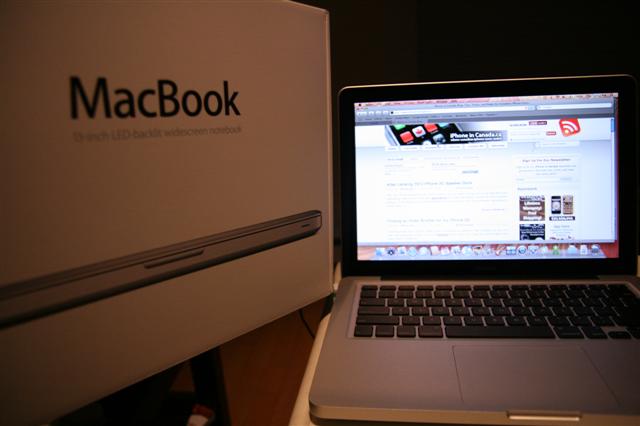
MacBook Review: My iPhone 3G’s Older Brother

On Tuesday Apple released an update to their MacBook line up. The new updated MacBook caught my eye as as I explained in my previous post. After getting my first real taste of OS X through the iPhone, I started to seriously consider switching over to a Mac! You hear people talk about how Apple is a gateway drug to more Apple products. When I heard this, I thought to myself “that’s crazy”…now I am having second thoughts, LOL!

Yesterday the Pacific Centre Apple Store did not have the new MacBooks in stock during the day. However, later in the evening they received a shipment of these new MacBooks (X1Zero was camping out waiting for one)! So today prior to visiting the store I called to inquire if there were any MacBooks in stock and on display. The answer I got was YES they are in stock, but not on display for you to dirty up with your greasy fingers.

After hearing the positive news I went down to the Apple Store and purchased my first Mac, a new aluminum MacBook (I cancelled my online order just in time on the phone after arriving at the store). I went with the base configuration (2.0GHz/160GB/2GB) and had an education discount to bring the price to $1349. Why didn’t I go for the higher end model for $300 more? Well, the illuminated keyboard would be nice but honestly how often do you surf the web in dimly lit areas? Also, since these new MacBooks allow for easy access to the hard drive I can always upgrade that myself in the future.

My Initial Thoughts on Using OS X Leopard

I think using the iPhone has prepared me for what OS X has to offer. I immediately noticed the similarities in icons, settings, and the intuitive features that are a signature of Apple products. At first though, I felt a bit lost since I was so accustomed to Windows XP all this time. Where’s the right click (figured that out later on)? How do I maximize windows? No Start button?!

Of course, after spending my evening on this beautiful notebook and getting ideas on what programs to download via Twitter, I am starting to feel a lot more comfortable using OS X. I must admit the system feels very rock solid, as opposed to Windows XP. I always had a feeling that Windows XP would crash on me whenever I was doing something important and get that dreaded BSOD (blue screen of death). Leopard feels very good and everything has been relatively smooth and lightning fast. Granted, my MacBook is pretty barebones right now so I’ll see how this unit fares when I have a bunch of software and other files are on the machine.

The Design of the MacBook Itself: It’s Pretty Darn Nice

The aluminum unibody structure is very strong. Holding the laptop with one hand does not result in any squeaking noises or bending–this MacBook is extremely well built. The glossy screen makes images pop out and I did not find any issues with glare (my Dell 700M had a glossy screen so maybe I’m used to it by now). The keyboard is nice and easy to type on. The keys are spaced out fairly well and soft with a slightly firm feel.
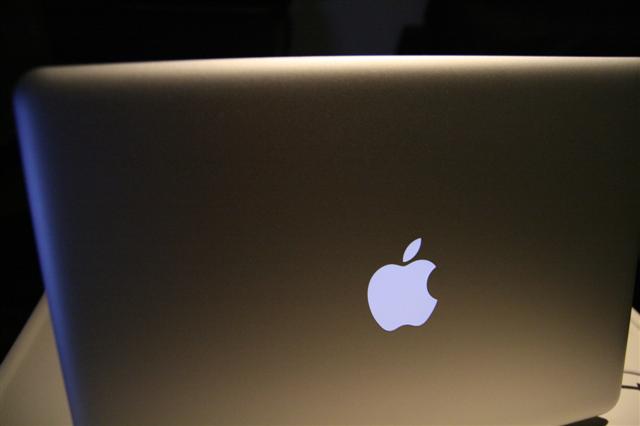
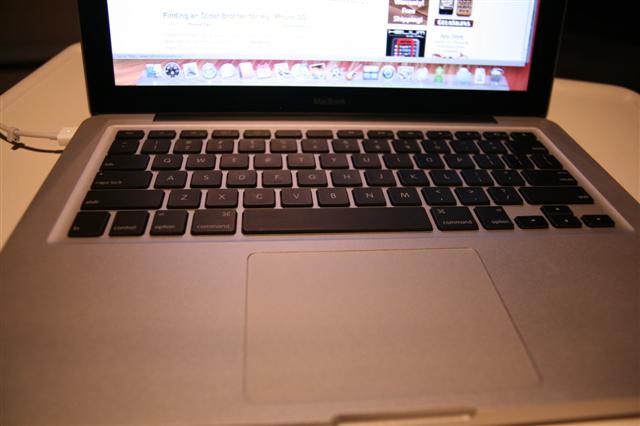
The new glass trackpad does not feel like glass (where is it?!). Since there are no more buttons, you have a lot of retail space to move your mouse around with. The trackpad button covers about two-thirds of the area and sometimes I made the mistake of trying to push near the top to no avail. After having the unit on for more than five hours, no heat has been emitting from the keyboard area, the LED LCD, or the palm rests itself. The aluminum is going to keep this puppy super cool or pass on the heat. So far so good!

Founder and Editor-in-Chief of iPhoneinCanada.ca. Follow @iPhoneinCanada and on Google+. Click here to save 20% OFF at ZAGG.com with coupon 'iphoneinca'!

Did you like the post?

  • Dan

    After reading your post, I ran out to Pacific Center at 10 am this morning to buy a new MAC. They didn’t have any of the 2.4ghz macbooks left, only the 2.0ghz. They checked the back, and they were just in the process of unloading some of the higher end macbooks! Yay!!! Waited a few minutes and walked out with my new macbook. $1649 ($100 educational discount). I’m so excited.

    Hopefully the switch from a PC to a Mac isn’t too bad, but really, when something looks so nice, who cares!

  • Dan

    After reading your post, I ran out to Pacific Center at 10 am this morning to buy a new MAC. They didn’t have any of the 2.4ghz macbooks left, only the 2.0ghz. They checked the back, and they were just in the process of unloading some of the higher end macbooks! Yay!!! Waited a few minutes and walked out with my new macbook. $1649 ($100 educational discount). I’m so excited.

    Hopefully the switch from a PC to a Mac isn’t too bad, but really, when something looks so nice, who cares!

  • http://www.ehphone.ca/ ruffdeezy

    Congrats dude, I know you will like Mac’s.

  • http://www.ehphone.ca ruffdeezy

    Congrats dude, I know you will like Mac’s.

  • bc

    a whole bunch of apps you may find useful. have fun!
    NetNewsWire: BEST RSS news reader (free), there’s also iPhone version
    SpamSieve: excellent spam filter
    TextExpander: typing shortcut utility
    MenuCalendarClock iCal: menubar thingy with ties into iCal
    iStat Pro: monitor all kinds of system stuff in this Dashboard widget (free), or…
    MenuMeters: monitor all kinds of system stuff in your menubar (free)
    Mouseposé: great utility if you do presentations or screencasts
    Onyx: system housecleaning utility (free)
    Applejack: system maintenance/troubleshooting utility (free)
    1Password: great password management utility, also on iPhone
    Transmission, or Acquisition: P2P
    Flip4Mac: WMV plugin for QuickTime
    iSquint: video conversion, e.g. video to iPod, convert FLV to whatever… (free)
    InstantShot: screengrab tool (free), more flexible than Cmd-Shift-3/Cmd-Shift-4
    DiskAid: access files on iPhone/iPod directly via USB (free) *haven’t tried this one personally yet but looks promising…

  • ifokust

    I have a 1st gen Macbook Pro and I was very excited when the new laptops were announced. the new Aacbook surpasses the processing speed, memory and hd capacity of my older Macbook Pro so in my mind I was planning on purchasing a new Macbook (jammed to the tits). I wanted to take advantage of a smaller form factor (going from 15″ to 13″) and also save a lot of $$$ for better performance.
    That was until I took a harder look at the specs……
    Since the Macbook does not have Firewire ports I’m stuck with a new Macbook Pro as my only option as an upgrade. I NEED at least one FW port for an audio interface I use for digital audio recording.
    Anyways….I’m going to delay my purchase until January at least in hopes of another announcement from Apple on returning the FW port to the new Macbook line.

  • ifokust

    I have a 1st gen Macbook Pro and I was very excited when the new laptops were announced. the new Aacbook surpasses the processing speed, memory and hd capacity of my older Macbook Pro so in my mind I was planning on purchasing a new Macbook (jammed to the tits). I wanted to take advantage of a smaller form factor (going from 15″ to 13″) and also save a lot of $$$ for better performance.
    That was until I took a harder look at the specs……
    Since the Macbook does not have Firewire ports I’m stuck with a new Macbook Pro as my only option as an upgrade. I NEED at least one FW port for an audio interface I use for digital audio recording.
    Anyways….I’m going to delay my purchase until January at least in hopes of another announcement from Apple on returning the FW port to the new Macbook line.

  • http://www.futurelooks.com/ Stephen

    On that note, the latest Unibody MacBook Update disabled the FW port on older MacBooks and Pros. Steve being all evil again :lol:

  • http://www.futurelooks.com Stephen

    On that note, the latest Unibody MacBook Update disabled the FW port on older MacBooks and Pros. Steve being all evil again :lol:

  • Bud Colby

    You may want to read ALL the comments applied to this artical for some new info on some of the apps you just listed. http://www.tuaw.com/2008/10/16/ripit-yanks-your-dvds-right-off-the-disc

  • Bud Colby

    You may want to read ALL the comments applied to this artical for some new info on some of the apps you just listed. http://www.tuaw.com/2008/10/16/ripit-yanks-your-dvds-right-off-the-disc

  • Bud Colby

    Not Bud Colby.

  • Bud Colby

    Not Bud Colby.

  • Bud Colby

    How can they take away what you paid for when you bought your computer? Are you saying that the FW port on previous models will simply quite working if you update. How can that be????

  • Bud Colby

    How can they take away what you paid for when you bought your computer? Are you saying that the FW port on previous models will simply quite working if you update. How can that be????

  • Stephen F

    Go to the Apple menu (top left), scroll down to “Dock”, and enable hiding. That should free up a lot of screen real estate at the bottom of you screen!

    Welcome to the community!

  • Stephen F

    Go to the Apple menu (top left), scroll down to “Dock”, and enable hiding. That should free up a lot of screen real estate at the bottom of you screen!

    Welcome to the community!

  • Jimbo Slice

    iPhone Fan good choice! I got the same model on Wednesday after they were released and its the best product I’ve ever bought. Nothing measures up in terms of design quality, e.g. my XBOX360, PS3, Samsung HDTV etc. And I love OS X Leopard as well.
    In a nutshell, I’ve never spent this much money and felt like I got every dollars worth. No cognitive dissonance whatsoever, I’m extremely happy!

  • Jimbo Slice

    iPhone Fan good choice! I got the same model on Wednesday after they were released and its the best product I’ve ever bought. Nothing measures up in terms of design quality, e.g. my XBOX360, PS3, Samsung HDTV etc. And I love OS X Leopard as well.
    In a nutshell, I’ve never spent this much money and felt like I got every dollars worth. No cognitive dissonance whatsoever, I’m extremely happy!

  • Seripha

    I can’t believe no one has mentioned this site yet for you: http://www.opensourcemac.org/

    It’s a really good collection of free apps for mac. Most of them are developer driven so they’re constantly being updated and made shinier. Some of my favourites I’ve found from that page are:

    - QuickSilver. It’s like a ‘start’ button for you mac. After you’ve installed it put it on your dock so it’s easy to access. What it basically does is finds apps, files, and links that you have stored on your computer as you type in each character of the file you’re looking for. Best part is, it’s not the like ugly search on Windows that takes 2 hours to find something. QuickSilver is instantaneous. Another good thing about it is that you can set it so it has a quick key that automatically opens the program.

    - Adium – I don’t know how much messaging you do, but it’s like a Trillium for macs. It supports your msn, AIM, yahoo, facebook, gmail, twitter, etc accounts. Pretty good for keeping in touch. A weird duck icon though for your dock.

    - Seashore – It’s like photoshop’s younger brother. Doesn’t have all the fancy bells and whistles that photoshop has but it’s pretty much the same. It’s also free. There’s quite a few updates going on for it as well so it’s getting better.

    - Senuti – Besides quicksilver this is my ultimate most favourite app for mac ever. It allows you to plug in any ipod / iphone product and copy the songs off that ipod on to your computer. If you want it to it can even import the songs straight into your itunes library as you download.

    The site also has a couple of apps that let you run windows programs on it. Like bootcamp, but free. Don’t know how good they are though – I really like my mac equivalents.

  • Seripha

    I can’t believe no one has mentioned this site yet for you: http://www.opensourcemac.org/

    It’s a really good collection of free apps for mac. Most of them are developer driven so they’re constantly being updated and made shinier. Some of my favourites I’ve found from that page are:

    - QuickSilver. It’s like a ‘start’ button for you mac. After you’ve installed it put it on your dock so it’s easy to access. What it basically does is finds apps, files, and links that you have stored on your computer as you type in each character of the file you’re looking for. Best part is, it’s not the like ugly search on Windows that takes 2 hours to find something. QuickSilver is instantaneous. Another good thing about it is that you can set it so it has a quick key that automatically opens the program.

    - Adium – I don’t know how much messaging you do, but it’s like a Trillium for macs. It supports your msn, AIM, yahoo, facebook, gmail, twitter, etc accounts. Pretty good for keeping in touch. A weird duck icon though for your dock.

    - Seashore – It’s like photoshop’s younger brother. Doesn’t have all the fancy bells and whistles that photoshop has but it’s pretty much the same. It’s also free. There’s quite a few updates going on for it as well so it’s getting better.

    - Senuti – Besides quicksilver this is my ultimate most favourite app for mac ever. It allows you to plug in any ipod / iphone product and copy the songs off that ipod on to your computer. If you want it to it can even import the songs straight into your itunes library as you download.

    The site also has a couple of apps that let you run windows programs on it. Like bootcamp, but free. Don’t know how good they are though – I really like my mac equivalents.

  • http://www.iphoneincanada.ca Gary

    Nice! I think these things are going to sell out quickly. There is already word of shortages at worldwide Apple stores. Maybe they are pulling a short supply trick like Nintendo and the “Wii”? ;)

  • http://www.iphoneincanada.ca iPhone Fan

    Nice! I think these things are going to sell out quickly. There is already word of shortages at worldwide Apple stores. Maybe they are pulling a short supply trick like Nintendo and the “Wii”? ;)

  • http://www.iphoneincanada.ca Gary

    Thanks for the amazing suggestions everyone! Love it!!! :)

  • http://www.iphoneincanada.ca iPhone Fan

    Thanks for the amazing suggestions everyone! Love it!!! :)

  • Lukasz

    I think you should of got the macbook pro refurbished- 2.4ghz (2008 model) for $1449, thats a much better offer!

  • Lukasz

    I think you should of got the macbook pro refurbished- 2.4ghz (2008 model) for $1449, thats a much better offer!

  • http://www.iphonenewbs.com/ Jordan

    I must admit the system feels very rock solid, as opposed to Windows XP. I always had a feeling that Windows XP would crash on me whenever I was doing something important and get that dreaded BSOD (blue screen of death).

    I have a MBP, it’s a work laptop and its second generation. I also have a 700M as well. I like both of them. I do prefer the MBP as its specs are more updated. I run Debian and Windows XP on both. Bootcamp and Fusion are awesome, and I generally find myself taking out the Mac Book more than the Dell 700M.

    I was kinda shocked that you would take an OS that you regularly used before buying the MB. And start boot kicking it to the curb.

    I’ve used all three OS’s extensively, and had crashes on OSX with Apple and non-Apple produced software that totally lock the system up. The can be said about Windows XP and Linux. Ultimately I do find Windows XP to be stable, the only times I’ve had issues with it BSOD was when there was hardware or software related issues. Re-Formatting has been an old past time favorite, with Windows XP. However recently, I haven’t had the need. And I do almost everything with my Windows XP thats theoretically possible, Graphic Design, Gaming, Music, Email, Browsing.

    I guess what I’m getting at is, I was once a Windows Fan Boy, way back in the day. Until I started using Debian as my desktop at work, which churned my productivity up like crazy. I then started using Mac OSX at work and noticed that it was actually a nice OS to use. So I’ve become an avid fan of all Operating Systems that I’ve come across and still used extensively. They all serve their purpose and I guess everyone has their personal preference. I just can’t live with out Windows XP at home, and I can’t really live without Linux at work.

    So why hate? Why become a fanboy? :D

  • http://www.iphonenewbs.com Jordan

    I must admit the system feels very rock solid, as opposed to Windows XP. I always had a feeling that Windows XP would crash on me whenever I was doing something important and get that dreaded BSOD (blue screen of death).

    I have a MBP, it’s a work laptop and its second generation. I also have a 700M as well. I like both of them. I do prefer the MBP as its specs are more updated. I run Debian and Windows XP on both. Bootcamp and Fusion are awesome, and I generally find myself taking out the Mac Book more than the Dell 700M.

    I was kinda shocked that you would take an OS that you regularly used before buying the MB. And start boot kicking it to the curb.

    I’ve used all three OS’s extensively, and had crashes on OSX with Apple and non-Apple produced software that totally lock the system up. The can be said about Windows XP and Linux. Ultimately I do find Windows XP to be stable, the only times I’ve had issues with it BSOD was when there was hardware or software related issues. Re-Formatting has been an old past time favorite, with Windows XP. However recently, I haven’t had the need. And I do almost everything with my Windows XP thats theoretically possible, Graphic Design, Gaming, Music, Email, Browsing.

    I guess what I’m getting at is, I was once a Windows Fan Boy, way back in the day. Until I started using Debian as my desktop at work, which churned my productivity up like crazy. I then started using Mac OSX at work and noticed that it was actually a nice OS to use. So I’ve become an avid fan of all Operating Systems that I’ve come across and still used extensively. They all serve their purpose and I guess everyone has their personal preference. I just can’t live with out Windows XP at home, and I can’t really live without Linux at work.

    So why hate? Why become a fanboy? :D

  • 4wallz

    Another option for Windows applications is called CrossOverMac. Check it out at: http://www.codeweavers.com/products/cxmac/

  • 4wallz

    Another option for Windows applications is called CrossOverMac. Check it out at: http://www.codeweavers.com/products/cxmac/

  • 4wallz

    @Tyler
    Is the 2.4L a new lens or did you mean 2.8L?
    @Tim
    He shoots Canon, they are the only ones who designate their lenses with the “L”. This is their pro version of lenses… best lenses on the planet!

  • 4wallz

    @Tyler
    Is the 2.4L a new lens or did you mean 2.8L?
    @Tim
    He shoots Canon, they are the only ones who designate their lenses with the “L”. This is their pro version of lenses… best lenses on the planet!

  • http://www.iphoneincanada.ca Gary

    Don’t get me wrong, XP has served me well but I’m tired of it now as my main OS. After using OS X it is clear it’s far superior to XP for my needs. XP slowdowns are going to be a thing of the past for me.

    Jusy because I bought a Mac doesnt automatically make me a fanboy. XP is a horrible system. To each their own right?

  • http://www.iphoneincanada.ca iPhone Fan

    Don’t get me wrong, XP has served me well but I’m tired of it now as my main OS. After using OS X it is clear it’s far superior to XP for my needs. XP slowdowns are going to be a thing of the past for me.

    Jusy because I bought a Mac doesnt automatically make me a fanboy. XP is a horrible system. To each their own right?

  • 4wallz

    Please delete this comment… this is a test to see if the avatar on the right loads properly.

  • 4wallz

    Please delete this comment… this is a test to see if the avatar on the right loads properly.

  • 4walls

    Another test to load the avatar….

  • 4walls

    Another test to load the avatar….

  • not for a minute

    I think he means the 2.8L lens from Canon. They don’t make a f/2.4 lens.

  • not for a minute

    I think he means the 2.8L lens from Canon. They don’t make a f/2.4 lens.

  • dmurray

    for Photo Management: it is time for us old-school folks to give up trying to manage photos in the file system. Do all photo stuff you can right in iPhoto (or Aperture if you have it?). Don’t fight it any longer ;-)
    (Haven’t settle on a favorite Flickr exporter yet – would like something that synchs tags back to iPhoto…)

    for Coverflow: Also the best i can find for finding and loading album art for iTunes and iPhone are liquidx.net’s Album Art Widget. Still very manual, but the best i can find.

    for Backups: don’t forget to activate and use Time Machine (built in)

    for Video Conversion: I second VisulaHub (or iSquint). Too bad they are discontinued. Also, for fun, try the iLife programs: iVideo and iDVD. Also, VLC to quickly view stuff that you haven’t yet converted using VisuaHub

    Utility: MainMenu will run scheduled cleanup. also handy for those rare times you need to try a gentle reset of the Finder.

    Keyboard Secrets: can’t remember them off hand, but there are a few for screenshots, reboot, and stuff like that. The one that always throws me is ‘sticky keys’ – very annoying when it happens (hold the shift key too long and you will see). It can be disabled, but I forget how.

    apologies for the ‘stream-of-conscious’ – hope it makes sense…

  • dmurray

    for Photo Management: it is time for us old-school folks to give up trying to manage photos in the file system. Do all photo stuff you can right in iPhoto (or Aperture if you have it?). Don’t fight it any longer ;-)
    (Haven’t settle on a favorite Flickr exporter yet – would like something that synchs tags back to iPhoto…)

    for Coverflow: Also the best i can find for finding and loading album art for iTunes and iPhone are liquidx.net’s Album Art Widget. Still very manual, but the best i can find.

    for Backups: don’t forget to activate and use Time Machine (built in)

    for Video Conversion: I second VisulaHub (or iSquint). Too bad they are discontinued. Also, for fun, try the iLife programs: iVideo and iDVD. Also, VLC to quickly view stuff that you haven’t yet converted using VisuaHub

    Utility: MainMenu will run scheduled cleanup. also handy for those rare times you need to try a gentle reset of the Finder.

    Keyboard Secrets: can’t remember them off hand, but there are a few for screenshots, reboot, and stuff like that. The one that always throws me is ‘sticky keys’ – very annoying when it happens (hold the shift key too long and you will see). It can be disabled, but I forget how.

    apologies for the ‘stream-of-conscious’ – hope it makes sense…

  • Pingback: Apple Exceeds 10 Million iPhones Sold in 2008

  • Pingback: Extend your iPhone 3G Warranty with Honesty

  • http://lowsalego.com/map.html bopdilly

    Excellent blog! Interesting article and very informative! I will necessarily subscribe for this blog. http://lowsalego.com/map.html

  • http://lowsalego.com/map.html bopdilly

    Excellent blog! Interesting article and very informative! I will necessarily subscribe for this blog. http://lowsalego.com/map.html

  • Pingback: 1Password 3: The Ultimate Password Manager for Mac Review | iPhone in Canada Blog - Tips, Tricks, News, and Tutorials for Canadian iPhone Users