**Visit the NEW iPhone in Canada FORUMS! Click here to register and sign up–it’s free!**
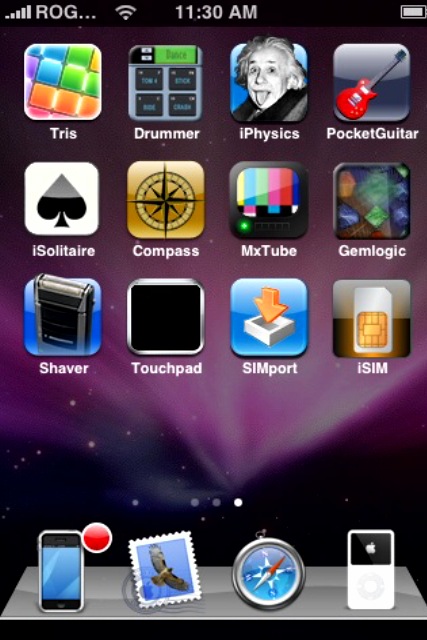
So you just got your hands on an iPhone to use in Canada, huh? Well, after you pop in your Rogers or Fido SIM card, you will soon notice that your contacts won’t appear in your contacts. They are there, but you need to transfer them over to the iPhone somehow. This is where the 3rd party app SIMport comes into play.

How to Import Contacts from your SIM Card to your iPhone
- Launch Installer, click on Sources–>Edit–>Add–>http://install.ifon.no
- Go to Install, then click on the iFon International category. Install SIMPort (don’t worry, it’s in another language)
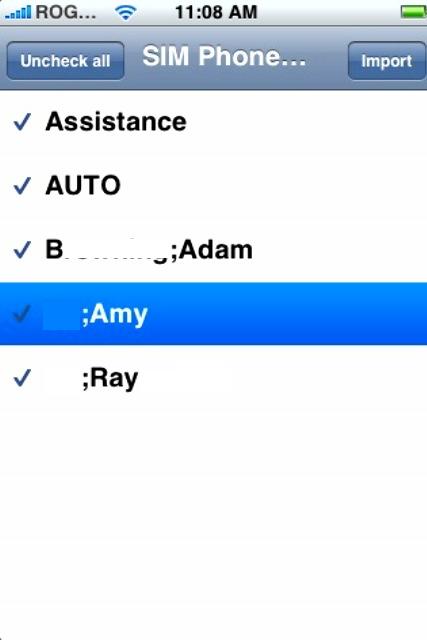
- Launch SIMport and follow the instructions.
The cool thing about SIMport is that it’s fast, easy, and free. There is another program too, called iSIM that was recently released, with a similar GUI and easy use. However the demo version only allows you to transfer one contact at a time–you need to pay to updgrade. I think I’ll stick with SIMport in the meantime. 🙂 Here are the screenshots:

Get 20% OFF the invisibleSHIELD by using discount code “iphoneinca”! Limited time only, Buy Now!




Thanks for sharing 😉
hi i am trying to get my contacts but I don’t understand your directions. I don’t see the international catergory?
what if it only shows two of your many contacts?
iphone Fan – again, thx for your blog. learned so much from it.
THANKS SO MUCH!!! you are a life saver… i thouhgt I would have to enter each one seperatly!!!!!
… o my you saved my boyfriends life, it was driving him nuts not being able to import his sim card!!! thanks a lot!!
I have not tried this software yet – but once i import from SIM to iPhone – can i do a reverse of iPhone to SIM when i need to change phones again?
Thanks much for your advise!
Sky: Yes, it should let you do the reverse. Try it! It’s very simple to use 🙂
Hi …It ther a way that we can import contacts from the PC to the I-Phone…if yes how can we do that ..and about the sim …do we have to do it through the iphone or we download it on the pc and then tranfer.
Tanvir
Thanks, thanks, thanks……I got it!!!
So how do you get the Installer app on the 3g iphone….
hi how would i know the version of my iphone because i bought it second hand tnx
How do I transfer contacs from an old SIM card to my new SIM card on my iPhone?
Hi , I had problems with my contacts to but it seems that the solution is very easy.
You go to settings – contacts,mail etc. – import contacts.
Thats all I did and my contacts came to show on my iPhone.
BTW I own a 3g version 2.02
You are a lifesaver. All this other stuff was way over my head.
but its not working on my iphone .. everytime i click on simport .. it keeps loading and goes back to the desktop why ?
Where can i find “Source”? It’s not on my home screen. Thanks.
omg just go settings>mail.contacts>import sim!!!!
hi guys i been searching on line for cupple of days, i already got that jailbreak on my iphone 3g 16 gb it but when i got to installer and add source, nothing happend , nothing appear to download, and i can not see simport to download need some help thank you
hi , i have 3g iphone , when i to enter the source in installer, it gives me an error of invalid source.. pls advise…
hi , i need to copy from my iphone 3 g to sim card….anybody can help me please
I try to do this and it says “Unable to decode source”. What do I do?
dude
settings>mail and contacts>import sim contacts
lol
I tried this. I have an unlocked/jailbroken 1st gen iPhone. When I try to add install.ifon.no, it says it’s an invalid source. Why?
I didn’t understand… Can i import my contacts from my iphone to the sim card? I want to pass all my contacts to another phone… how can i do it?
This is unbelievable that such a simple yet essential function in not built in in to the iPhone. I have a pre-3g iphone and cannot get my contacts from the Iphone back to the Sim.
When i bought the phone I downloaded iSim and it worked to get all my contacts onto he phone from my Sim. ISim seems to have disappeared since and i cannot locate it via installer.
SIMport only lets you transfer from Sim to iphone so I am still stuck and peeved off to say the least. Any accurate advice would be a big help. And any program geniuses should develop this widget and sell for a few buck and I think you would be able to retire !
(PS i bough the phone in HK and hear it will lock up if I synch and update it on my computer)
Hi all
iPhone OS3:
Settings > mail contacts calendars > import sim contacts.
Settings > mail contacts calendars > import sim contacts.
🙂
Thanks but it isn’t that simple.
Settings > mail contacts calendars > import sim contacts.
supreme preferences must be switched off first
Ok, there is no need to install any new APP. I have an Iphone 3Gs (not sure if it’s the same procedure for Iphone 3G). All you have to do is: Go to Settings, select Mail, Contacts, Calendar, Scroll down, and there is a “import SIM Contacts Option. and VOILA! You can reach me @ pa******@**.com if you have any questions or comments 🙂
after importing all contacs from sim to i phone how do you get them back onto sim if you needed to?
Exactly, good stuff. Added you to my feed.
Hi,
I used the SIM contacts import option, but it didn’t work. I clicked on it, it processed it for a few seconds, and looked to be successful but I checked address book and the SIM contacts did not port over – only my computer Address Book contacts are there.
Any ideas would be much appreciated …
Thanks!
Maine
Oh, I’m using an iPhone 3GS and the latest (4.0.1) software. Cheers. Attempted to port contacts from a Rogers SIM.
I found guide with screen shots here http://www.trickyways.com/2010/09/how-to-import-sim-contacts-to-iphone-4/
Thanks for sharing 😉
hi i am trying to get my contacts but I don’t understand your directions. I don’t see the international catergory?
what if it only shows two of your many contacts?
iphone Fan – again, thx for your blog. learned so much from it.
THANKS SO MUCH!!! you are a life saver… i thouhgt I would have to enter each one seperatly!!!!!
… o my you saved my boyfriends life, it was driving him nuts not being able to import his sim card!!! thanks a lot!!
I have not tried this software yet – but once i import from SIM to iPhone – can i do a reverse of iPhone to SIM when i need to change phones again?
Thanks much for your advise!
I have not tried this software yet – but once i import from SIM to iPhone – can i do a reverse of iPhone to SIM when i need to change phones again?
Thanks much for your advise!
Sky: Yes, it should let you do the reverse. Try it! It’s very simple to use 🙂
Hi …It ther a way that we can import contacts from the PC to the I-Phone…if yes how can we do that ..and about the sim …do we have to do it through the iphone or we download it on the pc and then tranfer.
Tanvir
Thanks, thanks, thanks……I got it!!!
So how do you get the Installer app on the 3g iphone….
hi how would i know the version of my iphone because i bought it second hand tnx
How do I transfer contacs from an old SIM card to my new SIM card on my iPhone?
Hi , I had problems with my contacts to but it seems that the solution is very easy.
You go to settings – contacts,mail etc. – import contacts.
Thats all I did and my contacts came to show on my iPhone.
BTW I own a 3g version 2.02
You are a lifesaver. All this other stuff was way over my head.