Lots of people have been taking advantage of US iTunes accounts to gain access to apps and downloads not available in Canada. Previously I showed you guys how to create a US iTunes account by purchasing a MasterCard gift card from Shoppers Drug Mart.
Today I’m going to show you how to open a US iTunes Account without a credit card! This following method comes straight from Apple and is for educational purposes only, of course.
How to Create a US iTunes Account Without Credit Card (Updated April 2016)
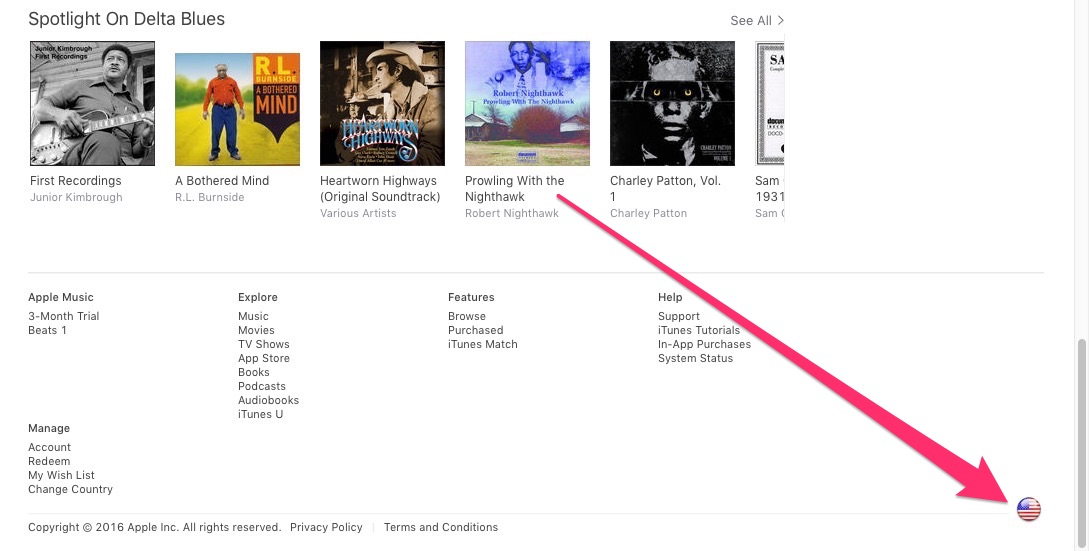
1. Open iTunes and sign out of your Canadian account. Scroll to the bottom right of iTunes on your Mac/PC, click on the flag and select the United States.
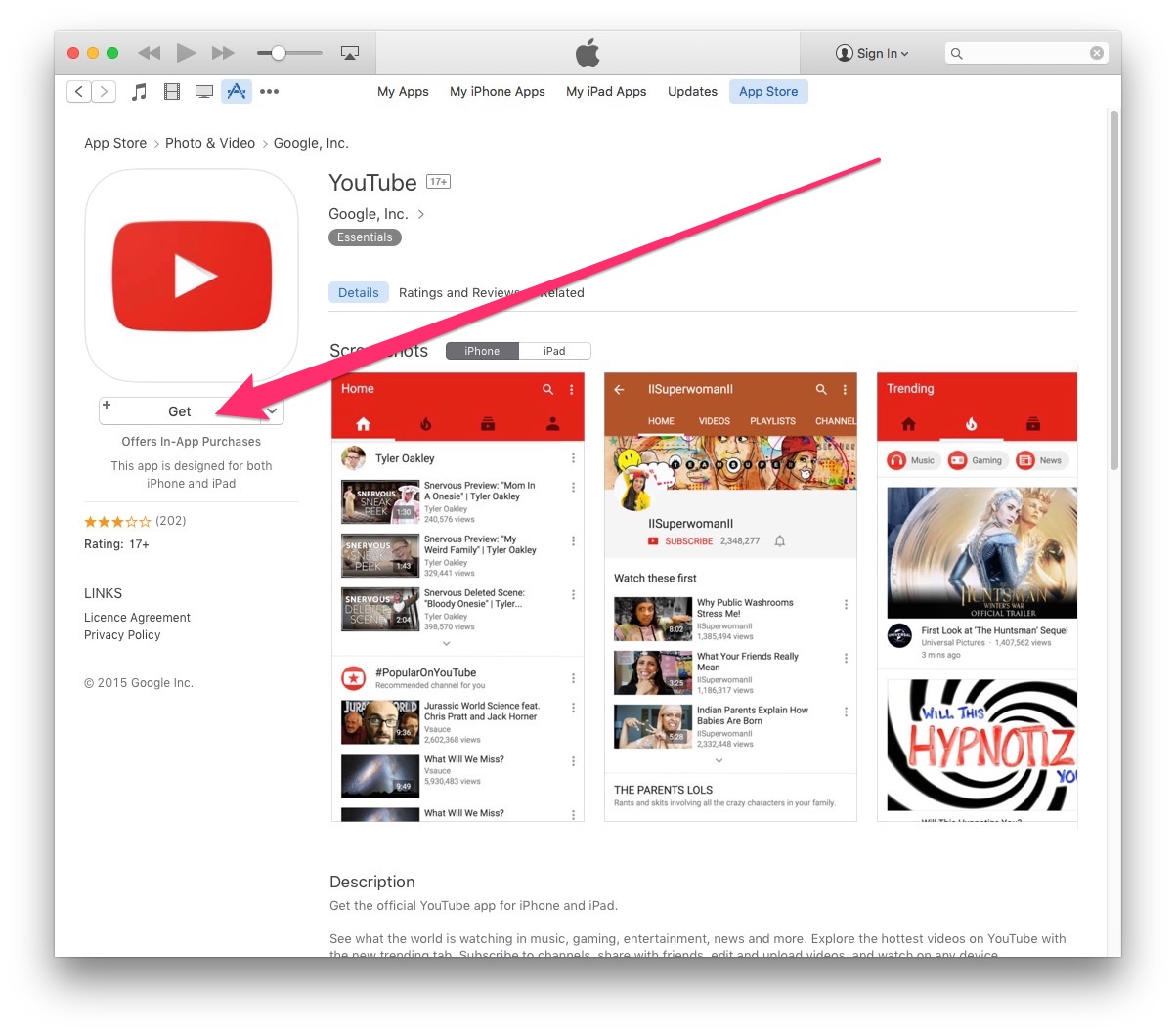
2. Next, go to any free app in the App Store and click ‘Get’. Below is YouTube for example:

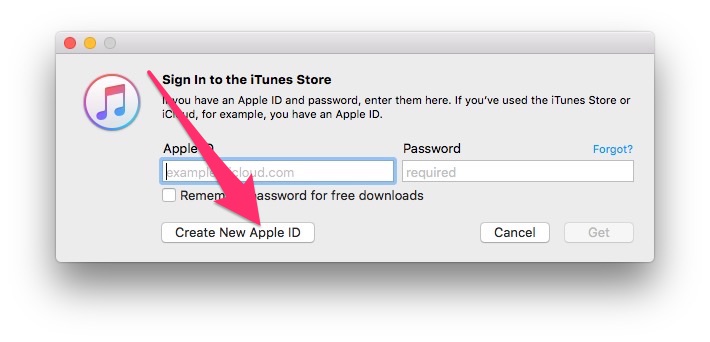
3. When the prompt appears to sign in to iTunes, click on Create New Apple ID. Agree to the terms and conditions, then fill out the necessary contact info and use a secondary email address.

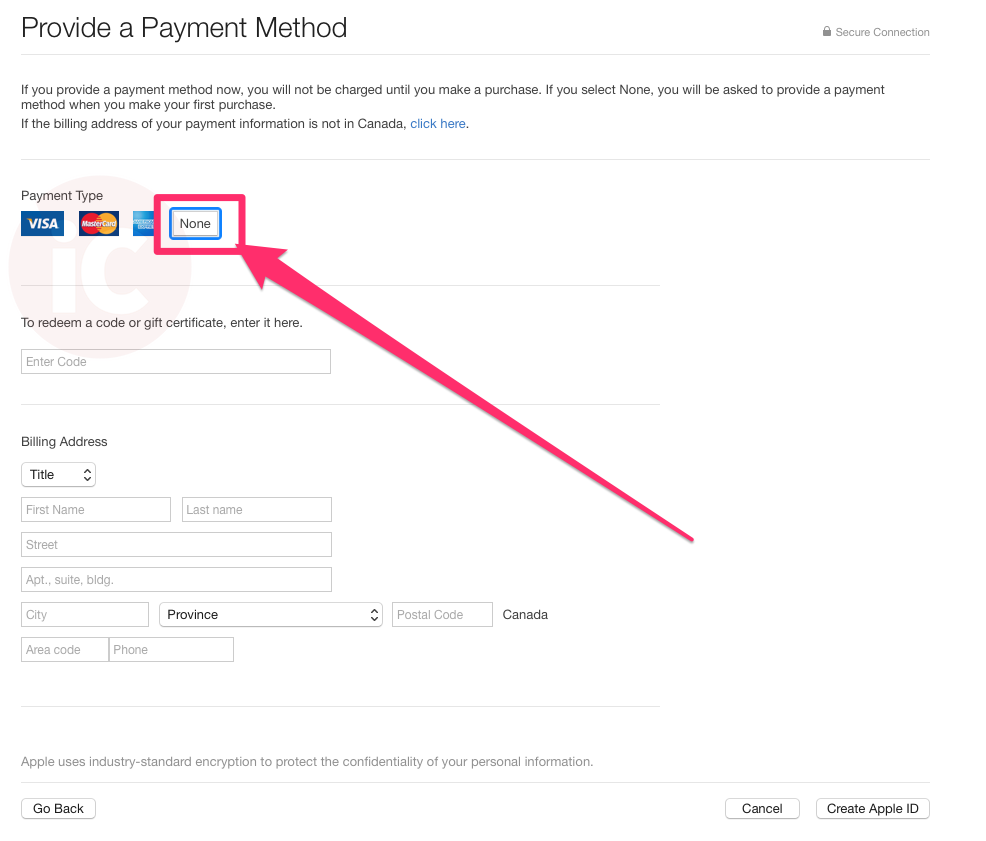
4. When the ‘Provide a Payment Method’ screen appears, click on ‘None’ and fill in an U.S. address (ignore the Canadian address field screenshot below, it should show US details):

5. You’ll be asked to check your email to verify your account and there will also be a link that launches iTunes. Sign in with your new account on your iPhone or iPad, then you can then start downloading U.S. apps not available in Canada.




I just tried this method and the None option for billing isn’t available. I hope I am doing something wrong. I don’t really want to go and buy a credit card from Shoppers. Any thoughts?
I did do it wrong. It’s late and apparently I don’t follow directions well at this time 😉 Works like a charm if you follow the instructions. Thanks Gary!
You’re welcome. Glad you followed the instructions–now I know they work! hehe 🙂
I tried this and I dont get the None option … any ideas … I am doing everything you listed and it is not working…
For the people that it not work, I think it’s because a free app was not selected to purchase. Follow these instructions- http://techwiredau.com/2008/09/grab-a-free-itunes-account-for-any-country/
It works but you have to select a free app first and then go thru the steps.
The instructions clearly say purchase a free app. Try again everyone 🙂
Is it possible to open the account from the iPhone?
Thanks!
Will the newly added Skype from the U.S. account be somehow removed or not updatable once I’m sign in again with my Canadian Account. So basically I hope my all my apps stay regardless on which account I use.
I installed US apps okay .But when you try to run the Pandora app it says not available in this country .
Tried it and it worked great. Downloaded Skype without a hitch. Great tip
Brilliant and simple. thanks for this.
I caught this post just as I was heading out the door to Shoppers Drug Mart to go get a MasterCard gift card as suggested in an earlier post. Thanks for saving me $25!! 😀
Worked well!
I installed Skype on my iPod Touch. It works very well. I placed Skype-to-Skype calls and Skype-out calls while connected on my WiFi network. This version of Skype doesn’t support video though.
For using Skype on iPod Touch you need a 2nd Generation iPod Touch with the new Apple Earphones with Remote and Mic (sold for $29 at the Apple Store).
Worked great – excellent workaround.
Here’s a new challenge for you – what is the best way for a Canadian to integrate an iPhone on Rogers, Skype on the iPhone, and GrandCentral to eliminate roaming charges while travelling in the US?
Thank you, thank you, thank you.
You’re welcome everybody! Be sure to share this with your friends!
This was very usefull!
I was very frustrated when I found out a certain very anticipated application was finally going to become available for the iphone, but not in Canada…
I followed the procedure you outlined above and it worked flawlessly!
Thank you very much, I’ll definitely read future articles!
RG50
Very usefull tutorial. Don’t want to give away my credit card details..and everything. Tried this today,just like u said.worked like a charm! cheers !
Thank you very much!!! You are a lifesaver!
It worked without problems!
Just one question. If I want to buy something, and I don’t a a US credit card,
I just use iTunes cards right???
Thank you!
Worked really well! Except skype crashed when I selected a user with “[]” in its name.
THanks!
Just did your setup – great work.
If you want to use a legit address, and/or you actually need an address in the US, I use Freeport Forwarding
1320 State Route 9
Champlain, NY 12919
Highly recommended and inexpensive service.
Fantastic. My itunes account in the US has been “locked” because of a voucher I bought on ebay. Still hoping to get my credit back, but in the meantime I opened another account – worked a dream, but you have to buy a “free App”. Does anyone know of a legitimate source of itunes vouchers on line. Happy to pay face value plus commission,just want to be sure they are not stolen! Thanks from UK
Sweet!!! Now I can finally get Episodes of How I met Your Mother strait form iTunes.. What a great day.. a new macbook, this.. life is.. complete? Nawww! Not til third generation iPhone comes out.. 😛 heh. 😉
thanks , it was quite easy..
I set up the account and now I am waiting for the email to arrive…. I still havent got anything….
Thank you sooooooooo much Ive been trying to get an accont since January and this helpped me a bunch! Thanks times a million
You’re welcome everyone! Glad this is working out for you! 😉
Any way to get pandora working???
after successful installation of the app, i tried to make call over the 3G network. Once i try to make a call, i get the following message:
Skype calleds over 3G networks are currently not allowed due to contractual restrictions. For more information see http://www.skype.com
Thanks so much for the tip, it worked like a charm!
i tried this & I’m not getting any email into my email account…plz help..i tried 2 times…
I’m having the same problem! No emails. Tried for over half an hour with three different emails. HELP!
same here – no email
Ok, about the no email thing…
I contacted itunes and they manually verified my account after I provided a us billing address (I have US friends, so I used their address.)
Took me a couple of hours to get email back to activate my account. Kindle installed fine. My problem is funding the Amazon account – the process of buying a vanilla master card, registering that, then sending a gift cert to yourself, subject to lots of “make sure you do this and that” isn’t sustainable. Is there an easier way?
Could I snail mail them a US draft?
could not get a validation email from apple with this method.
i looked around and found someone suggesting you join as a fan of us itunes on facebook, look around their page for a free offer and use the code they give instead of credit card or no payment.
this worked for me,
thanks to all for their helpful posts
good luck
could not get a validation email from apple with this method.
i looked around and found someone suggesting you join as a fan of us itunes on facebook, look around their page for a free offer and use the code they give instead of credit card or no payment.
this worked for me,
thanks to all for their helpful posts
good luck
did everything as described
when I click the email link to validate the screen just hangs – saying it is loading
the screen also says if itunes doesn't open then to open it from taskbar
if I open in taskbar and try to sign in – all it does is tell me my account is not validated?????????????
Worked like a charm. Thanks!!
This instruction is great — much better using a “free app” option than free coupons which are often invalid. — Now when your iPhone-Skype is working even in the Deep North — how can a Canadian (oops, a 'merican from Ottawa, Ohio) buy credit to use Skypeout on his iPhone?
What I've done is setup this $3/month plan in advance on my computer: https://www.iphoneincanada.ca/tips-tricks/how-to…
Once that is done you can call all you want, unlimited to Canada/USA! 🙂
Thanks! But the big question is what would happen to your ” 'merican” Skype-iPhone account if you try to buy Skypeout time in the US iTunes with a Canadian credit card? Is there a way around it?
me too, no email. anyone else got a solution to this?
Skype doesn't care where ur from. Setup an account on Skype from anywhere in the world and it will work on ur iphone/itouch in Canada.
tried this from Australia and followed directions – no 'none' column
Hi
I followed your instructions as best I knew how. My itunes screen not look like yours, I click the link that said change country. I did sign up as you suggested and now have an account with a US flag down at the bottom right side. I can't however find anything that looks like a kindle app. What am I missing. Thanks Barry
Just wondering if this still works. I already have an Amazon.com account. Do I have to create a new one with payment through the gift card under another name?
how to make call or open cradit on skype and what raet call to srilanka on qatqr riyal
Thanks — this worked just fine with no credit card, and I can use paypal if I DO decide to buy something!! Wonderful!!! I wonder when apple will realize that Free Trade is here? 🙂
Success! Thanks.
Success! Thanks.
THANK YOU THANK YOU THANK YOU!
this is brilliant.