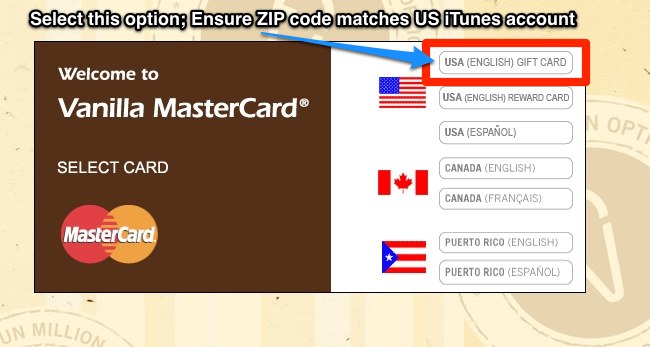
Update, May 21, 2011: This method still works, but you need to ensure the ZIP code registered to your Vanilla MasterCard matches the ZIP code in your iTunes account.
Previously this did not matter, but the card setup has changed.
How do to this? Visit this link here…then select USA (English), and enter your card details. Go to edit card info, and ensure the ZIP code entered is the same as your US iTunes account.
**This post is for educational purposes only.**
There are lots of perks living in Canada. Think of our freedoms, our multicultural society, maple syrup, back bacon, hockey, $2000 blog anniversary giveaways, and US iTunes accounts. Okay, so maybe the latter perk is not something we can easily acquire or enjoy. When it comes to creating a US iTunes store account in Canada, it does require more effort than usual.
So just how do we create US iTunes accounts in Canada? The easiest way is to get your American friends and family to buy you US iTunes gift cards or find them on eBay (or try shady iTunes gift card resellers). However that can be a pain in the butt if you don’t know anyone in the US or don’t want to get scammed on eBay. Well, today I’m going to show you how to create a US iTunes account in Canada. How? Easy. Buy Vanilla MasterCard gift cards from Shoppers Drug Mart!
How to Setup an US iTunes Account in Canada: Buy MasterCard Gift Cards from Shoppers Drug Mart
I was surprised really when I heard of this method. It’s actually pretty cool when you think about it because there are literally hundreds of Shoppers Drug Mart locations scattered across Canada. Here are the steps I took to create my US iTunes account here in Vancouver.
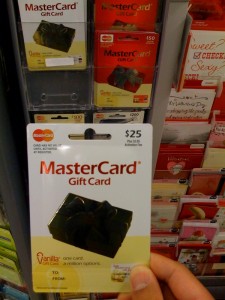
1. I went to my local store and quickly purchased a $25 MasterCard gift card (they also add on $3.95 activation fee, which is a small price to pay for convenience). Cards come in $25/$50/$100 denominations. Look for this card:

**EDIT** You will need to register a US ADDRESS for your Vanilla MasterCard for this to work. Do this online. Look at the back of the Vanilla MasterCard and visit the website to ACTIVATE/REGISTER!!!
—- read above before continuing —-
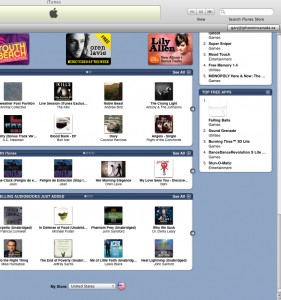
2. I opened iTunes on my computer. I clicked on the iTunes Store and then scrolled to the bottom. From there, under “My Store” I selected “United States” from the drop down menu.

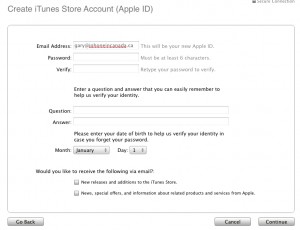
3. On the upper right, click on “Sign In”. Click on “Create New Account”.
4. **did you register your Vanilla MasterCard yet? Do this online before continuing.** Ensure ZIP code entered matches your US iTunes Account.
Agree to all the terms, etc. For your address, enter in the details of a “family member” or “friend” that lives in the US. Once could use a “friend’s” address in Oregon because they have no tax there.

5. On the next screen where it asks for payment details, select MasterCard. Enter in your gift card details (number, expiry, security code).
6. Once successful, you will see a screen explaining that your US account is now setup!
7. If you need to refill your account in the future, just buy another Vanilla MasterCard gift card, login to your iTunes account info, and change the payment info with the new card details.
Footnotes: I am able to switch easily between my Canadian and US iTunes account seamlessly. I can sync apps redeemed from the US iTunes store without a problem, along with US iTunes content.
What’s the Big Deal with a US iTunes Account?
Why get a US iTunes account? Well, for starters you gain access to a vast library of TV shows, movies, and music that is not available in iTunes in Canada. You can also rent movies and watch them on your Apple TV. More important, if you win a contest and get a promo code for an iPhone app, the only way to redeem them is through a US iTunes account. Certain iPhone apps are only available to the US as well (Pandora, Loopt; although Pandora doesn’t work in Canada!).
I’m sure this method of signing up for a US iTunes account will work with other pre-paid credit card gift cards, but so far all I know is the MasterCard gift card works like a charm. Also, this method should work for people living in other countries trying to get access to a US iTunes account.
So if you’ve been trying to setup a US iTunes account in Canada, stop procrastinating because a viable solution is finally here! Let me know how this works out for you in the comments!
*edit* Thanks to @eplatero for the heads up on this. Apparently this method also works for the Amazon MP3 store and streaming Netflix.



Do you ever have a problem downloading Apps? It worked fine for a few months. Now, I log into the app store with my US itunes account, but I can’t download or upgrade any of my apps. I keep getting a ‘Unable to purchase at this time’ or an “unknown error 5002” or “Your account is only valid for purchases in the US Itunes store”.
I have both a 2G and 3G. only the 3G is a US account. I make sure to log in and out everytime i sync. (though the apps from both remain in the applications). Would this be the issue?
I can’t seem to fix it. I’ve tried restoring, removing the jailbreak etc. I can’t upgrade any of my apps or get new ones.
Not at the moment. Everything seems to work so far. That is a pretty strange problem you have…try a Google search! 😉
I’m having a similar problem myself. I actually do live in the US, but since my first purchase this month, it has rejected my Vanilla Gift Card and will not let me download any more apps or update the ones that I have.
Can you reload the card instead of having to buy another one?
The cards themselves say they cannot be reloaded.
Question: if you have both US and Cdn accounts, can the content from BOTH co-exist your iPhone at the same time? i.e. apps as well as movies/tv shows? I thought the content was tied to the particular account. for example, when in iTunes itself I believe you have to be logged into your US account to view the US shows. how about on the phone itself?
Did the $25 Canadian work out to a $25 credit at the American Store? Anyone been able to find these in Winnipeg-or am I the only one living in this God Forsaken city:)
I’m not sure, but I think they do a conversion. You can check the MasterCard balance online pretty easily though!
Yes you can have CDN and US content on your iPhone at the same time.
This also works with the VISA gift cards that are sold at A&P.
Yes you can have content from multiple iTunes stores/countries exist on your iPhone/iPod. Just sync it up. The only caveat is that the store your are currently signed into is the store on your iPhone/iPod. Want to switch stores? switch in iTunes and resync your iPhone/iPod. There is no way to change stores directly on your iPhone/iPod (that I am aware of.)
thx to the replies re: Cdn/US content coexisting. this is great! it’s been annoying to miss out on all those US-only promo codes for apps going around elsewhere. not anymore…
Whoa
This is great info
I would love to be able to access US tv shows available on iTunes.com
Thanks
ok, need some help. Have both a Cdn and a US iTunes account. downloaded some free episodes of US TV show as a test into iTunes. tried to sync the new show to my iPhone and get an error saying that content is not authorized on that device. doesn’t matter if I’m logged in to Cdn or US account in iTunes itself – get same error. What’s the trick to make this work?
accessing tv shows…are these free or do we have to pay?
thanks.
Thanks for the how to!
Cheers
This is a wonderful post. I am going to try it as soon as I can get to a shoppers…”optimum” card anyone!
Thanks and keep up the great work!
to those of you with content from both stores working on your iPhone – is your phone jailbroken?
Yes…it should work fine with both stock and JB iPhones.
hmmm… won’t work for me (stock). US content complains at time of sync to iPhone and won’t load. but in iTunes, content from either plays fine on the Mac.
Tried it today, works flawlessly ,
I have a jailbroken phone
Love it!!!
Says my credit card info does dot match its bank records. Using VISA Gift Card
Give it a shot with the Vanilla MasterCard like I mentioned above. You won’t have any problems!
just a thought-will it warn you when you don’t have enough “credit” to make a purchase? The thing that I like about the gift cards is you know your balance immediately.
can anyone with a non-JB iPhone confirm you can load and play content from both stores on your phone? thx
Hey there to everyone. So to be able to get content from both stores on to your phone you need to make sure that the phone is authorized on both accounts. Also to set up an account for any country all you need to do is go to the appstore and get a free app. Then create an account from there. Then when the payment options come up just select none and go from there.
aha! thanks
With the credit you have ($25) can you buy any apps??
please help i don’t want to waste $25.
With the credit you have can you buy any apps
Hi, I stumbled upon your website following some recent trouble that I’ve had with iTunes.
I live in the US myself, but do not have access to a credit card, thus I was able to use a Vanilla Visa Gift Card to create my account. I made the account nearly a year or two ago and have been satisfied until just recently.
I found out that the Vanilla Gift Cards had a new policy since last year which would deduct approximately $2.50 per month after one year from the date of the card’s purchase. I was shocked to learn that I had lost nearly $25 from my $100 gift card from their so called “maintenance fees”.
Since I had only $4 left, I figured that I’d finally use some of it to purchase some apps for my iPod touch. I bought my first application Enigmo; the transaction went through perfectly fine on my computer. I then bought some racing game, this time through the iTunes store on the iPod. It downloaded and I’m able to play it.
However, the next time when I was checking for updates on the various free apps that I had downloaded through iTunes, I was presented with a billing error. Apparently, my last purchase didn’t go through. I checked my account balance and I had enough money. I wasn’t sure what was going on.
I checked my billing history and now it asks me for my payment method. For some reason, it does not accept my gift card anymore. I’ve retyped all of the information on it, but it keeps stating that I’ve entered an invalid Security code. There’s no way that it can be wrong. I haven’t changed anything about it, but the store keeps rejecting it.
I’m pulling out my hair over this since I can’t even download the free song/video of the week or update any of the apps.
Is anyone else having a problem with this? It’s almost the next week of the month where it is going to deduct another $2.50 and then I won’t have any more money on it.
Had the same problem in the CDN store…but not with a gift card…my regular credit card. It was declined by my card company due to unrelated activity they thought was fraud. I had to wait till the card was unblocked. I ended up having to switch to another credit card before it would work again as I kept getting the same exact message. Once it went on the new card I could switch back to the old card…its some wierd glitch they have with their system around certain times when the authorization for credit cards isn’t working or not active…its a rare event they told me at iTunes.
This is the best tip ever. Just bought the card tonight & am downloading TV shows that we can’t get up here. Gonna enjoy it while I can. $25 CDN, minus service/activation charges is not going to go very far 🙂
Thanks again for posting this.
Thank goodness here in Alberta there is a new law that basically says: “All gift cards must always retain their full value for the entire life of the card”. So it’s illegal for companies to reduce a card’s price by $2.50/month etc.
can you use the credit card to purchase aps? please someone answer this.
thanks.
Justin,
Yes you use the Mastercard Gift card to purchase Apps. It’ll change the card each time you purchase one, and if you use up the balance, your card will be declined.
Hope this helps
you can also use a usa itunes gift card or paypal or open a ‘free apps’ account. free instructions here: http://usitunes.blogspot.com. you can use the info to access other countries’ itunes stores as well.
I’m worried about the legal aspect.
I’ve set up the account, it works perfect (just downloaded Loopt for free), but it does say on the agreement “You agree not to purchase or try to purchase from outside the US”.
Eventually, the payment comes from Mastercard, which is based in the US, but the download is from at least a Canadian IP…
What’s the worse that can happen? if it’s just that all of the sudden, I find my card unworthy, I can live with that, but still, what do I actually risk?
BTW, here in Quebec, Shoppers Drug Mart is Pharmaprix.
And there’s this URL in case you don’t know anyone with an address in the US:
http://www.fakenamegenerator.com/index.php?gen=male&n=us&c=us
Please answer,
Some paranoid fella from Montreal 😉
I’m worried about the legal aspect of it all.
I mean, the terms say “you agree not to purchase or try to purchase from outside the US”.
If all I risk is that all of the sudden, the account stops working, that’s OK, I can live with that. But I wouldn’t wanna risk any more problem than that.
So do you think it’s safe?
Some paranoid fella from Montreal :p
technically, if you’re downloading ‘free’ apps, you’re not ‘purchasing’ from outside the US. if itunes chose to, they would just disable your access to the american account. there’s no legal action they would bother with. you should only get free apps if you’re worried. or get someone in the US to buy a gift certificate for you. then the purchases are made legitimately with a US card on the US site (for apps, tv, music, etc). my foreign customers have been doing this for years to access US itunes with no problems.
have you noticed? if you have two different accounts active/authorized in iTunes (i.e you have apps loaded from more than 1 account), iTunes doesn’t properly show you updates are available? even if you click on the “Check for Updates” button, you’ll usually see no update available, even if you know there should be some. the AppStore update list on the iPhone itself also behaves oddly, sometimes shows updates and later same updates don’t show. if you delete apps from the 2nd account and check for updates, suddenly a bunch of updates show up!
I have a stock iPhone (non-jailbroken) and have been downloading TV shows from the U.S. iTunes store with an american account as described above. There’s been no problems. I have tons of songs from my Canadian account on my phone and there’s no conflicts or problems.
A point to remember is that your iPhone’s app store is set to the last iTunes store account you were logged into when the iPhone was plugged in. You won’t get updates for your canadian-purchased apps until you plug the iPhone into your computer and log onto your iTunes Canadian account. Same goes for american purchased apps.
I noticed this too. Thanks for the details.
Ok so i have got all my apps on my iphone from the canada store…but if i switch to the us store redeem a few codes and then sync will my canadian apps be gone?
Nope they’ll still be there.
So does this exchange the CDN to USD?
Yes, CDN will be changed to USD.
I attempted to do as you described, however they only ask for the address info when you reach the credit card info page. when i put a friends address in the USA it says that it does not match my cc info. I was wondering if you cold help me. IS there a way to enter the payment info without entering an address? thnks
alex
Has anyone from Canada set up a US account this way and downloaded US TV shows on their AppleTV? Need confirmation this works.
Can anyone confirm if I can purchase US tv shows and play them on my apple tv? Thanks
I did this today and its telling me that the security code on the card isn’t valid.
I tried this technique about three weeks ago and it worked great – until …
A few days ago – when I kept getting messages that there was a problem with my billing info. On my account page it says my CC security number is incorrect (it’s not). I hope there’s an easy fix to this – I was loving watching Galactica in HD.
Hi, I live in the United States and I was wondering if this would work in reverse. If here in the USA i find the Vanilla Master Gift Card (or any other Pre-Paid Gift Card) could i make a Canadian iTunes Account with it? Because you guys have a lot of music, and shows (like on CTV) that we don’t have here and I wanted to know if their is anyway possible. Because I would like to have a US and Canada iTunes account. I would try anything to get a Canadian iTunes account. Thank you.
all I’m interested is the Kindle amazon app. Once that gets going, and I buy books through Amazon, does it use the Shoppers Master Card, or can I use my normal card? Ie: I’m not actually buying an app through the iPhone?
Thanks for this (and related threads) this is bugging me!
The Kindle app, unless it’s paid for and uses in-app purchasing, will, like any other app, not have access to your iTunes account. Amazon.com is completely separate from iTunes, so you should be okay there. I would imagine that Amazon would also expect a US address for Kindle book orders, but I could be wrong.
OMG!!! I'm An American teenager trying to access the Canadian iTunes store and I Need your help!!!! PLEASE!!! I sooooo badly want to get certain things that are available in the Canadian store like the Girlicious album which has been out for like a year now and that Danny Fernandes “Intro” album!!!! I don't know where to get a iTunes Gift Card from Canada. Please, someone help me I sooo badly want to access your iTunes Store. You guys have NO IDEA what its like trying to Access the Canadian iTunes Store when YOU'RE IN AMERICA!!!! You guys can easily get gift cards from eBay, I've searched eBay & The Net for a Canadian iTunes Gift Card and it's SOOOOO HARD!!!! I only got one result from eBay but it's ending in TWO DAYS!!!!! plus I don't have much money. Is there a way to access the Canadian iTunes store while you're in America…you know THE OTHER WAY AROUND 'CAUSE I love certain things that are just not available in the American iTunes Store. I'm trying to get a Canadian iTunes Account while living in Philadelphia along with a Japanese Account.
OMG!!! I'm An American teenager trying to access the Canadian iTunes store and I Need your help!!!! PLEASE!!! I sooooo badly want to get certain things that are available in the Canadian store like the Girlicious album which has been out for like a year now and that Danny Fernandes “Intro” album!!!! I don't know where to get a iTunes Gift Card from Canada. Please, someone help me I sooo badly want to access your iTunes Store. You guys have NO IDEA what its like trying to Access the Canadian iTunes Store when YOU'RE IN AMERICA!!!! You guys can easily get gift cards from eBay, I've searched eBay & The Net for a Canadian iTunes Gift Card and it's SOOOOO HARD!!!! I only got one result from eBay but it's ending in TWO DAYS FROM NOW!!!!!Is there a way to access the Canadian iTunes store while you're in America…you know THE OTHER WAY AROUND 'CAUSE I love certain things that are just not available in the American iTunes Store. I'm trying to get a Canadian iTunes Account while living in Philadelphia along with a Japanese Account. Do you think that any Gift cards will work for the Canadian iTunes Store??? I know it sounds like a stupid question but I really want to access the Canadian iTunes Store. You guys just have stuff that the American iTunes Store just don't have.
I just tried the gift certificate trick for setting up 1-Click Kindle purchases, and it works! The process is described elsewhere in the comments, but here's what I did:
1) Created a new Amazon.com account using a Gmail e-mail address.
2) Added a “Vanilla” Mastercard gift card that I bought at Shopper's Drug Mart. I entered a US address as the billing address. Like others, I found that I couldn't buy Kindle books using this credit card – I got the “geographic area restrictions yada yada” message when I tried.
3) Logged out of Amazon and logged back in with my normal (Canadian) e-mail address. Purchased an Amazon gift certificate with my (Canadian) credit card and e-mailed it to the Gmail e-mail address. Contrary to what others found, the gift certificate arrived in my Gmail account within minutes.
4) Logged out of Amazon and logged in with my Gmail (US) e-mail address. Added the gift certificate to my account.
5) Deleted the Mastercard credit card. My account now showed no credit card, but my US billing address was still there.
6) Went to the Kindle area and bought books using the normal 1-Click button. Yay, Amazon finally took my money!
If this works, and I haven't tried it yet… you're a freakin' LIFESAVER. I live on a border town (Sault Ste. Marie Ontario, and I go across the bridge almost weekly to Sault Ste. Marie, MI) and I get DVDs over there all the time. Sometimes they come with free iTunes downloads and I've never been able to access them until now. All hail the internet. I recently read a Rolling Stone article on how “Google” has become a verb and we don't try to fix problems ourselves anymore, we just look them up online. But you know what? THIS IS WHY. Awesome. Awesome, awesome. I'll update if it works. 🙂 I apologize for my ridiculous verbosity.
UPDATE: It worked like an incredibly charming charm!! All those US content DVDs of mine have been unlocked. I'm not going to lift my hands to the sky and shout “Praise Message Boards!!” but I want to.
AWWWWWESOME.
Glad it worked out for you! It's okay to praise the internet!! CHEERs!
Thank you for this! I am going to try this once I go to Shopper's and get myself a card. From the comments, I can tell that this is highly successful. I'm a Canadian living in Canada, and there's a TV show I'd love to purchase, but it's only available in the American store as far as I know.
Thank you again! I'm sure this will work magically. 🙂
I'm a little apprehensive about the whole address thing. I live in Canada and don't know anyone that lives in the US whose address I could use. Where do I find a US address anyway?
thanks! 🙂
great method btw, I see no reason why it shouldn't work.
Google one.
That's what I did!
So I could just go to google maps and find a location of a store (say best buy or something) and use that? ANY address will work as long as it's US? I'm not trying to come off as stupid it's just the idea of using someones home (someone that I don't know) as an address seems almost creepy to me, lol.