One of the main reasons people jailbreak their iPhones, is to get the ability to customize the iPhone OS with different themes that can be downloaded from Cydia or, if you have the capability, create yourself.
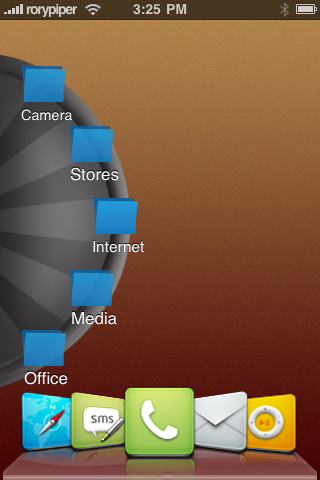
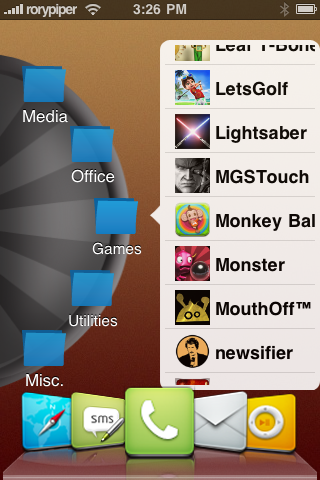
A “revolution” – ary new theme that was released a few weeks ago, by Justin Williams, in the Cydia Store, under the Big Boss repo, is PogoPlank. Basically, PogoPlank gives you the ability to categorize all your apps and games and have them accessible, via folders. The theme replaces all your pages of icons, with one screen, that has a “lazy susan” of folders. You just spin the wheel to get to the folder you need, tap the folder, and then you get a scrollable list of all the apps in that folder.
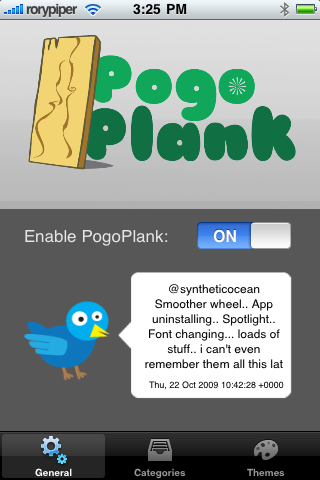
Unlike, “Categories”, PogoPlank doesn’t physically move your apps, but instead creates virtual folders. This makes it much easier to set up. In fact, it simply has an on/off switch, if you want to switch back to your normal home screen and pages. With, “Categories”, you would have to move all of your apps out of the folders before disabling or deleting it. Also, unlike other themes, there is no complicated process to set it up. You don’t need to add blank icons, or split the screen, or anything like that. Simply turn it on and re-spring.
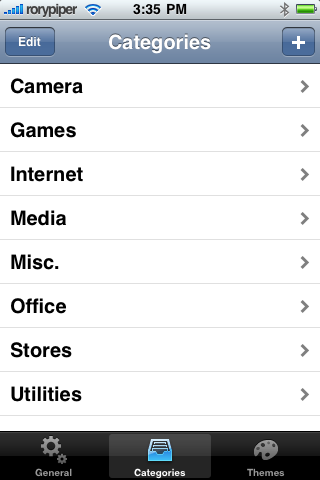
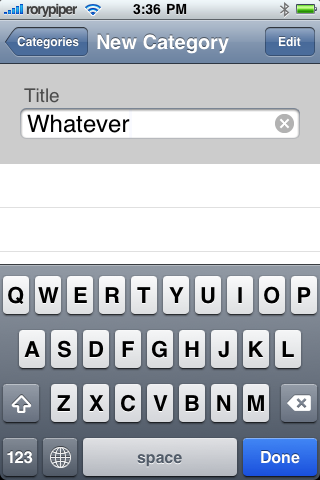
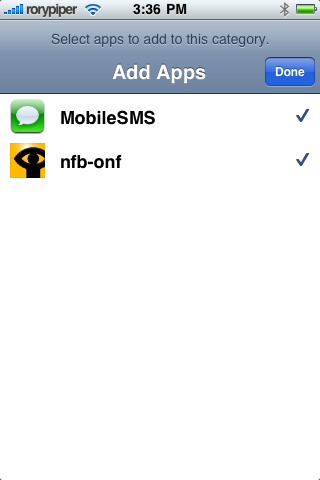
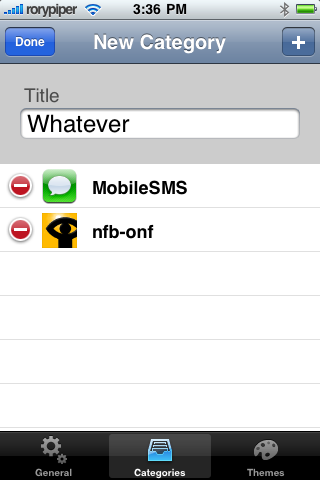
Setting up your folders is easy, too. Just go to the settings page, within PogoPlank. Tap the Categories tab in the middle, on the bottom. You can use the built in folders, or create your own. To create your own, simply tap the “+” on the top right, type the name of the new folder, and tap done. Then tap the “Edit” button at the tap right, and tap the “+”. Now, just select all the apps you would like in that folder. Tap done and exit to your home screen. Your iPhone will re-spring and you will see your new folder on the wheel.
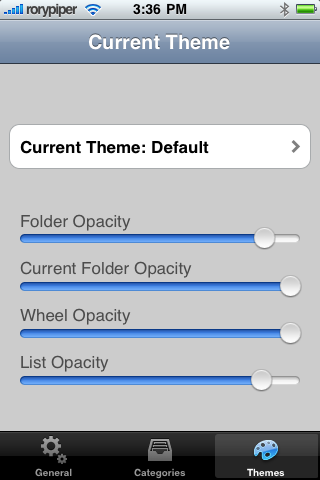
This is much more than a “theme”, as it completely replaces your UI, and is a nice change from looking at the giant sea of icons on your iPhone. Â It is also themeable with Winterboard, and there are already quite a few different PogoPlank Themes popping up in Cydia.You can adjust the appearence of PogoPlank, andapply the themes right in the PogoPlank app.
Here’s a video I made, of PogoPlank in action:
PogoPlank is $1.99 in the Cydia Store. If you have a ton of apps and games on your iPhone, and are looking for a new way to use your iPhone, this might be what you’re looking for.
Thanks for reading this week. You can read more of my stuff over at Green Candy, and you can follow me on Twitter: @rorypiper.
Want to see more of our stories on Google?
P.S. Want to keep this site truly independent? Support us by buying us a beer, treating us to a coffee, or shopping through Amazon here. Links in this post are affiliate links, so we earn a tiny commission at no charge to you. Thanks for supporting independent Canadian media!
Subscribe
8 Comments
Oldest
NewestMost Voted
elducker
16 years ago
Great concept, I've spent the past few days tinkering with it. In my opinion it needs further refinement if it's going to live up to iPhone snuff (the scrolling action of the wheel leaves a lot to be desired). I use BossPaper with about 250 revolving wallpapers and I'd love to see a feature whereby you could have the wheel disappear completely into the background until needed (double tap to reveal/send into background). Huge potential, just what many customization enthusiasts want!
Canada kicks off its 2026 FIFA World Cup campaign on Friday against Bosnia-Herzegovina at BMO Field in Toronto, and the stakes couldn't be higher for the host nation. This is just Canada's third World Cup appearance ever, following 1986 and 2022, and the first time the team has made it to back-to-back tournaments. Granted, they...
Getting in on a big IPO at the offering price used to be something only big banks and big time investors could do. Toronto-based Wealthsimple wants to flip that, and it just opened the door for everyday Canadians to grab a piece of what could be the largest IPO ever. Last month, Wealthsimple rolled out...
The Formula 1 2026 Canadian Grand Prix is finally here. As the racing world descends on the legendary Circuit Gilles-Villeneuve in Montréal, the anticipation is building for one of the most exciting weekends on the calendar. Whether you are following the championship leaders or cheering on local favourite Lance Stroll, here is the best way...




Great concept, I've spent the past few days tinkering with it. In my
opinion it needs further refinement if it's going to live up to iPhone
snuff (the scrolling action of the wheel leaves a lot to be desired).
I use BossPaper with about 250 revolving wallpapers and I'd love to
see a feature whereby you could have the wheel disappear completely
into the background until needed (double tap to reveal/send into
background).
Huge potential, just what many customization enthusiasts want!
great idea, but I wouldn't pay money for it. It looks silly.
fail.
what dockflow theme is used in the example?
The dock flow theme is “Tenuis Flow”. I found it under the iSpazio repo. There's a complete theme to go with it.
Thanks!
I've got PogoPlank running with this theme:
http://macthemes2.net/forum/viewtopic.php?id=16…
Really looks great. I'm also using the Tenuis Flow dockflow with a glassy dock base.
HA! Awesome.
Thanks!
I've got PogoPlank running with this theme:
http://macthemes2.net/forum/viewtopic.php?id=16…
Really looks great. I'm also using the Tenuis Flow dockflow with a glassy dock base.
HA! Awesome.