
Ontario Senior Loses $900,000 to a Terrifying AI Crypto Scam
An 86-year-old Ontario woman lost $900,000 to a fraudulent cryptocurrency platform after trusting a sophisticated Facebook AI deepfake video.
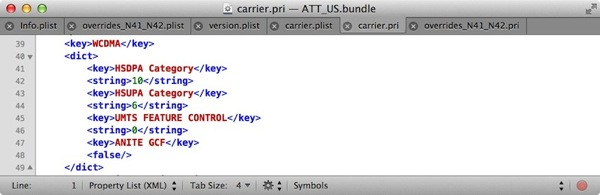
Remember those allegations US carriers were somehow throttling data speeds (the original source post has been since removed) on iPhones and iPads? Well, those allegations are completely false, as Brian Klug from AnandTech explains in technical detail why:
At a high level, some of this seemed plausible at first, as this wouldn’t be the first time that a handset maker throttled devices via some on-device setting at bequest of a network operator. If you’ve been with us long enough you’ll probably remember the case of the HTC Inspire 4G and Atrix 4G, two handsets which AT&T disabled HSUPA on, and later re-enabled with an update. Later there was the AT&T Nexus S which also had its HSDPA and HSUPA categories limited via build.prop.
Thankfully this is not the case currently with any iOS devices.
There’s no arbitrary capping of UE Category (User Equipment speed category), throttling on-device, or anything else that would prevent the device from attaching and taking full advantage of whatever the network wants to handshake with. If you’re going to read anything, just take that away with you, as the full explanation gets technical fast. If you’re willing, however, let’s walk through it.
You can check out the post in detail here, if you can follow along. Some Canadian users who managed to install the carrier profiles over at iTweakOS say after doing so, their data speeds did in fact increase, as noted in the comments. Whether or not this is related in Canada remains to be seen, as AnandTech’s report is related to US carrier bundles.
Want to see more of our stories on Google?

P.S. Want to keep this site truly independent? Support us by buying us a beer, treating us to a coffee, or shopping through Amazon here. Links in this post are affiliate links, so we earn a tiny commission at no charge to you. Thanks for supporting independent Canadian media!


I did the fido hack, and I saw a little difference. Uploads are the same about 5mb/s. Down did go up from 10 to 20mb/s, but on average a jump from 10 to 14mb/s. I am just hoping that by doing the hack I will pick up the closet towers and not just the preferred ones.
Where did you find the Fido hack if you don’t mind me asking. :- )
Ok have been getting speeds over 25mb/s, still not as fast as my cable (50mb/s) but really good, upload the same. I know LTE has a 40mb/s top end, it would be nice to get close to that, but for now I am not as close to a tower as I could be, 3 bars.
http://m.itweakios.com/site/mobile?dm_path=%2Fapps%2Fblog%2Fshow%2F26581973-fido-hacked-carrier-update-canada-&fw_sig_access_token=3bdb395ad788db78a5f55591ff18f545939f82fb&fw_sig_permission_level=0&fw_sig_permissions=none&fw_sig_time=1370602001851&fw_sig_is_admin=0&fw_sig_site=110563647&fw_sig_tier=1&fw_sig_premium=1&fw_sig=b0361f2e00b2aa2b787d6b81b1a13e89&fw_sig_api_key=522b0eedffc137c934fc7268582d53a1&fw_sig_social=1&fw_sig_session_key=79634ca10de2f26e2fc94a00b736a63bdc6833b953cb3095928dc120b8601991-110563647&fw_sig_url=http://www.itweakios.com/&fb_sig_network=fw#2230
Thanks for the link!
It’s not US carrier specific. If you read through the Anandtech post you can see that throttling would not be on the device side, but rather on the carrier side.
yeah but, its nice to have the closet tower picked rather than what it calls the best tower. Most cases not a problem, but when you are on one side of a building and it tries to connect to a tower on the other side, you have a weak signal, instead of the tower in your line of sight.