
Ontario Senior Loses $900,000 to a Terrifying AI Crypto Scam
An 86-year-old Ontario woman lost $900,000 to a fraudulent cryptocurrency platform after trusting a sophisticated Facebook AI deepfake video.
Apple software engineer Kelly Jacklin has revealed (via TUAW) how he helped create the infamous ‘tri-tone’ alert we are all too familiar with on our iPhone. The sound was originally created as a tone to notify users disc burns had been completed (remember those days?) for SoundJam (essentially a Mac version of WinAmp at the time), which would eventually become iTunes after Apple purchased the company.
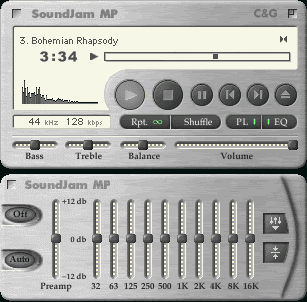
Jacklin reveals he tinkered to create the tone and settling on 158-marimba.aiff as his pick for his friend. To his surprise, this tone eventually made its way to the iPhone, almost ten years later:
After listening to them all one final time, I liked the marimba sounds the best, and preferred the ascending sounds. I settled on 158-marimba.aiff as my favourite.
I then converted them to .snd (SND, a Mac sound file format using ‘snd ‘ resources) files, and shipped them off to Jeff. I told him my recommendation, and after listening to some, he agreed, so he thanked me, and said he would be using it. Next time I got a drop of the app from him, it was using that sound for the disc burn completion sound. I thought that was pretty cool. All in all, I probably spent a couple hours on it, time I was more than happy to give to a friend who was developing a music app.
[…]
Fast forward quite a few years, and the iPhone comes out. I was not involved in development of the iPhone, nor iOS, although I was unsuccessfully courted by the iPod software guy (Tony Fadell) right when I was considering the move to work on audio software (I went to the Pro Apps group at Apple instead). So imagine my surprise when the iPhone ships, and the default text message tone is… “158-marimba”, now going by the clever (and not actually accurate, from a music theory perspective) name “Tri-Tone”. Time goes by, and this sound becomes iconic, showing up in TV shows and movies, and becoming international short-hand for “you have a text message”…
Wow! Who’d have thought?
Jacklin also includes a sample of other tones that could have been selected–listen to them here. What’s your default alert for message on your iPhone?
Want to see more of our stories on Google?

P.S. Want to keep this site truly independent? Support us by buying us a beer, treating us to a coffee, or shopping through Amazon here. Links in this post are affiliate links, so we earn a tiny commission at no charge to you. Thanks for supporting independent Canadian media!


I use the default. Interesting to know where all this comes from.
I had a hard time remember the sound, I always have my phone on vibrate, I do like how you can customize that now, so I can tell the difference between a text and email. But the mail message I think is the most I hear, even in the office.
interesting. btw – dead link at end of article
Try the link again it still works over here.
still dead here
Link is not working Gary.
The file raw-das.mp3 is missing inside the folder
“What’s your default alert for message on your iPhone?” Umm. Tri-Tone is default for everyone, isn’t it? I changed mine to telegraph because everyone leaves their tone default. Telegraph seems appropriate for a text, no?