A harmless glitch in iOS, discovered first by Reddit user vista980622 (via Tech Insider) makes your iPhone feel like it’s working much faster than usual. The glitch basically disables animation effects you see when opening and closing your apps.
Though you can manually limit the iPhone’s animations by switching on ‘Reduce Motion’ in Accessibility settings, that does not make any noticeable difference to your iPhone’s speed.
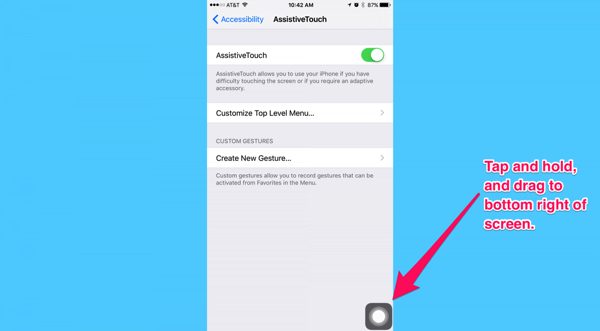
The glitch, on the other hand, completely removes all those iPhone animations which otherwise slow down the interactions between you and your device. Thus, the overall feel is that your iPhone is running a lot faster than it usually does with all those animations. Here’s how you can activate the glitch:
- Turn on AssistiveTouch.
- Go to home screen. Drag the white AssistiveTouch dot to bottom right corner.
- Pull down spotlight.
- Pull back up to dismiss Spotlight.
- Repeat step 3-4 for 20 times (exact number of times varies a little from device to device).
- Enjoy a system with no SpringBoard animation.
Check out the video below (via 9to5Mac) for a better idea:




Man, some people spend way too much time playing with their phones!!!
Haha seriously. Always puzzled how someone figures this stuff out. Pretty neat though!
“Man, some people spend way too much time playing with their phones!!!” – Said no one, ever.
The difference in how this speeds up the iPhone experience is definitely worth applying on any capable device. Your comment is literally stated by no one since everyone wants a faster phone!
take a breathe, inhale slowly, exhale slowly.. Now..
I was referring to the person who discovered this glitch being a very weird sequence of action to get the glitch to work..
Out of everyone’s comments (some about how they got it to work and others having problems) your comment is the most useless. I think you have the most time on your hands to take the time and actually write a comment that neither improves or assists anyone, in any way!
oh wow. you are back again.. very amusing..
I’m hoping now that you saved 0.3 seconds of your iPhone animation you now have time to find a cure for cancer or solve the Ontario debt problem?
talking about useless comments! that’s rich!!
Eat a dick
Hahahaha
Put a whole cock in your mouth, I’m sure you really want that!
this is awesome! I’ve been wanting this for so long since I always have to wait for the animation to finish (the interface should be faster than the user). My question is, how do you remove this or are you stuck with it forever?
Just reboot and it’s gone!
awesome thanks!
Haven’t managed it on my 5S
Can’t get it working on my 6S Plus either
It’s bizarre. It takes like 20 or so tries. Just keep activating and dismissing spotlight until you catch it at just the right moment. I hope apple takes note that the eye candy animations are artificially slowing user navigation of the phone. Even if it’s just a bit, it’s something.
Spelling police: “makes your iPhone fell like”
Cool. Works great!
Works on my 6. For those who didn’t think it was working for them, make sure you’re waiting to close spotlight until the assistive touch button moves above the keyboard, and also note that the animation of the keyboard going back down doesn’t stop.. meaning if you’re waiting for some indication that it’s worked from what you’re currently doing, it’s not going to give you one. The only way to see if it’s worked is to open an app.
It works on my ipad mini 4 too. Wow!
Doesn’t get rid of all animations, but it is definitely a help.
This is weird. After I did this my Hey Siri is working without being connected to power.
I just tried with my wife’s but hers doesn’t work.
We both have an iPhone 6.
To the people who can’t get it to work… Took me a while to get it working too. What I did was turned “reduced motion” on. Then to close spotlight, I just double tapped instead of 1 tap.
So…
Turn “reduced motion” to on
Turn on “assistive touch”
Pull the icon down to the bottom right
Pull down “Search”
“Double click” to cancel the search
REPEAT until you notice a speed increase
This glitch definitely speeds things up to the point that I have to get used to the jump in speed. Good luck to people trying to get it to work and haven’t yet. Keep trying, it’s worth it.
i tried this an it worked but I ran into a bug where i can’t move apps into other folders. does anyone else have that problem?
This works like a charm even on 9.3beta 6