Google has just added a great new feature to its 2-Step Verification (2FV) process, and has also integrated it within the Google search app on iOS making the authentication whole lot easier. Now when a user tries to sign into a Google account with two-step verification enabled, a notification from the Google search app on iOS will pop up, asking if they are trying to sign in. A simple tap on the option “Yes, allow sign-in” will authenticate the account.
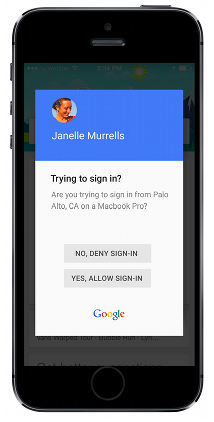
Best of all, users with an iPhone or iPad that supports Touch ID can use their fingerprints to authenticate. If you don’t have it already, simply install the Google app on your device and you’re all set once you enable the new Google prompt option. Below are a few points you must keep in mind before enabling the new option:
- Currently, you can’t have Security Keys and Google prompt enabled at the same time.
- A data connection is required to use Google prompt.
- iOS users will need the Google Search app installed on their phone to use Google prompt.
- Android users will need updated Google Play Services to use Google prompt.
Do you use 2-Step Verification for your Google account?




I just set this up with my account I’m impressed how fast it is
Sounds cool but it disables the option for security keys?? Doesn’t that kind of screw you over if you don’t have your phone??
No thank you. Everytime I bring myself to install the Google Search app which is bloatware, huge and a requirement for this new method,. I always uninstall it after a few days.