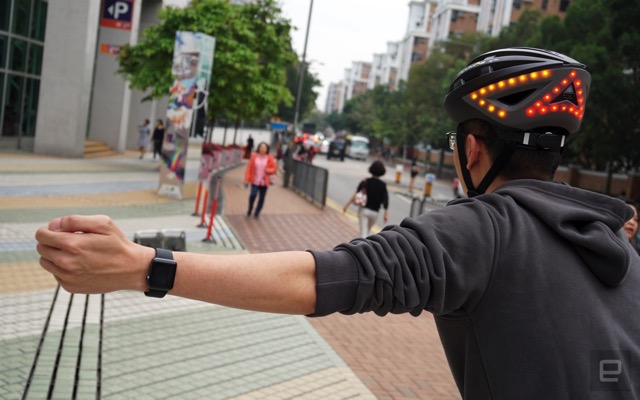
Lumos smart bike helmet, that features automatic brake lights and built-in turn signal indicators with wireless controls, has today received a major update that adds Apple Watch gesture controls for turn signals, as well as Apple HealthKit integration for automatic cycling tracking, Engadget is reporting.
“Lumos is the first smart bike helmet that beautifully integrates lights, hard brake, turn signals, iOS app and helmet into a single cohesive whole. Featuring super-bright LEDs in the front and back of the helmet, Lumos elevates your lights, making them naturally higher and easier to see, ensuring greater visibility on the road.
Thanks to smart gesture-recognition algorithms, the Lumos app on your Apple Watch recognises when you’re making a hand signal and then automatically activates turn signals on your helmet. Or you can simply tap the corresponding button on the included wireless handlebar remote.”
In order to set up gesture controls, helmet owners need to install the iOS and watchOS apps, pair the iPhone with the helmet over Bluetooth, and then calibrate the watch with their left and right turn gestures using their watch-wielding hand.
The source notes that the turn indicators continue to blink until you shake your hand, and make things a lot least easier to control than the original wireless remote.
Starting today, the Lumos helmet can also be integrated with Strava and Apple Health apps, which enables automatic cycling tracking in iOS. The helmet is available on the Apple Store Canada for CAD $249.95.



Wow!!! I’m about 99% sure I’m gonna get this baby! I love riding a bike and always felt guilty not wearing an helmet because they all looks awkward, but this one is gorgeous!!! Hope it does what it says it does!
A cool use for the Apple Watch, my only concern would be if it screws up and indicates you’re turning the opposite way. That could have drastic consequences.
I guess there’s only one way to find out.
*Buys it online to give as a gift to cyclist neighbour…*