
You Can Now Jailbreak iOS 16.4.1 with Palera1n 2.0.0 Beta 6
Codenamed Bakepale, the latest v2.0.0 beta 6 update to jailbreak tool Palera1n has just been released, which fully supports iOS 16.4 - iOS 16.4.1 jailbreak.
Happy Friday everyone! Today we’re going to address a concern that some people have with their iPhones. Are you the type of person that is obsessed over the state of your electronics, and in particular your precious iPhone? Ever have little brothers or sisters or cousins want to play Flight Control with their sticky fingers?
How To Stop People From Using Your iPhone
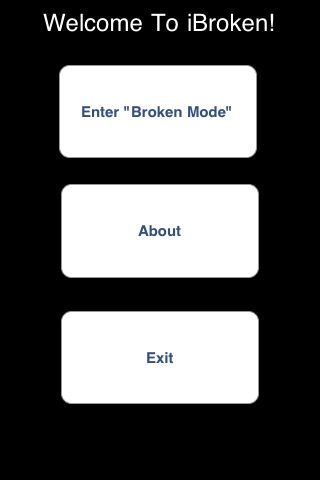
We’ve all been in those situations when that certain someone wants to borrow your iPhone to “make a quick call” or “Google something” and they can’t because they either a) don’t have a cellphone or b) have a regular flip phone with no internet capabilities. How do you say “NO” without saying “NO”? Can’t muster up enough courage to say “N-O”? Easy! You activate the app iBroken!
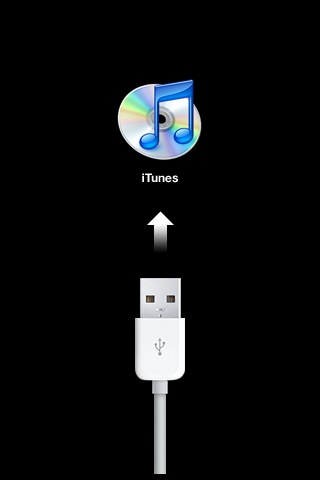
iBroken is available in Cydia (jailbroken iPhones only) and what it does is simulate the “Connect to iTunes” picture on your iPhone. You launch this bad boy, then demonstrate that your iPhone is “having problems” and prove it by tapping on the screen to show that it’s “frozen”. The app will only exit if you press the Home button, so guard that button with your LIFE!
Scare Your Friends With Jailbroken iPhones
Want to play a quick joke? Install iBroken on your friend’s jailbroken iPhone and tell them “OMG dude, I think I did something wrong” and wait to see the priceless expression on their face.
I haven’t used iBroken yet, but I’m waiting for the perfect opportunity to put it to good use. Have you used iBroken? Has it saved you from lending out your iPhone to people/friends/family/coworkers/young children/animals?
Want to see more of our stories on Google?

P.S. Want to keep this site truly independent? Support us by buying us a beer, treating us to a coffee, or shopping through Amazon here. Links in this post are affiliate links, so we earn a tiny commission at no charge to you. Thanks for supporting independent Canadian media!


The only downfall part is usually if something happens, everyone clicks every button to try and fix it. ( I know I do lol) They should have made it so u have to double tap home or even hit it three times and then the app closes and back to springboard.
I like the idea of installing this on a friends phone and sayin that there iPhone is messed! lol
This also reminds me when they had the cracked glass app and opening the app display they cracked screen image. Loos pretty real 😛
The only downfall part is usually if something happens, everyone clicks every button to try and fix it. ( I know I do lol) They should have made it so u have to double tap home or even hit it three times and then the app closes and back to springboard. This way the joke can last longer 😉
I like the idea of installing this on a friends phone and sayin that there iPhone is messed! lol
This also reminds me when they had the cracked glass app and opening the app display the cracked screen image. Loos pretty real 😛