For those who have successfully jailbreaked and unlocked their 1.1.2 and 1.1.3 iPhones using ZiPhone, you will be happy to know that there are new solutions for the new 1.1.4 firmware update.
There are now two applications you can use to jailbreak/unlock your 1.1.4 iPhone. They are ZiPhone 2.5 and iNdependence, which have both been updated to unlock/jailbreak 1.1.4 iPhones! Let’s see what’s involved to unlock your 1.1.4 iPhone using ZiPhone 2.5!
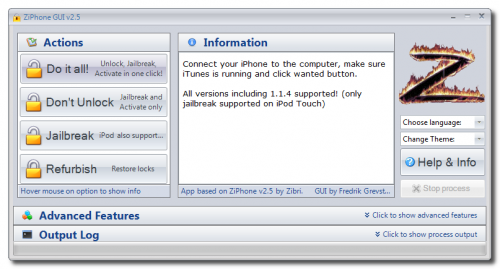
How to Unlock Your 1.1.4 iPhone with ZiPhone 2.5 (the simplified version!)
Prior to these instructions, if you have an OTB (out of the box, aka BRAND NEW) 1.1.2/1.1.3/1.1.4 iPhone you can follow the steps below. If you’re on older firmware, you should have “restored” your iPhone to 1.1.4 via iTunes first before attempting the jailbreak/unlock.
- Download the program from here
- Extract the contents to a folder on your desktop. Launch ziphoneGUI.exe
- Connect your iPhone to your computer and make sure it has been detected
- Time to jailbreak, activate, and unlock. Click “Do It All!” to rock and roll!
- ZiPhone will now load zibri.dat and then search for your iPhone. You will be asked to wait 4 minutes once it’s been found.
- Once this time has passed, your iPhone will reboot. After the reboot, it will be activated, jailbreaked and unlocked!
- Installer.app should be on your iPhone after this process. You shoud install the BSD Subsystem.
- Thanks to iClarified for these instructions. Check out their site for graphical step by step instructions.

Want another 1.1.4 unlocking option? Own a Mac? You can try using iNdependence!
Using iNdependence to Jailbreak 1.1.4 (Mac only)
- Download iNdependence from here
- Follow the instructions supplied with the download
As with any hacking with your iPhone, please do so at your OWN RISK! Is your iPhone working perfectly? Then don’t bother doing any updates, as the trouble you’ll come across if you get stuck somehow is not worth the headache. I’m still happily on 1.1.1, but once summer comes around I plan on updating to 1.1.4 (I won’t need my phone everyday)…remember, “if it ain’t broke, don’t fix it!” =)
If you enjoyed this post, please subscribe to my RSS feed, so you won’t miss any updates!



they did a great job at updating really fast this time! but my phone is working great on the previous ZiPhone! Plus are any of the apps working on 1.1.4 yet?
I have not heard much about 1.1.4FW apps as it’s still new… I just keep reading in forums that ppl are having many problems with 1.1.3FW apps LOL So i’m debating if I should even upgrade my iPhone…
Man those hackers are working quick these days!! Apple just can’t keep up with them!!
Thanks and good job to all those working at giving us a fully open and unlocked iPhone!
Big thanks goes out to Zibri and those hackers!
I’m still running 1.1.2FW…. Has anyone had good luck with 1.1.4FW?
Hey iPhone Fan, if u don’t mind me asking but what version of FW are u running? 😛
1.1.1, as stated in the post above. 😉
I am sure, with time updates and apps will come for 1.1.4…however, I bet programmers are waiting for the SDK right about now to launch…
Hi Recently I came to know iphone is very much useful in future. Please send me what ever up date news release.
Oh, 1.1.4 already… I just got my iPhone two days ago, and im on 1.1.3… Everything works flawless, so I guess theres no point in upgrading.
Guys, my SMS’s stopped working… I get “Error sending message” when I press send.. how the hell do I fix this?
i already have my 1.1.2 unlocked….should i even bother upgrading and unlocking to 1.1.4?
I ran the 1.1.4 updater last night (using ziphone). It wasn’t flawless (I had a number of failed unlockings, but after sleeping on it, I ran ziphone one more time this morning — using the Do It All! option — and my phone now is fully unlocked. (1.1.4 (4A102), Modem Firmware: 04.04.05_G)
One thing that is different (from when I was running 1.0.2 unlocked), in the upper left when the Carrier name is shown beside the signal strength, it now reads: CAN Rogers Wireless Inc. while previously it said only Rogers Wireless, I believe. Everything else works without any other mods (YouTube now works!! YEAH!)
Another thing: it doesn’t let me install the BSD Subsystem! (though I’m not sure I need it since everything is working, it seems).
Has anyone else who has upgraded to 1.1.4 seen this?
I’m not sure if it is due to 1.1.4 or to the code ziphone used to unlock the phone!?
I have an OTB 1.1.3 iphone unlocked.
Will using ziPhone upgrade it to 1.1.4? Or do I have to do that manually? If so, what is the process?
Thanks!!!
if u want BSD subsystems to work, install the big boss source pack under the sources section in your installer. worked for me.
@Tom
I’m thinking the same… I like my 1.1.2FW as all apps work fine and really no problems, just stupid SMS limit! I always fill up 1000 easy. LOL Like iPhone Fan always says… “if it ain’t broke, don’t fix it!” =) 1.1.4FW is too new for me, who knows what bugs it may have and what apps will work.
A few quick questions. I have an unlocked 1.1.2 phone, works great. It was 1.1.2 OTB, I used ZiPhone 2.4 and had it unlocked in 4 mins and working on Rogers in 5 mins. Here are my questions:
1) What is BSD subsystem? I saw a few posts that recommend installing it (I haven’t done that yet). Everything on my phone works fine so far.
2) Can I upgrade from 1.1.2 to 1.1.4, or do I have to go the logical sequence first?
3) Does the locate me feature in Maps only work on 1.1.3? What areas does this work in?
4) Does upgrading the Installer.app cause any harm, or should I just leave it on the current version?
Thanks!!
I have a 1.1.2 OTB iphone. I unlocked it using a StealthSim. Since the thing kinda has to be pulled out and readjusted every 4 days or so, I am thinking of trying out the alternative.
Do I need to upgrade to 1.1.4 on iTunes first? Or can I just plug in the way that I have it (Jailbroken 1.1.2) and run Ziphone?
Is it worth doing this or shall I wait for the SDK to come out first?
Thanks!
My wife has a 1.1.2 iphone with the turbosim card in it. Can I upgrade flawlessly to 1.1.4 with Ziphone? I don’t want to use the turbosim in it (like my 16g 1.1.3 iphone)
Please help!!!!!!
Shane
yes you can, it’s really easy:
http://www.downloadziphone.org/
Just follow the intructions in this post for “How to Unlock Your 1.1.4 iPhone with ZiPhone 2.5 (the simplified version!)” or the other option if you are on a Mac: “Using iNdependence to Jailbreak 1.1.4 (Mac only)”
yesterday I restored a 1.0.2 in itunes to 1.1.4, ran ziphone 2.5c, every feature works like a charm.
Can some post the instructions for restoring a previously unlocked iPhone (ex: 1.0.2, 1.1.2, 1.1.3) in iTunes and upgrading to 1.1.4?
Do yu ahve to uninstall all the apps? Will you loose your address book?
Regarding your saved data, if you sinc through itunes, it backs up your data, I have upgraded and restored through there a couple times and it always asks me if I want to add a new iphone or use my back up of my existing iphone. My address book is still intact. For the apps you will have to reinstall them, but no need to uninstall before a restore. Also every time I put my apps back on the settings and games scores were still intact as well.
I bought Iphone 16GB yesterday then restore to 1.14 and ran Ziphone 2.5c with “Do it all”.
Every features work fine and most apps I install works fine
However, in case I need to reverse the phone back to Factory default, How can I do it?
Is this not possible? or does anyone have done this?
I think you can just do a “restore” again.
Thanks for your reply.
However, have you ever done this?
following link tells me “Do it all” is not reversible
http://www.winandmac.com/mobile/iphone/winhow-to-use-iphone-114-with-040405_g-baseband/
So do I just take out the turbosim card and upgrade the iphone with Ziphone? Is there anything else I have to do. I don’t want it to lockup.
Hey guys if you actually read iPhone Fan’s posts on this blog you wouldn’t have to ask then wait for your answers, in this post it says, “Prior to these instructions, if you have an OTB (out of the box, aka BRAND NEW) 1.1.2/1.1.3/1.1.4 iPhone you can follow the steps below. If you’re on older firmware, you should have “restored” your iPhone to 1.1.4 via iTunes first before attempting the jailbreak/unlock.”
And in this other post: iphone-firmware-114-now-available-via-itunes it tells you where you can get the firmware to do the RESTORE instead of an update”.
Also, how do I restore my iphone 1.1.2 and my 1.1.3 to 1.1.4 using itunes. Do I just update it?
I recently bought a 1.1.2 phone OTB, used ZiPhone “Do It All” and it worked flawlessly. Last night, I upgraded to 1.1.4 in iTunes and used Ziphone 2.5c to “Do It All” and again it worked flawlessly. I was going to restore to 1.1.4 in iTunes, but I it upgrade by mistake. I lost all my settings, which wasn’t that hard to get back. In iTunes I didn’t restore my old settings but set it up as a new phone with the same name. No issues at all in the process.
Hi, I just bought OTB 1.1.1 unlocked and jailbroken and managed to upgrade it to 1.1.4 and used ziphone to unlock it well my question is apart from Installers app. can I add extra app which is not in the Installer from what I know Ibrickr is the method but it seem it wont work on 1.1.4 . I want the X-ray application in my Iphone does anybody try this
HMm, I just bought my iPhone. And when I bought it it was 1.1.3. But I was stupid and tried to put music on it, and it said there is an update on it, and so like the retard I am, then I did it. And now I can’t get anything to work on it, and my SIM card doesnt work in it. I read that I need it to be in 1.1.3 for it to work right now. But this seems to fix it (The programs advertised here) Can anyone else give me any more information on how to use these? Does it work perfectly? Is there a way for me to downgrade to 1.1.3 without paying for it? Anyone have any answers for me? 😛 Any help would be appreciated. Thanks.
Have you tried restoring to 1.1.3/1.1.4 in iTunes, then running ZiPhone? It sounds like you need to unlock/jailbreak your iPhone. 🙂
I’m trying to unlock my brand new iphone. I’ve downloaded Ziphone and I’m trying to launch the ziphone.gui file but it won’t launch. What program should be launching it? I’m using a ibook G4 and I’m having problems. Someone help!!
Did you download the Mac version of ZiPhone?
where can I download the mac version of ziphone?
Hey Guys,
Im wondering if the iphone will work anywhere in the world once you have “done it all” in Ziphone.
I live in Canada, but if I were to travel to another country, say somewhere in Asia, will it work if i pop in a prepaid simcard or simcard from their providers?
Thanks
Mac version of Ziphone is here
http://rapidshare.com/files/96078701/ZiPhoneOSX-2.5.tbz.html
I just tried the unlock, and I made sure to restore through itunes and it worked flawlessly, no issues with this unlock. I also have a Mac and it was perfect.
Just upgraded from the 1.1.3 jailbreak to the 1.1.4 and NO issues at all…easy as pie…just restored as prompted first, then the upgrade and then the unlock…it worked first time, although I was sweating a little through the process and mumbling…please work…I have enough expensive paper weights!
Awesome…although I don’t notice any differences!
Why should the BDS subsytem be installed?? Why…do I really need it??
thanks
Hi Mary-Ellen! BSD Subsystem is recommended before you start installing 3rd party applications…:)
Question: I bought an iPhone today with 1.1.3, I have not unlocked it yet, can I upgrade the phone to 1.1.4 first through iTunes then unlock the phone using Ziphone?
Yes, you should use iTunes to update to 1.1.4, then run Ziphone.
My experience was this worked flawlessly.
does anyone know if i use ziphone do i have to do anything before i use the software???????????
where do i get the 1.1.4 firmware application
I have now performed the ZIPHONE jailbreak on my 1.1.4 phone (it already had 1.1.4)
But i can’t get any of the apps to work. Maybe 5 apps the rest says error download error
What gives
I am unable to install the BSD subsystem on my jailbroken 1.1.4, i have done all inc. installing BigBoss sources and installer files.
It comes to a point where the BSD pop’s up a message warning not to change passwd on 1.1.3, and asks me to click “OK” i try do it but the screen gets locked and i have to reboot it.
PLEASE HELP! also the downloaded themes are not showing up on the summer board application. does this have to do with not installing the BSD Subsystem???
Thanks a ton in advance!!
so in .4 themes still not working?
Hi all,
Wondering if anyone has experienced any issues with the iPod function on the phone after upgrading. I recently upgraded my phone ti 1.1.4 and since then, songs either stop playing after 2 seconds, 10 seconds or skip to the next song. If I scroll past the stop point the song will continue to play (sometimes). I have reset my sync history, rebooted the phone, synced without syncing music, deleted and recreated play lists, made sure there was no dust in the earphone jack, and changed USB cords. With each sync, the issue will happen with a different song. All songs are downloads from iTunes and I haven’t installed any 3rd party apps.
Any ideas? Anyone? Thanks!
Hello everyone, I jst bought my wife a Iphone for her Birthday it just pasted(22, still young). Drove all the way to Rochester(By the way EastView have some HOT girls). But back on topic, the Iphone had 1.1.4 I used Ziphone for windows (make sure you have .net framework 2.0 for your windows, you can download it from the microsoft website) And it took me 2 minutes or so to get it up and running. the apps work great havent tried to put music on right now but most likely it would work aswell. THANK YOU ZIBRI
Hello
Hey, pls reupload on rapidshare
Halooooo!Sou Brasileira nunca tive um Zphone mais gostaria de ter byee!
Halooooo!Sou Brasileira nunca tive um Zphone mais gostaria de ter byee!
they did a great job at updating really fast this time! but my phone is working great on the previous ZiPhone! Plus are any of the apps working on 1.1.4 yet?
Man those hackers are working quick these days!! Apple just can’t keep up with them!!
Thanks and good job to all those working at giving us a fully open and unlocked iPhone!
Big thanks goes out to Zibri and those hackers!
I’m still running 1.1.2FW…. Has anyone had good luck with 1.1.4FW?
Hey iPhone Fan, if u don’t mind me asking but what version of FW are u running? 😛
I have not heard much about 1.1.4FW apps as it’s still new… I just keep reading in forums that ppl are having many problems with 1.1.3FW apps LOL So i’m debating if I should even upgrade my iPhone…
1.1.1, as stated in the post above. 😉
I am sure, with time updates and apps will come for 1.1.4…however, I bet programmers are waiting for the SDK right about now to launch…
Hi Recently I came to know iphone is very much useful in future. Please send me what ever up date news release.
Oh, 1.1.4 already… I just got my iPhone two days ago, and im on 1.1.3… Everything works flawless, so I guess theres no point in upgrading.
Guys, my SMS’s stopped working… I get “Error sending message” when I press send.. how the hell do I fix this?
i already have my 1.1.2 unlocked….should i even bother upgrading and unlocking to 1.1.4?
I ran the 1.1.4 updater last night (using ziphone). It wasn’t flawless (I had a number of failed unlockings, but after sleeping on it, I ran ziphone one more time this morning — using the Do It All! option — and my phone now is fully unlocked. (1.1.4 (4A102), Modem Firmware: 04.04.05_G)
One thing that is different (from when I was running 1.0.2 unlocked), in the upper left when the Carrier name is shown beside the signal strength, it now reads: CAN Rogers Wireless Inc. while previously it said only Rogers Wireless, I believe. Everything else works without any other mods (YouTube now works!! YEAH!)
Another thing: it doesn’t let me install the BSD Subsystem! (though I’m not sure I need it since everything is working, it seems).
Has anyone else who has upgraded to 1.1.4 seen this?
I’m not sure if it is due to 1.1.4 or to the code ziphone used to unlock the phone!?
I have an OTB 1.1.3 iphone unlocked.
Will using ziPhone upgrade it to 1.1.4? Or do I have to do that manually? If so, what is the process?
Thanks!!!
A few quick questions. I have an unlocked 1.1.2 phone, works great. It was 1.1.2 OTB, I used ZiPhone 2.4 and had it unlocked in 4 mins and working on Rogers in 5 mins. Here are my questions:
1) What is BSD subsystem? I saw a few posts that recommend installing it (I haven’t done that yet). Everything on my phone works fine so far.
2) Can I upgrade from 1.1.2 to 1.1.4, or do I have to go the logical sequence first?
3) Does the locate me feature in Maps only work on 1.1.3? What areas does this work in?
4) Does upgrading the Installer.app cause any harm, or should I just leave it on the current version?
Thanks!!