Seems like Apple is at it once again with another firmware update. For those who haven’t found out yet, this time it’s 1.1.4, and it fixes a “few bugs” according to Apple, but does not offer any new features. This looks like it could include the code necessary for the upcoming SDK.
Also, the word on 1.1.4 is that it can be jailbroken via ZiPhone, however activation will not work. In other words, don’t bother updating to 1.1.4 if your iPhone is working fine on 1.1.1/1.1.2/1.1.3 (remember what I said about “if it ain’t broke, don’t fix it?”). Zibri recommends for you to NOT to jailbreak 1.1.4 for now! This update will break your 3rd party apps!

According to NateTrue’s blog and his testing with the new 1.1.4 firmware update…
Okay, so I’ve finished my preliminary examination of the iPhone 1.1.4 firmware. And what’s new?
Bug fixes. Like three of them. No new features, no new apps, nothing.
Not even any significant changes that would render the current jailbreak methods unusable.
You can download the 162mb 1.1.4 firmware download here. Update at your own risk, as you will most likely lose your 3rd party apps!
PS – Thanks to those that sent in a screenshot of their Springboard--the post will come later! 🙂
If you enjoyed this post, please subscribe to my RSS feed, so you won’t miss any updates!
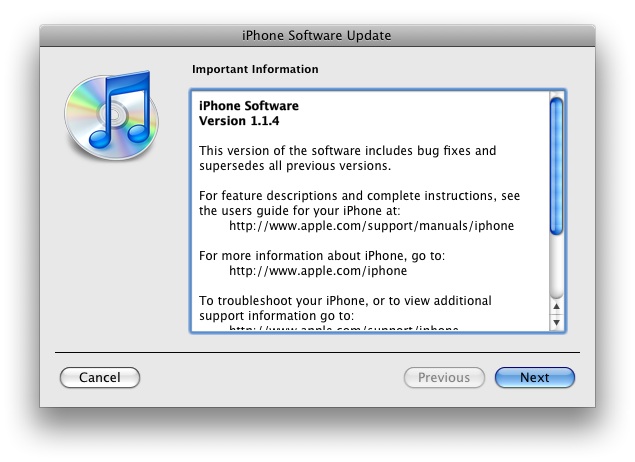




So now I am scared.. I noticed that my iTunes has a field that says that it automagicly checks for updates for my iphone.. will this update me to 1.1.4 ? how can I avoid that ? does it meant that I have to stop using itunes?
You can keep on using iTunes, just don’t click in “update” when it asks you to…
Right on. When reading reviews on it yesterday, I was hoping they had added some new features or etc. but nothing… I think this is for the upcoming SDK 😉 I just want (A2DP) support for my Motorola Stereo Bluetooth Set! LOL
@Gunfus
No it will not automatically update ur iPhone to 1.1.4, u have to agree to terms and so on… U can easily avoid this buy turning Automatic Updates off and yes u can still continue to use iTunes. I believe u go to Edit, Preferences, under the General Tab look near the bottom and u will see automatic updates and uncheck that for iTunes. Then have a browse through the iPhone tab and see if there is any options for updates to be turned off. I think the option to upgrade ur iPhone will stay on…. can’t remember. Just never click the update iPhone and u will be fine. 😛
I did look through all of those settings before.. but I didn’t find anything that would deactivate the auto-update for the iphone. I will never click on that evil button of “update iPhone” then.. thanks!
Are 1.1.4 phones in the stores or is it updated only through iTunes? I’m in the US and was going to buy a iPhone tonight and unlock on Rogers, but will hold off if I can’t unlock 1.1.4.
I doubt they have made it them to the store, yet… but who knows. You can ask the so called “Mac Genius” and see what they say. You also can always buy it and check what update does it come with then return it the day after if it is at 1.1.4, but as I understand the 1.1.4 can still be unlock using the ZiPhone GUI, it just not not fully tested. I think the policy for returning is 15% re-stocking fee.. again check with the store “Genius”
What is Mac Genius?
Hey everybody,
I just wanted to update you guys, that I finally got my iPhone. it was 1.1.2 OTB, I restored it to 1.1.3 before I even use it. Then I used Zibri’s ZiPhone (2.4 GUI) to unlock it. I used the “do it all” option. it took less than 4 minutes to finish and it worked like a charm. After ZiPhone, I used this site’s tip to get my Fido EDGE enabled, and I restarted the phone once to get the Wi-Fi working. I love the phone. I also ordered a BestSkinsEver protective film. so there ya go, another success story. I am waiting for further instructions from Zibri regarding the 1.1.4 firmware. oh and if anybody needs any older firmware including 1.1.3, here’s a good download site: http://wiki.howardforums.com/index.php/IPhone_Firmware_Downloads
I am with FIDO as well. Which is best data plan? I have Blackberry connect plan wi Nokia E62 but just got my iPhone.
@Gunfus
LOL ya just don’t upgrade for now 😛
@Neediphone
I was reading in one of the Mac Rumors forums about 1.1.4 and someone asked the same question as u about are they being released yet… I can’t remember as I just glimpsed through the topic but I don’t think so yet. It usually takes a couple days before they start selling the iPhones with the new FW, I would say maybe sometime at the end of this week… It shouldn’t matter though as Ziphone should still be working and u can downgrade and etc. Zibri is working on this and will fill us in with more info in a couple days.
Good luck
Well, I got the phone, brought it home, used ZiPhone and it worked like a charm. I was expecting something to come up, but it was a piece of cake. I made my first call to my wife, used Safari, checked stocks, it worked flawlessly. The phone has 1.1.2 firmware and was manufactured in the first week of this year. Haven’t decided if I’m going to upgrade to 1.1.3 yet.
Glad it worked out for ya–enjoy the iPhone! 🙂
@Neediphone
Good to hear it’s working for ya! 😉
Thanks, I’m still amazed at how easy it was.
When I put my rogers sim card, my contacts didn’t show up. Can I view contacts that were stored on the sim card?
1.1.4 already eh! I haven’t even updated to 1.1.3 yet!!
@Neediphone
Im not to sure… I’m not familiar with these SIM cards as I was with Telus and switched to Rogers (Doh! Thinks twice about doing that… LOL) I seen some applications in the installer.app that might help ya, try checking those out…
@Tim
Ya that’s crazy, It’s most likely to do with something for SDK or only bug fixes… I’m still on 1.1.2, haven’t even thought of 1.1.3 LOL
Srry to double post, we need an edit button lol I found some info on the 1.1.4 and the SDK
Now there’s a delay with SDK AGAIN (BETA)! or some kind of issue… LOL
http://www.macrumors.com/2008/02/28/iphone-sdk-in-beta-only-more-3g-iphone-predictions/
http://www.macrumors.com/2008/02/28/apple-coo-discusses-iphone-exclusivity-sdk-and-unlocking/
http://www.macrumors.com/2008/02/27/iphone-ipod-touch-sdk-details-march-6th/
http://www.macrumors.com/2008/02/26/apple-releases-firmware-1-1-4-for-iphone-and-ipod-touch/
The 1.1.4 firmware update finally includes a French-Canadian keyboard! No more “space” and “enter”. It is “espace” and “entrée” from now on.
For those of you who don’t know, French-Canadians use the Qwerty keyboard whereas the French in France (and Morocco) use the Azerty keyboard. A French-Canadian keyboard is quite usefull on a computer as typing é for example requires one touch (versus alt130 which is 6 keys eh). French-Canadians can not use the Azerty keybord as the letters are not in the right place (for example, the “Q” would be an “A”).
However, on the iPhone and iPod touch, an accent is made by holding the letter and scrolling sideways (try it). So the French-Canadian keyboard on the iPod touch is relatively pointless except it replaces “space” and “enter” with “espace” and “entrée”.
But if you wear you maple leaf on your sleave, you can now be proud that the iPhone and iPod touch include the word “Canadian” (French-Canadian keyboard).
PS. When Quebec seperates (in a few months) there will be a firmware update to change the name to “Québécois keyboard”. 😛
I have a unlocked phone 1.1.2 and lost my installer icon from my home screen after my kids decided to install some games on the phone. Now i cant find the icon and dont know how to delete these games any ideas on what i can do to fix this problem.
So now I am scared.. I noticed that my iTunes has a field that says that it automagicly checks for updates for my iphone.. will this update me to 1.1.4 ? how can I avoid that ? does it meant that I have to stop using itunes?
Right on. When reading reviews on it yesterday, I was hoping they had added some new features or etc. but nothing… I think this is for the upcoming SDK 😉 I just want (A2DP) support for my Motorola Stereo Bluetooth Set! LOL
@Gunfus
No it will not automatically update ur iPhone to 1.1.4, u have to agree to terms and so on… U can easily avoid this buy turning Automatic Updates off and yes u can still continue to use iTunes. I believe u go to Edit, Preferences, under the General Tab look near the bottom and u will see automatic updates and uncheck that for iTunes. Then have a browse through the iPhone tab and see if there is any options for updates to be turned off. I think the option to upgrade ur iPhone will stay on…. can’t remember. Just never click the update iPhone and u will be fine. 😛
I did look through all of those settings before.. but I didn’t find anything that would deactivate the auto-update for the iphone. I will never click on that evil button of “update iPhone” then.. thanks!
Are 1.1.4 phones in the stores or is it updated only through iTunes? I’m in the US and was going to buy a iPhone tonight and unlock on Rogers, but will hold off if I can’t unlock 1.1.4.
I doubt they have made it them to the store, yet… but who knows. You can ask the so called “Mac Genius” and see what they say. You also can always buy it and check what update does it come with then return it the day after if it is at 1.1.4, but as I understand the 1.1.4 can still be unlock using the ZiPhone GUI, it just not not fully tested. I think the policy for returning is 15% re-stocking fee.. again check with the store “Genius”
What is Mac Genius?
Hey everybody,
I just wanted to update you guys, that I finally got my iPhone. it was 1.1.2 OTB, I restored it to 1.1.3 before I even use it. Then I used Zibri’s ZiPhone (2.4 GUI) to unlock it. I used the “do it all” option. it took less than 4 minutes to finish and it worked like a charm. After ZiPhone, I used this site’s tip to get my Fido EDGE enabled, and I restarted the phone once to get the Wi-Fi working. I love the phone. I also ordered a BestSkinsEver protective film. so there ya go, another success story. I am waiting for further instructions from Zibri regarding the 1.1.4 firmware. oh and if anybody needs any older firmware including 1.1.3, here’s a good download site: http://wiki.howardforums.com/index.php/IPhone_Firmware_Downloads
@Gunfus
LOL ya just don’t upgrade for now 😛
@Neediphone
I was reading in one of the Mac Rumors forums about 1.1.4 and someone asked the same question as u about are they being released yet… I can’t remember as I just glimpsed through the topic but I don’t think so yet. It usually takes a couple days before they start selling the iPhones with the new FW, I would say maybe sometime at the end of this week… It shouldn’t matter though as Ziphone should still be working and u can downgrade and etc. Zibri is working on this and will fill us in with more info in a couple days.
Good luck
Well, I got the phone, brought it home, used ZiPhone and it worked like a charm. I was expecting something to come up, but it was a piece of cake. I made my first call to my wife, used Safari, checked stocks, it worked flawlessly. The phone has 1.1.2 firmware and was manufactured in the first week of this year. Haven’t decided if I’m going to upgrade to 1.1.3 yet.
You can keep on using iTunes, just don’t click in “update” when it asks you to…
Glad it worked out for ya–enjoy the iPhone! 🙂
@Neediphone
Good to hear it’s working for ya! 😉
Thanks, I’m still amazed at how easy it was.
When I put my rogers sim card, my contacts didn’t show up. Can I view contacts that were stored on the sim card?
1.1.4 already eh! I haven’t even updated to 1.1.3 yet!!
I am with FIDO as well. Which is best data plan? I have Blackberry connect plan wi Nokia E62 but just got my iPhone.
@Neediphone
Im not to sure… I’m not familiar with these SIM cards as I was with Telus and switched to Rogers (Doh! Thinks twice about doing that… LOL) I seen some applications in the installer.app that might help ya, try checking those out…
@Tim
Ya that’s crazy, It’s most likely to do with something for SDK or only bug fixes… I’m still on 1.1.2, haven’t even thought of 1.1.3 LOL
Srry to double post, we need an edit button lol I found some info on the 1.1.4 and the SDK
Now there’s a delay with SDK AGAIN (BETA)! or some kind of issue… LOL
http://www.macrumors.com/2008/02/28/iphone-sdk-in-beta-only-more-3g-iphone-predictions/
http://www.macrumors.com/2008/02/28/apple-coo-discusses-iphone-exclusivity-sdk-and-unlocking/
http://www.macrumors.com/2008/02/27/iphone-ipod-touch-sdk-details-march-6th/
http://www.macrumors.com/2008/02/26/apple-releases-firmware-1-1-4-for-iphone-and-ipod-touch/
I have a unlocked phone 1.1.2 and lost my installer icon from my home screen after my kids decided to install some games on the phone. Now i cant find the icon and dont know how to delete these games any ideas on what i can do to fix this problem.