
Apple’s AirPort Utility App is Being Removed From the App Store
Apple warns that "functionality is not guaranteed" when using AirPort Utility on iOS 27 or later.
Dropbox for iOS today has been updated to version 3.7 which brings a much welcome feature: the addition of the iOS 8 share sheet extension, which allows for quick saving of files directly into Dropbox.
You will have to enable this first before you can use it.
For example, say you have the Mail app open and want to save an image attachment. Tap and hold on the image to bring up the iOS 8 share sheet. Along the bottom actions row, tap ‘More’.
From here, toggle ON ‘Save to Dropbox’. You can drag the option up or down to rearrange its position in the share sheet menu. You don’t need to do this again once you’ve enabled the option.
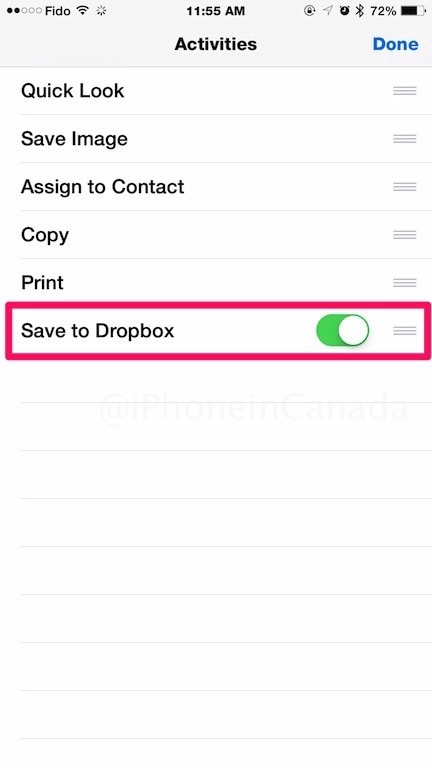
Once this is enabled, the next time you want to save an image, you’ll now see the option for Dropbox as seen below:
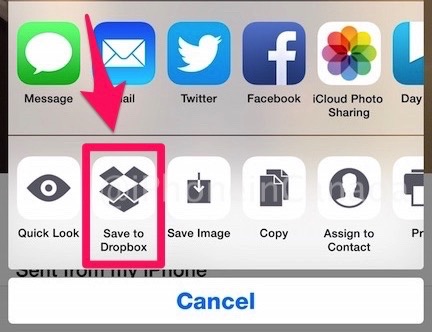
This just makes it incredibly easier to save files directly to Dropbox. Let us know how you like this addition!
Click here to download Dropbox for iOS—it’s free.
Want to see more of our stories on Google?

P.S. Want to keep this site truly independent? Support us by buying us a beer, treating us to a coffee, or shopping through Amazon here. Links in this post are affiliate links, so we earn a tiny commission at no charge to you. Thanks for supporting independent Canadian media!


This might have me ditching iCloud for documents.
Nice. Certainly a welcomed addition