Update 1: Click here for our Greenpois0n Windows jailbreak guide.
Looking to jailbreak your iPhone 3GS, iPhone 4, iPad or iPod Touch 3G/4G? You have come to the right place!
NOTE: THIS GUIDE WILL NOT UNLOCK YOUR iPHONE (guide coming soon to preserve baseband)
Read Me Before Continuing:
- Use at your own risk, we are not responsible for your decision to jailbreak.
- Do you plan on unlocking your iPhone 3GS/4 in the future? Do not use this guide.
- You must be updated to iOS 4.2.1 via the latest version of iTunes before proceeding.
- Your iPhone/iPod touch must be activated (screen does not show “Connect to iTunes”)
This Guide Has Two Sections:
A. How To Jailbreak the iPhone 3GS/4 & iPod Touch 3G/4G on 4.2.1 Firmware
B. How To Revert Your iPhone 3GS/4 or iPod Touch Back To “Normalâ€
——
A.)Â How To Jailbreak the iPhone 3GS/4 & iPod Touch 3G/4G on 4.2.1 Firmware
To jailbreak your iDevice on the 4.2.1 firmware, ensure you have access to WiFi and follow the steps below:
1. Plug your iDevice into iTunes, do a backup and then click “Restore†to install firmware 4.2.1 (you can do “Update”, but Restore is better).
2. After the restore, choose to “Set Up A New…” and continue, bypass the prompted sync selections, eject your iDevice from iTunes using the “eject†button, close iTunes and turn the iDevice off.
3. Click here to download greenpois0n for MAC or WINDOWS. Â Save the file to your computer desktop.
4. Locate the file and open the application. You may need to extract/unzip the file.
5. With Greenpois0n open, and your powered off iDevice connected, click the “Jailbreak” button.
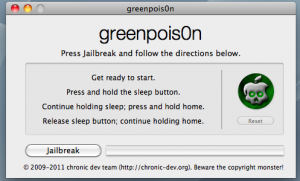
6. You will now follow the instructions to place your iDevice into DFU mode:
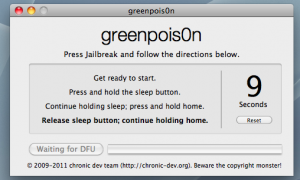
- Press & Hold the Sleep button for 3 seconds
- Continue holding the Sleep button and press and hold the Home Button for 10 seconds
- Release the Sleep Button and continue to hold the Home Button

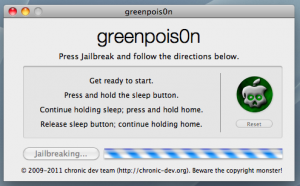
7. While still holding the Home button, the iDevice will enter DFU mode and the jailbreak will begin automatically.

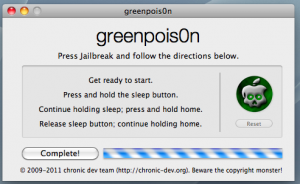
8. While still holding the Home button, after the process is complete, click on the “Complete!” button. While still holding the Home button, you’ll see some verbose text on your iDevice. Keep holding Home button.

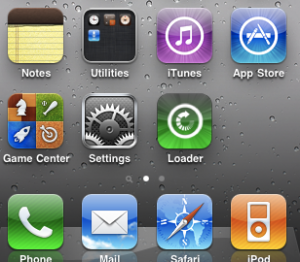
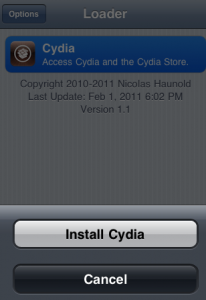
9. Keep holding the Home Button until you see an animated Apple/Greenpois0n logo. At this point, the iDevice is rebooting. Upon reboot, a new “Loader” app will be on the Home Screen. Tap on the “Loader” app, tap on Cydia and then tap on “Install Cydia“.
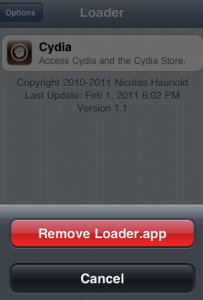
10. In the “Loader” app, you can then tap “Options” to remove “Loader” and click the Home Button to auto-reboot the iDevice. After reboot, run Cydia for the recent Cydia updates.


11. If you chose to “Restore” in Step one above, plug your iDevice into iTunes, right-click on the device in the sidebar and select “Restore from Backup…”. Choose the latest backup, from Step 1 above, and click “Restore”.
Common Problems Encountered by Many…
- Problem: The iPhone is showing a blank (black) screen after jailbreak, and is still in DFU mode after applying the jailbreak.
- Solution: Leave the iDevice for two minutes, then press and hold both power and home button at the same time for 10-15 seconds until the iDevice reboots. Redo.
- Problem: Greenpois0n loader is crashing when I install Cydia or I am unable to install cydia via greenpois0n loader.
- Solution: For those having trouble getting Cydia via the GP Loader, use redsn0w (see bottom of post for links)Â to install it. Follow the redsn0w steps to install Cydia. Ignore anything redsn0w indicates about being “tethered”.
B.) How To Revert Your iPhone 3GS/4 or iPod touch 3G/4G Back To “Normalâ€
So you have Jailbroken or Unlocked (or both) your iPhone 3GS/4 or iPod touch 3G/4G but now you want to revert to the factory fresh iPhone 3GS/4 or iPod touch 3G/4G.
To do so, follow the steps below:
1. Open iTunes and plug your iDevice in via the USB. Backup your iDevice if iTunes allows you to.
2. When iTunes recognizes the iDevice, click on the “Restore†button in iTunes. This will restore your iDevice with fresh 4.2.1 firmware.
3. After the restore is complete, iTunes will prompt you to Set up a New Device or Restore from Back Up from an existing backup (the backup from step one above. Choose which ever method you want and let iTunes process.
4. After the processing is complete, your iDevice will be loaded with the fresh 4.2.1 firmware or loaded with your back up that you may have chosen.
5. Eject the iDevice from iTunes using the “eject†symbol/button in iTunes and disconnect the USB cable from the iDevice. Turn the iDevice off and then turn the iDevice back on.
———



For some reason, I couldn’t find the “Back Up” option when I right click on the iPhone under device in iTunes.
How to backup then?
All I see is Eject, Sync, transfer purchases, restore from backup, reset warning BUT no back up option.
does it matter if I have the latest iTunes software?
Why won’t I be able to unlock my phone if I jailbreak it with this guide? That wasn’t very well explained. Thanks for any info you can provide.
Because the baseband for 4.2.1 hasn’t been unlocked by the DEV team yet.
Thanks. I can’t get the jailbreak to work anyway. I get a warning that it can’t find four files and then the screen says Greenpoison initialized and then nothing. I have to kick the phone out of DFU mode with RecBoot Utility and then it goes back to being an un-jailbroken iPhone again. Tried three times. Frustrating. Oh well, can’t complain about something I didn’t pay for and everyone worked so hard on.
It’s usually best to have the latest version of iTunes when you are upgrading your iPhone’s OS.
I guess I should wait until more success stories come in… 🙂
Try reauthorizing your device by going to menubar and click on tools (I think) and select authorize. Once the authorization in complete you’ll see the backup option.
Tried the Authorize this computer and still nothing.
I got it to work. I just downloaded the Greenpois0n software directly from their site instead of from the link provided in these instructions. Don’t know why that made a difference but it did. I’m totally Jailbroken now. Works great!! THANKS Dev team!!
Evey time I do a jailbreak, i lose all my game saved data. Anyway to restore those so I keep all the game saved data. Like Infinity Blade, worked hard to unlock all the weapons and armor and don’t want to start all over, etc.
Does not work and site is down…. Geohot versions are always more stable than fricken dev team!
You may already be backed up
It helps
The iPhone baseband is updated and prevents unlock
Mine worked following our guide completely
not working for me
unable to find gBdevList
unable to find fs_mount
unable to find fs_unmount
unable to find fs_load_file
Greenpoison initialized
The file linked to here seems that this file is missing some code or is not uncompressing code properly.
The loader doesn’t have an instal cydia button for me.
keep re-launching loader, it should eventually appear from my experience.
I’m not home to try the new link, markajaw, did it work you?
Or use Redsnow
Does anyone know whether this will work if your device is already jailbroken? Or do you have to redo the process?
This just works on mac only at the moment?
If you’re not on 4.2.1, redo the process
Good news, I didn’t like having to go up to Price Rupert and have to listen to my co workers will Bell bug me about not having a High Speed Data network.
I tried the new version of Greenp0ison and the jailbreak worked however when I go into the loader it says Loading sources then just goes to a blank screen.
I had this issue, google it and found a solution, I cant remember what it was, but there is one.
same problem
I just did the jailbreak yesterday with RC5 and it worked fine, whats the difference with RC5.2??? do i have to do it again? Please help !
Greenpois0n RC5.2 download links now posted. Try this update if you’re running into issues.
No. It fixes bugs for people who used the original release.
any words on when windows jailbreak will become available?
and my iphone isn’t on contract, it uses prepaid vouchers on sim card, will jailbreaking affect that?
do you need WIFI or is 3G network ok…im running ethernet on my computer but i have no wifi basestation available
hey, seemed to have worked perfectly. When I start the iphone back up the apple logo comes on and then switches to the Green Pois0n logo. phone boots up and everything is still there. My only problem is that I can’t get cydia in the loader. its not appearing. any ideas or any other way to get cydia?
I kept reloading the loader, and NOW I HAVE IT!! thanks!
Install Cydia by using redsn0w.
Use redsnow
My friend recently got an iPhone 4 from Fido and it came with 4.2.1
Is there any way he can unlock it now?
spoke to soon. Cydia is in the loader, but it keeps giving me the error “the request timed out” . I am assuming that there are way too many people trying to load the app? your suggestion of using redsnow, do you mean to load the untethered version via redsnow and then re install green pois0n?
thanks
Any idea if the iPad works? I saw 3GS/4G and iPod Touch 3/4G..
Thanks
If I have a jailborken 4.1 iphone4, what is the process of upgrade and re-jaiborken?
The jailbreak didn’t work and now it won’t restore is there anything I can do?
I am on 4.2.1, but the tethered method using Redsn0w. I was hoping to know if I need to go back to stock in order for this to work.
No. Just run greenpoison.
You can skip the first few steps of the guide
the unlock hasn’t been released, you can go ahead and jailbreak it and wait for the unlock
Follow the guide
Hmm. I don’t think so. If the baseband is 03.xx.xx or higher, it can’t be unlocked…yet!
No, try running redsnow and select install cydia from it’s menu. You don’t have to run greenpois0n again.
Try running redsnow and select install cydia from the menu. It will take care of the loader issue.
I’ve never jailbreaked before, if I do it will I lose game info, text messages, and other info? Also, does greenpois0n not work with the iPhone 3G? It just lists 3GS and 4.