

Meta’s Muse Hits #1 in Canada, Outpaces ChatGPT’s Early Downloads
Meta’s new Muse AI app has climbed to the top of Apple’s App Store in Canada, overtaking ChatGPT as the country’s most downloaded free iPhone app. As of writing on Tuesday, Muse sits at No. 1 on Apple’s Canadian chart for free iPhone apps, followed by ChatGPT at No. 2, Claude at No. 3 and...


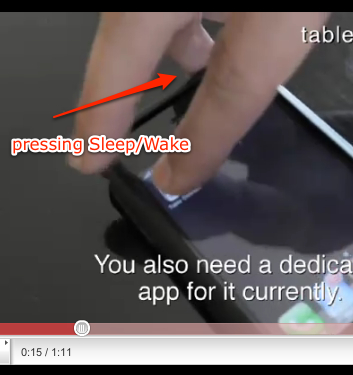
Your first claim to it being false is a pretty bad one. Watch the video again, he barely touches the sleep/wake button. The speed at which he does it, and also the positioning of his hand, makes it impossible for him to actually press the button. You need to apply SOME amount of force to use that button, and he clearly doesn’t have the leverage or hand positioning to do so. If he was trying to press the sleep/wake he would have slid the iPhone almost right off the table since he wasn’t bracing the phone with anything. Don’t be so quick to pass judgment.
Maybe there was an adhesive on the back? Or a protector film?
Either wools prevent the device from sliding.
Well, if he isn’t pressing the sleep/wake button, why does he hold the
iPhone in an iron death grip just prior to launching the app, that requires
nothing but a delicate TAP?
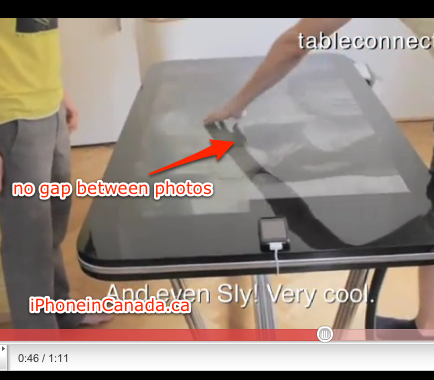
…and what about claim #2?
Maybe I don’t understand what you mean by #2, but when I open Photos on my iPhone 4 running iOS 4.1 it looks exactly like it does on their table. The photos are arranged in a grid format with a small amount of white space between them.
The image for #2 says there are no ‘gaps’ between photos when swiping. Try it on your iPhone. You’ll see white gaps when swiping left to right. In the video, those are absent. FAKE!
I have black gaps on my iPhone, but I see your point. I apologize, I was too quick to call you out on being to quick to judge 🙂 Forgiveness?
It’s okay, glad you noted what was posted. 🙂
The rubberized edges of the Bumper on a glass table would be more than enough, I think.
he is holding the device with his other hand while pressing the sleep wake button.
Also, the table has no Home button. How would they exit out of an app? Notice the video fades to black, before they can go back to the home screen.
Also, the table has no Home button. How would they exit out of an app? Notice the video fades to black, before they can go back to the home screen.
AND…when he swipes to the last picture, his hand is still on the table while the picture is still moving to the left. Also, the pinch and zoom: it starts moving just before the guys fingers are on the table.
lol yeah
you see his hand lean in to the phone, applying pressure to activate the button too.
I watched the video 5-6 times watching for the slightest mistakes in their hands.
I must admit, its very convincing, but im also a natural skeptic. on .46 as pointed out the photo slides in to place while his fingers are still on the touch screen. its really hard to tell right now…
I dont think im ready to slap a label on it just yet, but i can say for sure that it will take more then that to make me a believer
Well of course it is fake. I knew that from the first. If this were anywhere near real, we would have heard about it months ago. Apple products that have not even been thought of yet get leaked and scooped on the interwebz/toobz every day.
It was stated on pade that it was a mock up not actually function. Just a concept. Thats whay nothing worked.
Everything on the screen looks razor sharp. Wouldn’t the images be blurry after being upsized to gargantuan proportions? Even if they rebuilt the images and had them “stored” on the table that wouldn’t be practical for real-life use as you’d have to build new images for every app available. I mean they had to rewrite all the apps for the iPad for the same reason and it’s only slightly larger than the iPhone relative to the table.
It looks like it could be a projector projecting onto the table and someone behind the scenes manipulating the actual movements.
not from above but from below
It’s not really gargantuan proportions. iPhone resolution is 960×640, which is not far off of the 720p resolution of some HDTVs that size. Hardly any upsizing would be necessary, and would probably not be noticible on a 360p youtube video.
That said, clearly it is fake. It seems like there’s popcorn popping in the background, maybe an homage to those fake “watch our cellphones pop kernels of corn” videos.
That ‘popcorn’ sound appears to be the hardwood floor they are working on.
Maybe that was amplified to distract us! 😉
And you can see his fingers going backwards, so he can press the button.