
Sonos Teases New Soundbar Ahead of September Hardware Reveal
Sonos has revealed plans for a new home theatre soundbar ahead of its dedicated hardware launch event scheduled for September.
The folks over at Redmond Pie have put up a simple guide on how to add an Apple logo to the Apple Watch clock face, at the usual spot where majority of real watches have their manufacturer’s monogram. As you can see in the following image, it looks pretty cool. Simply follow the steps after the jump to get it on your Apple Watch.
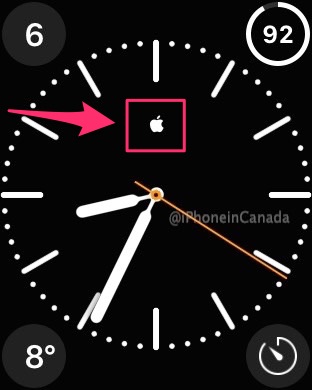
Step 1:
Open the Apple Watch app on your iPhone and select Clock > Monogram.
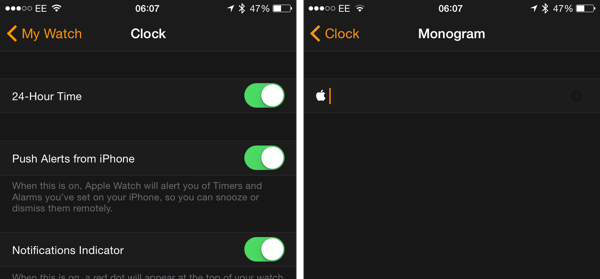
Step 2:
In the text field, simply copy this Apple logo, found here.
Step 3:
Now choose a watch face that supports monograms such as Color.
That’s it. You now have the Apple logo as your Apple Watch monogram.
Enjoy! ?
Want to see more of our stories on Google?

P.S. Want to keep this site truly independent? Support us by buying us a beer, treating us to a coffee, or shopping through Amazon here. Links in this post are affiliate links, so we earn a tiny commission at no charge to you. Thanks for supporting independent Canadian media!


For this you need an Apple Watch 😉 …. Still waiting for a status change from “processing” to “shipping”
can you put Emoji?
No, already tried
Same her, still says processing.