
You Can Now Jailbreak iOS 16.4.1 with Palera1n 2.0.0 Beta 6
Codenamed Bakepale, the latest v2.0.0 beta 6 update to jailbreak tool Palera1n has just been released, which fully supports iOS 16.4 - iOS 16.4.1 jailbreak.
Looking to jailbreak and/or unlock your iPhone 2G, iPhone 3G, iPhone 3GS, or iPod Touch? You have come to the right place!
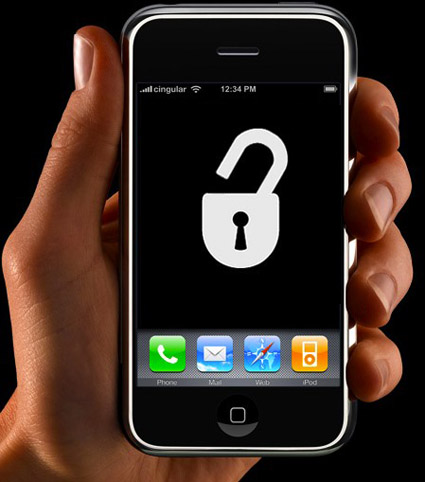
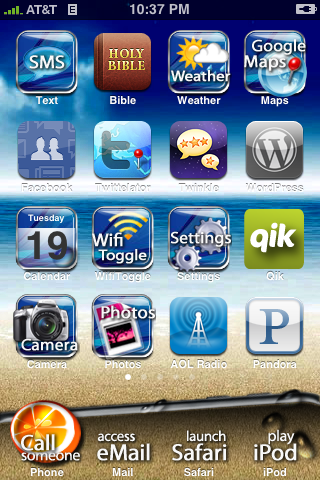
Jailbreaking is a term used that refers to modifying the software on your iPhone/iPod Touch. These modifications essentially “free” your device from the device constraints and allow you to do functions such as applying custom wallpapers, changing the way the icons look, modifying text message tones, changing the device sounds, and about 1 million other things. The list is endless. The image below is an example of what you can do with a jailbroken iPhone/iPod Touch:
Jailbreaking is accomplished by using programs such as ‘redsn0w’ (listed below). Once you do jailbreak however, it is not permanent. At any time you can restore your iPhone/iPod Touch to factory defaults and return the device back to ‘normal’. However until you do the restore, your device will stay jailbroken. Also, it goes without saying that this voids your warranty, but when you restore to factory defaults, the traces of jailbreaking are usually cleaned up.
If you want to know more about Jailbreaking, you can read all about it here.
The wireless carriers in Canada, such as Rogers and Fido, put “carrier locks” on their devices. What this does is prevent you from using the device on another wireless network. For example, you cannot take a Rogers device and put a Fido SIM card into it and vice versa.
Using similar methods to jailbreaking, one can unlock their iPhone. This allows you to “free” your device and allows the user to put any SIM card into the device. For example, if you unlock your Rogers iPhone, you can now put a Fido SIM in, or AT&T or O2 or whoever.
Unlocking is accomplished by using programs such as ‘ultrasn0w’ (listed below). Once you do the unlock however, it is not permanent. At any time you can restore your iPhone to factory defaults and return the device back to ‘normal’. However until you do the restore, your device will stay unlocked. Also, it goes without saying that this voids your warranty, but when you restore to factory defaults, the traces of the unlock are usually cleaned up.
If you want to know more about Unlocking, you can read all about it here.
Before we begin, please take some time to review the notes below as they are very important:
– The methods listed below can be followed on BOTH a PC or a Mac
– Your iPhone/iPod Touch must be updated to firmware 3.1.2 via iTunes before beginning this process.
– For users that already have a jailbroken device and want to keep their jailbroken apps, before you begin the process below, download “AptBackup” from Cydia and back up your jailbroken apps. Now connect your device to iTunes and backup your device using the iTunes backup process. After you do the jailbreak process below, redownload AptBackup from Cydia and plug your device into your computer. Using AptBackup, restore your apps.
– If you are already jailbroken and/or unlocked and have problems with WiFi, GPS or Youtube, click here.
—————
Below you will find detailed guides (so you do not miss any steps) of how to jailbreak and unlock an iPhone or an iPod Touch. There are five sections:
1.) How To Jailbreak and Unlock the iPhone 2G on 3.1.2 Firmware
2.) How To Jailbreak and Unlock the iPhone 3G/3GS on 3.1.2 Firmware
3.) How To Unlock the iPhone 3G/3GS if you are already Jailbroken and running Baseband 05.11.07
4.) How To Jailbreak the iPod Touch on 3.1.2 Firmware
5.) How To Revert Your iPhone 2G/3G/3GS or iPod Touch Back To “Normal”
—————
To jailbreak and/or unlock your iPhone 2G on the 3.1.2 firmware and so you can put in your Rogers/Fido SIM card (or any other carrier SIM), follow the steps below:
How to Jailbreak the iPhone 2G
1.) Plug your iPhone into iTunes, do a backup and then click “Update” to install firmware 3.1.2. After the update, eject your iPhone from iTunes using the “eject” button and close iTunes. Leave your iPhone connected to your computer.
2.) Click on the PC or Mac links to download Blackra1n for PC or MAC. Save the file to your computer desktop.
3.) Locate the downloaded file “Blackra1n” and double-click on it.
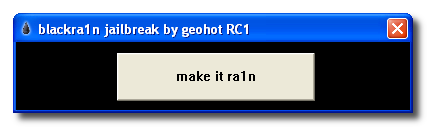
4.) Your iPhone will now enter into Recovery Mode. If iTunes opens, simply close it.
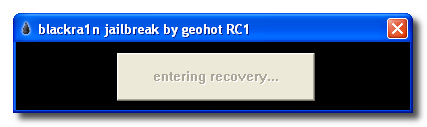
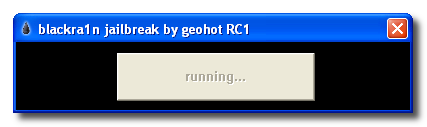
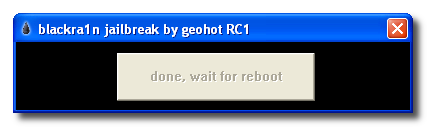
5.) After the reboot, Blackra1n will indicate that your iPhone has been jailbroken. Click “OK”. You can also close Blackra1n now if it is still open.
6.) Once at your iPhone home-screen, go to Settings > WiFi and turn on WiFi.
7.) On your iPhone home-screen, you will see a new Blackra1n icon. Tap on it.
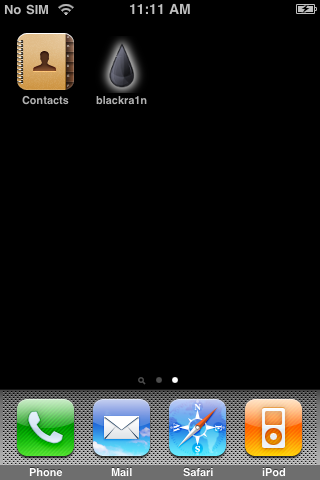
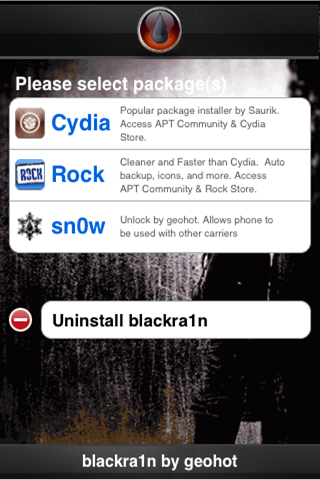
8.) When Blackra1n opens, tap on Cydia (or Rock) and tap “Install” in the top right corner.
9.) Cydia (or Rock) will now be visible on your iPhone home-screen. Your iPhone is now Jailbroken.
How to Unlock the iPhone 2G
1.) On your iPhone home-screen, tap on the Blackra1n icon.
2.) In the Blackra1n app, tap on “Cydia” to install Cydia. (If you already installed Cydia, move to Step 3)
3.) Cydia will prompt you for updates. Tap on “Complete Upgrade” and install them all.
4.) In Cydia, search for the app “BootNeuter” and install the app.
5.) Open BootNeuter and make sure the settings match the image below:
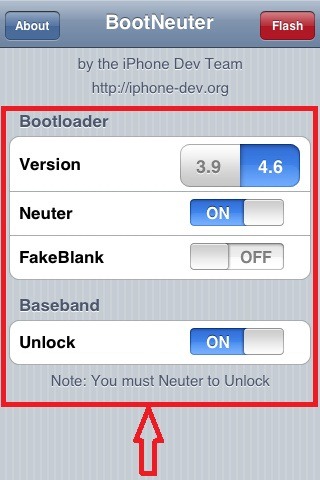 6.) When the settings match the above image, tap on “Flash” in the top right corner. The iPhone 2G will now be unlocked.

Note: You may go back into the Blackra1n app on your home-screen and use the Uninstall toggle to remove the Blackra1n app from your home-screen. This does not affect the jailbreak or unlock.
To jailbreak and/or unlock your iPhone 3G/3GS on the 3.1.2 firmware and so you can put in your Rogers/Fido SIM card (or any other carrier SIM), follow the steps below:
How to Jailbreak the iPhone 3G/3GS
1.) Plug your iPhone into iTunes, do a backup and then click “Update” to install firmware 3.1.2. After the update, eject your iPhone from iTunes using the “eject” button and close iTunes. Leave your iPhone connected to your computer.
2.) Click on the PC or Mac links to download Blackra1n for PC or MAC. Save the file to your computer desktop.
3.) Locate the downloaded file “Blackra1n” and double-click on it.
4.) Your iPhone will now enter into Recovery Mode. If iTunes opens, simply close it.
5.) After the reboot, Blackra1n will indicate that your iPhone has been jailbroken. Click “OK”. You can also close Blackra1n now if it is still open.
6.) Once at your iPhone home-screen, go to Settings > WiFi and turn on WiFi.
7.) On your iPhone home-screen, you will see a new Blackra1n icon. Tap on it.
8.) When Blackra1n opens, tap on Cydia (or Rock) and tap “Install” in the top right corner.
9.) Cydia (or Rock) will now be visible on your iPhone home-screen. Your iPhone is now Jailbroken.
How to Unlock the iPhone 3G/3GS
1.) On your iPhone home-screen, tap on the Blackra1n icon.
2.) In the Blackra1n app, tap on “Sn0w”. Your iPhone will now be unlocked.
Note: You may go back into the Blackra1n app on your home-screen and use the Uninstall toggle to remove the Blackra1n app from your home-screen. This does not affect the jailbreak or unlock.
—————
1.) On your iPhone home-screen, tap on the Cydia icon.
2.) If Cydia prompts you for updates, install them all.
3.) In Cydia, tap on the “Manage” tab at the bottom.
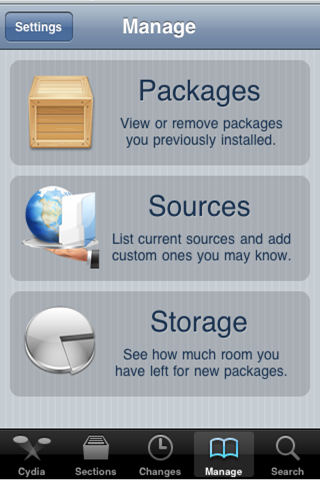
4.) Tap on the “Sources” button.
5.) Tap on the “Edit” button in the top right corner of the screen and then tap the “Add” button in the top left corner.
6.) Type in http://www.blackra1n.com and then tap “Add Source“.
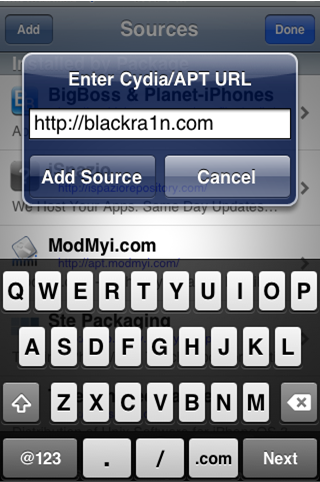
7.) Now tap on the “Done” button in the top right corner of the screen.
8.) Tap on “blackra1n” from the “Sources” List under the “Manage” tab.
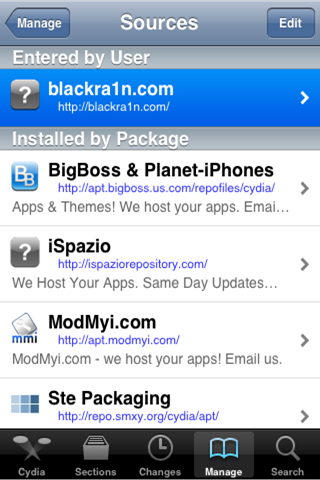
9.) Select “blacksn0w” from the list of packages and then tap “Install” in the top right corner of the screen and then tap “Confirm“.
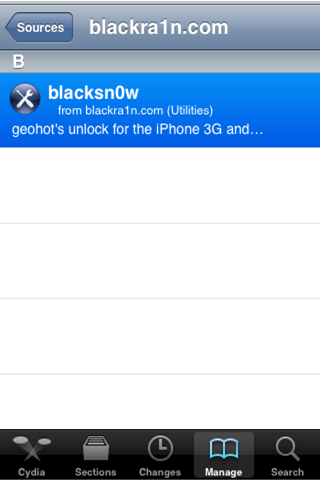
10.) After the unlock is installed, tap on “Return to Cydia“. Your iPhone is now unlocked.
—————
To jailbreak your iPod Touch on the 3.1.2 firmware, follow the steps below:
How to Jailbreak the iPod Touch
1.) Plug your iPod Touch into iTunes, do a backup and then click “Update” to install firmware 3.1.2. After the update, eject your iPod Touch from iTunes using the “eject” button and close iTunes. Leave your iPod Touch connected to your computer.
2.) Click on the PC or Mac links to download Blackra1n for PC or MAC. Save the file to your computer desktop.
3.) Locate the downloaded file “Blackra1n” and double-click on it.
4.) Your iPod Touch will now enter into Recovery Mode. If iTunes opens, simply close it.
5.) After the reboot, Blackra1n will indicate the your iPod Touch has been jailbroken. Click “OK”. You can also close Blackra1n now if it is still open.
6.) Once at your iPod Touch home-screen, go to Settings > WiFi and turn on WiFi.
7.) On your iPod Touch home-screen, you will see a new Blackra1n icon. Tap on it.
8.) When Blackra1n opens, tap on Cydia (or Rock) and tap “Install” in the top right corner.
9.) Cydia (or Rock) will now be visible on your iPod Touch home-screen. Your iPhone is now Jailbroken.
Note: You may go back into the Blackra1n app on your home-screen and use the Uninstall toggle to remove the Blackra1n app from your home-screen. This does not affect the jailbreak.
—————
So you have Jailbroken or Unlocked (or both) your iPhone 2G/3G/3GS or iPod Touch but now you want to revert to the factory fresh iPhone 2G/3G/3GS or iPod Touch. To do so, follow the steps below:
1.) Open iTunes and plug your iPhone 2G/3G/3GS or iPod Touch in via the USB. Backup your iPhone/iPod Touch if iTunes allows you to.
2.) When iTunes recognizes the iPhone/iPod Touch, click on the “Restore” button in iTunes. This will restore your iPhone/iPod Touch with fresh 3.1.2 firmware.
3.) After the restore is complete, iTunes will prompt you to Set up a New Device or Restore from Back Up from an existing backup (the backup from step 1). Choose which ever method you want and let iTunes process.
4.) After the processing is complete, your iPhone/iPod Touch will be loaded with the fresh 3.1.2 firmware or loaded with your back up that you may have chosen.
5.) Eject the iPhone/iPod Touch from iTunes using the “eject” button and disconnect the USB cable from the iPhone/iPod Touch. Turn the iPhone/iPod Touch off and then turn the iPhone/iPod Touch back on.
—————
So far I have successfully jailbroken my iPod Touch 2G and jailbroken/unlocked my iPhone 2G and iPhone 3G.
If you follow the steps above, you will have success.
Enjoy!
Want to see more of our stories on Google?

P.S. Want to keep this site truly independent? Support us by buying us a beer, treating us to a coffee, or shopping through Amazon here. Links in this post are affiliate links, so we earn a tiny commission at no charge to you. Thanks for supporting independent Canadian media!


So, quick question. I've been meaning to Jailbreak for a while now but just haven't gotten around to doing it. I have a rogers plan, so, by jailbreaking, I don't need to unlock do I? Just run Blackra1n to jailbreak and I should have service still?
Nice work, X1Zero!
That is correct. You do not need to use blacksn0w to unlock.
Right
I have trouble showing user background image via Winterboard with FoxKeh winterboard theme. Any idea why and how to solve this problem? A known bug perhaps?
I have a 3.0 ultrasnow unlocked phone and jailbreaked. I was just wondering if I update to this, how do I back up my apps downloaded from cydia? Is there anyway? or I have to download everything again 🙁 ?
Alright thanks! Just might finally jailbreak now that it is easier than ever.
Use AptBackup, just download it from cydia click on buck up then connect your phone to your computer and Make a backup then when you update your phone and jailbroken it download AptBackup and click on restore and then connect your phone to your computer and you will get all your apps from cydia again.
Wow. What an incredible post. I'm not sure I'm ready to “break” my iPhone, but I'm certainly thinking about it.
C'est excellent. Merci beaucoup!
thanks a lot bro! was really bothered about this!
Nice guide dude!
Comments @ forums… https://www.iphoneincanada.ca/forums/showthread.php?…
WIFI issues?
For people having wifi issues, i've heard a “Reset Network Settings” fixes them
You'll enjoy the iPhone even more after is JB 🙂
WOW it didn't even took 5 seconds
that's freakin crazy
WOW! That was so easy. I have certainly learnt my lesson and any future “FW upgrades” will wait unit there is a proven JB/UL solution available. I was getting a little concerned that my perfectly functioning 3.0 JB/UL phone had been lost forever but thanks to GeoHot, I now have the most up to-date version . I hope people are making a small contribution via Paypal in recognition of his work!
Hey guys! Does lockdown works with 3.1.2??????
I have 3.0 jailbreak with ultrasnow, is there any reason to go to this version, 312?
Any real advantages? Or should I just stay put?
So does it work for ipod touch 3g 8 gig this time around? model MC without having to load blackra1n everytime u want to start ur ipod???
Dang, that went really well on my ole 2G iPhone! I can now use Remote, nice!
already jailbreak and unlock!
Certainly worth it
So does this mean I can buy an iPhone 3GS tomorrow and with the latest firmware be able to unlock it?
I need an unlocked phone.
Not necessarily.
They have also changed the boot code recently which makes the jailbreak not work. If you get a phone with the older boot code, you are fine. I am running 3.1.2 but it came with 3.0.1.. no real reason to unlock as I am on contract with Rogers for a while. There are articles on the new boot code causing issues.. quick search will find them.
Yes
Right. Keep that in mind
Man that was slick
skype over 3g works no problem
WAIT !! My iphone 3Gs is bricked! All I have after running blackrain is an iphone with colored diagonal lines on the screen and I can't even turn it off or anything!
HELP !!!
Plug into iTunes > restore
Can't. The device is not even recognized on the USB port anymore. The computer sees it as an unvalid device. Can I hard-reboot the iphone?
Put into recovery mode then plug into iTunes.
I have rebooted without going in restore mode (holding both the power and home buttons until the screen went black) and the phone rebooted OK. But blackra1n didn't work. Nothing wa done to the phone. I will try on another computer and let you know.
OK! I was able to run through blackra1n. I had to use another computer and everything looks fine now. It seems that blackra1n.exe cannot do its magic if you run a virtual machine on VMWare, as was my case. Although itunes has no problem with the USB management on VMWare, blackra1n is stumbling on the configuration. Nothing bad, I suppose. I used a second computer running WinXP (not on VMWare) and blackra1n completed the jailbreak. Fiouf!
Try holding down the Home button while you plug the USB cable into
your computer with iTunes open. That should start recovery mode.
Nice work. Bet your heart skipped a beat there eh? 😉
X1Zero didnt come up with it! GEOHOT did!
Ha! Yeah, that is obvious. I just meant, nice work on the tutorial.
Umm…obviously RoryPiper meant X1Zero's tutorial. It's very clear. 😉
My pleasure!
ihave a 2g i restored to 3.1.2 using i tunes then ran blackra1n it restarted i opened blackra1n again to do the unlock and there was no option for unlock?? how do i unlock it? help please
I think it's already unlocked because that is what mine did. The
baseband is the same on the 2G
Hi there,
I did the unlock on my iphone 3gs 32 gb that i brought home with me from tokyo and it worked great and got bell service today as rogers forces u to go with a contract and bell will do month to month and for some reason…. i can't send text messages, the sending bar goes 90% to finish each time i try to send but doesn't go all the way and says message was not sent tap try again to send this message. ANYONE HELP?!??!?!
for some reason now my phone cannot detect any data network… is this maybe because bells system went up today? if anyone can help it would be appreciated, thank you..
ok basically my wifi stopped working. and its not connecting to the 3g data network either. PLEASE HELP! it recognizes my sim card and i can make and receive calls but NO DATA receiving or sending not on bells data network or my home wifi. why is this happeneing? it was working all fine up until about an hour ago.
Try a reboot, if that fails restore and jailbreak again.
I have followed the instruction above for 2g iphone. But i did not see an option for sn0w to unlock it. on ly Cydia and Rock. Can anyone please tell me what wrong with my phone? Thanks
I've followed the instruction above for my 2g iphone. but after running blackrain I did not see an option for sn0w. only shows Cydia and Rock. Can someone please tell me what I did wrong? Thanks
when i put in a tmobile sim card it tells me to connect to itunes and when i do that it tells me the sim is unsupported, so i just rolled it back to 3.0 unlocked it using redsn0w, now im going to up grade it 3.0.1 then unlock it uning redsn0w then upgrade it to 3.1.2 then run blackra1n to jailbreak it and according to what ive read it should keep unlock and jail break with blackra1n…well see
i did. forgot to backup my photo roll too. ouch. after restoring and re-jailing it and then unlocking it it worked fine. i didn't install cydia right away but soon after i did the wifi stopped working again. ridiculous.
Did you at least sync before you started? The photos will be in your
previous backup then.
Just did it. Wow, that was just waaaaaay too simple. 🙂
hi i followed all the instructions but my 2G phone lets me make only emergency calls. what did i do wrong? please anyone help!!!