
You Can Now Jailbreak iOS 16.4.1 with Palera1n 2.0.0 Beta 6
Codenamed Bakepale, the latest v2.0.0 beta 6 update to jailbreak tool Palera1n has just been released, which fully supports iOS 16.4 - iOS 16.4.1 jailbreak.
Since the iPhone 3GS jailbreaking tools aren’t out yet (they will be once firmware 3.1 is released), your iPhone 3GS looks pretty much like any other iPhone out there. Jailbreaking allows us to download themes and apply them with Winterboard. This makes our phones look pretty neat and unique.
Well, here’s something I first heard about yesterday that will make your iPhone 3GS look jailbroken (or just broken too) and unique for all you ancy people out there. All it does is make your iPhone look different from the million other 3GS units out there. I’ll stop ranting now and let you observe the following pictures to see what I’m talking about:
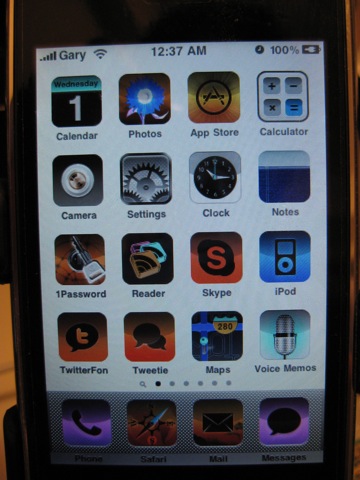
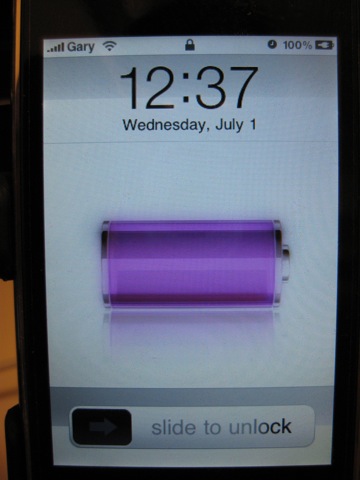

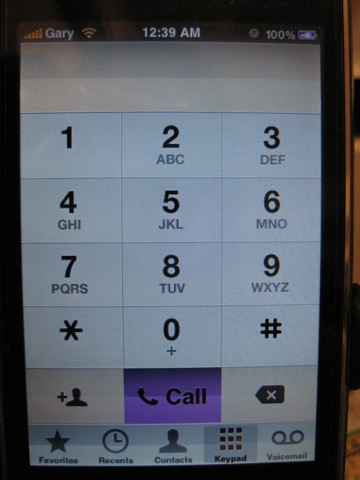
So what is this “new” iPhone 3GS “theme” I’m using above? Some of you might have already figured this out, but it’s under the new Accessibility options. Go to General–Settings–Accessibility–then toggle White on Black to ON. Presto! Your iPhone 3GS now looks totally unique and will fool your friends (the clueless ones at least). This little trick will give you 5 minutes of fun before you switch back to the original setting. Enjoy!
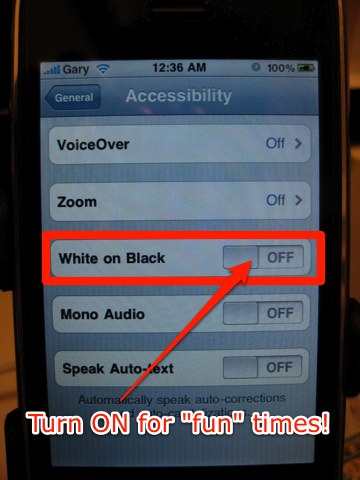

So there you have it, one little tweak that can make you “feel” like your iPhone 3GS is running a theme via Winterboard–but without the slowdowns (even though this setting is for those with visual impairments). Also, some might be wondering why I didn’t take screenshots–that’s because the white on black doesn’t appear in screenshots! I had to use my point and shoot digicam.
Want to see more of our stories on Google?

P.S. Want to keep this site truly independent? Support us by buying us a beer, treating us to a coffee, or shopping through Amazon here. Links in this post are affiliate links, so we earn a tiny commission at no charge to you. Thanks for supporting independent Canadian media!


The demo unit in the o2 store near me was like this, was a bit confused but figured it was some kind of accessibility option and sure enough it was and found the option, kinda looks cool apart from your photos wont show right.
I tried playing with a few of these settings before, it does look somewhat better lol
I still want that JAILBREAK! :):):) EH iPhoneFan!
Cheers
Is “Gary” an actual carrier?
No. The reason that is like that is because when his iphone was hacked, the banner carried over in the backups. Mine says “X1”.
Mine also carried over, so did the emoji unlock.
“Gary” is a carrier…
very cool deal they offer too- get iPhone 3Gs for the cost of ten albums for a penny.
Gary is one of the new GSM carriers that I signed a lifetime contract with. However, they not trigger frequent “FML’s” like Rogers. 😉
Ha! I hadn’t played with those controls, until just now. Changed it right back, though. Cool that they’ve added these features, for the visually impaired.
Happy belated Canada Day. For a blog that prides on being canadian, I’d thought that there would be some mention of the day here…
Happy Canada Day to you and everyone else too, Kai! I had a shout out on Twitter but forgot to mention it on the blog 😉
Go canada!!
The demo unit in the o2 store near me was like this, was a bit confused but figured it was some kind of accessibility option and sure enough it was and found the option, kinda looks cool apart from your photos wont show right.
I tried playing with a few of these settings before, it does look somewhat better lol
I still want that JAILBREAK! :):):) EH iPhoneFan!
Cheers
Is “Gary” an actual carrier?
“Gary” is a carrier…
very cool deal they offer too- get iPhone 3Gs for the cost of ten albums for a penny.
Ha! I hadn’t played with those controls, until just now. Changed it right back, though. Cool that they’ve added these features, for the visually impaired.
No. The reason that is like that is because when his iphone was hacked, the banner carried over in the backups. Mine says “X1”.
Mine also carried over, so did the emoji unlock.
Gary is one of the new GSM carriers that I signed a lifetime contract with. However, they not trigger frequent “FML’s” like Rogers. 😉
Happy belated Canada Day. For a blog that prides on being canadian, I’d thought that there would be some mention of the day here…
Happy Canada Day to you and everyone else too, Kai! I had a shout out on Twitter but forgot to mention it on the blog 😉
Go canada!!