P.S. Want to keep this site truly independent? Support us by buying us a beer, treating us to a coffee, or shopping through Amazon here. Links in this post are affiliate links, so we earn a tiny commission at no charge to you. Thanks for supporting independent Canadian media!
Subscribe
22 Comments
Oldest
NewestMost Voted
Ecua3000
14 years ago
Can this be done without the original SIM? I have an AT&T phone without a SIM and need to unlock to use on Rogers.
Yes it should.
I have not tried it, but you should be able to put in the Rogers Sim, launch SAM, deactivate phone under utilities, then make sure SAM is enabled like in the video, make sure it’s on auto-detect, and then attempt activation. If you get errors, just keep trying activation and it should work.
Again, I have not tried this, but it should work.
I’m not sure – so here are a few suggestions I hope will help.
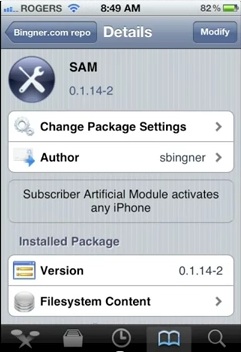
Try re-installing SAM.
Make sure you’re running the newest version of SAM
Try uninstalling all the SAM items that were downloaded from the BINGNER repo, and then re-installing SAM.
That’s all I can think of right now.
did it work for you…because i am in same situation.
I hae bell locked phone but i dont have bell sim. I want to use my rogers sim on this phone. Let me know if it worked for you.
Thanks
I believe it should although I can’t test it as I’m on 5.0.1
roadcarver
14 years ago
Thanks for this informative video tutorial. I thought you had to use iTunes to activate? Or was booting and connecting to iTunes only required if you want to use your jailbroken tweaks?
My phone is currently locked to Bell but I dont have bell sim and i have a Rogers sim that I want to use for this phone. I installed sam and keep trying to activate but I am getting error msg. Can you please help? Do I have to have bell sim in order to unlock?
I should work with any sim. I’ve tried it with Bell and Telus and it works.
Make sure you are running the latest version of SAM.
If that doesn’t work, uninstall all the SAM items that were installed, and re-install SAM
Ean
14 years ago
At the reactivation step, my screen goes black with a “loading” icon, then goes back to the home screen.
ATT iPhone4 / 5.0.1I even have an ATT sim. Didn’t help.
I click “reactivate”, the “attempting” window appears and it goes to the black loading screen within a second. When the lock screen comes up, it says no service.
Is the base band an issue at all?
Jason
14 years ago
Hi Kris,
I did not see in the video that your are connected to iTunes? do I need iTunes to activate? or it can be done without having the phone connected to computer?
This can be done without iTunes. Make sure you have the latest version of SAM.
Ztauby
14 years ago
whenever i take out my sim i lose service…..
Jordyn
14 years ago
Will this work with 5.1.1? As well, what if I have a phone that is locked to one carrier (say Bell) but not actually activated? (IE I don’t have a Bell account). I tried the method to use a Fido SIM, but it wasn’t working. Any hints??
ramsed
14 years ago
what s up? any news from bell
sunny
13 years ago
hi I just want to know could I unlock iphone 5 from bell network
spartacuswines
13 years ago
Hi Gary, as you mentioned the SAM Notification “Activation reports Error:’ continues to pop up. I have hit the “Attempt Activation” button more times than I can count and I still receive the error and I can’t get past it. Do you have any idea’s?
British Columbia is suing OpenAI in California, accusing the company of failing to warn police about the Tumbler Ridge shooter's ChatGPT activity before the February attack.
Neuralink's new video shows Terry, an ALS patient and the third participant in its VOICE trial, communicating by thinking words his brain implant turns into speech.



Can this be done without the original SIM? I have an AT&T phone without a SIM and need to unlock to use on Rogers.
Yes it should.
I have not tried it, but you should be able to put in the Rogers Sim, launch SAM, deactivate phone under utilities, then make sure SAM is enabled like in the video, make sure it’s on auto-detect, and then attempt activation. If you get errors, just keep trying activation and it should work.
Again, I have not tried this, but it should work.
hi kris! i did all the steps that you’ve shown in your video but nothing happens. it always says error on it. what should i do?
Hi, I got the same problem, always the error message
I’m not sure – so here are a few suggestions I hope will help.
Try re-installing SAM.
Make sure you’re running the newest version of SAM
Try uninstalling all the SAM items that were downloaded from the BINGNER repo, and then re-installing SAM.
That’s all I can think of right now.
did it work for you…because i am in same situation.
I hae bell locked phone but i dont have bell sim. I want to use my rogers sim on this phone. Let me know if it worked for you.
Thanks
Does it work on IOS 4.1? Baseband 02.10
I believe it should although I can’t test it as I’m on 5.0.1
Thanks for this informative video tutorial. I thought you had to use iTunes to activate? Or was booting and connecting to iTunes only required if you want to use your jailbroken tweaks?
This newest version of SAM doesn’t require the computer process.
Awesome, thanks.
My phone is currently locked to Bell but I dont have bell sim and i have a Rogers sim that I want to use for this phone. I installed sam and keep trying to activate but I am getting error msg. Can you please help? Do I have to have bell sim in order to unlock?
I should work with any sim. I’ve tried it with Bell and Telus and it works.
Make sure you are running the latest version of SAM.
If that doesn’t work, uninstall all the SAM items that were installed, and re-install SAM
At the reactivation step, my screen goes black with a “loading” icon, then goes back to the home screen.
ATT iPhone4 / 5.0.1I even have an ATT sim. Didn’t help.
After updating SAM…
I click “reactivate”, the “attempting” window appears and it goes to the black loading screen within a second. When the lock screen comes up, it says no service.
Is the base band an issue at all?
Hi Kris,
I did not see in the video that your are connected to iTunes? do I need iTunes to activate? or it can be done without having the phone connected to computer?
This can be done without iTunes. Make sure you have the latest version of SAM.
whenever i take out my sim i lose service…..
Will this work with 5.1.1? As well, what if I have a phone that is locked to one carrier (say Bell) but not actually activated? (IE I don’t have a Bell account). I tried the method to use a Fido SIM, but it wasn’t working. Any hints??
what s up? any news from bell
hi I just want to know could I unlock iphone 5 from bell network
Hi Gary, as you mentioned the SAM Notification “Activation reports Error:’ continues to pop up. I have hit the “Attempt Activation” button more times than I can count and I still receive the error and I can’t get past it. Do you have any idea’s?
Thanks,