
Asus ROG Xbox Ally X20 Review: A Gorgeous Handheld at a Steep Price
The ROG Xbox Ally X20 finally features an OLED screen, plus redesigned controls and improved thumbsticks.
iPhone 2.0 firmware has already been “cracked”, but the firmware so far has only been available to iPhone developers to use. With tools such as Pwnage, installing iPhone 2.0 firmware will be a breeze once it’s available. For those people eagerly waiting till July 11th for their iPhone 3G, your App Store time is quickly coming around the corner (Rogers & Fido FTW).
What about for the rest of us who want to get that “2.0” look on our original iPhones? Well, with the 3rd party app called Switch-It. The purpose of the program is to give your first generation iPhone a more “2.0” look, by changing around some graphics.
The most notable feature is the your Installer icon, which will turn into the App Store icon. “Yay, look at me, I have iPhone firmware 2.0!”. Also, the calculator layout is also changed, and aside from that not much else is different.

Switch-It reminds me of the days of modifying imports, where you would see “VTEC” stickers plastered all over non-VTEC Hondas/Acuras (so called ricers). Anyways, Switch-It is available on Installer and if you’re looking for a cheap chuckle on a Saturday morning, give this app a try!
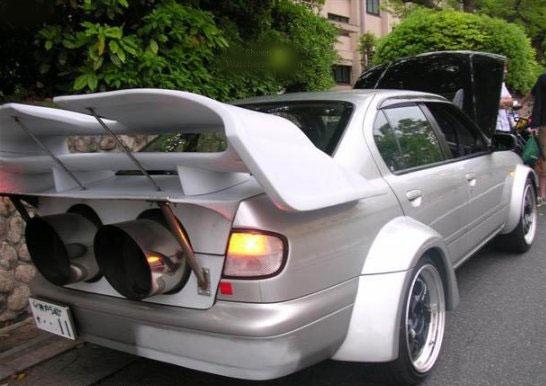

When he’s not playing the diamond-studded evil dude in Die Another Day, Rick Yune loves to live his 2Fast 2Furious lifestyle a quarter mile at at time. For those 10 seconds or less, he’s free (props to Vin Diesel for the…err…legendary quote!).
If you enjoyed this post, please subscribe to my RSS feed, so you won’t miss any updates! You can also subscribe via email and have daily updates sent to your Inbox! Want more? Find out what I’m doing right now! Follow me on Twitter!
Want to see more of our stories on Google?

P.S. Want to keep this site truly independent? Support us by buying us a beer, treating us to a coffee, or shopping through Amazon here. Links in this post are affiliate links, so we earn a tiny commission at no charge to you. Thanks for supporting independent Canadian media!


I’m eager to try switch-it, but cannot find it in installer. Does this still exist? If not how does one in install the app store on an unlocked iphone? Curious,
alex
Not sure if Switch It still exists. It’s so easy to get the App Store now.
The short version:
1. Update to 2.2 firmware in iTunes.
2. Jailbreak/Unlock using QuickPwn 2.2
3. Ta da!!
I’m a new iPhone user, and after two weeks of using my iPhone the App Store icon dissapear!
How could I do reinstall it ???
Please help me…
I’m eager to try switch-it, but cannot find it in installer. Does this still exist? If not how does one in install the app store on an unlocked iphone? Curious,
alex
Not sure if Switch It still exists. It’s so easy to get the App Store now.
The short version:
1. Update to 2.2 firmware in iTunes.
2. Jailbreak/Unlock using QuickPwn 2.2
3. Ta da!!
Not sure if Switch It still exists. It’s so easy to get the App Store now.
The short version:
1. Update to 2.2 firmware in iTunes.
2. Jailbreak/Unlock using QuickPwn 2.2
3. Ta da!!
I’m a new iPhone user, and after two weeks of using my iPhone the App Store icon dissapear!
How could I do reinstall it ???
Please help me…
I’m a new iPhone user, and after two weeks of using my iPhone the App Store icon dissapear!
How could I do reinstall it ???
Please help me…
My app store icon gone i cant find at my iphone please help me
my iphone 3gs itunes and app store icon dissappear ! Can anyone help me how to get it back ?
I wish I new how to install it myself my phone did the se as yours what do you do did you ever find out how you put your apps back on the front of your phone