One of the major benefits of the 2.0 firmware on the iPhone is the addition of the App Store. There have been some really cool apps that we’ve seen (and some horrible ones too), but for the most part you need to sift through the junk to find the quality ones.
Today we’re going to check out FlyCast, a free app that streams internet radio to the iPhone! Formerly known as FlyTunes, the app works on the original first gen and iPhone 3G. You can listen to radio, podcasts, and even videos. It’s touted as the best free internet radio app now with all its features.
Highlights of FlyCast:
– select from over 520+ channels of music, news, and sports. Satellite-radio quality audio
– works well on EDGE, even better on 3G and WiFi
– some stations are on demand! This lets you choose and skip songs.
– lack of Canadian content is a bit disappointing
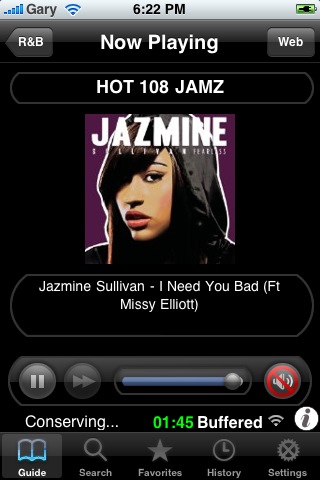
– the app buffers a stream of content, so you can fast forward and rewind your song
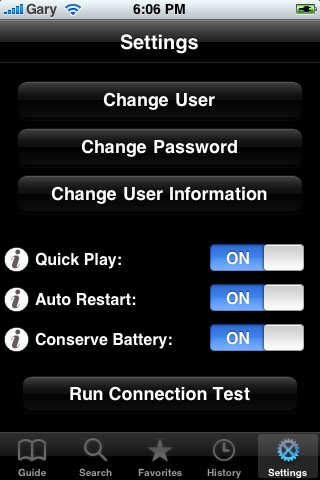
If only this app could run in the background, it would be even better. Okay so FlyCast does run in the background (thanks magpie). Turn off “Quick Play” in the settings tab. Select a station and then the app will launch it via Quicktime, then run in the background! Voila, you can now do whatever you want while listening to your tunes!
In order to add favorites (thanks Christophe):
1) register on the FlyTunes website.
2) click on the link you receive by mail to validate your registration
3) enter your email and password in the Flycast application settings
4) click on the white star on the left of the radio title. This star only appear if you do all of this.
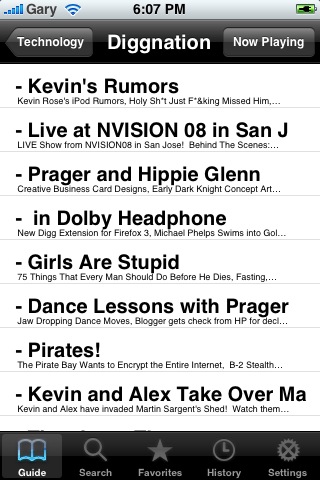
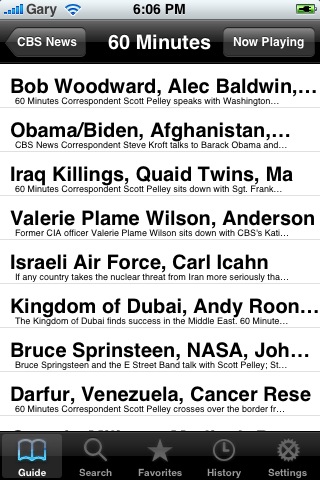
What I love about FlyCast is the huge selection of channels out there. You can listen to diggnation, CBS, CNN, 60 Minutes, unlimited radio, talk, weather, traffic, and stations from all over the USA. Make sure you have a healthy data plan or are using WiFi when you’re running FlyCast. Maybe this is my time to hit the 6GB mark…who wants to try with me? 😉
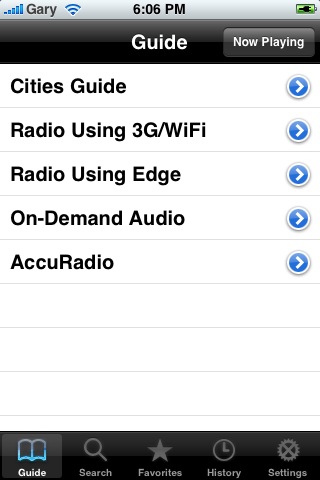
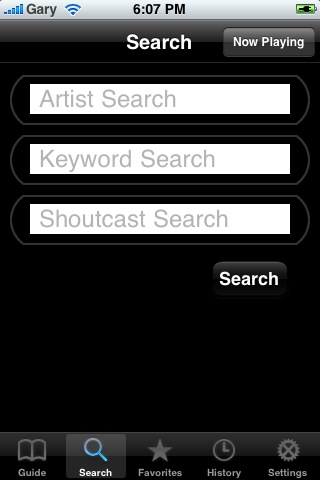
Check out the following picture gallery:

Right now the app is free via the App Store so get your hands on it now! If you want to chat more about FlyCast, make sure you join the discussion at the iPhoneinCanada.ca Forums! Click here to register!
**Looking for an iPhone 3G case? Go get an invisibleSHIELD, the strongest protection for your iPhone backed by a 30 day moneyback guarantee, lifetime replacement warranty, and FREE shipping! Use coupon code iphoneinca for 20% off your purchase! Order today!**
If you enjoyed this post, please subscribe to my RSS feed, so you won’t miss any updates! You can also subscribe via email and have daily updates sent to your Inbox! Want more? Find out what I’m doing right now! Follow me on Twitter!



Just got this app, will try it out. I’ve been using AOL radio and have managed to use 1.8gb’s total in the past month. They generally use 30-50 mb’s per hour depending on the quality of the stream so it can add up fast.
I found this app yesterday, its amazing, do people actually pay for radio these days?
Works great, cant go wrong with this one.
Pretty cool app! Trying it right now while waiting for my dogs to finish grooming!! I actually found an African station!! Will be sure to watch data!!! 🙂
I am not able to find this app on Itunes. Any suggestion, I tried both “Fly cast” and “Fly tunes”.
If you go to Top 25 Free apps it should be near the top. Let me know!
All of On Demand Audio feeds (like 60 Minutes) restart on me after like 2-3 minutes! So they’re basically non-functional.
Nasir- try searching for it as one word.
its now the number 2 on the top free apps. it should beat out Air Sharing for the number one spot soon 🙂
App runs in the background. Turn off QuickPlay in the Settings tab. If it asks you to stop playing the current station, say OK. Then pick a station to play and wait about 15 secs. The app will go thru some gyrations with quicktime and safari and then come back to the app and start playing the station. Now exit the app. Still playing! Same process to start a new station so this is best used if you are going to listen to one station for awhile.
This application works perfectly, better than Tuner for which I paid 7$! Does someone know how to add a station to the favorite? I didn’t find the trick.
When the station is playing in the player, click on the white star in the top right corner until it turns red. Now it is a favorite.
There isn’t any white star in the top right corner and anywhere in the iPhone version… Still stuck to setup a favorite
Actually, it CAN run in the background.
If you see in the pictures in the post above, there is a “quick play” option. Turn that option off and it will launch your Safari browser which has plays through there. Since Safari can run in the background, your music plays in the background as well.
Just the app I was looking forward too, as well as others I’m sure – no wonder it went up to the “top apps” list sooooo fast.
Top left (sorry) corner when the player is playing definitely has a white star next to the station name. Touch it and make it red. Favorites works fine.
So it’s clear, you HAVE TO SIGN UP with flycast to get this favourites option. I signed up on their site, but I suppose it is the same if you sign up on the iphone too (they will send a verification email).
Only once you do and you’re logged in this icon will show up.
Thanks for your comments above. I was able to get the favorite options. To resume, you need to:
1) register on the FlyTunes website.
2) click on the link you receive by mail to validate your registration
3) enter your email and password in the Flycast application settings
4) click on the white star on the left of the radio title. This star only appear if you do all of this.
It definitely does not. How am I supposed to add favorites????
I got it, its beautiful and awsome :):)
DLed it over the weekend & LOOOOOVE IT! Incredibly easy to use ‘cept for tha background play. Magpie – Thanks for the instructions. Tried it, it worked, not sure how often I’ll be using it though. I do like being able to access the web w/in the app.
Got the favorites star! Thanks for the clear explanation Christopher! 🙂
Is there a way to add a radio station that isn’t on the list of available stations?
eg a radio station from my home town. this radio station allows you to listen to their station online but it requires you to have WMP and we dont have it on our iphone.
Any ideas?
Thanks
You can add any shoutcast channel using the search feature.
Just got this app, will try it out. I’ve been using AOL radio and have managed to use 1.8gb’s total in the past month. They generally use 30-50 mb’s per hour depending on the quality of the stream so it can add up fast.
Just got this app, will try it out. I’ve been using AOL radio and have managed to use 1.8gb’s total in the past month. They generally use 30-50 mb’s per hour depending on the quality of the stream so it can add up fast.
Just got this app, will try it out. I’ve been using AOL radio and have managed to use 1.8gb’s total in the past month. They generally use 30-50 mb’s per hour depending on the quality of the stream so it can add up fast.
Just got this app, will try it out. I’ve been using AOL radio and have managed to use 1.8gb’s total in the past month. They generally use 30-50 mb’s per hour depending on the quality of the stream so it can add up fast.
I found this app yesterday, its amazing, do people actually pay for radio these days?
Works great, cant go wrong with this one.
I found this app yesterday, its amazing, do people actually pay for radio these days?
Works great, cant go wrong with this one.
I found this app yesterday, its amazing, do people actually pay for radio these days?
Works great, cant go wrong with this one.
Pretty cool app! Trying it right now while waiting for my dogs to finish grooming!! I actually found an African station!! Will be sure to watch data!!! 🙂
Pretty cool app! Trying it right now while waiting for my dogs to finish grooming!! I actually found an African station!! Will be sure to watch data!!! 🙂
Pretty cool app! Trying it right now while waiting for my dogs to finish grooming!! I actually found an African station!! Will be sure to watch data!!! 🙂
I am not able to find this app on Itunes. Any suggestion, I tried both “Fly cast” and “Fly tunes”.
I am not able to find this app on Itunes. Any suggestion, I tried both “Fly cast” and “Fly tunes”.
All of On Demand Audio feeds (like 60 Minutes) restart on me after like 2-3 minutes! So they’re basically non-functional.
Nasir- try searching for it as one word.
I am not able to find this app on Itunes. Any suggestion, I tried both “Fly cast” and “Fly tunes”.
All of On Demand Audio feeds (like 60 Minutes) restart on me after like 2-3 minutes! So they’re basically non-functional.
Nasir- try searching for it as one word.
If you go to Top 25 Free apps it should be near the top. Let me know!
If you go to Top 25 Free apps it should be near the top. Let me know!
If you go to Top 25 Free apps it should be near the top. Let me know!
its now the number 2 on the top free apps. it should beat out Air Sharing for the number one spot soon 🙂
its now the number 2 on the top free apps. it should beat out Air Sharing for the number one spot soon 🙂
App runs in the background. Turn off QuickPlay in the Settings tab. If it asks you to stop playing the current station, say OK. Then pick a station to play and wait about 15 secs. The app will go thru some gyrations with quicktime and safari and then come back to the app and start playing the station. Now exit the app. Still playing! Same process to start a new station so this is best used if you are going to listen to one station for awhile.
App runs in the background. Turn off QuickPlay in the Settings tab. If it asks you to stop playing the current station, say OK. Then pick a station to play and wait about 15 secs. The app will go thru some gyrations with quicktime and safari and then come back to the app and start playing the station. Now exit the app. Still playing! Same process to start a new station so this is best used if you are going to listen to one station for awhile.
App runs in the background. Turn off QuickPlay in the Settings tab. If it asks you to stop playing the current station, say OK. Then pick a station to play and wait about 15 secs. The app will go thru some gyrations with quicktime and safari and then come back to the app and start playing the station. Now exit the app. Still playing! Same process to start a new station so this is best used if you are going to listen to one station for awhile.
This application works perfectly, better than Tuner for which I paid 7$! Does someone know how to add a station to the favorite? I didn’t find the trick.
This application works perfectly, better than Tuner for which I paid 7$! Does someone know how to add a station to the favorite? I didn’t find the trick.
When the station is playing in the player, click on the white star in the top right corner until it turns red. Now it is a favorite.
When the station is playing in the player, click on the white star in the top right corner until it turns red. Now it is a favorite.
There isn’t any white star in the top right corner and anywhere in the iPhone version… Still stuck to setup a favorite
There isn’t any white star in the top right corner and anywhere in the iPhone version… Still stuck to setup a favorite
Actually, it CAN run in the background.
If you see in the pictures in the post above, there is a “quick play” option. Turn that option off and it will launch your Safari browser which has plays through there. Since Safari can run in the background, your music plays in the background as well.
Just the app I was looking forward too, as well as others I’m sure – no wonder it went up to the “top apps” list sooooo fast.
Actually, it CAN run in the background.
If you see in the pictures in the post above, there is a “quick play” option. Turn that option off and it will launch your Safari browser which has plays through there. Since Safari can run in the background, your music plays in the background as well.
Just the app I was looking forward too, as well as others I’m sure – no wonder it went up to the “top apps” list sooooo fast.
Actually, it CAN run in the background.
If you see in the pictures in the post above, there is a “quick play” option. Turn that option off and it will launch your Safari browser which has plays through there. Since Safari can run in the background, your music plays in the background as well.
Just the app I was looking forward too, as well as others I’m sure – no wonder it went up to the “top apps” list sooooo fast.
Top left (sorry) corner when the player is playing definitely has a white star next to the station name. Touch it and make it red. Favorites works fine.
Top left (sorry) corner when the player is playing definitely has a white star next to the station name. Touch it and make it red. Favorites works fine.