Four New Owned Games Available to Stream Via Xbox Cloud Gaming
Microsoft has added four new titles to Xbox's ever-expanding "Stream your own games library" for Xbox Cloud Gaming including Bloodstained: Ritual of the Night.
I can hear the cries for help already. But thee worry no more.
Read about the new Rogers/Fido Tethering policy here.
So can it be prevented…the short answer: maybe.
Before we begin, the policy only really negatively affects Rogers/Fido customers with a 500MB Data plan that have added or are going to add a 500MB Data plan. So this post is for you guys.
If you have a 1GB Data plan or higher already or are planning on getting a 1GB or higher Data plan, you can ignore this post entirely and read this one instead.
What is currently happening is most of the Rogers/Fido customers that are running version 3.0 iPhone software released at WWDC have the Internet Tethering option blocked when they try and access Internet Tethering. It is blocked in Beta 3.0 and will be blocked in the official June 17, 2009 release of 3.0 as well.
Customers with a 500MB Data plan that have added or are going to add a 500MB Data plan will not be able to call in to Rogers/Fido and get tethering enabled by Rogers/Fido unless they upgrade their data plan to atleast a 1GB Data plan. I don’t know about you, but I like my 500MB and do not plan on spending more.
However, if you have a 1GB Data plan or higher already or are planning on getting a 1GB or higher Data plan, you can ignore this post entirely and read this one instead.
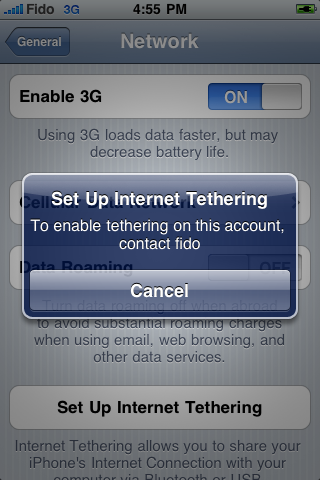
The error message that Rogers/Fido customers are getting on their 3.0 iPhone is:
Set Up Internet Tethering
To enable tethering on this account, contact Rogers (or Fido)
So it would seem that this is the method in which Rogers/Fido will control this new tethering policy.
The way they do this is through iTunes. Rogers/Fido have what are called IPCC files or “iPhone Carrier Configuration” files. These files are loaded onto Rogers/Fido iPhone’s and give you MMS, Tethering, etc.
In this case, in order to enable tethering, you must call in to Rogers/Fido, have them place an “internet tethering promotional SOC code” (pronounced “sock”) on your account and then tethering will be enabled. The only catch is this is where Rogers/Fido get you because remember, if you have a data plan less than 1GB, Rogers/Fido will not activate tethering.
I like to call this “Cash Grab” because there should be no reason why you cannot tether on a 500MB data plan.
So how do you avoid this? The answer is get a custom Rogers mobileconfig profile.
I have been using a custom Rogers mobileconfig profile throughout all of the Beta periods of OS 3.0 and to this day I have tethering enabled and working fine on my 500MB data plan (I also have MMS working fine). So it would seem that as long as you have the custom mobileconfig profile, you’re all good!
Do not worry if you already downloaded the 3.0 software and tethering is blocked. All you need to do is get the custom updated mobileconfig profile.
Proceed at your own risk. Playing around will this stuff can (but unlikely) negatively effect your wireless bill
Here are the steps to activate tethering on your iPhone 3G/3GS with OS 3.0 without having to call Rogers/Fido or increase your monthly fee and data plan to 1GB or higher:
1.) Ensure you have an iPhone 3G/3GS running OS 3.0 and atleast a 500MB data plan
2.) Click here on your iPhone 3G/3GS and choose your carrier, Rogers or Fido, and then tap “Install”.
3.) Ensure the profile is installed by going from your home-screen to Settings > General. Scroll to the bottom and tap “Profile”. You should see the “rogers_com.mobile” profile.
Want to see more of our stories on Google?

P.S. Want to keep this site truly independent? Support us by buying us a beer, treating us to a coffee, or shopping through Amazon here. Links in this post are affiliate links, so we earn a tiny commission at no charge to you. Thanks for supporting independent Canadian media!


Or using your own words above:
I like to call this “Cash Grabâ€.
Robbers just never has enough money coming in! Stupid! Stupid! Stupid!
Looks like I wont be tethering lol I only use Wifi at the moment, I don’t think my plan even contains Data lol I don’t want to pay more monthly, I like my price right now! 🙂
If I were going to pay for a Data plan, it would be the 6G promotion again or see whats best for the buck!
Rogers just gave me 6GB for $30 on a three year plan. And yes the tethering here in Van is fast – 300K sustained download
Thats awesome!
Coming this Friday I think im going to sign on board with the whole iPhone 3GS 32GB package and get the 6GB data all at once since everything now a days is 3 year contracts. No more living in the whole with free WIFI haha
I have had the 6GB plan since day 1 and my usage is at sent: 514MB and received: 5.9GB. That’s 11 months of usage. I have been using PDAnet and the OS3.0 beta for tethering for the last couple of months. 1GB/month is plenty for tethering.
I’m running OS 3.0 GM right now on Fido and I don’t get the popup when I browse to the network section of settings > general. I’ll try calling them.
One question about the .ipcc file: How is that generated? is it when you sync on itunes or is it pushed to the phone when you reboot? MMS is turned on for me now and I’m sure it wasn’t there a few days ago.
I’m also running 3.0 GM on my iPhone 3G. I called Fido today to ask them to enable tethering. They basically said it was out of their control 🙁
I’ll try again when i have some more time and ask about this “internet tethering promotional SOC codeâ€.
Hey everyone. I have a quick question. Say I have mms enabled, on my iPhone 3g, how much does it cost to use mms on fido, and like how does fido monitor it…? I was afraid to try it out because I thought I would get charged like crazy. Someone whose done this pls reply. Thanks.
Hey i downloaded a rogers ipcc file and downgraded my iTunes but when ever i try to do option+ check for updates the ipcc file is grayed out.. i have changed the extention to ipcc from .zip so i dunno whats going on
@kfricke — I’ve found the exact same thing. And X1Zero asks for a donation for his customized Rogers IPCC file. I think I’ll wait for next Friday.
Waiting is a fine solution but remember though, if you have 500MB data plan, Rogers/Fido will not enable tethering for you unless you add a 1GB data plan starting at $30/month. Then you add VM/CallerID and etc to that because no 1GB data plans come bundled with additional features and it adds up quickly.
i am just ending up calling rogers i have the 6 gb plan anyway so its not a problem i just wanted too do it without talking to rogers lol
thanks
so i called rogers and after talking to 3 different people and finally reaching their so called iPhone expert he stated that apple wont let rogers enable tethering until jun 17th which i think is bs. The first person i talked to added it to my account i was just wondering how the iphone software was supposed to change and enable tethering after i called them but no one there could answer that question.
With the IPCC file. A new one will be pushed to your iPhone next week to enable tethering if you have a 1Gb data plan or higher and have the internet tethering SOC code on your account.
thanks now i understand thank you.. if rogers only told me this i could have saved time
Yea I asked about the tethering option at a Rogers Wireless yesterday, and was told Rogers/Fido wasn’t gonna allow tethering on the iPhone. Further asked about 3G which is what I had, and was still told it ain’t happaining.
Called Rogers service told again 3G would’nt work, due to it missing something hardware specific by the rep’s supervisor. According to the super it was a feature meant for 3G[S]…
So could someone with the Beta I’ve heard about clear this confusion Rogers has started for me, or confirm it.
If you have the right setup, you can tether fine on the 3G.
I’ve been tethering using 3.0 for a few months now and even before that using PDAnet on my 3G
Me too. I don’t have PDAnet anymore though, because I plugged my 3.0 into itunes and BAM, new carrier settings that enabled tethering. Done.
Hey there, great article and ipcc file… only thing… when I updated the ipcc file I now lost the photo icon in my messages (for MMS). tethering works, but now I lost that MMS capability. any ideas?
thanks!!
Your IPCC is not the right one.
Now that we will will be able to use tetheribg on our phones, will Rogers allow VPN throught the APN without charging 10$ a month to add the option
This is a very cool way to get tethering and MMS working in the current GM version of 3.0.
Go to this address on your iPhone (Only works on 3.0 GM), click on the Rogers or Fido link. And bingo — you’re done!!
http://www.phonetweaks.com/canadian-carriers/8252-enable-tethering-fido-rogers-iphone.html
(It downloads a network profile which can very very easily be removed if you find Rogers or Fido release a different solution next week).
I just ran it and it works!!! Very cool.
To confirm, this method works great. Got tethering set up in no time
I just did this and it works, I’m using it right now. I’m on rogers, and using OSX 10.4.11 through bluetooth.
Very cool.. thanks!
It works on fido in Vancouver. I’m tethered now. From the forum it’s being reported that visual voicemail doesn’t work. There were 2 .ipcc files floating around, one where mms worked and one where vvm worked. I guess this is the former.
Andrew
Yeah — the whole hassle of getting the proper version of iTunes, and the proper IPCC file that enabled BOTH tethering AND MMS is so easily solved with the phonetweaks.com link above. And it being able to remove the “hack” without having to revert to the Original IPCC is comforting. Way to go phone tweats dudes (and dudettes).
I just ran speedtest on my tethered phone. When I ran it before the owner of the IP range was listed as Rogers Cable (im on fido). Then it was Rogers Wireless this morning. Now I’m getting Metrix Interlink? Also, the geocoding is showing Montreal, QC rather than Vancouver.
http://www.speedtest.net/result/494646957.png
WHO FUCKING CARES???
Works fine on both Mac and PC (Windows7 RC). When the device was paired, Windows complained about not having device driver, but you can just ignore this and it works ;-). Visual V/Mail alerts don’t work while the IPCC file from phonetweeks is loaded, but one can just remove it, and add it back in when one wants the tethering capabilities.
phonetweeks fixed the ipcc file so now on my FIDO phone, tethering can be enabled with no loss of functionality to vvm or mms!
Today when I got home from work and opened Itunes a message showed up that there is a carrier update for itunes so I decided to agree. when I synced my Iphone the tethering was enabled now and im running gm 3.0 on a 6gb plan.
I just tried this. And I can confirm it’s right! Update!
I can confirm the above post. Just connect the iphone and check for updates in itunes.
Are you on Rogers or Fido? I got the update, but no tethering yet. I’m on Fido.
I got the carrier update but tethering isn’t working. I probably messed it up with all those .carrierprofile files i installed. I’m restoring now to see if that helps.
I’m on Rogers . I also noticed that when I tether the data usage counter doesn’t register any extra mbites . That has me a bit worried cause I can probably exceed my 6 gb an not know about it . I don’t know if it’s just a gm 3.0 glitch and tomorrow’s update will be fixed or will it never register the tethered data.
I’m on rogers and using the phonetweaks ipcc and my data counter works. Haven’t updated with itunes yet.
For those of you having trouble (I’m on Fido). Remember that you need a plan of at least 1gb or more. If you do and it’s still not working then I suggest resetting the network settings.
Settings>General>Reset>Reset Network Settings
Note: This will also reset any Wifi password you had put in. You’ll need to re-enter them.
Hope that helps.
You dont necessarily need a 1GB or higher data plan. If you have that custom IPCC file, you can tether no matter what data plan you have.
@Tilk
I didn’t notice that yet. I’m pretty sure mine was counting. I’ll double check later. But even if it wasn’t if memory serves me correctly. You should get an alert that you’re approaching your data limit. Maybe X1Zero can confirm that one for us.
@X1Zero,
True. I should have been more clear. My advice was for people who got the official ipcc via iTunes. Anyone else just use the phonetweaks ipcc works great.
@Tilk
I just tested tethering to see if the data counter would work. And I got the same result as you. However people with the custom ipcc aren’t having a problem with it. Let’s wait for tomorrow and see if anything changes. Problem with ipcc file?
I just restored my phone with a legit iTunes 3.0 firmware and my data counter still doesn’t work .
What gives, I’d really feel much better tethering if I Knew how much data I have left..
ok .. i got the prompt in itunes after installing 3.0 that the updated carrier settings are available, would you like to download? I said cancel.. just tried it an tethering working like a charm .. DO NOT UPDATE CARRIER FILE!!!!!!!!!!
If you don’t care then why do you bother visiting thEse posts Dick!
I got tethering to work (connect my iPhone to my MBP and have the glowing blue message on the device) but no Internet connection. Anyone had something similar? What is the fix?
OS X 10.5.7, iPhone OS 3.0
I called to get set up with Tethering. They tried to UPGRADE me just like the article above says. SMACKS OF GREEDY CASH GRAB. Good for FIDO/Rogers. A$$holes.
So, I let them know I will be HACKING. Nice customer service from FIDO. What difference does it make to these greedy ba$tard$ if you tether on 500MB or 1 GB.
Well, they want to take advantage and empty your wallet.
It isn’t happening here. If you have a FIDO/Rogers account, send them a nasty email, as I did and let them know what you think. You have more power as a consumer than you may realize but you have to use that power.
Email the Greedy Ba$tard$
If you are pissed enough about being denied Tethering until you Upgrade, here is where you go to stick it in FIDO’s face:
http://www.fido.ca/web/page/portal/Fido/GCT_ContactUs
Or, bend over, open your wallet and let FIDO/Rogers continually stick it to you. You have a voice, USE IT.
FIDO FREE Tether HACK. Here ya go: Tried it and it works as far as setup goes. I will test it tomorrow away from my home network. Thank you GREEDY FIDO:
http://www.jellysms.com/blog/enable-internet-tethering-with-your-iphone-in-2-minutes-on-o2-ireland-with-30-gm/
Does anyone know if you should download the carrier update from Rogers if you activated tethering yourself with the custom IPCC file or the Safari install?
Is the carrier update only for tethering, or will there be a problem if you don’t install it.
Ditto.
I refused the Carrier Update, will there be ramifications down the road?
I’ve yet to try our tethering.
I think this hack is great for those who use the Rogers iPhone package at 30$ including 500MB. X1Zero is right – there’s no reason for Rogers not letting 500mb users tether except to gobble up more money from data upgrade.
However, one thing I’m worried about is Rogers being able to track how you use your data/tether. I know that it states in our contract we are not allowed to tether so would bypassing this manually have any ramifications?
Can anyone provide information from experience or if you know what’s the deal?
Thanks
I would also like to know this, as I’m on a 500MB plan. Can Fido tell the difference between tethered data and “on-device” data?
Anyone with a 500mb plan tried tethering yet? I’m afraid to try it in case Rogers charges me for it.
same here i'd like to know if they're noticing cuz it works on my phone with 500mb but dont know if there charging me
same here i'd like to know if they're noticing cuz it works on my phone with 500mb but dont know if there charging me
I tried it and it worked beautifully. Thanks for this post
I tried it and it worked beautifully. Thanks for this post
to enable tethering i just tapped the tethering option over and over til i got into the screen to turn it on, works awesome. just cancel the popup and keep tapping. took 5-6 trys for me.
So you're saying every 3gs users that opted for the 6gb plan will be forced to buy a tethering plan in nearly 6 months.
I doubt it. They wouldn't make this plan a 36 months contract without telling people that they can't tether with it. Unless they are incredibly greddy bastard. Oh wait..
They did tell us about it.
It was posted along with the 6GB plan release and the release of the
iPhone 3GS.
It was part of the push to getting a data plan thats 1GB or higher for
being able to temporarily tether but as many know, it was all lies as
you can tether just fine with less than a 1GB data plan.
why dont you simply spend $5 more for 6G data option at $30 per month? then you can tethering at anytime. I know this promotion will expire soon. Since tethering usage is huge if you would watch movie online, 500mb is definitely not enough
Do you know that Rogers will start charging Tethering fee starting Jan 2010? I just phoned to inquired about the cost to upgrade from 500MB to 1GB so i could tether, but they wanted an arm and a leg and my first born to upgrade, then further told me there would be a tethering fee added starting Jan 2010. I called them Highway robbery and hung up.
I have news for everyone – Just got off the phone with Rogers – They are pulling ALL data tethering as of May 1 2010! All of us that bought the iPhone with the 6GB plan or other have just been scammed by rogers! They said it was not in the contract – just an “extra” and they are pulling it. They basically said too bad – suck it up.
Can you smell a class action lawsuit? they are pushing everyone to buy a Rocket Stick.
Everyone gets a notice on the next billing.
Start circulating this message now! Start bitching on blogs so we can stop this Rogers scam! This is a classic bait and a switch.
The profile you provided for Rogers doesn't work on 3GS version 3.1.3. I got an error, ” Profile could not be validated. Profile is missing identified.”
Any solution?
Mr Ex should update the info at iphoneincanada and refer to 3GS and Version 3.1.3.
Does anyone have any new news on tethering the 3GS?
Can a user do it without Rogers help?
Mr Ex should update the information on the iphoneincanada site to refer to the specific Version (not just 3.0) and speak to 3GS and Version 3.1.3.
Has anyone heard newer information than 2 months ago?
Can a 3Gs user tether without going thru Rogers?