
ASUS Launches Free Beta for Zenni Claw, its New AI Assistant
Zenni Claw is available now as a free download for supported Asus devices running Windows 11.
Alongside Apple’s new media device called the iPad, the company also released a new multi-touch version of iWork that works specifically with the iPad. The new iWork includes all new versions of Keynote, Pages, Numbers.
Using your fingers, slides can be dragged and dropped around in the multi-touch version of Keynote, easily allowing users to create new presentations. Keynote also runs in landscape because the slides are in landscape.
Users can also resize and move elements by tapping and dragging, similar to how users would use a mouse by clicking and dragging. Moving and picking up individual or multiple slides also works in a similar fashion as users can hold one slide and tap other slides to select them.
Animations and transactions reveal themselves in a list form, where users can tap and choose any of the pre-generated tools. Moving through slides is done by tapping or sliding a finger.

Scrolling through text is done by flicking and when users tap on text, the keyboard automatically pops up, mimicking behavior from the iPhone/iPod Touch. Pages also runs in either landscape or portrait to make typing easier.

Numbers allows users to use one document to hold many spreadsheets using tabs. Modifying and changing columns is done by tapping and dragging and the virtual keyboard allows users dynamic input, such as a time and date keyboard.
Numbers also includes more than 250 formulas built-in.
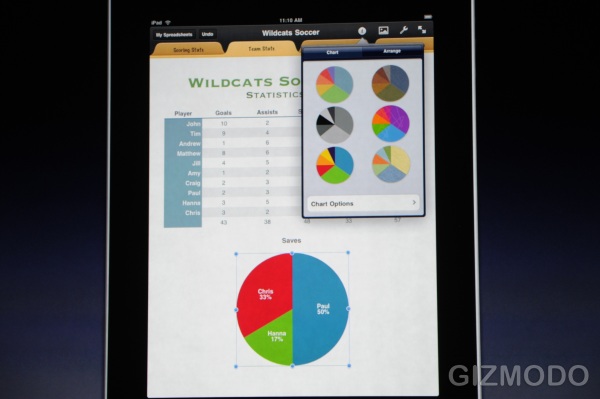
 (Images courtesy of Gizmodo)
Want to see more of our stories on Google?

P.S. Want to keep this site truly independent? Support us by buying us a beer, treating us to a coffee, or shopping through Amazon here. Links in this post are affiliate links, so we earn a tiny commission at no charge to you. Thanks for supporting independent Canadian media!


Pretty cool!
The REAL question: Will Microsoft Office be available for the iPad down the road?
Documents To Go is available from the app store currently so you would be able to create/edit MS documents on the iPad right now. We'll see if they create a version specific to the iPad to fully use the larger screen.
Documents To Go is available from the app store currently so you would be able to create/edit MS documents on the iPad right now. We'll see if they create a version specific to the iPad to fully use the larger screen.