This took me a few hours and quite a few firmware builds and restores to make it work, but I got it working. There is a specific set of circumstances that have to be in place for this to work for you. If you are not experienced in jailbreaking, turn back now! Your iPhone 3GS must be on OS 3.1.2, and already jailbroken with your ECID/SHSH on file on Saurik’s server. If you are on OS 3.1.3, you can downgrade to 3.1.2, as long as your ECID/SHSH is on file.
I should warn you that this is not an official release from the creators of Pwnage Tool, The iPhone Dev Team. We have to modify the Pwnage Tool, to make this work with iOS 4. This all has to be done on a Mac, and you’ll need Pwnage Tool 3.1.5, the iOS 4 GM firmware for Iphone 3GS (iPhone2,1_4.0_8A293_Restore.ipsw), and iTunes 9.2 (beta). The firmware and iTunes 9.2 aren’t widely available to the public, but I have a feeling you know where to get them.
Another thing you should know is, there isn’t much in Cydia that works with iOS 4, yet. You’re better off waiting for an official release. Upgrading to iOS 4 will upgrade your baseband, so if you need to unlock your iPhone to use it, stop right here. Pwnage Tool does preserve your baseband, but if something screws up, you may be forced to restore, upgrading your baseband, and losing your unlock.
Okay, if I haven’t scared you away yet, let’s get started. Download these files:
Pwnage Tool 3.1.5
iPhone2,1_4.0_8A293_bundle.zip (this was built by msft.guy, and will be inserted into Pwnage Tool, for compatibility with iOS4 on 3GS)
data.tar (this will be inserted into the Cydia bundle, in the Pwange Tool)
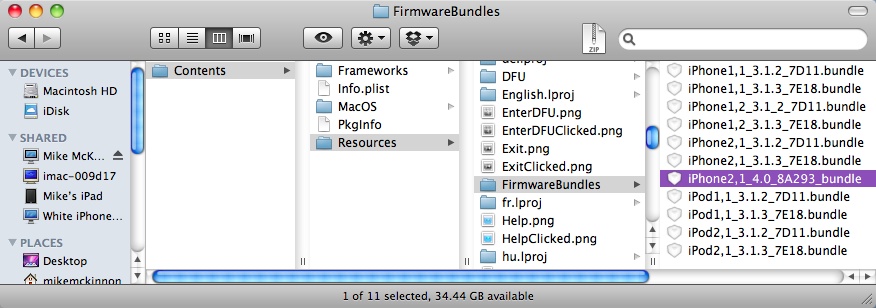
Now, unpack Pwnage Tool and the bundle; leave “data.tar†the way it is. Get it all to your desktop. Right click on Pwnage Tool and select Show Package Contents. Navigate to Contents>Resources>FirmwareBundles. Drop in the bundle you just downloaded, into this folder.
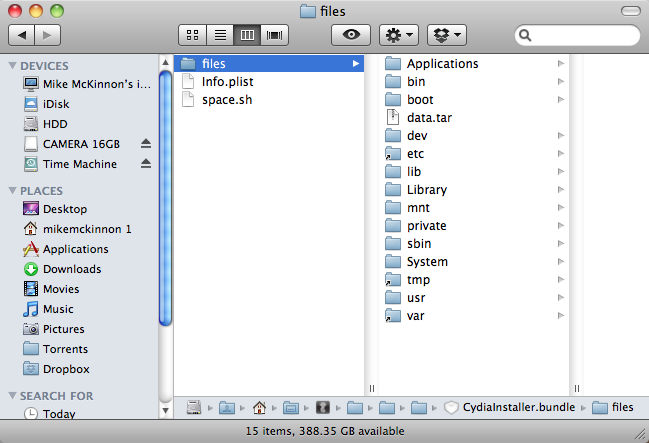
While still in Pwnage Tool file system, navigate to Contents>Resources>CustomPackages>CydiaInstaller.bundle>. Right click on CydiaInstaller.bundle and select Show Package Contents. Select the “files” folder, drop in the data.tar file.

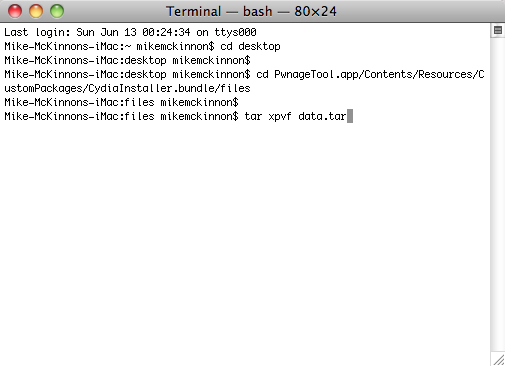
Now, open Terminal, and type the following commands:
cd desktop
cd PwnageTool.app/Contents/Resources/CustomPackages/CydiaInstaller.bundle/files
tar xpvf data.tar
This installs the data.tar file in the Cydia bundle properly.

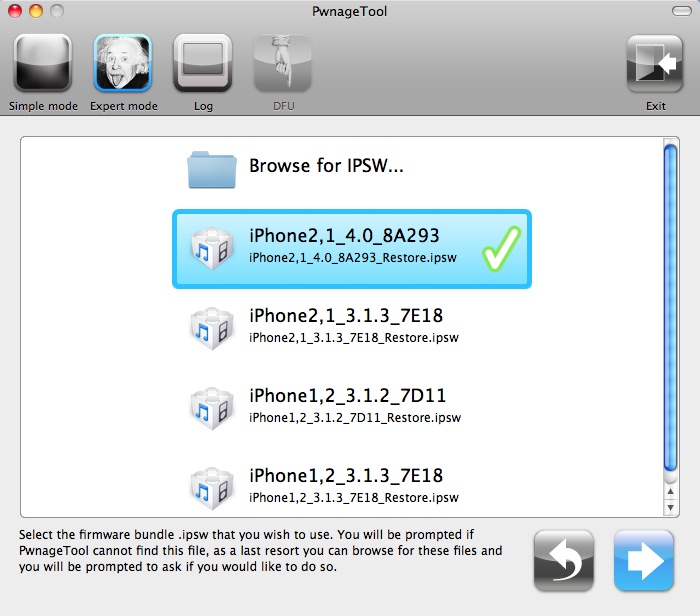
Once that’s all done you can close all windows and open up your modified Pwnage Tool. Select iPhone 3G(s) from the device choices, and click the blue arrow. The iOS 4 firmware should pop up on the list. If not, just browse for it. Select it and continue as you normally would to build your custom firmware with Pwnage Tool.

When Pwnage Tool is finished, you can restore your iPhone 3GS using iTunes 9.2 and the custom firmware you just built. This method worked for me, but you try this at your own risk. We here at iPhoneinCanada cannot be held responsible for anything you do to your iPhone.
If you’re successful, you will notice that Cydia runs really fast in iOS 4. I had played with it a bit on an iPhone 3G, but on the 3GS, it is incredibly faster. Like I said earlier, not much is working, but things like OpenSSH and iFile are working, so you are able to get in there and change SMS tones, and UI elements. Just make sure you back up your files, before you start changing things around in there.
Please post below if you have success or failure with this method. Good luck!
You can follow me on Twitter, if you have questions: @rorypiper. I’m usually pretty quick to answer.
You can also check out more jailbreak and iPhone news over at www.iEvolution.ca



You don't really need a MAC. I've done this using my Asus laptop and running snow leopard in vmware. Worked fine!
I think Rory means any computer running Mac OS, and only Mac computers can run it. Hackintosh not included.
So in other words, this is absolutely useless for anyone with a modern iPhone what has never been jailbroken before. It is the status quo.
Okay, smarty pants. I guess I could have been more specific. You must be in an OS X environment. iTunes 9.2 and Pwnage Tool only work in OS X.
why can't windows do this?
Excellent tutorial. The only reason to JB iOS4 is for MyWi and the other tweaks like SBSettings etc. For those who can't wait, this is the way to go.
Last I checked mywi currently isn't working on 4.0
Can someone confirm this?
Confirmed. MyWi is NOT working with iOS4, yet.
iTunes 9.2 and Pwnage Tool won't run on Windows.
Kind of unrelated, but do I have to purchase MyWi. I cant seem to get it to work, do I need a rock account?
Yes, you should purchase it. It is available in Rock and Cydia.
I will consider it. The problem for me is, if I buy this up then upgrade to iOS4 its usesless right? until there is an iOS4 version released. I dont wanna buy it if I'm gonna be upgrading in a week or so….seems pointless…
It is a risk. But mywi is a good seller. Popular apps normally are
kept up to date.
Some incorrect information. You do NOT need to be on 3.1.2 and can update from 3.1.3. Unlock will work on 5.11.7 baseband only. There are custom images available without BB update, jailbroken. 9.2 beta can be run on Leopard installed in VMWare, images are also available. The process to update to 4.0 is extemely simple (except for the unlock part since you need to do some tweaking). However, I will second that it's best to wait for devteam's solution AND that not much from cydia works on 4.0 yet. I reverted back to 3.1.3 almost right away.
iOS4 jailbreak compatibility :http://spreadsheets.google.com/lv?key=tz1lkTAAwtDi_7HJxef0Vgg&f=true&gid=1
Can I ask a simple question? I have my SHSH's on file for iPhone OS 3.1, 3.1.2, & 3.1.3 all on saurik's server. How the heck can I downgrade? I've never been able to figure that out! Thanks to all those who decide to reply. Cheers!
Can I ask a simple question? I have my SHSH's on file for iPhone OS 3.1, 3.1.2, & 3.1.3 all on saurik's server. How the heck can I downgrade? I've never been able to figure that out! Thanks to all those who decide to reply. Cheers!