

Apple’s AirPort Utility App is Being Removed From the App Store
Apple warns that "functionality is not guaranteed" when using AirPort Utility on iOS 27 or later.
Scotiabank released their iPhone app late last Winter. However, it did not have actual mobile banking like other bank apps, such as the CIBC iPhone app. The wait for mobile banking is over as the Scotiabank iPhone app has been updated to version 2.0, which includes actual mobile banking. Members rejoice!
What’s New In Version 2.0
Scotiabank® Mobile Banking is here!
– Check your personal and small business account details
– Pay bills
– Transfer money between your Scotiabank accounts
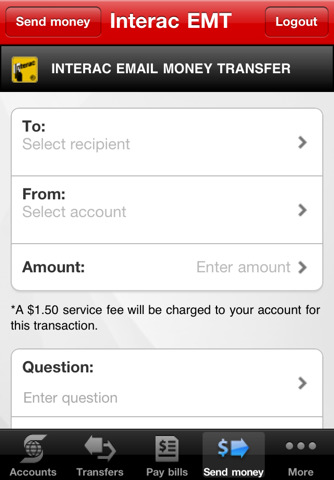
– Send money through Western UnionTM or Interac Email Money Transfers
– Find the nearest branches with the ABM/Branch locator. Search by street address, or GPS.
– Register for Scotiabank Text Banking and check your balance, available credit or last transactions in record time
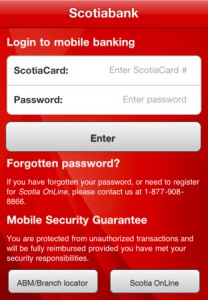
The ability to send money through Western Union and Interac Email Money Transfers right from your iPhone is pretty nice. Kudos to Scotiabank for joining the mobile banking phenomenon, let’s hope other big banks will also keep up with the move to banking on your smartphone.
Let me know how you like this new update! Click here to download (iTunes link).
Thanks to Shaun and @ZippoS for sending this in!
Want to see more of our stories on Google?

P.S. Want to keep this site truly independent? Support us by buying us a beer, treating us to a coffee, or shopping through Amazon here. Links in this post are affiliate links, so we earn a tiny commission at no charge to you. Thanks for supporting independent Canadian media!


It’s about damn time.. Their a little late in the loafers them people..
It’s about damn time.. Their a little late in the loafers them people..
Still waiting on RBC.
About time indeed! I was starting to think they would be the last to jump on the smartphone bandwagon. Or were they?
Yeah, where the hell is RBC? I guess when you’re as big as them, things move sloooooooow!
yeah RBC needs to jump on it…slow pokes lol…
ROYAL
BANK of
CANADA
WAKEEE UPPPP
ROYAL
BANK of
CANADA
WAKEEE UPPPP
ROYAL
BANK of
CANADA
WAKEEE UPPPP
RBC — WhyTheFace??? hurry up please!
ABOUT FREAKING TIME!!!!
In echoing others… when is RBC going to get with the program and bring an app out? 🙂
In echoing others… when is RBC going to get with the program and bring an app out? 🙂
You’d think be an iPhone owner AND ScotiaBank customer, that THEY would be the ones to tell me. No, I find out from Gary.
Thanks man
Cheers Buzz, lol!
Cheers Buzz, lol!
Yes finally!! Official launch is on Monday apparently. Seems pretty solid so far, although my buddy can’t seem to get his new iPod Touch to work with it…I have an iPhone 3GS and no issues so far….he gets an error after attempting to log in. Just ‘error’. He uses online banking already and has tried everything…sounds as though he needs some sort of registration process or to call them directly. Anyone else have an iPod touch that is having issues?
Would be great if you could get your mortgage details other than just the balance though.
+1!
No mention of this on Scotiabank’s websites.
FINALLY. Geez it took FOREVER.
Does anyone know how the Western Union transfer works? How do I add recipients to send money to?
By the time RBC come out with one, most of their customer base might as well jump ship to CIBC or Scotiabank…lol
Now they need to support multiple cards.
Now they need to support multiple cards.
you have to register them using Online Web Banking first. It’s a security feature apparently. Same for EMT’s. Once you have them on your Online Banking then you can use them through the app.
Part of the reason I switched to SB was because RBC wouldn’t do this. The other part is that RBC wouldn’t negotiate on a mortgage rate at renewal time. Bite me RBC. If you can’t help out a 30 year customer, i’m gone.
Ya, I have that issue. I delete the app. download and reinstall the app. Plug my account and password in and voila. I’m in. turn the app off or log out…. and it wont let me in again. At all. This only just started this week. I don’t recall any update so… I don’t know whats going on. Being as you posted 3 months ago, has there been any fix?
call the toll free number for mobile support 1-877-908-8866.* *Sometimes
they have to clear something behind the scenes. Worked for me. Hope that
helps.