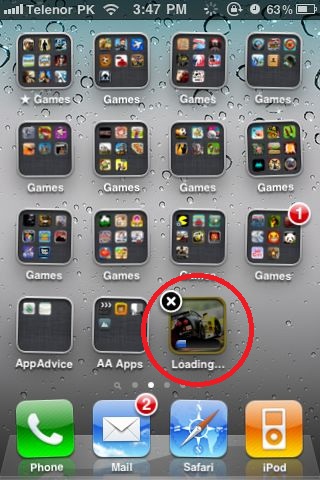


iOS 4.3 To Allow Users To Delete Apps During Download

A new feature today found in iOS 4.3 (beta) allows users to delete an app that is in the process of downloading.

With iOS 4.2.1, users have the ability to pause and resume downloads by tapping on the downloading app, but deleting the app in mid-download is a new function. This is a nice feature, mostly for the convenience, if you decide you do not want to the downloading app or if the app is frozen in mid-download.

To use the feature, first you must have iOS 4.3 installed. After that, when you are in the process of downloading an app, tap and hold on any app icon until the app icons begin to wiggle. Now, appearing over the downloading app, you will see an “x”. Once tapped and confirmed, the app download will be interrupted and deleted.

[AppAdvice]

Want to see more of our stories on Google?

Add iPhone in Canada as a Preferred Source on Google

P.S. Want to keep this site truly independent? Support us by buying us a beer, treating us to a coffee, or shopping through Amazon here. Links in this post are affiliate links, so we earn a tiny commission at no charge to you. Thanks for supporting independent Canadian media!

Subscribe
Notify of
guest
3 Comments
Oldest
Newest Most Voted
Zillypaul
Zillypaul
15 years ago

I like this. It is SO annoying when the load stalls and hangs!

Cake
Cake
15 years ago

Will it also cancel an app purchase with the delete ?

Anonymous
Anonymous
15 years ago

NOOO dont delete Real Racing 2!!! haha 😛

3
0
Would love your thoughts, please comment.x
()
x