My 32GB iPhone 4 is more than just my phone, it is also my go to camera when I don’t want to ‘lug’ around my Panasonic GF2. So when my Camera Roll and Camera apps mysteriously started to crash upon launch, I was slightly worried. Not only that, my photos became inaccessible as iTunes no longer recognized my Photos–the space used was just known as ‘Other’.
I did a fresh restore and synced from my recent backup but that did not fix the problem. My last resort was to do a fresh restore and setup as a new iPhone, which I did not want to do. Luckily, I finally stumbled upon a solution that fixed everything with no photos or videos lost. It will also work to fix corrupt Camera Roll thumbnails.
Here’s how I solved my Camera Roll and Camera crash situation–this is a slightly advanced method so I urge you to proceed with caution. This method requires you to view your iPhone’s internal files. Do not attempt this as deleting incorrect files could ‘wreck’ your iPhone. You’ve been warned.
1. I used PhoneView to connect to my iPhone (a free Mac/PC alternative is iPhone Explorer). I then transferred off all of my photos and videos to my Mac to back them up. Highlight the “DCIM” folder (which contains all your photos) and select ‘Copy from iPhone’ (just save them to a new folder on your desktop to make it easy):
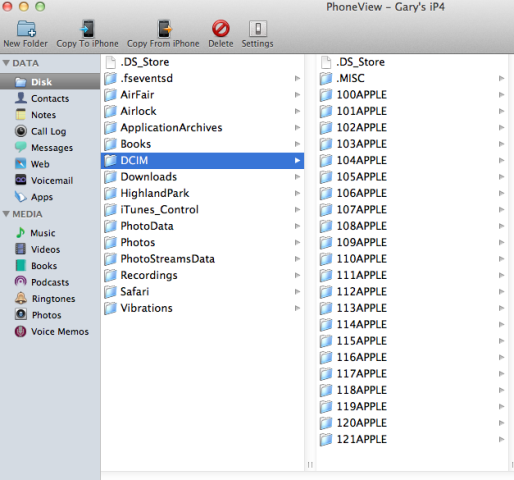
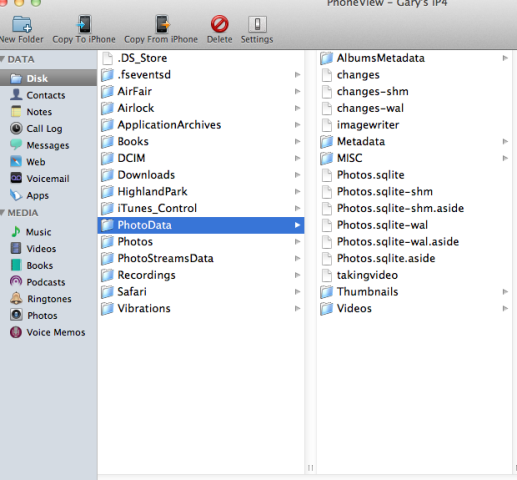
2. Next, I navigated to the PhotoData folder, backed up (just copy them to your desktop to make it easy) and then deleted the following three files (or just delete ANY of the ones you see in this list):
- com.apple.photos.caches_metadata.plist
- Photos.sqlite
- PhotosAux.sqlite
(this image below is just to highlight the PhotoData folder)
You will be warned against deleting these files, but if you have them backed up proceed.
Note: In the Windows version of iPhone Explorer, you’ll have to ‘right click’ and delete.
3. Restart your iPhone. Afterwards, my Camera Roll actually launched–but no photos were shown. Be patient, as the photo library will rebuild itself and all your images should appear minutes later.
The above method worked for my situation, and enabled me to recover my photos without restoring my iPhone. If you are running into Camera Roll crashes, I would highly recommend trying the above before attempting to ‘nuke’ your iPhone.
Have you ever encountered a similar Camera Roll crash/corruption situation? How did you fix it? Let us know if this worked for you!
PS – I’ve received so many emails thanking me for this solution and you have requested to add a donation button so you can “buy me a beer”. You can do so below if you wish! Cheers.



Have had the problem where the Camera Roll would be pushed up so that is was covered by the “Albums” title bar. This was fixed by force closing the Photos app in the app switcher and opening Photos again. I’ve never run into your issue before.
Have had the problem where the Camera Roll would be pushed up so that is was covered by the “Albums” title bar. This was fixed by force closing the Photos app in the app switcher and opening Photos again. I’ve never run into your issue before.
You saved my life! Had exactly that problem. Was in Vienna and made lots of photos and couldn’t get them. I tried iPhoto, Image Capture and Windows. Didn’t show up anywhere. Thanks a lot.
You saved my life! Had exactly that problem. Was in Vienna and made lots of photos and couldn’t get them. I tried iPhoto, Image Capture and Windows. Didn’t show up anywhere. Thanks a lot.
Cheers! 🙂
This worked for me, not very complicated like he said. Thanks
Cheers
It worked! Thanks for the helpful write-up.
Worked like a charm thanks!
Sweet!
Just wanted to give you a huge thumbs up! Just unboxed and restored a my brand new 64gb iPhone 4S. Same exact issues and symptoms with a few exceptions. Tried everything under the sun but your simple fix has got me back up and running. Only issue is that it caused me to lose my “folders” out of iphoto, but hell I can deal with that. Huge thanks once again!
Just wanted to give you a huge thumbs up! Just unboxed and restored a my brand new 64gb iPhone 4S. Same exact issues and symptoms with a few exceptions. Tried everything under the sun but your simple fix has got me back up and running. Only issue is that it caused me to lose my “folders” out of iphoto, but hell I can deal with that. Huge thanks once again!
🙂
Thank you so much. Your steps got me working again.
Worked GREAT!! Thanks!!
iPhone 4S camera crashed while on a field trip, only 3 days old, could not take a photo without it crashing and couldn’t access camera roll at all. This fixed it, so thank you very much 😀 too bad I didn’t have my laptop with me on the field trip, would have been good to fix it sooner.
This cured my problems! I was having very similar issues. It was much easier than I thought it was going to be. I was nervous about deleting system files from the phone.
I’ve posted a link to this in the Apple Support community in reply to a topic very similar.
Thank you!!!
Thanks!
Sent from my iPad
Does this limit the phone’s restoring/updating capabilities in anyway?
No, not a jailbreak or anything. It removes & rebuilds corrupted files. I’ve synced, and done everything normally since doing this
Ok thanks alot!
Thank you soooo much! As Marshall said, it was much easier than originally thought. I’m grateful to you that I didn’t have to restore my iPhone, again.
I will spread this link to all topics with the same problem!
Awesome fix!!! Worked as described, enough said.
Thanks you saved my day!
I’m actually sitting in the Apple Store waiting for my Genius to return from his break so I can show him that your solution fixed the problem he couldn’t.
Nice work! Thank you! I had my baby’s first ultrasound on my phone and hadn’t had a chance to back it up before the library became corrupt.
Thanks again!
You’re welcome! Spread the word!
Perfect fix….thank you so much….really scared me when this happened on vacation with my iPhone 4…thank you!
I wanna try this but these instructions are quite vague in terms of how and where I’m transferring and backing up these files to my mac.
In step one, it says to highlight everything to the left and copy from iPhone but the photo shows only the DCIM folder highlighted. I’m assuming I highlight from fseventsd to vibrations. To what location exactly on my mac do you copy these files from your iPhone? Does it give you a choice?In step 2, it says to back up what’s in the PhotoData folder, but where do I back it up to? Do I highlight every folder from AlbumsMetadata to Videos and then back those highlighted items to somewhere on my mac?
Once those three files are deleted and you restart your phone, I’m assuming you connect it to your mac and iTunes opens up and somehow it knows where are the things you transferred/backed up are located on my mac and put everything back in place? If I somehow wreck my phone (which wouldn’t surprised me lol), can I still restore it and have it working again (if I lose the photos, not the end of the world)
Do yopu think that this is something that Apple can somehow restore through a future update to iOS5 and make the phone recognize that the data that shows up as other is actually your photos?
I’m really hating iOS5 now, thanks Apple!!!!!
1. Just highlight the DCIM folder as that contains all your photos. You can save them to anywhere on your Mac, choose the desktop to make it easy.
2. As for backing up the PhotoData folder and its contents, again just save it to your desktop.
3. Once you delete the files, and you restart your iPhone, the photo library will start rebuilding. You don’t need to connect to iTunes.
i have an ipad. everytime i take a photo or video and go back to see it, its just a black blank nothing. i go to camera roll and all thats there are older vids n pics.for example, i take 5 pictures and 5 vids…i go to cam roll to view them nd theres only 10 black squares in place of what should be there. (make sense?) and when i click to watch one or share a photo to fb or something, it says saving! even if i try n delete it,itll say “saving” and it dont save. then it crashes. its so odd. i dont have much on the ipad. no music.. about 200 pics and vids…maaaaybe,15 apps. thats it. i tried to back it up on icloud to restart the ipad..but dont have enough GB it says. the ipad belongs to my 8 yrs old daughter who would be so sad if i got rid of her pics and fun games… (that i paid for) what can be wrong? help please.
melissa
Thanks a Billion, you saved me…..
Thanks a Billion, you saved me…..
I had the same problem. Glad I found this blog. Worked great!
I had the same problem. Glad I found this blog. Worked great!
Who the man!! Excellent solution., Question of course: how did this occur in the first place, and will it happen again?
Who the man!! Excellent solution., Question of course: how did this occur in the first place, and will it happen again?
It *might* be a recurring problem as a result of that file that you deleted, but it will be that simple fix every time! (until iOS5.0.1)
Hooray! I can see my camera roll and photo stream again! And the photos app isn’t crashing! Thanks so much for writing this up!
What do those files do, out of curiosity? I actually couldn’t find
com.apple.photos.caches_metadata.plist but just deleting the other ones worked for me.
Hooray! I can see my camera roll and photo stream again! And the photos app isn’t crashing! Thanks so much for writing this up!
What do those files do, out of curiosity? I actually couldn’t find
com.apple.photos.caches_metadata.plist but just deleting the other ones worked for me.
Thank you so much! I hadn’t backed up the new photos I took since I updated to ios5 and my iphone camera roll would crash whenever I tried to go into it. It showed it had 730 photos listed but wouldn’t let me in and my computer (itunes and iphoto) claimed I had no photos at all on my phone. This fixed it perfectly! THANK YOU!
thank you sooo much!!
Hi! Thank you so much! After so many days of trying to fix this to no avail I finally was able to restore my iPhone photos! But Apple should really fix this! I don’t want to pay $20 just for this! But I guess I can use some of the nice features of this app so not too bad. Thanks again!
Thanks, you are a lifesaver! Me and my bro filmed a concert, but when i got home shit got f****d up. But this guide helped. Thanks again!
You’re a genius!! Thanks!!!!!!!
Iexplorer does not have the option to copy from iPhone or back up?? I would love to do this process but I am afraid I will do it wrong.. Please help
Just delete the files indicated….no need to back up. Worked perfectly!
You just have to click and drag the file to a folder
I had the same problem after upgrade to iOS5. Your tip worked fine for me, thanks !
Yeah! that did the trick for me as well, but I reloated my phone BEFORE finding this solution… I agree, this is a bug that I did not see with the Beta of IOS5…
you sir are a fucking genius. thank you. apple support, all they said was you have to restore the phone.. its the only way. If you want to edit your post, here is an update on how to do it for iPhone 4S. My folders look a little different than you described and I only had to delete one file for it to work. On the left, I clicked PhotoData like you said, and just deleted the 1 file called Photos.sqlite because I did not have any of the other ones. So I restarted my phone and it worked!
Awesome 🙂
Heh, ok the first I did it, it didn’t work. I almost gave up. Second time lucky! Thanks very much. Useful information! We all seem to be learning to be iphone DIY mechanics. We know how to fix our iphones better than we know how to fix our cars, certainly seem to be better at it than the guys at the store…(restore duhh…) OK, thats my 5cents. Thanks for the help….
How didn’t it work? Because mine got messed up REALLY bad the first time as well, I just had to restore to a backup a few days back! I was freaking out though the phone was in bad shape 😛 haha I’m just glad I have all my stuff back from the previous restore!
downloaded and install but not running, prompted to send error report, im using my old laptop running on windows xp
I also had this problem. I went to apple store and they gave e a new one. I’m sure I will have to use this method from you. Thank you.
This really worked. The software changed its name to iExplorer due to copyright issues. And moving the photos over as a backup took me hours but I did have a lot of photos.
In the end everything came back in the camera roll and photostream.
Thanks much
Was gonna use PhoneView but you have to pay to access all the files 🙁 With iExplorer, when you highlight the folders you wanna back up, do you right click them and then click Export to Folder? Which folder would it go to?
Any folder on your computer.
Brilliant solution!! No data lost. Camera crashes gone.
Thanks v much! 🙂
Great news 🙂
This worked great! Thank you so much!
Thank you soooo much! I had the photoroll-crash… and deleted the three files, booted.. a couple of minutes later it had restored the photos – and I could save my photos again.. fantastic! 🙂 Thanks :)!
Wow, thanks very much. Sqlite was the only one I had to delete for my 4GS..
what a star you are mate!
I phoned apple last week and after 40 mins gave up as they clearly had no clue what to do.
phoned vodafone today and after another 40 mins with their “iphone specialist” 😉 still no better.
Just tried your method and it worked straight away, did as the last poster did, just deleted one file called photos.sqlite and after a restart my messed up camera roll first was empty then started to restore all my photos back to normal.
Cheers!
#winning
Woohoo. Best advice ever. I have an iPhone 4, all worked until I upgraded to iOS 5. Then it went to Hell. Your blog sorted it out in 10 mins.
Thanks..
Thank you so much! This fixed it all for me!
Thank you sooooo much! I followed all your instructions for my iPhone 4, found all 3 files & deleted them and boom! my camera & camera roll works again..you’re an absolute genius! the guys at apple had no clue what to do…told me to restore & it didn’t do anything for me..they asked me to make an appointment at their Genius Bar thing but said most prob i’d need a new phone 😛 luckily i stumbled across your page..thanks a million!
Worked perfectly. iphone 4 with iOS 5. Would not save photos and other pics that I had taken were pixelated. I used this program to get into the file structure and deleted one file photos.sqlite. Camera back working now, savings pics and all my pics still there and those that were pixelated are now perfect.
Thank you!
By restart, do you mean a typical off/on, or a HARD reset? Does it matter?
Update: I did the hard reset, and all appears fine! THANKS!
I would assume Apple will release a bug fix for this via 5.0.1.