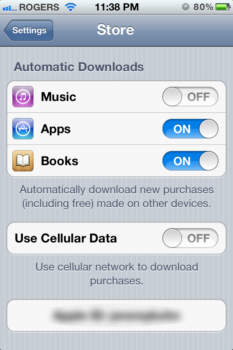
Update 2: If you can’t see the ‘Purchases’ link in iTunes on your Mac/PC, make sure you have the setting toggled ON within your iPhone settings for Store (thanks Jeremy!). Previously, the Music tab was unavailable but now it is:
Update 1: iTunes for your Mac/PC now shows a new ‘Purchased’ link in the sidebar as well.
It appears some iPhone users in Canada have started to experience Apple’s rollout of iCloud, set to go live tomorrow along with iOS 5. The iTunes app now shows a ‘Purchases’ tab, along with ‘Alert Tones’. Introduced in June, the ‘Purchases’ tab showed previously downloaded apps on your iPhone.
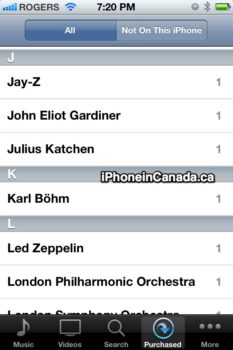
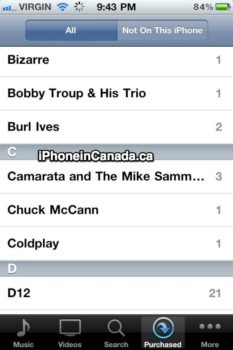
As seen in the images below, purchased songs now show up for download right to your device (@KyleJDuffield sent us his image on the right).

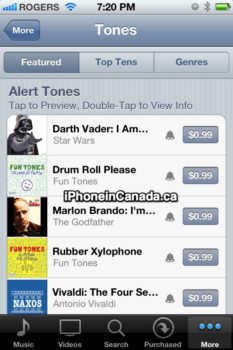
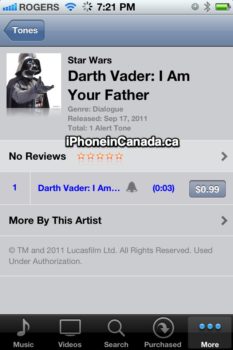
Under the ‘More’ tab, if users tap on ‘Tones’, a new section called ‘Alert Tones’ appears (
thanks Tyler!). These alert tones can be purchased to replace the default SMS tones. You can preview tones by tapping once, or double tap for more info. This ‘Darth Vader: I Am Your Father’ alert tone is going to sell like hotcakes:
Have you seen these changes appearing on your iPhone yet? Let us know below!



I can see it but none of the “alert tones” will play a preview. They all error out for me
I can also report that iTunes in the Cloud – Music is also available in iTunes 10.5 on my Mac.
How do you get to this?
How do you get to this?
I see it too! No previews yet tho! So excited!!
both purchase and tones showing for me (but I’m running ios5 gm)
Both are showing up for me. No problem playing the tone previews… haven’t purchased any yet though!
I see it too, but no previews either
Theres a new itunes terms and conditions…
I See it and the tones work fine! this is awesome!
OMG these Star Wars tones… must have them all
Amazing!!
Buying tones? Wtf. Why not just allow everyone to make their own like on other phones? Seriously Apple.
Thank god for jailbreak tweaks.
You can put your own in. I’ve already done that. iOS 5 opens up sound customization to use your own tones for a lot more stuff. Just put them into iTunes in .m4r format and sync to your phone.
Do the your own tones work for SMS now
You can put your own in. I’ve already done that. iOS 5 opens up sound customization to use your own tones for a lot more stuff. Just put them into iTunes in .m4r format and sync to your phone.
I have been making my own ring tones from my itunes songs for 2 1/2 years. Would never buy one.