
Four New Owned Games Available to Stream Via Xbox Cloud Gaming
Microsoft has added four new titles to Xbox's ever-expanding "Stream your own games library" for Xbox Cloud Gaming including Bloodstained: Ritual of the Night.
Jailbreaking your iOS devices is fun, but backing up all those jailbreak apps and tweaks manually isn’t fun at all. There wasn’t any simple backup / restore solution for Cydia apps available out there until PKGBackup was introduced. It not only provides the simplest, fully automated backup solution for all your jailbreak stuff including Cydia sources, jailbreak apps and tweaks, Preferences files, Springboard files but can also backup all your App Store and default iOS Apps data, all with just a few taps.
Like all renowned Cydia apps, developer Jibril Gueye (@jibrilg) has been regularly updating PKGBackup ever since its release and those who are already using it must know that its last major update i.e PKGbackup 5.0+ has brought tons of new stuff to it. First of all, the tweak is now fully compatibly with iOS 5. You can use SugarSync as your cloud storage for device backups in addition to Dropbpx. The UI has been made a lot simpler with support for 15 new languages including ‘French’. The app now fully supports iOS 5 Twitter UI integration allowing users to send and share their data with friends via Twitter in addition to Facebook, Bump, Bonjour and email.
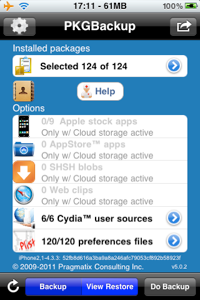
PKGBackup is available in the Cydia Store for $7.99 via the BigBoss repo. Once you download and install it, the app icon appears on your Springboard. When you launch the app, you’ll be asked to allow access to your location so proceed by tapping Yes. On the top left corner is the in-app settings icon. Tap it to choose your data backup location i.e locally inside your Address Book or use cloud services like Dropbox and SugarSync. You can also schedule your backups from here. If you have any existing backups, a small disc icon appears on the main view. Tapping the disk icon shows you all your previous backups with latest backup highlighted in Red.
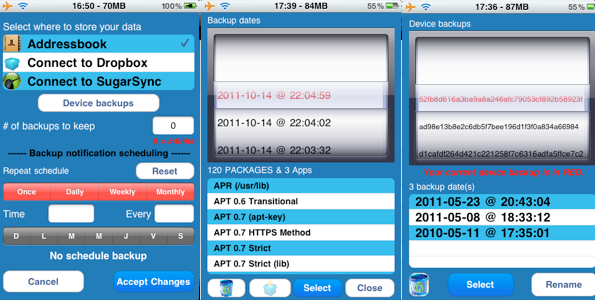
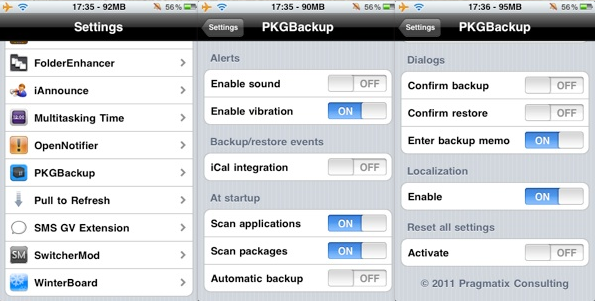
Once done, tap ‘Accept Changes’ at the bottom. On first use, the app might ask you to enable scanning of your apps/tweaks from the iPhone’s Settings.app. To do so, press the Home button, open up Settings, scroll down till you see PKGBackup, tap it and then enable it from the presented set of options. Now press the Home button again and open PKGBackup. The app will now scan all your your Cydia and App Store apps data.
When the scanning is done, its time to choose the stuff you want to backup though everything is selected by default. Tapping the blue arrows beside each section allows you to select / deselect individual apps, preferences, packages, sources, etc. Best thing about PKGBackup is that you get to choose each and every bit of what you want to back up and what you don’t. Not only can you choose Cydia and App Store data, you also have the option to backup your Web Clips, Stock Apps (address book, photos, calendar, notes etc.) and even your saved SHSH blobs. You do need iSHSHit for that though, which is a free SHSH offline saving tool available on Cydia.
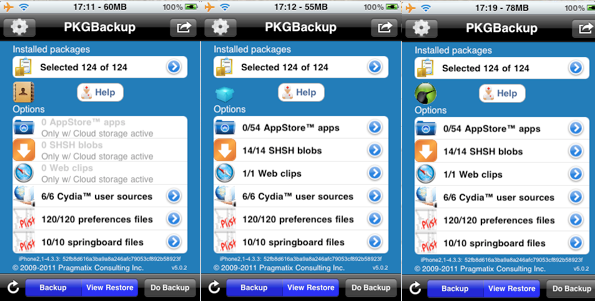
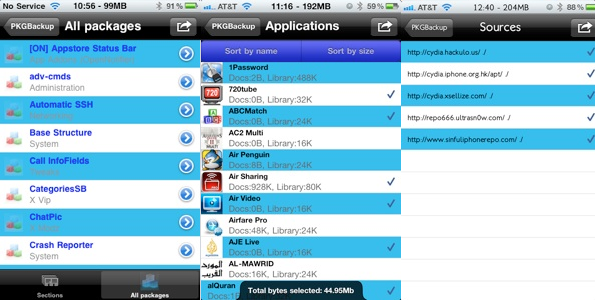
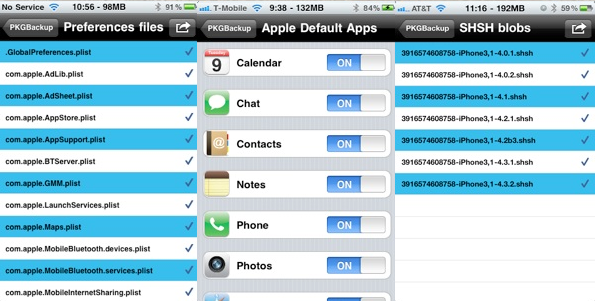
When you tap a blue arrow beside a section, you can see a list of all packages inside it. Simply double-tap a package to select (blue color) or deselect (black color) it. You can easily view a package’s details by tapping it once. Navigating back and forth through the packages and quick and easy. In case of stock apps, you have the on/off toggles to include them in your backup or not.
Once you’re done, navigate back to main view and initiate the backup by tapping the ‘Backup’ icon on the navigation bar. An address book entry will be created in case your primary storage is the Address Book. If you choose cloud storage like Dropbox or SugarSync, the file is directly created and uploaded to your account. In case of Address Book as storage option, syncing the iPhone using iTunes preserves a copy of the backup file in your computer as a phonebook entry.
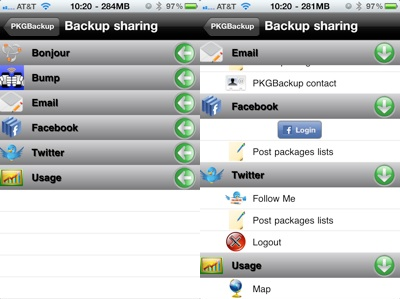
Likewise, the restore process is also seamless. Choose the storage option from the settings, tap to select the packages you want to restore, navigate to main view once done and hit the ‘Restore’ icon. Thats it, all your packages will be restored to their latest version. You can even share your backups with your friends using Facebook, Twitter, Bonjour and Bump as shown in the following screenshot.
To sum things up, PKGBackup is undoubtedly the easiest yet the most comprehensive backup / restore solution for iOS with cloud storage support, social sharing and a superb feature set that no backup app can match. Highly recommended!
Free License Giveaway:
We have 3 Cydia Licenses for PKGBackup ($7.99) to give away. You can enter the contest via Twitter for free in just two easy steps:
NOTE: If you also leave a comment below, this will increase your chances of winning. Don’t forget to leave your Twitter ID with it.
We will announce the winners by the end of the day!
[UPDATE] Giveaway Winners Announcement:
Here are the Twitter IDs of our 3 lucky winners:
Congratulations to our winners and many thanks to everyone who participated. Winners please check your Twitter DMs for instructions.
Those who didn’t win, please don’t lose heart as there are tons of other giveaways coming your way, right here on your favorite iPhone blog. Stay tuned !
Want to see more of our stories on Google?

P.S. Want to keep this site truly independent? Support us by buying us a beer, treating us to a coffee, or shopping through Amazon here. Links in this post are affiliate links, so we earn a tiny commission at no charge to you. Thanks for supporting independent Canadian media!


I’ve been looking at this app for a while – would love to get it for free. Twitter id: jpottle
Me Me Me! @SteveNaka:disqus
p.s. nice review 🙂
thanks, appreciate it 🙂
Would love to win that!! Twitter handle is @bloons
Great review, I could really use this. @brad_silliker
Done. @sheldon_torres:twitter
goo review. great looking app. @paintballpimp:disqus @paintballpimp
Sounds really useful! @thisisziad
Wow that seems very useful!! @iEricMartel:twitter
You may lose iphone data if any sort of corruption or damage happen to the iphone while may lead to data loss situations. the best way to save dat from being lost is to create backup of iphone.
I will keep my fingers crossed! 😉
@BeeDee21:twitter
Pick me, pick me! @srzinck:twitter
I bought this a while ago.. Never managed to make it work properly but I’ll try your instructions when the 4S JB is out
Great blog post and review on PKGBackup! @W0ngn:twitter
Please please please !!! @marty_johnston
I purchased this back in my jailbreak days (pre 4S). Love it!! Works amazing and is so handy, one of my top 3 fav jb apps!!!
Cannot recommend highly enough.
I never knew about this before. If I don’t win it, it just may be the second purchase I make on the Cydia Store when my 4s is jailbroken.
Thanks for the review. Very informative.
This is an awesome solution for backing up Cydia apps…I’ve heard a lot about it and it would so great to get it…I’ll probably still buy it even if I don’t win!
I ll buy it if I doing win it
This app sounds amazing. Great app for the scene!
My twitter is: @chicoquente:twitter
This would be awesome! Twitter is @Jay_Vey
Great app, buying if I don’t win!!
Twitter: hell0w0rld08
I use xbackup. Much cheaper, and does the exact same thing.
I’d love to win!
@c0kelover is my twitter name.
Great review! My names Gary too Gary Ng haha.
Twitter @ggmanye
Looks sweet
@organicaudio
i buy iphone unlock
I was one of those winners of another
Contest here but never received my prize. I even gave it to my wife so both of us have been waiting for months. I can’t help it if I am feeling discouraged. Please. For the sake of keeping a loyal reader happy. Send me the case that I won here on your blog. I have even tried emailing Gary about it and nothing seems to get done about it.
Interesting. Oh well. What did you supposedly win?
I emailed CellularFirm.ca and they told me items were sent out, on October 5th. I will double check with them.
This is your tracking number: 7295 9577 3587 0581
It appears to be held at the Canada Post facility.
Thank you very much.
Gary,
I need you to please resend the package. For some reason the package is being returned to sender. I never received a door tag. Also please confirm the address you have for me. This has takes since the beginning of August And it seems it will take even longer. You could also please put me in touch with the people who are sending it. Thank you for your help.
I am excited to be one of the winners! Thanks so much! I have successfully installed & completed my first backup with PKGBackup. It is very timely as I have not yet upgraded to iOS 5 but was planning to do it soon. Then, I will be able to try a restore!
If the address book as a storage option, the iPhone sync with iTunes keeps a copy of the backup file on your computer as a phone book entry.
My personal review:Overview:
– poor error handling
– counterintuitive userinterface
– and of course – way too expensive (at the moment it’s available for 9.99$) for all the hassle involved
Experience:
…for example i wasn’t able to restore my themes from dropbox because it simply didn’t back them up even if there was no error at the backup process… therefore in the middle of the restore-process i was presented with a messagebox saying that the themes-file could not be found on dropbox – after dismissing that, the restoring process stopped without indications of what was already restored and what not…
– a pretty poor experience in my opinion
Conclusion:
…somehow i hate myself for wasting my money on that – but sadly it seems to be the only solution for backing up the >settings< along with the cydia-apps…
Hola