
How to Restore iPhone if You Forget Your Passcode [VIDEO]
If you can't use Passcode Reset, you can then reset your iPhone or iPad without a computer to regain access to your Apple device.
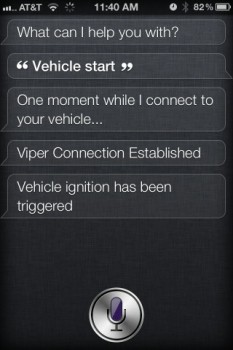
Brandon over at fiquett has figured out how to use Siri to control his car via the Viper Smart Start module installed inside his vehicle.
I created a new ruby plugin that is used by plamoni’s “Siri Proxy”, a proxy server for Apple’s Siri assistant. This proxy server allows for the creation of custom plugins that can intercept recognized speech and perform virtually any function imaginable (programmable, scriptable).
The “Siri Proxy” plugin I wrote handles interaction with a php script that runs on my web server. The php script, which I developed months ago for personal use, allows me to send commands to my car which has a Viper SmartStart module installed.
The current commands Siri will understand and execute include:
Vehicle Arm
Vehicle Disarm
Vehicle Start
Vehicle Stop
Vehicle Pop Trunk
Vehicle Panic
He has also updated his commands for conversational styles such as ‘start my car, lock my car, pop my trunk…etc’. Below are a couple videos showing his work in action:
That’s pretty awesome stuff. Next up, getting Siri to drive your car…maybe.
[via 9to5Mac]
Want to see more of our stories on Google?

P.S. Want to keep this site truly independent? Support us by buying us a beer, treating us to a coffee, or shopping through Amazon here. Links in this post are affiliate links, so we earn a tiny commission at no charge to you. Thanks for supporting independent Canadian media!


error:
Vehicle Arm
Vehicle Disarm
Vehicle Start < 1
Vehicle Start < 2 lol??
Vehicle Pop Trunk
Vehicle Panic
Obviously one of them is “Vehicle Stop”
Dumb question maybe… isn’t that why he has a remote??
Lol