
Apple’s AirPort Utility App is Being Removed From the App Store
Apple warns that "functionality is not guaranteed" when using AirPort Utility on iOS 27 or later.
Google has just introduced a new update for Gmail for iOS on the iPhone and iPad. The app brings a redesigned interface, multiple account support (finally), autocomplete, infinite scrolling inbox and more.
Here’s what the Gmail team announced today:
Six months ago, our team set out to completely rebuild the Gmail app for iPhone and iPad to give you you a faster, sleeker, and easier experience on iOS. The result? Version 2.0. With version 2.0 of the app, you’ll get a totally new look and feel, plus a bunch of improvements like profile pictures in messages, numerous new animations from swivels to transitions and infinite scrolling in the message lists.
Change log below:
What’s New in Version 2.0
– Multiple account support
– App redesigned with a new, cleaner look
– Search predictions as you type
– Infinite scrolling inbox
– Respond to Google Calendar invites inline
– Interactive Google+ posts support
– New welcome experience
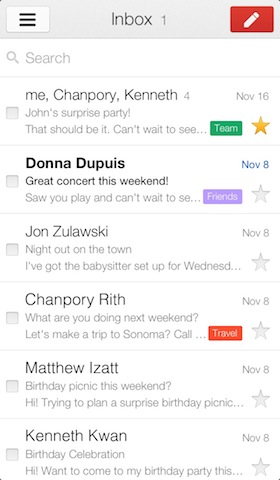
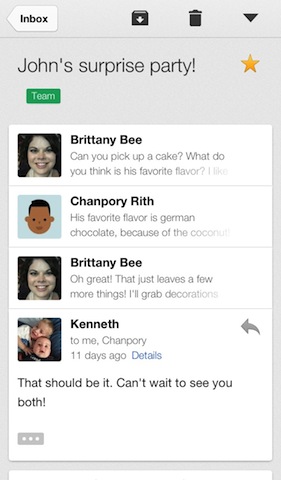
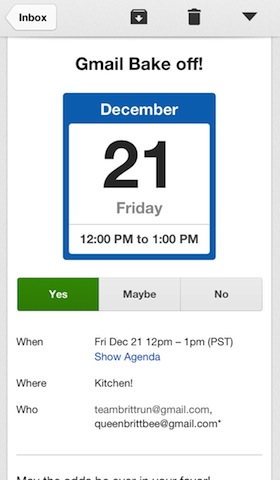
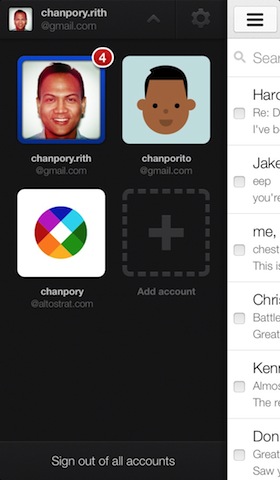
This update looks awesome. Get this now if you’re a heavy Gmail user. Finally, some larger buttons for replying to messages.
Click here to download Gmail for iOS 2.0 and tell us what you think!
Update: Use the download link above to get this update. The App Store update process results in an error.
Want to see more of our stories on Google?

P.S. Want to keep this site truly independent? Support us by buying us a beer, treating us to a coffee, or shopping through Amazon here. Links in this post are affiliate links, so we earn a tiny commission at no charge to you. Thanks for supporting independent Canadian media!


When trying to update GMail from App Store application getting message “the item you are trying to buy is busy or not available” . Was GMail 2.0 update pulled off from AppStore?
Try the link in our article, that worked for us.
Yep. It doesn’t work when you just click Update from the Updates menu. I used the link in your article on my iPhone, and that worked. So for people getting the error message, you can try that.
link from article does gives me the same “item not available” message when using the link from this article on my iphone or mac. I smell a rotten apple.
Thank you! worked well using the link
It appears this has been pulled from the App Store. “The item you tried to buy is no longer available.”
Got the same results
multiple accounts, finally… sold
Holly crap. Its actually pretty great! Very surprised.. google apps are usually nonsense. 🙂
Are there any significant benefits yet to using this vs. Mail with an Exchange account?
Anyone get account images to work? All I have are silhouettes in the app, but when I load an email message it shows my account image in there.