
How to Use Guided Access On iPhone and iPad
With Guided Access on iOS, you can temporarily restrict your iPhone or iPad to a single app. This can be useful when you let a child use your device.
Apple has recently pushed iOS 7 beta 3 with significant performance enhancements over the previous betas, as well as a bunch of improved features like new fonts, updated Siri, Calendar, Safari and more (details here). However, an apparent glitch in the latest beta software allows iOS 7 users to hide any stock apps from the home screen, as noted by AppAdvice.
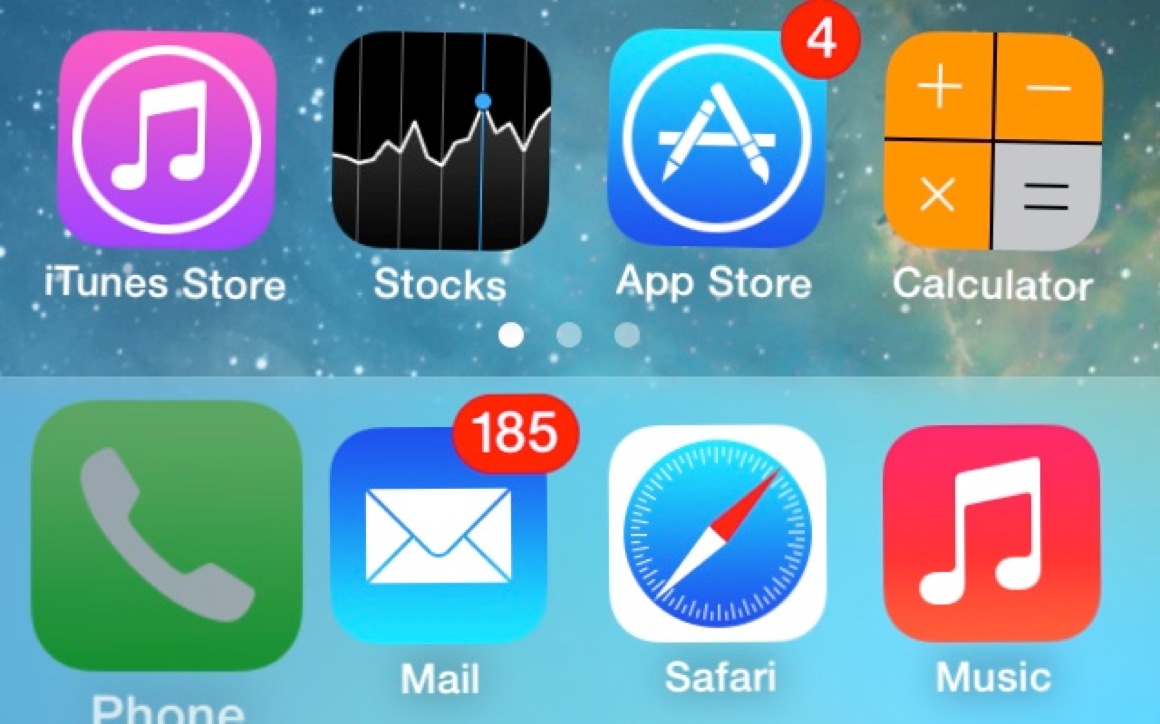
In order to hide stock apps on iOS 7 beta 3, here’s what you need to do:
Step 1:
First, you need to set up the home screen properly, making sure the first page of your home screen in completely full and has one folder available.
Step 2:
Now move any app that you want to hide to the dock.
Step 3:
Tap and hold on that app on the dock and immediately double press the home button.
Step 4:
As soon as the multitask switcher opens, tap on the home screen preview. You’ll notice that the dock app used is now larger and slightly tinted (see screenshot above).
Step 5:
Now open the folder on your home screen, get back from it and press the home button. Voila! the app has now disappeared from the home screen.
Step 6:
You can repeat the procedure as much as you want to hide any unwanted iOS apps. To access the hidden apps, simply use the Spotlight search.
That’s it, enjoy!
You can also check out the video tutorial below:
Want to see more of our stories on Google?

P.S. Want to keep this site truly independent? Support us by buying us a beer, treating us to a coffee, or shopping through Amazon here. Links in this post are affiliate links, so we earn a tiny commission at no charge to you. Thanks for supporting independent Canadian media!


Nice glitch but iOS 7 also alllows you to park any app (Newstand included) into a folder and put it whereever you see fit. That is much easier than removing it all together.
From what I’ve read you can park newsstand in a folder without this glitch in iOS 7
I know. Much easier than trying to hide them. No glitch required
Reboots bring them back though….boo-urns!