
Microsoft 365 Support to End on Older Macs and iPhones Starting in July
Microsoft is ending core support of Microsoft 365, Office 2019, and Office 2021 on older Macs and iPhones, starting July 13th.
Some iOS 6 users who are still not planning to upgrade to the latest iOS 7, are reportedly complaining that the built-in Software Update tool is downloading the large-sized iOS 7 over-the-air on their iOS devices even before asking them to upgrade, taking up space that can’t be reclaimed, according to CNET . While it won’t initiate the install process automatically, the iOS 7 OTA download renders nearly 1GB of space useless for such users.
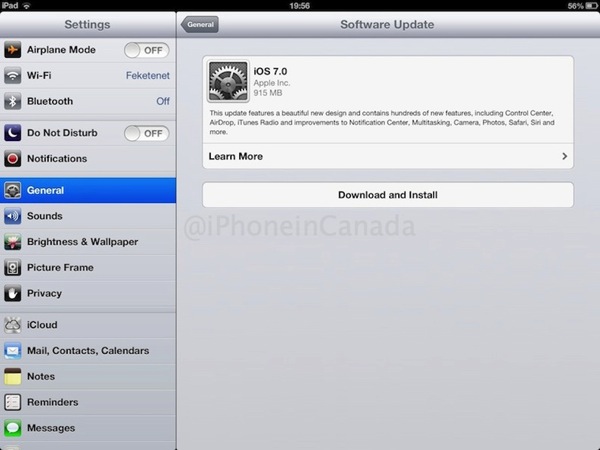
Even though iOS device owners with 32GB of storage or more may not be bothered by a gigabyte of wasted space, it surely is a big deal for owners of 16GB devices, where the amount of storage users get out of the box is already less and can fill up quickly with HD video content and 3D games. The source seems to have confirmed the behaviour on both an iPhone 4 as well as a current generation Retina iPad.
CNET confirmed the behavior on both an iPhone 4 as well as a fourth-generation iPad, both of which were running the latest version of iOS 6 before 7 arrived. For the iPad, the download began within minutes of turning on the device and plugging it into A/C power. When finished on both devices, it accounted for a little more than 3GB of space that was previously available on the device, and did not show up in the storage management settings submenu.
wow my phone downloaded iOS 7 without my permission
— Jade Swart (@JadeSwart) September 20, 2013
– Lol wtf iOS 7 was downloaded automatic on my iPad wtf . But I’m not gonna install ????????????????
— ????? (@Ztshanshan) September 22, 2013
Are you one of those iOS 6 users who are still holding out on an upgrade? If yes, why?
Want to see more of our stories on Google?

P.S. Want to keep this site truly independent? Support us by buying us a beer, treating us to a coffee, or shopping through Amazon here. Links in this post are affiliate links, so we earn a tiny commission at no charge to you. Thanks for supporting independent Canadian media!


this is actually really funny 😀
they should update, I actually got half a gig in space after the upgrade with the same apps.
Not touching ios7 until jailbreak
why, everything I used to have in JB is on ios now, well except winterboard
I’m not updating since friends have said that iOS7 consumes more battery, even after toning down features.
it doesn’t on mine, but I did turn off autoupdate on the apps. I will turn it back on when most of the apps have fixed their iOS7 issues.
I read an article where the person lost all their podcasts when they downloaded the new iTunes and iOS7. There is a glitch in the software and since I have almost 8000 podcasts, I’m waiting until Apple fixes the problem. Also, comparing my 6 with my kid’s 7; the new iOS has many great features, but I like the way my 6 looks way better. The new one is faded, flat and ugly. Wish I could combine the new features and keep the old look.
I have all my podcasts, but then again I don’t have 8000. I never keep my old ones, they are on the server there is no point.
I always wait a year before upgrading. Just upgraded to iOS 6 last week.
I’m still holding out on updating my iPhone 4, but may do it over the weekend. Many people are complaining about lag online, but I have several coworkers who updated their 4’s and report great performance.
Music app didn’t handle my various artist compilations properly and ios7 as a whole hurts my eyes. The apple maps issue is nothing compared to the dogs breakfast that is ios7. It’s actually caused me to question my dependence on Apple products in my day to day workflow. I put ios6 back on my iPad and I would like to keep it that way. I don’t appreciate the ios7 download just sitting there waiting for a momentary lapse of judgement for it to install.