
How to Recover and Restore an Apple Watch
Learn how to recover and restore your Apple Watch with an iPhone or iPad, based on Apple's official Support video.
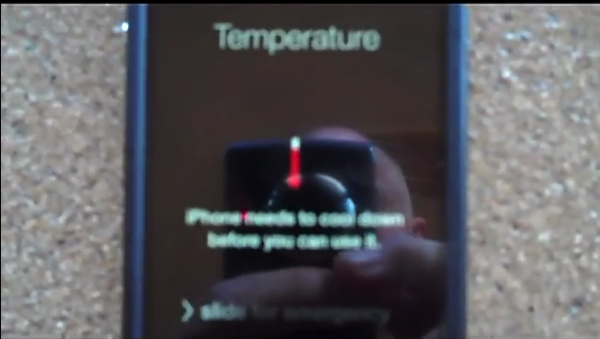
Earlier this month we brought up a widespread issue regarding iPhone 4S users who updated to iOS 7, only to experience Wi-Fi being disabled (i.e. greyed out and inaccessible). The story was shared with us by frustrated iPhoneinCanada reader Trent, as his wife’s iPhone 4S no longer had Wi-Fi access.
WARNING: try this fix at your own risk. We are not responsible in any way if this method causes permanent damage to your iOS device.
Now he has shared a popular working solution which has solved the iOS 7 Wi-Fi woes on his wife’s iPhone 4S. It involves using a hair dryer and heating up your iPhone 4S until you get a temperature warning pop up saying “iPhone needs to cool down before your can use it.”
Once this message appears, pop your iPhone into the fridge for 10 minutes to allow it to cool down. Once that’s done—Wi-Fi should work again. This worked for Trent’s wife’s iPhone 4S and also many others who have been stuck with this problem.
The video below explains the fix to the greyed out Wi-Fi problem on the iPhone 4S in more detail:

If your iPhone 4S has its Wi-Fi greyed out in iOS 7 (some users have had this issue prior to iOS 7 as well), let us know if this overheating trick works for you.
Want to see more of our stories on Google?

P.S. Want to keep this site truly independent? Support us by buying us a beer, treating us to a coffee, or shopping through Amazon here. Links in this post are affiliate links, so we earn a tiny commission at no charge to you. Thanks for supporting independent Canadian media!


Is this a joke 😐
Seriously it’s not, read the Apple Support communities thread! it works for some people but of course try at your own risk
It worked for me, no joke
The process seems weird but It worked for me too..
It worked for me. After my iphone 4s battery died in Sept 2013. I went to “Genius (?s***id) Bar. They said this phone can not be fixed. replace with another for 199$. I did not and sent directly to Apple repair. After paying 99$ they actually sent me a replacement phone. I was up for upgrade. I was unhappy enough at that point that I did not get iphone rather Note 3. So, replacement phone was sitting unopened until last week when I turned It on. Lo and behold wifi grayed out. It was in iOS 6. something then. I thought updating will fix it. I did. Now this replacement phone is out of warranty. Crazy me! I went to “the bar” again. Again told pay 199 and get another phone. After trying to reset network, reset all setting, reset iphone through itune, factory reset (press home and power while connected to itune) I had no option but to try this. Wifi was still grayed when I took it out of freezer. I did “reset network settings”, then it worked. This is just today, so, I can not tell whether it will last. If this is really a software thing and company is not owning it then I hope truth will come out and they will pay for their Karma.
If you are heating the motherboard, that is hardware, and his is quite dangerous to perform with the board still in the phone. It may work but would be much safer to perform with the motherboard out. I’m really not sure what’s causing this either but I intend in looking into it further. I have a repair shop and have not had a single customer in. I’m on Canada, is this only happening on AT&T phones?
No it happened to Trent who is based in Canada.
hmmm, interesting ‘fix’. ‘reflowing’ the operating system.
This is an iPhone 4s on the Bell network.
Funny how people get worked up over something like heating up a broken phone that is out of warranty. The phone doesn’t work, she’s faced with the prospect of buying a new phone and eating the subsidy/new contract penalties that come with it. How much worse can it get?
In the end, the fact remains, the fix works. Both wifi and bluetooth have been working all day with no problem.
As for this being a hardware issue: I find it hard to believe that heating the phone is fixing a broken wifi chip. We can’t be talking about a loose connection being melted together with a hair dryer, that makes no sense and I’m pretty sure the physics argues against it. I believe something about the overheating causes the OS to reset it’s evaluation of the hardware condition and no longer sees the wifi chip as broken.
Why should it be a problem. The temperature warning is a safety feature. I experienced it a while back when I was working outside and my phone was in the sun. This comparison may not fly but IMO it is similar. When you are driving your car the temp gauge or warning light come on to tell you of a problem. If you stop right away let it fully cool down you can than drive it some more until it heats up again. I used this method in the past when my car radiator sprung a leak and I was 300 miles from home. Using the heat and cool method I was able to get home with NO damage to the engine whatsoever.
BTW after My heat up in the sun my phone continued to work perfectly for another year and a half. At least until 7.1 🙁
Is this motor trend weekly?? I think your in the wrong blog. Were taking electronics, not mechanics. Ones made of steel and ones made of plastic, glass and small pieces of aluminum, not even in the same ball park. It takes about 5 minutes and 2 screwdrivers to remove the motherboard on an iPhone 4S. It is much safer to heat just the board. The rest of the parts are made of things like paper thin flex cables that can melt easily, plastic frames, plastic speaker and microphone housings, not to mention a Lithium ion battery which says on it “DO NOT HEAT” it can explode. Please have even a faint idea what you are talking about before you make a point of comparing apples to Oranges.
I can’t believe this worked. Thank you… dealing with apple is another hour of my life I will never get back…
I have Rogers phone and having the same issue. Where is your shop? I can bring it in.
Trent – I officially love you! My iphone now works agan! Thank you!!!
it worked for only 2 days and it is back again , is there any permanent solution ?
I had the same problem for a few months now, tried the freezer and fridge, the wifi came on for a few minutes.Finally today I tried the hairdryer trick, however the warning sign didn’t appear after 5 minutes, went ahead and put it in the freezer. As soon as I had the wifi working, I quickly updated the latest software, and the wifi is back, working normally for the last 6 hours.
did u hard shutdown or just turned the screen off and ho log did u keep in freezer
I turned off the power, wrap the phoen on cling film and put in the freezer for 15 minutes
THANK YOU SO MUCH!!! THAT MIGHT HAVE NOT WORKED FOR YOU BUT IT DID FOR ME
unfortunately it worked for about a week, tried again the hairdryer & freezer tricks several times, the Wifi came back on but very briefly, so frustrating, so finally I sent it for repair at a smartphone repair shop here in Germany 2 days ago which costed 50 Euros. I must admit it’s great to have the wifi again, worth the repair!
me too but mine only works for five minutes and if i turn off my iphone it dont work anymore is there anything i can do about it??
Yo Trent, you’re my saviour. I’m in Scotland, iPhone 4S on O2 been lost for 2 wks with greyed out wifi & no Bluetooth, tried as suggested and dumbfounded it worked. I started to believe it was a hardware issue, but your tip cured it, so it has GOT to be software related. Thank you so much 🙂
Nope its hardware issue just like with old Xbox and Xbox 360 when they overheated too much they would bug so the way to solve it was to make it overheat again then cool it down in the fridge…
It is hardware!
Just did this and it worked !!!! We have been on the phone with apple support, they wanted $25 to try things that I had already looked up online and tried such as resetting the phone, disconnecting the router then resetting, ect .. None of which worked. But I was afraid to use this method so I have wen without wifi for months . Well my husband used this method and finished 5 minutes ago and it WORKS!!!!! Thank you so much!
This is no joke!!! Oh thank you so much!!
I am sorry to keep posting but I just want to say thank one more time !!
Morgan Harvey
Thank You for this was very helpful
Worked great, thanks a lot!!
Just did this tonight. For the first time in 2 1/2 weeks, I am able to connect to our wifi network. Thank you! Hopefully this lasts.
it works !!!!!!
I tried this method and it did not work but while my iphone was connected to my laptop I restarted it (holding the sleep and home button simultaneously) , while in airplane mode and when it came back on my wifi was working. It still is, as of now*
Woohoo! I tried your fix using restart in airplane mode (w/o connecting to laptop) and my wifi is working!! THANKS! I’ll definitely try the heating method if needed but glad this fixed it first 🙂
Thank you sooooooo much!! Can’t believe my wifi is back!
Wow…I decided to try this before using the hairdryer technique…it WORKS!!! 🙂 I did not connect to the laptop, I put the phone in airplane mode, then restarted (as described above), wala…I can now switch the wifi ON. Thank you so much for sharing!!!
I tried the same but no luck. Wi-Fi is still greyed-out.
I tried that too, but no results. Did you get it fixed yet?
same
I tried this as well. Once in airplane mode and restarted the phone turned back on with wifi connected. Can’t believe this worked. Looks like a calculated tactic by Apple to screw their customers at around the same time their contracts are set to expire.
And now my wifi works. The good of reading, tried this out before the blow-dry trick and boom! its there. 🙂 Thanks mate!
Very much thanks! it really worked for me….
now i started hating apple for that silly problems
OMG, my wifi wasn’t working for the past 2 months and the blow-dryer trick didn’t work the 1st time I tried it. This method actually worked for me, hopefully it stays on 🙂
I decided to give this a go before using the blow dryer trick!
It worked for me! Only I did not need to restart my phone. While in airplane mode it let me turn on WiFi once again and then I simply turned off airplane mode and now my WiFi is back to normal. Just hoping it stays this way.
Thanks 🙂
Blow dryer/freezer trick didn’t work for me but the airplane mode one did…..omg thanks for the info!
really! It didnt work for me but I’ll try this now thank you!
DIDNT WORK
Worked for me! Thanks stranger 🙂
Thank you very much!!!
No joke! I read about this because my 4s was doing the same and one day, by chance, I left my phone in the car; I live in Phoenix. When i got back to it i saw that my phone had that temp. warning so i let it cool down and wamo! it worked, but for only about 3 weeks. 🙁
Wow! It worked for me! Been running for two days now without any wifi issues at all.
Apple gave me the offer to exchange my phone for 200$, but I tested this first 🙂 Am I glad for that!
Great article! Thanks!
thank you so much for the fix. it worked!!!!!!!!!!!!!
dos anyone know why this works?
Not sure, the heat might make some of the parts expand to make a better contact, or it could be just magic!
It worked like Magic , it’s working Thanks
THANK YOU SO MUCH IT ACTUALLY WORKS! ive tried everything from turning it off to restoring it completely and nothing worked besides this!
worked a treat. went to the apple store and they didnt give a sh1t. just wanted to sell us a new phone. Last apple product I will buy.
i guess more and more ppl will see the truth about iPhones..
Yea apples the only company who cares about selling new phones the other companies give them all away for free
Well it works!!!!! But for how long I will have my precious wifi signal!?!
Thats random because when a chip overheat its never as good as before so you may experience strange bug or wifi slowdown or its may stop working again.
it worked , but it lasts only a few days, then i have to do that again and again and again…
Hat’s Off !!!! to this trick who ever invented it!!..It’s really works!! I was using my IPhone 4S without WiFi since the 7.0 release came and even Apple cannot solve it !! But Thanks to you man I can use WiFi to my IPhone now 🙂 wuuuuuuf what a relief !!!! Apple customer Service Sucks and Cheers mate and Once again Thanks to Mike N Shelley Robins (You Tube) and IPhone in Canada….
Didn’t work
Try again…on ur own risk…worked for me 2nd time…
OOH crap.. it really works! So after the blow dry and temp reset wifi was still greyed out. However, I done a network reset just in case and wham. It work. I was not just the network reset as I had done that many times. Must have been a combination of the two. Thank you sir for taking the time and posting this wonderful information. You saved me a new phone!!!!!
dweeb, glad i read your post. It did not work for me too… until I did what you said and did a network reset after (had tried that numerous times before the heat treatment and it did nothing). YAY it works now!!!
It worked for me for about half an hour, until (my theory) it reheated up again. (I have tried every other fix out there- update, restore, recovery, restore from backup, airplane mode, on/off, blah blah blah…)
My theory is that the new iOS runs hot, the paste holding the wifi chip in place gets soft and slightly moves the chip out of position, the freezer makes it… well, freeze back in place and it works again. Then, it reheats and the cycle continues. So it’s a combo hardware/software issue (software runs hot, messes up hardware).
When will Apple release a cooler-running iOS?
In fact its cheap wifi chipset thats cause this because its cannot handle the heat.
Its also Apple fault for forcing ppl to go to ios7 on all phone… so many client calling me to complain of various problems on iphone 4 and 4S since ios 7… Its not always good to have latest OS there a reason why android dont always updates phone to newest OS ( like hardware compatibility)
it worked! who would of thought!!! thank you 🙂
It worked. Just now. Thank you very much.
Awwww I’m sooook happy it worked for me too thank you sooo much
Just did this!! It actually works!! cannot believe it, thank you so much!! +++++++
This is in part why Android OS is fragmented. They cant always use all hardware with new OS version and its the same with Iphone. This is why i have load of customer with iphone 4 who are complaining of crash , slowdown , overheat ect. Same with Iphone 4S user ( less often at least )
The goal should not to always updates as much phone to new ios as possible its should be to not force ppl to upgrade and make it so they can still use most app like it is in android currently as long as you over 4.0 you fine. I have friend who refused to upgrade to IOS 7 and they have more and more apps they cant use because Apple force dev and user to go to ios 7..
Thank you so much, your my hero! I can’t believe this worked the store told me there was nothing they could do, so this will be the last iPhone I ever have! Thanks again I’m so happy!!!
Tried the freezing cure, which worked for 1/2 hour. The heating trick worked for two weeks, but today I was trying to connect to the office wifi and couldn’t see the network on my iphone 4S, so I tried resetting the network settings, which resulted in a greyed out wifi switch again. Fortunately the heating thing worked again tonight. I am not worried about damaging the phone. I will be quite happy to destroy this phone in the nastiest way possible once my contract expires. My heating method was to place the phone on the hot lid of a sauce pan while I cooked some rice….no hair dryer handy.
Creative!
Made for some very tasty rice as well.
Just did this and it really worked. Lost wifi is now working very well. Can someone explain me how this is possible?
IT WORKS GUYS!!! IM NOT JOKING!!! JUST DO WHAT HE SAYS! MAKE SURE EVERY 4MINS CHECK YOUR PHONE!! WHEN YOU HEATING IT, JUST HEAT ON TOP JUST LIKE HE SAID. IM TELLING YOU IT IS WORKING. IF NOT I WONT EVEN BOTHER TO COMMENT THIS. I RATHER CELEBRATE 😉
thanks you much this worked for me.I have been having problems with my Wi-Fi and I now I know how to fix it thanks a million
also worked for me although i didn’t get the temperature warning.
Why does Apple get away with calling a refurbished phone “brand new” or “a new service part”? This is really outrageous. They are turning teenagers into lifelong Apple avoiders because they will not take responsibility for this Wi-fi scandal with the upgrade. I would like to know how many users with grey Wi-fi were just slightly out of warranty when Apple crashed their device. #wifigreyedoutApple demand a recall.
I took my phone to apple yesterday to fix the wifi problem and was told my warenty had just expired two week prior to that. when in fact i should have another 3 months.
Haha Wi-Fi Scandal.
“First Watergate, now this.”
—David Ireland
It works the second time
can’t quite believe this but thank you thank you thank you i tried it and it worked first time x
works like charm!! thanks a lot man
its work as before , thanks a lot
It just worked! it’s a shame apple denies its iOS updates triggered the hardware issue. i installed iOS 7.0.4 and the next day the wifi was dead.
Actually I’ve been running iOS 7.0.4 since the day the update was released and my wifi was fine up until 2 days ago. If it’s the OS then why was it working fine for weeks prior? That’s like eating bad seafood and then getting a flu 5 weeks later and saying it’s from the food.
Worked like a charm 😀 I used OS 6.1.3 and updated my OS to 7.0.4 and still wifi didn’t work. After heating it and than cooling it wifi turned on and now it is working like a charm. Thank YOU
worked like a hot damn. Thanks for this crazy idea..bested all the tech info i received. Amazing!
did it for 5 minutes and the message did not appear help..
I just tried this and it worked !!! Thank so much….I hope it is going to work for good , today’s date Dec. 19th noted ….can’t beleive it….I just postpone the purchase of the Ipad mini retina since my 4s Wi-FI is working again. Must say I was a bit afraid to make damage, and didn’t trusted other web sources that would suggest this. Read it before….but this time I felt like I had nothing to loose after many efforts to fix the problem (visit apple store ..repair guy, not counting the lost of time to search for a solution) . I used the phone mostly to surf the web anywhere in the house or where it’s free like Time Hortons . I am not even using the cellular function (I was given to phone as a gift and didn’t really need a cell.) Me too I was told at the Ottawa Apple store to exchange to phone for another one :op
I put the hair dryer for 5 min then 5 min in the refrigerator.
If you don’t see me again with another comment , it means the fix is still working.
From an happy (and busy) girl who wouldn’t write it was not true. Good luck!
I did not have the warning message on my 4s , put max heat with a pro hair dryer for 5 min (2 or 3 inch distance ) blowing the top portion of the phone until difficult to touch and after cool down in the fridge…my wifi is still working
thank you thank you, i was just about to spend $400 for a new phone, i can’t believe that this worked.
Brilliant!! It worked! Thank you so much! Thank god for people like you!
This worked for me too. I had tried full restore with no luck. Also tried the hair dryer method from a different forum but it wasn’t specific enough and I did not follow up with fridge. These instructions did it for me. Oh I did not get the temp warning either but the screen kep going black after 5 minutes and it would not take my passcode. That’s how I knew it was hot enough.
It works, I seriously can not believe it but I am so happy! I called Rogers, Apple and took it to a tech geek store and no one could help me. Thank you so so much!!!
Well, it worked for my girlfriends phone as well….after stressing about not having wifi on her trip abroad, we tried the hair dryer trick, as Apple wanted to charge her to upgrade to a new phone with only a month left on her contract.
First attempt didn’t work….so we tried again heating the top half of the phone on both sides again, then placing it in the freezer….WORKED PERFECTLY ON THE SECOND ATTEMPT!!!!
Thanks so much….
🙂