
Apple’s AirPort Utility App is Being Removed From the App Store
Apple warns that "functionality is not guaranteed" when using AirPort Utility on iOS 27 or later.
If you’re in Toronto you may be familiar with the RocketMan Transit App. Developed right in the city, the app is set to release a major update with a new UI update.
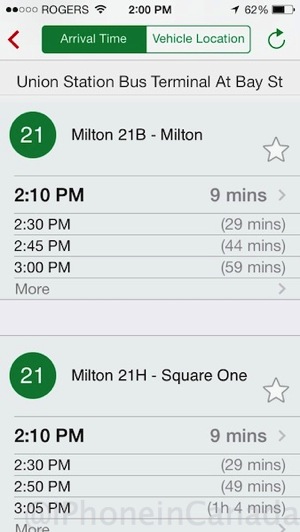
RocketMan provides realtime bus arrivals and bus locations and recently extended its coverage to major regions across the country and in the USA, utilizing information from almost 40 transit agencies.
The developer tells us the app is very popular in the GTA and has well over 440,000 downloads and is on pace to break 500,000 in the next few weeks. There are almost 44,000 active unique users daily and total sessions per month exceed 5 million.
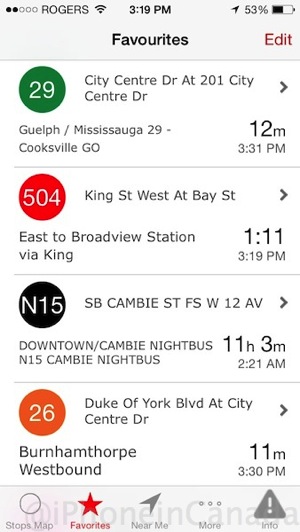
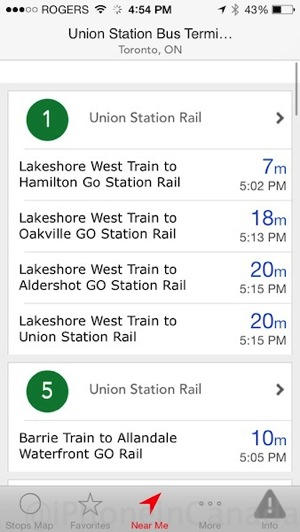
We asked RocketMan what makes their app unique, compared to other popular transit apps. They explained their app is different as it offers transit colour-coded and route colour-coded map pins, as well on the ‘near me’ stops list screen. The app also changes colour based on the transit agency you’ve selected and uses Google Maps heavily.
Other unique features include a customizable favourite screen and just less work to view transit routes with one tap. For example, RocketMan can display all of your route times one one scrollable page, saving time.
RocketMan recently added support for Vancouver to the app and is now live and real-time bus schedules will follow later this week.
Below are some images of the upcoming 4.1 update, set to his the App Store this week:
We spoke with the creator of RocketMan, Hussain Saleem, a software engineer who left RIM (now BlackBerry) to dedicate his work full time to the app. The budding development company has just recently hired another software engineer and is looking to add one more employee to manage their social media channels. An Android version of the app is slated for January.
Click here to download RocketMan—it’s free. Let us know if you’re using RocketMan for your transit needs.
Want to see more of our stories on Google?

P.S. Want to keep this site truly independent? Support us by buying us a beer, treating us to a coffee, or shopping through Amazon here. Links in this post are affiliate links, so we earn a tiny commission at no charge to you. Thanks for supporting independent Canadian media!


This looks a lot like Transit.
Ah, the first image was to compare it to Transit. Clarified thanks
Anyone notice the favorites screen no longer counts down? you have to tap on a stop to see a live count down
Hello Daniel,
We are sorry we’ve made a mistake, that caused the count down timer to stop. We have fixed this issue and submitted an App update to the App Store. It’s currently pending AppStore team approval. ETA sometime before Dec5th.
Cheers
RocketMan
Got it! Thanks! I’m hoping for a couple features. The ability to disable transit companies and better favorites managements! I have a bunch of favorites. Folders would make managing my favorites so much easier! Thanks for a great app!
Filter and folders for favourites are both on our to do list. We are focused to release the Android App later this month and add some really cool practical features. Coming soon 🙂
Hello Daniel
New update for RocketMan App to fix the count down issue, is now available on the AppStore. Thank you for your patience.
https://itunes.apple.com/ca/app/rocket-man-ttc-go-nextbus/id421781409?mt=8
Hello Daniel,
We are sorry we’ve made a mistake, that caused the count down timer to stop. We have fixed this issue and submitted an App update to the App Store. It’s currently pending AppStore team approval. ETA sometime before Dec5th.
Thanks
RocketMan