
Apple’s AirPort Utility App is Being Removed From the App Store
Apple warns that "functionality is not guaranteed" when using AirPort Utility on iOS 27 or later.
Back in May Loblaws released their PC Plus iPhone app, which allowed customers to implement their rewards program card right into the app. At the time when we inquired to the company when Passbook support would be coming, they mentioned it was in the works, coming in a future update.
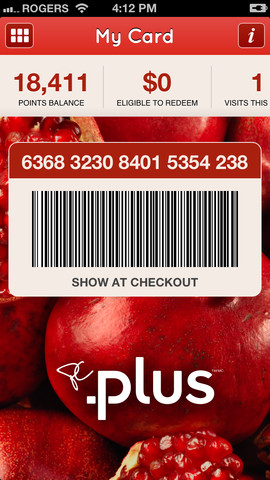
Well, last month the PC Plus iPhone app was finally updated with Passbook integration. So if you haven’t used the app since or have not tried it yet, this might be the time to do so since your rewards card can now be accessible via Passbook and also show up on your lockscreen.
Click here to download PC Plus for iPhone—it’s free. Let us know how Passbook support works out for you.
Want to see more of our stories on Google?

P.S. Want to keep this site truly independent? Support us by buying us a beer, treating us to a coffee, or shopping through Amazon here. Links in this post are affiliate links, so we earn a tiny commission at no charge to you. Thanks for supporting independent Canadian media!


It’s kind of useless. Only a real card works at self check out and only the app version of the card with your phone turned sideways is readable at the regular check out
Nope. I’ve used the passbook version (vertical of course). No problem.
It works at self-checkout (despite the note written at my local store saying otherwise) but it’s a hassle because you can’t scan it yourself. You have to call the attendant over. For that reason I just swipe my debit card since I carry it with me anyway. Hopefully they’ll add barcode scanners some day.
Again, I don’t see the point. If you have to load your virtual card on your device before transferring its info to Passbook (Starbuck card another example), why bother with Passbook? Why have two apps doing the same thing – with the original more often than not giving better control and info? Meanwhile, I’ve yet to find a popular ‘loyalty’ card program in Canada that can not only use Passbook, but be used at the cash registers’ scanners.
In the case of the Loblaws card, I have the mini key fob version which is faster to produce and use than the one on my iPhone.
The scanners at Starbucks actually work really well off the iPhone’s screen, compared to older generation scanners. The staff there never ask for your phone to scan but let you do it yourself, versus other stores where they ask to manhandle your phone.
I agree, Gary – but i just use the Starbucks app, because its already there and gives me more info. Why use Passbook?
The loyalty cards I’m talking about are those for like Air Miles, Shoppers Optimum, iTunes Store, other Gift Cards etc – most retailers have not the equipment software to read them, even if one could load them into Passbook.
Well, the advantage of Passbook is it ‘appears’ on your lockscreen once you’re within the vicinity of a Starbucks location, saving ‘time’ to unlock the phone, launch the app and tap the card to reveal the barcode. Passbook just takes one swipe to reveal your card’s barcode (and easily cycle between multiple cards). Yes, we have all become lazy in today’s world! 😉
Yes, this is convenient but only if they have the location ability set up. The Starbucks app has it when you set up favorite locations and it transfers to Passbook but the Plus app doesn’t have it so far as I can tell. Starbucks and Cineplex are the only ones I have that do that.